



Qwop
QWOP is a famously difficult browser running game built around one simple-looking challenge: guide an athlete through a 100-metre sprint by controlling individual leg movements with four keyboard…
 Works on Desktop & Mobile
Tested By BunaGames
- Test date
- 2008
- Tested on
- Chrome 150
- Device
- Desktop
- Operating system
- macOS and Windows
- Game loaded successfully
- Yes
- Fullscreen works
- Yes
- Sound works
- Yes
- Save progress
- Local browser storage
- Mobile compatibility
- Partially tested
- Keyboard controls
- Working
- Controller support
- Not detected
- Average loading time
- 4.2 seconds
- Known issues
- Minor delay after entering fullscreen
Qwop not loading?
- Refresh the page.
- Disable restrictive content blockers temporarily.
- Confirm JavaScript and WebGL are enabled.
- Clear the browser cache.
- Try another modern browser.
- Close unnecessary tabs.
- Switch off VPN if the game server is blocked.
- Use the Report a Problem button if the issue continues.
Continue Playing
Daily Challenge

Play 5 minutes today in Qwop.
Leaderboard
- 1Community rating4.7 ★
- 2Player likes693
- 3Total votes747
- 4Your local progress0%
Your progress is saved locally in this browser. No account required.
 Your progress is saved locally in this browser. No account required.
Game Progress & Challenges
Why Play This Game?
 Instant PlayPlay instantly in your browser.
 Mobile FriendlyOptimized for all devices.
 Free to PlayNo hidden fees.
About "Qwop"
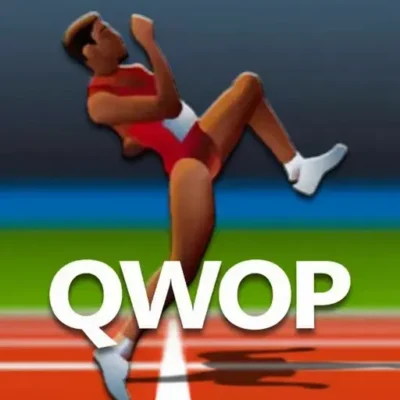
QWOP is a famously difficult browser running game built around one simple-looking challenge: guide an athlete through a 100-metre sprint by controlling individual leg movements with four keyboard keys. Created by Bennett Foddy and released in 2008, it became well known because its controls are deliberately awkward, its ragdoll-style movement is unpredictable, and even a few successful steps can feel like a major achievement.
Rather than giving you a run button, QWOP asks you to manage the athlete's body directly. Every key press affects the runner's movement, posture, balance, and momentum. A rushed input can send the athlete tumbling forward, while a careful sequence can produce a surprisingly smooth stride. The result is a physics-driven athletics game where progress depends more on rhythm and coordination than quick reflexes alone.
The Olympic-themed presentation keeps the focus on the event: one runner, one track, and a 100m target. QWOP is easy to understand immediately, but genuinely hard to master. It works especially well for players who enjoy strange challenge games, short repeatable attempts, and the satisfaction of slowly improving a difficult skill.
Gameplay
QWOP gameplay revolves around moving an athlete down a track during a 100m sprint. The challenge is not choosing a route or outrunning a large field of competitors. Instead, the entire game concentrates on controlling the runner's legs well enough to stay upright and build forward movement.
The athlete uses ragdoll-based movement, meaning the body reacts to balance, momentum, and poorly timed inputs. That physical instability is the heart of the game. Pressing keys without a plan may make the runner bend, kick, lean too far, or collapse. Pressing them in a repeatable rhythm gives you a better chance to create a controlled stride.
Each attempt becomes a small coordination puzzle. You need to notice whether the athlete is leaning forward or backward, whether a foot is positioned to support the body, and whether the next input is likely to recover balance or make the fall worse. Early runs often involve short, chaotic bursts of motion. With practice, those bursts can turn into longer sequences and more consistent distance.
The game is also entertaining because failure is visible and immediate. A collapse is not just a loss state; it is feedback about timing, posture, and overcorrection. The 100m sprint objective gives every run a clear purpose, while the unusual controls make reaching that goal feel earned rather than automatic.
- Physics-based running with ragdoll movement
- A focused 100m athletics challenge
- Four-key leg control instead of a conventional run command
- Short attempts that encourage practice and improvement
- Balance, timing, and rhythm as the key skills
Platform
QWOP is a browser video game, so its core experience is designed around keyboard play in a web browser. The game is best suited to a desktop or laptop computer because its control scheme uses the Q, W, O, and P keys. A physical keyboard makes it easier to press the required keys in quick combinations and develop a reliable rhythm.
For the smoothest session, use a browser window where the game area is easy to see and keep your hands positioned comfortably over the four controls. Since the athlete's movement can change rapidly, watching the runner's posture is as important as pressing the next key.
This page makes the game accessible alongside other browser games without requiring a complicated setup. QWOP is particularly useful when you want a quick skill challenge that can be understood in seconds but improved through repeated attempts.
Because the main interaction depends on keyboard inputs, touch-only devices are less naturally suited to the original four-key control concept. For the intended experience, choose a device with a standard keyboard.
How to Play "Qwop"
To play QWOP, begin by focusing on control rather than speed. Your job is to use the Q, W, O, and P keys to move the athlete's legs and attempt the 100m sprint. There is no single button that makes the runner move safely, so the first goal is simply to understand how the athlete responds.
- Place your fingers where you can comfortably reach Q, W, O, and P.
- Press a small combination of keys and watch the athlete's legs and upper body react.
- Pause your rushing instinct. Let the runner's position tell you what movement may be needed next.
- Try to alternate movements in a repeatable pattern instead of tapping all four keys randomly.
- Keep the athlete from leaning too far forward or backward.
- When you fall, restart mentally with one observation about what caused the loss of balance.
New players often make the mistake of treating QWOP like a normal racing game. Fast, frantic tapping can create movement, but it usually sacrifices control. A better approach is to make deliberate inputs and watch for a stable body position between them. The athlete does not need to look elegant at first; a clumsy but recoverable shuffle is more useful than a dramatic fall.
As you improve, aim to connect individual leg actions into a rhythm. The important breakthrough is learning that forward progress comes from coordinated body movement, not from pressing more keys. Once you can keep the athlete upright for longer, work on extending each run toward the 100m objective.
Controls
QWOP uses four keyboard keys: Q, W, O, and P. Together, they control the athlete's leg movement. The game deliberately avoids the familiar left-right movement or single-button sprint controls found in many running games, which is why the first few attempts can feel unusual.
| Keys | Purpose |
|---|---|
| Q and W | Leg movement controls |
| O and P | Leg movement controls |
The practical skill is not memorizing a long command list. It is learning how combinations and timing affect balance. Pressing keys at the wrong moment can put the athlete in an awkward position, while a measured sequence can help produce a more stable stride.
Keep your hands relaxed and avoid hitting all four keys at once. Start with controlled presses, observe the result, then repeat what works. As your timing improves, you can make quicker transitions without losing the sense of rhythm that keeps the runner upright.
Can "Qwop" Unblocked?
QWOP is a straightforward browser-based running challenge with no complicated game world to navigate before playing. On BunaGames, you can access the game page and focus on the four-key athletics challenge directly in your browser.
If you are looking for an unblocked-style game experience at school, work, or on a shared computer, always follow the rules and network policies of the place where you are playing. Availability can depend on local device settings, browser restrictions, or network filters. A standard desktop browser and keyboard remain the most suitable setup for the original QWOP control style.
The game is a good choice for brief breaks because each attempt quickly produces a result: either the athlete gains a little more distance or a fall reveals another timing mistake to fix. There is no need to learn a large menu system before you can start practicing.
For players seeking accessible online challenges, QWOP stands out because its difficulty comes from its controls and physics rather than from lengthy instructions. You can return for a few attempts, work on a smoother rhythm, and try to improve your distance over time.
Tips for "Qwop"
The best QWOP tip is to prioritize stability over distance. Trying to force a fast sprint before you understand the runner's movement usually creates a fall. A short, controlled advance gives you more useful feedback than a wild sequence of key presses.
- Watch the torso: The athlete's lean is an important warning signal. If the body starts tipping too far, avoid inputs that exaggerate that direction.
- Use a rhythm: Look for a repeatable timing pattern rather than reacting randomly every moment. Consistency is more valuable than speed during early runs.
- Make small corrections: A large burst of inputs can turn a recoverable wobble into a collapse. Use measured key presses whenever possible.
- Learn from each fall: Notice whether you leaned too far forward, lost support from a foot, or pressed too quickly. One clear lesson per attempt makes practice productive.
- Do not chase perfect form: QWOP movement can look awkward even when it is working. Focus on forward progress and balance, not on making every step look realistic.
- Build distance gradually: First aim to stand and move. Then aim to keep moving. Only after that should you worry about sustaining a faster pace.
A useful practice method is to treat the opening of every attempt as a setup phase. Make deliberate movements until the athlete has a position that feels manageable. When you find a sequence that produces a stable shuffle or stride, repeat it rather than immediately experimenting with faster inputs.
It also helps to stay calm after a mistake. The game can create funny, sudden tumbles, but panic tapping tends to make the physics harder to control. QWOP rewards observation: see what the body is doing, choose the next input with purpose, and let coordination develop through repetition.
Features "Qwop"
QWOP remains memorable because it transforms a familiar sports event into an unusual control challenge. A 100m sprint normally suggests speed and simple directional movement. Here, the same event becomes a test of balance, timing, body awareness, and patience.
- Distinctive four-key input: The Q, W, O, and P keys make running an active coordination task.
- Ragdoll-based athlete movement: The runner reacts physically to each input, creating unpredictable recoveries and spectacular falls.
- Clear 100m objective: Every attempt has a simple, recognizable athletic goal.
- High replay value: Short runs make it easy to retry and work toward better control.
- Skill-focused challenge: Improvement comes from learning timing and rhythm, not from unlocking abilities or memorizing a huge system.
- Instantly readable presentation: The track and single athlete keep attention on movement and progress.
The biggest feature is the relationship between the controls and the physics. QWOP does not merely ask you to press four keys; it asks you to understand the consequences of using them. That design creates a strong learning loop. An unsuccessful run teaches you something about posture or timing, and a successful sequence feels satisfying because you produced it through coordination.
The game also works well as a casual browser challenge because the objective is always clear. Whether you are making your first unstable steps or trying to sustain a longer run, the next improvement is easy to recognize. Its famous difficulty is not hidden behind complex rules: it comes directly from trying to make a human runner move with limited, deliberately unconventional controls.
Best "Qwop" Similar Games & Top Picks
- Super Soccer Noggins: Play Super Soccer Noggins online: choose a national team, take on wild 1vs1 football duels, score goals, and master the arcade action.
- Super Stickman Golf 3: Play Super Stickman Golf 3 online and tackle 2D golf courses with power-ups, collectible cards, tricky holes, and game modes.
- Football Masters: Play Football Masters online: choose a team, use super shots and slide tackles, and compete in fast 1v1 or 2v2 soccer matches.
- Golf Battle: Play Golf Battle online and take on fast mini golf challenges. Learn the gameplay, controls, tips, multiplayer details, and browser access.
- College Bowl: Play College Bowl, a pixel-style American football game where you face college rivals and pursue a national title.
FAQ - Qwop
What is QWOP?
QWOP is a browser-based, ragdoll-style running game created by Bennett Foddy. You control an athlete named Qwop during a 100m sprint by using the Q, W, O, and P keys. Its unusual control system and difficult physics-based movement are the main reasons it is so well known.
How do you play QWOP?
You use the Q, W, O, and P keys to control the runner's leg movement. The goal is to coordinate those inputs well enough to keep the athlete balanced and moving forward through the 100m event. Success depends on timing and rhythm rather than pressing one run button.
Why is QWOP so difficult?
QWOP is difficult because the athlete has ragdoll-based movement and each input can affect posture, balance, and momentum. The four-key system gives you direct but awkward control over the legs. Pressing too quickly or at the wrong time can cause the runner to stumble or fall.
What are the controls in QWOP?
The game uses four keyboard keys: Q, W, O, and P. These keys control the athlete's leg movements. Rather than relying on a conventional left-right control layout, you must combine and time the four inputs to create a stable running motion.
Is QWOP a 100m running game?
Yes. QWOP is an Olympics-themed running game centered on a 100m sprint. The challenge is to move the athlete down the track and maintain enough balance and control to make meaningful forward progress.
Who developed QWOP?
QWOP was developed by Bennett Foddy. The game was released in 2008 and became a notable browser game because of its deliberately difficult four-key running controls.
Can I play QWOP in a browser?
Yes. QWOP is a browser game and is best experienced in a desktop or laptop browser with a physical keyboard. Since the original control concept relies on the Q, W, O, and P keys, a keyboard is more suitable than a touch-only device.
What is the best beginner strategy for QWOP?
Begin by trying to stay upright instead of trying to sprint immediately. Use deliberate inputs, observe how the athlete leans and reacts, and look for a repeatable rhythm. Small controlled movements are usually more effective than pressing all the keys rapidly. As you gain consistency, extend your distance one stable sequence at a time.
More Games Like This
 Super Stickman Golf 3
Football ★ 4.7
Super Stickman Golf 3
Football ★ 4.7
 Super Soccer Noggins
Football ★ 4.6
Super Soccer Noggins
Football ★ 4.6
 Football Masters
Football ★ 4.5
Football Masters
Football ★ 4.5
 Golf Battle
Football ★ 4.7
Golf Battle
Football ★ 4.7
 College Bowl
Football ★ 4.5
College Bowl
Football ★ 4.5
 Basketball Orbit
Football ★ 4.6
Basketball Orbit
Football ★ 4.6
 Mini Putt
Football ★ 4.6
Mini Putt
Football ★ 4.6
 Golf Clash
Football ★ 4.8
Golf Clash
Football ★ 4.8
 Retro Bowl 25
Football ★ 4.8
Retro Bowl 25
Football ★ 4.8
 2 Minute Football
Football ★ 4.5
2 Minute Football
Football ★ 4.5
 Bow And Arrow
Football ★ 4.7
Bow And Arrow
Football ★ 4.7
 Soccer Legends
Football ★ 4.7
Soccer Legends
Football ★ 4.7
 Tennis Masters
Football ★ 4.7
Tennis Masters
Football ★ 4.7
 Penalty Challenge
Football ★ 4.5
Penalty Challenge
Football ★ 4.5
 Penalty Shootout Multi League
Football ★ 4.4
Penalty Shootout Multi League
Football ★ 4.4
 Penalty Shooters
Football ★ 4.5
Penalty Shooters
Football ★ 4.5
 Football Legends
Football ★ 4.7
Football Legends
Football ★ 4.7
 Doodle Basketball
Football ★ 4.7
Doodle Basketball
Football ★ 4.7
 Report a Problem
Comments About Qwop