



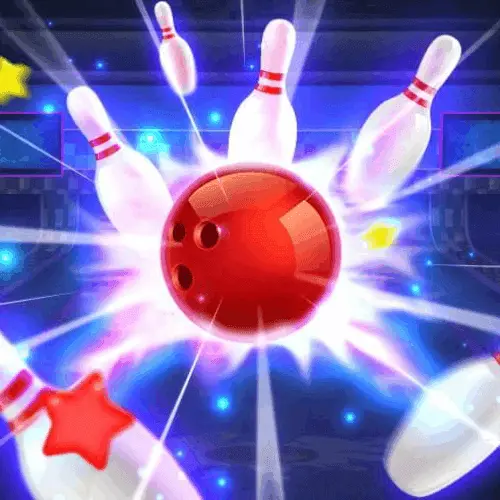
Bowling Star
Bowling Star is an online sports game built around the familiar objective of bowling: send the ball down the lane and knock over as many pins as possible.…
 Works on Desktop & Mobile
Tested By BunaGames
- Test date
- July 7, 2026
- Tested on
- Chrome 150
- Device
- Desktop
- Operating system
- macOS and Windows
- Game loaded successfully
- Yes
- Fullscreen works
- Yes
- Sound works
- Yes
- Save progress
- Local browser storage
- Mobile compatibility
- Partially tested
- Keyboard controls
- Working
- Controller support
- Not detected
- Average loading time
- 4.2 seconds
- Known issues
- Minor delay after entering fullscreen
Bowling Star not loading?
- Refresh the page.
- Disable restrictive content blockers temporarily.
- Confirm JavaScript and WebGL are enabled.
- Clear the browser cache.
- Try another modern browser.
- Close unnecessary tabs.
- Switch off VPN if the game server is blocked.
- Use the Report a Problem button if the issue continues.
Continue Playing
Daily Challenge

Play 6 minutes today in Bowling Star.
Leaderboard
- 1Community rating4.7 ★
- 2Player likes1.1K
- 3Total votes1.2K
- 4Your local progress0%
Your progress is saved locally in this browser. No account required.
 Your progress is saved locally in this browser. No account required.
Game Progress & Challenges
Why Play This Game?
 Instant PlayPlay instantly in your browser.
 Mobile FriendlyOptimized for all devices.
 Free to PlayNo hidden fees.
About "Bowling Star"
Bowling Star is an online sports game built around the familiar objective of bowling: send the ball down the lane and knock over as many pins as possible. Its appeal comes from putting a recognizable bowling format into a quick digital session, with smooth swiping input, realistic-looking bowling action, and a competitive route toward trophies.
Every roll asks for more than simply throwing the ball forward. Players need to choose a starting line, guide the release, watch how the ball travels toward the pin deck, and react to the pins that remain after each attempt. A well-placed delivery can create a strike, while a slightly inaccurate roll may leave a spare opportunity that still needs careful planning.
The game also includes customizable items and a selection of more than a dozen bowling balls, giving players a way to personalize the experience while they work through its progression. The result is a browser-friendly bowling game for players who want a fast sports challenge without learning a large set of complicated commands.
Whether the goal is a cleaner score, more reliable strikes, or continued movement along the trophy road, Bowling Star keeps the focus on timing, lane awareness, and pin-by-pin decision-making. It is a practical choice among browser games when you want a simple game loop with room to improve from roll to roll.
Gameplay
Bowling Star follows the core rhythm of traditional bowling: line up a ball, roll it down the lane, count the pins that fall, and use the next opportunity to clear whatever is left. The basic objective is instantly understandable, but consistent scoring depends on accuracy rather than random movement. Your release direction determines where the ball enters the pins, so small adjustments can make a major difference.
The main scoring moments are strikes and spares. A strike happens when all pins fall on the first roll. When pins remain, the next roll becomes a spare attempt. That follow-up shot is especially important because the remaining pins can form awkward patterns rather than a simple cluster in the middle of the lane. Reading the leave before rolling helps you decide whether to target one pin directly or send the ball through a narrow gap.
Progression gives the bowling action a clear longer-term purpose. The trophy road encourages players to keep winning challenges and overcome opponents on the path toward higher achievement. Instead of treating every frame as isolated, you can use each session to refine your approach and push farther through the game’s competitive progression.
Bowling balls and customizable items add another layer to the experience. With more than a dozen ball choices available, players can select a look they prefer while enjoying the same central skills of aiming, release control, and pin clearing. The strongest gameplay habit is simple: observe the result of each roll, then make a deliberate correction on the next one rather than repeating the same line.
Platform
Bowling Star is designed for online play on both mobile and desktop devices. The game can be played without an installation step, making it suitable for a quick session when you have access to a compatible web browser and an internet connection.
On a mobile device, the swipe-based format fits naturally with touch input: drag to guide the roll and release to send the ball down the lane. On desktop, the same idea is adapted to mouse input, allowing you to click, drag, and release. The shared goal on either device is to create a controlled, straight or adjusted path toward the pins.
The browser format is useful for players who do not want to manage downloads, storage space, or separate game updates before playing. Open the game page, let it load, and begin a bowling session directly in the browser.
- Desktop: browser play with mouse-based dragging.
- Mobile: browser play with touch-and-swipe input.
- Setup: no installation is required.
- Format: online sports gameplay based on bowling rules.
How to Play "Bowling Star"
Start a Bowling Star round by focusing on the lane and pin arrangement rather than rushing the first throw. Your aim is to guide the ball into a productive line that can topple the largest possible group of pins. In general, a centered and controlled roll is easier to judge than an exaggerated movement, especially while you are learning how the game responds to your input.
- Look at the full pin deck before making your first roll.
- Choose a starting direction for the ball instead of swiping immediately.
- Drag or swipe to set the ball’s path.
- Release smoothly and watch the ball travel toward the pins.
- Check how many pins fell and identify the pins still standing.
- Use the next roll to complete the spare if pins remain.
- Continue scoring well to advance through trophy-road challenges.
A first-roll strike is ideal, but it should not be the only goal. If the ball leaves pins standing, slow down and evaluate the shape of the leave. A single pin requires precision. A small group may require a line that reaches the front pin first. The important part is treating the second roll as a new aiming problem, not as an automatic repeat of the opening throw.
As you play, try different bowling ball options and customizable items if they are available to you. These selections let you personalize the game while the actual improvement comes from practice: choosing a sensible lane line, releasing consistently, and learning which adjustments help after a missed strike. The bowling rules remain approachable, but every frame can reward a more thoughtful roll.
Controls
Bowling Star uses straightforward drag-and-release controls. The input is designed to keep attention on the lane and the pins instead of requiring a complicated keyboard layout.
| Device | Action |
|---|---|
| Desktop | Click, drag, release |
| Mobile | Touch, swipe, release |
Begin by pressing on the ball or active play area, then drag in the direction you want the delivery to travel. Release to roll. A controlled motion is usually more useful than a hurried swipe because it gives you a clearer reference point for the next attempt.
Pay attention to the result after every shot. If the ball misses the desired pin group, alter your starting line or release direction on the following roll. This simple feedback loop is the key control skill: aim, release, observe, and adjust.
Can "Bowling Star" Unblocked?
Bowling Star is available as a browser game, so it can be played online without installing an app or separate program. This makes it convenient for players looking for a fast bowling session on desktop or mobile, provided that browser access is available on their device or network.
If a game page does not load where you are playing, the issue may be caused by local browser settings, an internet connection, or network rules set by a school, workplace, library, or other administrator. Those restrictions vary by location and are not controlled by the game itself.
For the smoothest browser session, use an up-to-date browser, allow the page time to load, and make sure your connection is stable before beginning a challenge. Because Bowling Star does not require installation, you can return to the game page and continue practicing your rolls without a download process.
Always follow the internet-use rules for the network and device you are using. When access is permitted, the online format keeps the path to play simple: open the page, load the game, and start aiming for the pins.
Tips for "Bowling Star"
The best Bowling Star tips begin with consistency. Do not change your aim dramatically after every roll. Make a small, intentional adjustment, then compare the new result with the previous one. This helps you learn how your release direction affects the ball’s route and gives your practice a clear purpose.
- Plan before releasing: Take a moment to identify the line you want the ball to follow.
- Prioritize pin contact: A controlled roll into a useful pin group is better than an uncontrolled attempt at a perfect strike.
- Study the leave: After the first roll, locate every remaining pin before choosing the spare attempt.
- Use smaller corrections: If a shot goes slightly off line, adjust slightly rather than overcorrecting.
- Practice repeatable swipes: Similar drag length and direction make it easier to judge what changes are working.
- Respect spare shots: Clearing remaining pins protects your score and rewards accurate follow-up play.
A useful mental routine is to divide each frame into two tasks. On the first ball, aim to create the best possible pin fall. On the second ball, forget the missed strike and focus only on the current arrangement. This prevents frustration from turning a manageable spare into a missed opportunity.
Trophy-road progression also rewards patience. Rather than chasing a flashy result every time, build dependable scoring habits that can carry across multiple challenges. Explore the available bowling balls and customization choices for a style you enjoy, but keep your attention on the fundamentals: a deliberate line, a smooth release, and a quick review of what happened at the pins. Those habits provide the most reliable path toward stronger performances.
Features "Bowling Star"
Bowling Star combines a recognizable bowling format with online convenience and progression-focused play. Its features are centered on giving players a direct way to roll, score, customize their setup, and pursue trophies through repeated bowling challenges.
- Traditional bowling objective: Knock down pins with as few rolls as possible.
- Strike and spare opportunities: Aim to clear all pins on the first roll or finish the remaining pins on the next attempt.
- Smooth swipe controls: Use drag-and-release input to guide each delivery.
- Mobile and desktop support: Play online with touch controls or a mouse.
- No installation required: Start from a compatible browser without a download step.
- Trophy-road progression: Keep moving forward by overcoming bowling challenges and opponents.
- Customizable items: Personalize parts of the experience while playing.
- More than a dozen bowling balls: Choose from a broad set of ball options.
- Realistic presentation: Bowling action is supported by polished graphics and a realistic game feel.
The most valuable feature is how these elements work together. The controls are simple enough for a new player to understand quickly, while the scoring structure gives experienced players reasons to refine their aim. Customization adds personal choice, and the trophy road supplies a continuing objective beyond a single roll.
For players searching for free online sports entertainment, Bowling Star offers a focused alternative to larger simulations. The action stays centered on the lane, the ball, and the pins, which makes it easy to begin while still leaving room for satisfying improvement over time.
Best "Bowling Star" Similar Games & Top Picks
- Bowling Champion: Play Bowling Champion online for free. Aim your ball, guide each roll, knock down pins, and compete in Cup Game mode.
- Sports Heads Soccer: Play Sports Heads Soccer online for fast one-on-one football matches with big-headed players, goals, jumps, kicks, and power-ups.
- Speedy Golf: Play Speedy Golf online and combine accurate shots, quick movement, and smart course reading to finish each hole in fewer strokes.
- Axis Football League: Play Axis Football League online and lead one of 14 teams through fast American football matches, league action, and sudden-death overtime.
- Table Tennis Game: Play Table Tennis Game online in your browser. Return fast shots, place the ball carefully, and build smarter ping pong rallies.
FAQ - Bowling Star
What is Bowling Star?
Bowling Star is an online sports game based on bowling. Players guide a bowling ball down the lane, try to knock over pins, score strikes and spares, and work through trophy-road progression. It also offers customizable items and a selection of more than a dozen bowling balls.
Can I play Bowling Star online for free?
Yes. Bowling Star is presented as an online game that can be played without an installation step. Load the game in a compatible browser and begin playing when access is available on your device and network.
Do I need to download Bowling Star?
No installation is needed for browser play. The game is available online on mobile and desktop, so you can play through a web browser instead of downloading a separate application.
How do I control the bowling ball?
Use a drag-and-release motion. On desktop, click and drag with the mouse, then release to roll the ball. On mobile, touch the screen, swipe in the desired direction, and release. The key is to make deliberate, repeatable movements so you can adjust your aim after each roll.
What is the goal in Bowling Star?
The goal is to knock down as many pins as possible. A strike clears all pins on the first roll, while a spare clears the remaining pins with the next roll. Strong scoring and successful challenges help you progress along the trophy road.
Can I play Bowling Star on mobile and desktop?
Yes. The game supports online play on both mobile and desktop devices. Mobile players use touch-and-swipe input, while desktop players use mouse-based drag-and-release controls.
How can I improve my score?
Focus on consistent aim and small corrections. Before every roll, choose a lane line and release smoothly. After the ball reaches the pins, study what is left standing. Use that information to make a measured adjustment instead of repeating the same shot blindly. Treat spare attempts as important scoring opportunities.
Does Bowling Star have customization?
Yes. The game includes customizable items and lets players choose from more than a dozen bowling balls. These options allow you to personalize the experience while you continue practicing the same core bowling skills of alignment, release control, and pin clearing.
More Games Like This
 Super Stickman Golf 3
Football ★ 4.7
Super Stickman Golf 3
Football ★ 4.7
 Super Soccer Noggins
Football ★ 4.6
Super Soccer Noggins
Football ★ 4.6
 Football Masters
Football ★ 4.5
Football Masters
Football ★ 4.5
 Golf Battle
Football ★ 4.7
Golf Battle
Football ★ 4.7
 College Bowl
Football ★ 4.5
College Bowl
Football ★ 4.5
 Basketball Orbit
Football ★ 4.6
Basketball Orbit
Football ★ 4.6
 Mini Putt
Football ★ 4.6
Mini Putt
Football ★ 4.6
 Golf Clash
Football ★ 4.8
Golf Clash
Football ★ 4.8
 Retro Bowl 25
Football ★ 4.8
Retro Bowl 25
Football ★ 4.8
 2 Minute Football
Football ★ 4.5
2 Minute Football
Football ★ 4.5
 Bow And Arrow
Football ★ 4.7
Bow And Arrow
Football ★ 4.7
 Soccer Legends
Football ★ 4.7
Soccer Legends
Football ★ 4.7
 Tennis Masters
Football ★ 4.7
Tennis Masters
Football ★ 4.7
 Papas Sushiria
Football ★ 4.6
Papas Sushiria
Football ★ 4.6
 Papas Wingeria
Football ★ 4.6
Papas Wingeria
Football ★ 4.6
 Papas Scooperia
Football ★ 4.7
Papas Scooperia
Football ★ 4.7
 Papas Pizzeria
Football ★ 4.6
Papas Pizzeria
Football ★ 4.6
 Qwop
Football ★ 4.7
Qwop
Football ★ 4.7
 Report a Problem
Comments About Bowling Star