



Fun Clicker
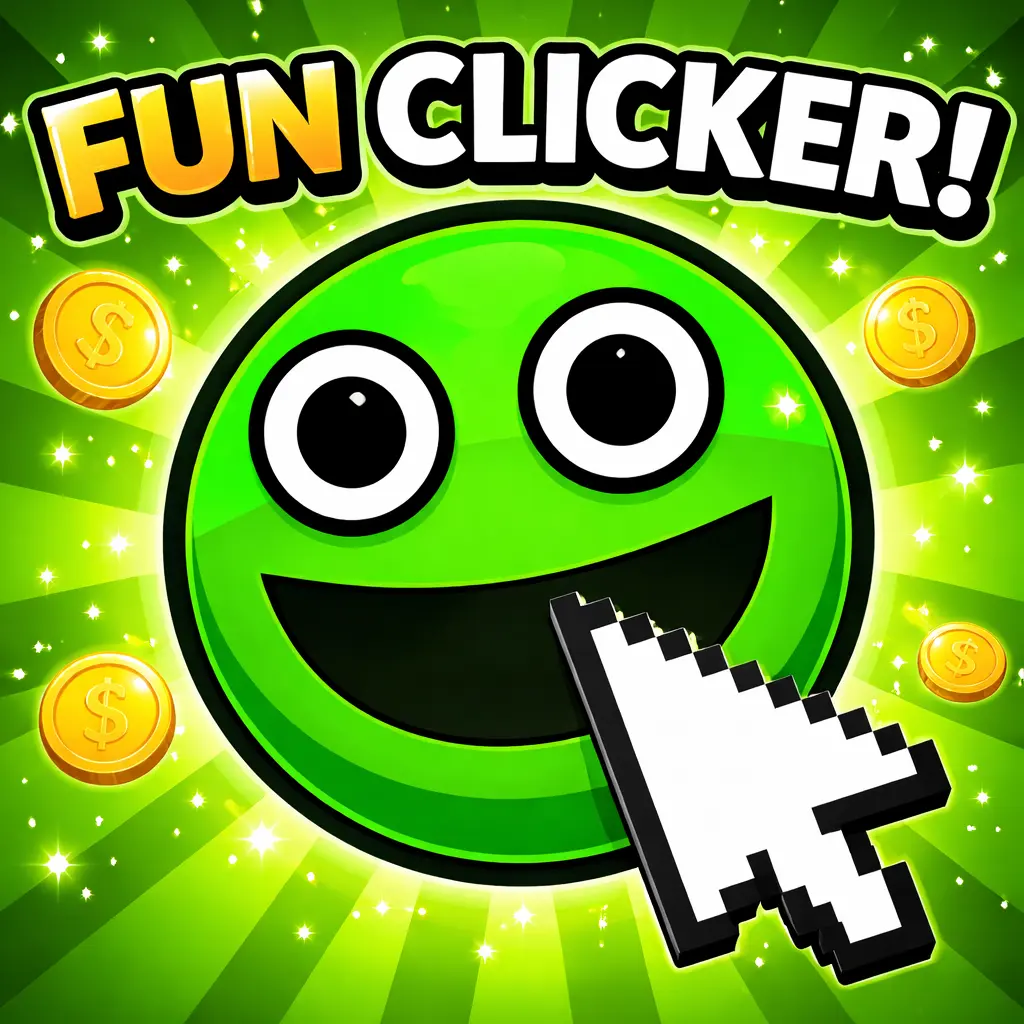
Fun Clicker is a browser-based incremental clicker game built around one deliberately simple action: click the smiling green character in the center of the screen to earn Clicks.…
 Works on Desktop & Mobile
Tested By BunaGames
- Test date
- June 12, 2026
- Tested on
- Chrome 150
- Device
- Desktop
- Operating system
- macOS and Windows
- Game loaded successfully
- Yes
- Fullscreen works
- Yes
- Sound works
- Yes
- Save progress
- Local browser storage
- Mobile compatibility
- Partially tested
- Keyboard controls
- Working
- Controller support
- Not detected
- Average loading time
- 4.2 seconds
- Known issues
- Minor delay after entering fullscreen
Fun Clicker not loading?
- Refresh the page.
- Disable restrictive content blockers temporarily.
- Confirm JavaScript and WebGL are enabled.
- Clear the browser cache.
- Try another modern browser.
- Close unnecessary tabs.
- Switch off VPN if the game server is blocked.
- Use the Report a Problem button if the issue continues.
Continue Playing

Daily Challenge

Play 4 minutes today in Fun Clicker.
Leaderboard
- 1Community rating4.6 ★
- 2Player likes795
- 3Total votes883
- 4Your local progress0%
Your progress is saved locally in this browser. No account required.
 Your progress is saved locally in this browser. No account required.
Game Progress & Challenges
Why Play This Game?
 Instant PlayPlay instantly in your browser.
 Mobile FriendlyOptimized for all devices.
 Free to PlayNo hidden fees.
About "Fun Clicker"
Fun Clicker is a browser-based incremental clicker game built around one deliberately simple action: click the smiling green character in the center of the screen to earn Clicks. At first glance, it presents the familiar language of a light casual game, with bright visuals, cheerful energy, cute character design, and an easy rhythm that asks players to click and relax.
That welcoming opening is only part of the experience. Fun Clicker is designed as a deceptive clicker: continued progress changes the mood and reveals a more unsettling psychological horror direction. The contrast between its friendly presentation and its later tone is central to the game’s identity. It is not simply about reaching a large score as quickly as possible; it is also about noticing what changes as you continue interacting with the character and unlocking progress.
The game suits players who enjoy short, direct browser games but want more atmosphere than a standard idle tapper usually offers. There is no complicated setup to learn. Start clicking, collect Clicks, watch for new developments, and let the game’s unusual shift in tone unfold at its own pace.
Gameplay
Fun Clicker begins with a clear incremental-game loop. The central smiling green character is the main interactive target. Each repeated click earns Clicks, the game’s named currency or score resource. This makes the first objective immediate: keep clicking to build your total and move toward the next unlock.
What gives the loop its personality is the presentation around it. Rather than announcing every surprise before it happens, Fun Clicker starts with a cheerful, low-pressure feel and gradually uses progression to alter expectations. The game has been described as a horror clicker because its innocent-looking starting point develops into a psychological horror experience. Paying attention is therefore part of playing well. A player focused only on rapid clicking may miss small changes in mood, visual context, or the meaning of the game’s previously harmless-looking interface.
The practical rhythm is simple:
- Click the central character to generate Clicks.
- Continue building progress through repeated interaction.
- Watch for newly available changes or the promised fun mode.
- Notice how the game’s initially upbeat style evolves.
This structure makes Fun Clicker approachable for casual players while giving it a stronger narrative and emotional hook than a purely mechanical score-chaser. The action stays accessible, but the atmosphere turns the repeated click into more than routine input. The best way to approach it is with curiosity: progress steadily, remain observant, and avoid assuming that the first few moments define the entire game.
Platform
Fun Clicker is presented as an online browser game, so it is designed for a quick play session without the complexity of a large installation. Open the game page, load the play area, and begin interacting with the central character. Its clicker format is especially well suited to browser play because the core loop uses a single, repeatable action rather than a long list of commands.
A desktop or laptop browser is a natural fit for the game’s pointer-based interaction. The on-screen target is easy to identify, and a mouse click keeps the repeated-input loop direct. The game’s simple interface also makes it practical for short breaks, whether you want to test the basic clicking premise or keep going to see how the experience changes.
Fun Clicker’s browser format should not be mistaken for a generic idle game that needs no attention. Although clicking drives progress, its horror angle rewards players who look at the screen and notice shifts in the experience. Use a stable browser session, keep the game visible while you play, and give yourself enough time to move beyond the opening presentation.
How to Play "Fun Clicker"
Playing Fun Clicker is straightforward, but the game works best when you treat its simple instructions as the beginning rather than the whole challenge. Your first task is to locate the smiling green character in the main game area. Click that character repeatedly to earn Clicks. Every click contributes to your progress, so there is no need to search for a complicated movement system or memorize a large command list before starting.
As your Click total grows, continue watching the screen for changes. The game’s stated goal includes unlocking a fun mode, and its wider premise involves an initially cheerful clicker evolving into a darker psychological horror experience. That means progress is both numerical and contextual: you are collecting Clicks, but you are also advancing into the game’s changing presentation.
- Open Fun Clicker in your browser and wait for the play screen to load.
- Find the central smiling green character.
- Click the character repeatedly to earn Clicks.
- Keep building your total instead of stopping after the first few clicks.
- Look for unlocked changes, including the game’s fun mode.
- Stay alert to changes in tone, visuals, or the feeling of the experience as you progress.
There is no need to rush through the opening. A consistent clicking pace lets you follow the game while still generating progress. If the game initially seems like a bright, ordinary casual clicker, that reaction is intentional. Continue playing to experience the contrast that distinguishes Fun Clicker from a standard incremental game.
Controls
Fun Clicker uses intentionally minimal controls. The core input is clicking the central character, making the game easy to begin even for players who rarely play clicker games. You do not need directional movement, aiming, platforming skills, or a complex keyboard layout to understand the basic loop.
| Input | Action |
|---|---|
| Mouse click | Click the central character |
| Repeated clicks | Earn more Clicks |
Keep your pointer over the smiling green character and click repeatedly to build the Click total. Because the game uses a focused central target, accuracy is more important than moving quickly around the screen. Watch the game area between bursts of clicking, particularly after you have made noticeable progress. Fun Clicker’s appeal comes from the changing context around its basic action, so do not treat the interface as something to ignore while you chase a higher number.
If a click does not register, make sure the game window is active and that your pointer is positioned over the character rather than outside the playable area.
Can "Fun Clicker" Unblocked?
Fun Clicker is available to play online through this browser game page, giving players a direct way to try its clicker-and-horror premise without needing to begin with a complicated download process. Load the game in a supported web browser, interact with the central character, and build Clicks from the play screen.
“Unblocked” is often used by players searching for a version that opens easily at school, work, or on a shared network. Whether any game website is accessible in those locations depends on the network rules set by that school, workplace, library, or device administrator. Those restrictions are outside the game itself and can vary from one connection to another.
For the smoothest legitimate access, use a personal device or a network where browser gaming is permitted. Avoid trying to bypass local restrictions. When the page is available, Fun Clicker is quick to understand: click the smiling green character, earn Clicks, and keep playing to discover why this cheerful-looking game has developed a horror-game reputation.
Tips for "Fun Clicker"
The strongest Fun Clicker strategy is not an advanced button combination. It is a balance of steady clicking and careful observation. The basic task is to generate Clicks by repeatedly selecting the central smiling green character, but the game’s distinctive value comes from the changes that emerge beyond its friendly opening.
- Keep the target centered: Place your pointer comfortably over the green character before beginning a clicking streak. This reduces missed inputs and keeps the loop efficient.
- Build progress consistently: The game is incremental, so continued interaction matters. A steady pace is more useful than clicking briefly and assuming you have seen everything.
- Watch between click bursts: Pause for a moment after making progress. Look at the screen, not only the Click total. Fun Clicker’s shift from cheerful casual game to horror experience is an important part of what you are playing.
- Do not judge the game only by its opening: Bright colors, a smiling character, and a relaxed mood establish the initial contrast. Continue long enough to see what progression reveals.
- Follow unlocks: The game refers to unlocking a fun mode. When a new option or change becomes available, examine it rather than immediately returning to repetitive clicks.
- Play with attention: A clicker can invite autopilot play, but this one benefits from awareness. The atmosphere, presentation, and unexpected turn are as relevant as the score-building loop.
Players looking for the fastest possible score may find the opening easy to grasp. Players looking for the full Fun Clicker experience should give equal weight to pace and curiosity. The game deliberately makes one simple action feel different over time, and noticing that transformation is the most useful tip of all.
Features "Fun Clicker"
Fun Clicker combines the accessibility of an incremental browser game with a deliberately contrasting horror premise. Its main features are focused rather than overloaded, which helps the game establish a clear identity quickly.
- Central clicker mechanic: Repeatedly click the smiling green character to earn Clicks.
- Named progression resource: Clicks provide a visible reason to continue interacting and advancing through the game.
- Simple starting objective: The opening goal is easy to understand even for first-time clicker players.
- Bright casual presentation: Fun Clicker begins with cheerful colors, cute character energy, funny emoji-style appeal, and a relaxed vibe.
- Psychological horror evolution: The innocent-looking clicker format gradually develops into a darker, more unsettling experience.
- Unlock-driven interest: Continued clicking is associated with unlocking a fun mode and discovering new changes.
- Browser-friendly format: The focused interface and single primary action make it suitable for a quick online session.
- Expectation-based design: The game’s strongest hook is the gap between what players expect at the beginning and what they encounter through continued progress.
This is why Fun Clicker stands apart from a standard idle clicker. The repeated action is intentionally familiar, but the game uses that familiarity to make later developments more effective. Players can start immediately without complicated instructions, then decide whether they want to keep clicking for score progression, unlocks, the changing mood, or the horror surprise behind its harmless-looking surface.
Best "Fun Clicker" Similar Games & Top Picks
- Cupcake Clicker: Play Cupcake Clicker online. Click the cupcake, earn treats, buy upgrades, and build automatic cupcake production in this browser clicker game.
- Poop Clicker 2: Play Poop Clicker 2 online. Click the poop emoji, collect resources, buy upgrades, and build a bigger idle production pile.
- Little Farm Clicker Game: Play Little Farm Clicker Game online. Harvest crops, earn coins, unlock farm plots, and reinvest your money in this idle farming clicker.
- Minecraft Clicker: Play Minecraft Clicker online. Click, collect resources, pursue upgrades, and enjoy a Minecraft-inspired browser clicker game for free.
- Clicker Cookies: Play Clicker Cookies free in your browser. Click to bake cookies, buy automated production, and grow your cookie total.
FAQ - Fun Clicker
What is Fun Clicker?
Fun Clicker is an online incremental clicker game with a psychological horror twist. It begins like a bright, simple casual game, where players click a smiling green character to earn Clicks. Continued progress changes the experience beyond that cheerful first impression.
How do you play Fun Clicker?
Click the central smiling green character repeatedly. Each click earns Clicks, which act as the game’s progression resource. Keep interacting to build your total, unlock changes such as the fun mode, and see how the game develops.
What are Clicks in Fun Clicker?
Clicks are the named points or currency earned through repeated clicks on the central character. They are the core measure of progress and give the player a reason to continue the incremental loop.
Is Fun Clicker a horror game?
Yes. Although Fun Clicker starts with cheerful colors, a cute-looking character, and a relaxed clicker-game feel, it is described as evolving into a psychological horror experience. The contrast between its opening mood and later direction is one of its main features.
Is Fun Clicker free to play in a browser?
Fun Clicker can be played online in a browser through this game page. Its core format is built around a simple click-based interaction, so players can begin without learning a complicated control system.
What controls does Fun Clicker use?
The main control is a mouse click. Move the pointer over the central character and click repeatedly to earn Clicks. The game’s core loop does not require movement controls or a large set of keyboard commands.
What is the goal of Fun Clicker?
The immediate goal is to click the smiling character, earn Clicks, and continue progressing. The game also refers to unlocking a fun mode. More broadly, the goal is to discover what lies behind the game’s deliberately innocent-looking clicker setup.
Why does Fun Clicker look cheerful at first?
The friendly opening is part of the design. Fun Clicker uses bright colors, cheerful energy, and a simple clicking objective to establish expectations before its psychological horror elements become more noticeable. Staying observant as you progress helps you appreciate that change.
More Games Like This
 Room Clicker
Clicker ★ 4.8
Room Clicker
Clicker ★ 4.8
 Mr Mine
Clicker ★ 4.7
Mr Mine
Clicker ★ 4.7
 Clicker Heroes 2
Clicker ★ 4.5
Clicker Heroes 2
Clicker ★ 4.5
 Cookie Clicker 3
Clicker ★ 4.7
Cookie Clicker 3
Clicker ★ 4.7
 Pizza Clicker
Clicker ★ 4.7
Pizza Clicker
Clicker ★ 4.7
 Idle Mining Empire
Clicker ★ 4.6
Idle Mining Empire
Clicker ★ 4.6
 Papas Sushiria
Clicker ★ 4.6
Papas Sushiria
Clicker ★ 4.6
 Italian Brainrot Clicker 2
Clicker ★ 4.7
Italian Brainrot Clicker 2
Clicker ★ 4.7
 Papas Wingeria
Clicker ★ 4.6
Papas Wingeria
Clicker ★ 4.6
 Papas Scooperia
Clicker ★ 4.7
Papas Scooperia
Clicker ★ 4.7
 Papas Pizzeria
Clicker ★ 4.6
Papas Pizzeria
Clicker ★ 4.6
 Papas Freezeria
Clicker ★ 4.6
Papas Freezeria
Clicker ★ 4.6
 Italian Brainrot Clicker
Clicker ★ 4.6
Italian Brainrot Clicker
Clicker ★ 4.6
 Papas Taco Mia
Clicker ★ 4.6
Papas Taco Mia
Clicker ★ 4.6
 Papas Cupcakeria
Clicker ★ 4.6
Papas Cupcakeria
Clicker ★ 4.6
 Clicker Heroes
Clicker ★ 4.4
Clicker Heroes
Clicker ★ 4.4
 Capybara Clicker
Clicker ★ 4.5
Capybara Clicker
Clicker ★ 4.5
 Goo Goo Gaga Clicker
Clicker ★ 4.4
Goo Goo Gaga Clicker
Clicker ★ 4.4
 Report a Problem
Play Anytime, Anywhere
Add BunaGames to your home screen for quick access to your favorite games!
Comments About Fun Clicker