



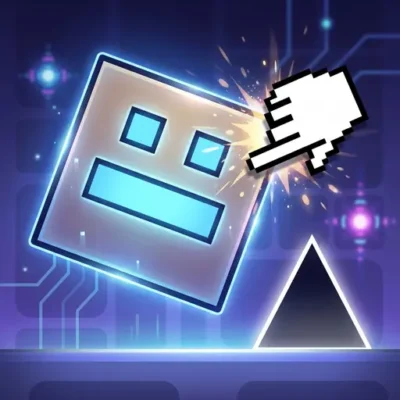
Geometry Dash Clicker
Geometry Dash Clicker is a free online clicking game built around fast reactions, repeated input, and obstacle awareness. Its Geometry Dash-inspired presentation places the focus on a simple…
 Works on Desktop & Mobile
Tested By BunaGames
- Test date
- July 11, 2026
- Tested on
- Chrome 150
- Device
- Desktop
- Operating system
- macOS and Windows
- Game loaded successfully
- Yes
- Fullscreen works
- Yes
- Sound works
- Yes
- Save progress
- Local browser storage
- Mobile compatibility
- Partially tested
- Keyboard controls
- Working
- Controller support
- Not detected
- Average loading time
- 4.2 seconds
- Known issues
- Minor delay after entering fullscreen
Geometry Dash Clicker not loading?
- Refresh the page.
- Disable restrictive content blockers temporarily.
- Confirm JavaScript and WebGL are enabled.
- Clear the browser cache.
- Try another modern browser.
- Close unnecessary tabs.
- Switch off VPN if the game server is blocked.
- Use the Report a Problem button if the issue continues.
Continue Playing

Daily Challenge

Play 7 minutes today in Geometry Dash Clicker.
Leaderboard
- 1Community rating4.3 ★
- 2Player likes429
- 3Total votes518
- 4Your local progress0%
Your progress is saved locally in this browser. No account required.
 Your progress is saved locally in this browser. No account required.
Game Progress & Challenges
Why Play This Game?
 Instant PlayPlay instantly in your browser.
 Mobile FriendlyOptimized for all devices.
 Free to PlayNo hidden fees.
About "Geometry Dash Clicker"
Geometry Dash Clicker is a free online clicking game built around fast reactions, repeated input, and obstacle awareness. Its Geometry Dash-inspired presentation places the focus on a simple but demanding player skill: knowing when to tap or click and being able to do it consistently when the action becomes busy.
The game is aimed at players who enjoy short reflex challenges rather than slow, menu-heavy play. You interact through taps or clicks while navigating colorful challenges where poor timing can send your character into an obstacle. That creates an immediate loop: read what is ahead, react at the right moment, and try to maintain control instead of rushing every input.
Geometry Dash Clicker is especially appealing when you want a browser game that is easy to begin but still leaves room to improve. Early attempts help you understand the pace and visual cues; later attempts test whether you can repeat that timing under pressure. The result is a focused clicker experience where precision matters as much as speed.
Whether you are warming up your reflexes, practicing quick clicking, or looking for a colorful arcade-style challenge, the game gives each tap a purpose. Stay alert, keep your inputs deliberate, and learn from every missed obstacle.
Gameplay
Geometry Dash Clicker combines the accessible feel of a clicker game with obstacle-driven reflex play. The main task is not simply to click as fast as possible. Players need to use taps or mouse clicks in response to the action on screen, avoiding dangerous obstacles while progressing through colorful challenges.
That distinction is important. Rapid clicking can be useful when a situation calls for quick input, but uncontrolled clicking can also make timing less reliable. A productive run depends on recognizing the next hazard, choosing the moment to act, and keeping a steady rhythm when several actions are needed close together.
The game therefore rewards two connected skills:
- Reaction speed: responding quickly when an obstacle or opening demands action.
- Input consistency: producing clean, repeatable taps or clicks instead of uneven bursts.
- Visual attention: watching the play area closely enough to identify hazards before they become urgent.
- Recovery: using a failed attempt as information about the pace, spacing, or timing that caused it.
Each attempt can become a small practice session. At first, concentrate on surviving and understanding when obstacles appear. Once the sequence feels more familiar, work on reducing rushed inputs. This approach is more useful than treating every round as a pure speed test, because the central challenge is making the right click at the right time.
The Geometry Dash connection also sets useful expectations: obstacles are dangerous, timing is central, and a brief hesitation can matter. Yet the clicker angle keeps the interaction direct. You can jump into the action quickly, test your reflexes, and immediately try again when you want another run.
Platform
Geometry Dash Clicker is presented as a free online game, so it is designed for play through a web browser rather than as a game that must be understood through a long setup process. Open the game page, allow the play area to load, and use the available tap or click input to begin interacting.
The core input is well suited to common browser play styles because the game is based on clicking and tapping. A mouse or trackpad provides click input on a computer, while a touch-enabled device may use taps where the game page supports touch interaction. The essential requirement is responsiveness: delayed, accidental, or inconsistent inputs make obstacle timing harder to judge.
For the clearest experience, use a stable connection and close distractions that could interrupt the game window. Browser zoom, pop-ups, notification overlays, and background tabs can all make it harder to follow fast on-screen movement. Keeping the game visible and your input device comfortable helps turn each attempt into a fair timing test.
Because browser environments and local device settings vary, the exact performance can differ between players. If the action feels less responsive than expected, refresh the page, reduce competing browser activity, and make sure the game area has focus before starting another attempt.
How to Play "Geometry Dash Clicker"
Start Geometry Dash Clicker by watching the screen for a moment before trying to maximize your speed. The game’s challenge is built around taps or clicks, colorful action, and obstacles that must be avoided. Your first goal is to understand how your input relates to the character and the hazards ahead.
- Begin an attempt. Let the play area become active, then prepare your mouse, trackpad, or touch input.
- Watch the approaching action. Look ahead instead of staring only at the character. Obstacles are easier to handle when you notice them early.
- Tap or click with intent. Use an input when the situation calls for it. Avoid turning every moment into a frantic stream of clicks.
- Protect your timing. When hazards arrive close together, aim for controlled, even input rather than large, uneven bursts.
- Learn from mistakes. If you crash into an obstacle, think about whether you acted too early, too late, or without first reading the next visual cue.
- Try again with one adjustment. Change one habit at a time, such as clicking later, clicking more steadily, or looking farther ahead.
A useful beginner method is to prioritize accuracy over intensity. Many players instinctively click faster when a challenge becomes difficult, but fast input only helps when it matches the game’s timing. If you can identify the point where an obstacle becomes relevant, you can prepare the correct response instead of reacting at the last possible instant.
As your confidence grows, practice consistency. The strongest runs usually come from maintaining attention across the whole attempt, not from one extraordinary burst of speed. Geometry Dash Clicker works best as a cycle of observation, response, feedback, and another attempt.
Controls
The control scheme is intentionally direct: use click or tap input to respond to the game. This keeps the focus on reaction timing instead of complicated button combinations.
| Input | Use |
|---|---|
| Mouse click | Act in the game |
| Trackpad click | Act in the game |
| Screen tap | Touch input where supported |
Before a serious attempt, make sure the game window is selected and your input feels comfortable. On a mouse, avoid gripping too tightly; tension often leads to accidental double-clicks or delayed reactions. On a touch screen, use a clear, repeatable tapping position that does not block too much of the action.
There is no need to overcomplicate the controls. The skill comes from reading the screen, choosing a moment, and producing a clean input. If your clicks feel inconsistent, slow down briefly and rebuild a steady cadence before attempting faster sequences.
Can "Geometry Dash Clicker" Unblocked?
Geometry Dash Clicker is available as a free online browser game on BunaGames, making it convenient to open when you want a quick clicking and reflex challenge. You can access the game page without needing to search for a separate installation source.
However, “unblocked” access can mean different things in different places. A school, workplace, library, network administrator, browser extension, or device setting may restrict gaming pages independently of the game itself. Those local restrictions are outside the game’s control and should be respected.
If the page is permitted on your connection but does not load correctly, try practical browser checks first:
- Refresh the page and wait for the game area to finish loading.
- Confirm that your connection is stable.
- Close extra tabs or programs that may affect responsiveness.
- Check whether a content blocker or browser setting is preventing game content from running.
- Open the game only where online games are allowed.
Once the game is running, the browser format is useful for short sessions. You can focus on timing, obstacle awareness, and repeated practice without treating every visit as a major commitment.
Tips for "Geometry Dash Clicker"
Better Geometry Dash Clicker performance comes from combining fast reactions with disciplined input. The most common mistake in a click-focused obstacle game is assuming that maximum speed solves every problem. Instead, build speed on top of accuracy.
- Look ahead of the immediate danger. Keep your attention slightly in front of the character or active action. Early recognition gives you time to prepare instead of panic-clicking at the last second.
- Use purposeful clicks. Make each tap answer something you see on screen. Random extra input can disrupt a rhythm that was working.
- Find a repeatable tempo. When the game asks for several quick responses, try to keep your taps even. Consistency is often more valuable than one very fast burst followed by hesitation.
- Separate speed practice from survival practice. During one attempt, focus on reading obstacles cleanly. During another, challenge yourself to react faster without abandoning control.
- Identify the reason for each crash. Label the problem: early input, late input, missed visual cue, or uncontrolled clicking. A specific diagnosis leads to a specific improvement.
- Reset your hands between intense attempts. A brief pause can prevent tension and help you return with cleaner clicks.
- Reduce visual distractions. Keep the game area visible, avoid notifications, and do not cover important screen space with your hand or cursor.
Players looking to improve quick clicking should also remember that sustainable accuracy matters. Clicking rapidly for a few seconds is different from maintaining reliable reactions through an entire obstacle sequence. Practice short, controlled bursts first, then aim to connect them without losing awareness of the level.
The best mindset is calm concentration. Geometry Dash Clicker rewards alert play, but it does not require frantic play. When you treat each obstacle as a timing problem rather than an emergency, you give yourself a better chance to react cleanly and improve from run to run.
Features "Geometry Dash Clicker"
Geometry Dash Clicker focuses its design around recognizable arcade and clicker-game strengths: immediate interaction, visible obstacle pressure, colorful presentation, and replayable reflex practice. It is easy to understand the basic objective, while the timing challenge gives players a reason to return and improve.
- Click-and-tap gameplay: The game uses direct input that is easy to pick up for players using a mouse, trackpad, or supported touch controls.
- Reflex-based challenge: Quick reactions matter, especially when dangerous obstacles demand a timely response.
- Timing emphasis: Success is about more than input speed; it also depends on clicking at useful moments.
- Colorful level action: The game is described through colorful challenges that support a lively arcade atmosphere.
- Obstacle avoidance: Hazards create a clear fail condition and make visual awareness essential.
- Quick replay value: A missed obstacle leads naturally into another attempt, allowing players to test a revised approach right away.
- Browser convenience: The free online format suits short sessions when you want to play a focused skill game.
A key benefit is the feedback loop. You do not need a complicated tutorial to notice whether an approach worked: a cleanly timed response keeps the run moving, while a collision reveals that the timing or attention needs adjustment. That clarity makes the game useful both for casual play and for players who enjoy improving a measurable skill such as click consistency.
The strongest feature is this balance between accessibility and pressure. Anyone can begin by tapping or clicking, but playing well requires concentration, visual reading, and control. Geometry Dash Clicker turns a simple input into an active obstacle challenge rather than a passive clicking task.
Best "Geometry Dash Clicker" Similar Games & Top Picks
- Cupcake Clicker: Play Cupcake Clicker online. Click the cupcake, earn treats, buy upgrades, and build automatic cupcake production in this browser clicker game.
- Poop Clicker 2: Play Poop Clicker 2 online. Click the poop emoji, collect resources, buy upgrades, and build a bigger idle production pile.
- Little Farm Clicker Game: Play Little Farm Clicker Game online. Harvest crops, earn coins, unlock farm plots, and reinvest your money in this idle farming clicker.
- Minecraft Clicker: Play Minecraft Clicker online. Click, collect resources, pursue upgrades, and enjoy a Minecraft-inspired browser clicker game for free.
- Clicker Cookies: Play Clicker Cookies free in your browser. Click to bake cookies, buy automated production, and grow your cookie total.
FAQ - Geometry Dash Clicker
What is Geometry Dash Clicker?
Geometry Dash Clicker is a free online clicking game with Geometry Dash-inspired obstacle action. Players use taps or clicks while working through colorful challenges and avoiding dangerous obstacles. It is built around fast reactions, timing, and consistent input.
Is Geometry Dash Clicker free to play?
Yes. Geometry Dash Clicker is presented as a free online game on BunaGames. You can open the game page and begin playing in your browser when access to online games is allowed on your device and network.
How do I play Geometry Dash Clicker?
Watch the play area, look for upcoming hazards, and tap or click in response to the action. Avoiding obstacles is central to the challenge. Start by learning the pace, then improve by making your inputs more deliberate and consistent.
What controls does the game use?
The game uses simple click or tap input. On a computer, this can be a mouse click or trackpad click. On a touch-capable device, tapping may be used where touch interaction is supported. The important skill is accurate timing rather than a complex control layout.
Do I need to click as fast as possible?
Not always. Fast clicking is only useful when the situation requires rapid input. Geometry Dash Clicker also tests whether you can recognize obstacles and act at the correct moment. Uncontrolled clicking can make it harder to maintain a useful rhythm, so aim for speed with precision.
Why do I keep hitting obstacles?
Most crashes come from acting too early, acting too late, missing an approaching visual cue, or clicking in an uneven burst. After a failed attempt, identify one likely cause and change only that habit on the next run. Looking ahead and keeping a steady input rhythm are effective starting improvements.
Can I play Geometry Dash Clicker at school or work?
That depends on the rules and network settings of your school, workplace, library, or other location. The game is available online, but local administrators, filters, browser settings, or device policies may limit access. Always follow the rules that apply where you are playing.
Is Geometry Dash Clicker a good game for reaction practice?
It can be a useful casual reaction and clicking exercise because it asks you to notice obstacles, respond quickly, and repeat inputs consistently. For the best practice value, focus on controlled timing instead of random rapid taps. Short attempts also make it easy to test one improvement at a time.
More Games Like This
 Room Clicker
Clicker ★ 4.8
Room Clicker
Clicker ★ 4.8
 Mr Mine
Clicker ★ 4.7
Mr Mine
Clicker ★ 4.7
 Clicker Heroes 2
Clicker ★ 4.5
Clicker Heroes 2
Clicker ★ 4.5
 Cookie Clicker 3
Clicker ★ 4.7
Cookie Clicker 3
Clicker ★ 4.7
 Pizza Clicker
Clicker ★ 4.7
Pizza Clicker
Clicker ★ 4.7
 Idle Mining Empire
Clicker ★ 4.6
Idle Mining Empire
Clicker ★ 4.6
 Papas Sushiria
Clicker ★ 4.6
Papas Sushiria
Clicker ★ 4.6
 Italian Brainrot Clicker 2
Clicker ★ 4.7
Italian Brainrot Clicker 2
Clicker ★ 4.7
 Papas Wingeria
Clicker ★ 4.6
Papas Wingeria
Clicker ★ 4.6
 Papas Scooperia
Clicker ★ 4.7
Papas Scooperia
Clicker ★ 4.7
 Papas Pizzeria
Clicker ★ 4.6
Papas Pizzeria
Clicker ★ 4.6
 Papas Freezeria
Clicker ★ 4.6
Papas Freezeria
Clicker ★ 4.6
 Italian Brainrot Clicker
Clicker ★ 4.6
Italian Brainrot Clicker
Clicker ★ 4.6
 Papas Taco Mia
Clicker ★ 4.6
Papas Taco Mia
Clicker ★ 4.6
 Papas Cupcakeria
Clicker ★ 4.6
Papas Cupcakeria
Clicker ★ 4.6
 Clicker Heroes
Clicker ★ 4.4
Clicker Heroes
Clicker ★ 4.4
 Capybara Clicker
Clicker ★ 4.5
Capybara Clicker
Clicker ★ 4.5
 Goo Goo Gaga Clicker
Clicker ★ 4.4
Goo Goo Gaga Clicker
Clicker ★ 4.4
 Report a Problem
Comments About Geometry Dash Clicker