



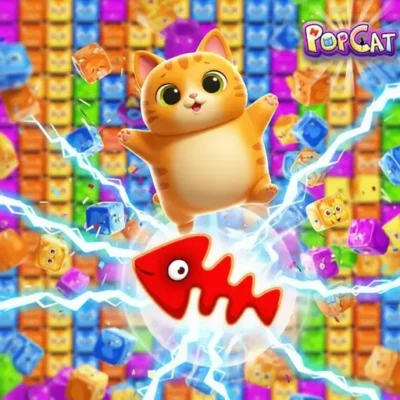
Pop Cat Clicker
Pop Cat Clicker is a light, cat-themed clicking game built around one immediately understandable action: click or tap to make the pop happen. Its simple premise connects it…
 Works on Desktop & Mobile
Tested By BunaGames
- Test date
- July 12, 2026
- Tested on
- Chrome 150
- Device
- Desktop
- Operating system
- macOS and Windows
- Game loaded successfully
- Yes
- Fullscreen works
- Yes
- Sound works
- Yes
- Save progress
- Local browser storage
- Mobile compatibility
- Partially tested
- Keyboard controls
- Working
- Controller support
- Not detected
- Average loading time
- 4.2 seconds
- Known issues
- Minor delay after entering fullscreen
Pop Cat Clicker not loading?
- Refresh the page.
- Disable restrictive content blockers temporarily.
- Confirm JavaScript and WebGL are enabled.
- Clear the browser cache.
- Try another modern browser.
- Close unnecessary tabs.
- Switch off VPN if the game server is blocked.
- Use the Report a Problem button if the issue continues.
Continue Playing
Daily Challenge

Play 6 minutes today in Pop Cat Clicker.
Leaderboard
- 1Community rating4.6 ★
- 2Player likes838
- 3Total votes922
- 4Your local progress0%
Your progress is saved locally in this browser. No account required.
 Your progress is saved locally in this browser. No account required.
Game Progress & Challenges
Why Play This Game?
 Instant PlayPlay instantly in your browser.
 Mobile FriendlyOptimized for all devices.
 Free to PlayNo hidden fees.
About "Pop Cat Clicker"
Pop Cat Clicker is a light, cat-themed clicking game built around one immediately understandable action: click or tap to make the pop happen. Its simple premise connects it to the internet-famous Popcat idea, but the appeal is not complicated strategy or a long rulebook. It is the quick response between your input and the playful on-screen result.
This browser game suits players who want a short, funny break without committing to a demanding session. The game is described as cute, relaxing, and funny, with clicker and idle-style appeal. That makes it easy to enjoy at your own pace, whether you have a few spare minutes or want to settle into a longer casual session.
Pop Cat Clicker keeps the focus on the cat, the clicking rhythm, and the satisfying repetition of the pop. It is a good fit for fans of simple reaction-based games, casual minigames, and cheerful animal games. Because the central interaction is so direct, new players can start quickly while still choosing their own tempo.
Play it when you want a small dose of low-pressure browser entertainment: no dense controls to memorize, no complicated setup, and no need to turn a relaxing clicker into a serious challenge.
Gameplay
Pop Cat Clicker gameplay centers on repeated input. Use a mouse click or a touchscreen tap, watch for the cat's response, and continue at whatever pace feels satisfying. The core loop is deliberately compact: input, pop, response, repeat. That clarity is a strength because the game communicates its main activity without a tutorial-heavy opening.
Rather than asking you to navigate a large world or learn a deep set of commands, the game turns a familiar internet-style cat reaction into a casual interactive activity. Each click becomes part of a rhythm. Some players will prefer quick bursts of taps; others may use a steadier pace and treat the game as a calm background break. Both approaches fit the clicker format.
The important gameplay context is that Pop Cat Clicker is not best approached like a precision action game. Fast input can be fun, but comfort and consistency matter more than forcing a frantic pace. The game is designed around an accessible click-or-tap interaction, so the useful decision is usually how you want to play rather than which complicated move you must perform.
Its average session is described as about half an hour, giving it more room than a single novelty click while preserving a casual feel. You can begin with the basic popping action, take a pause whenever you need one, and return without having to relearn a complicated system. That combination of simple input, cute presentation, and flexible pacing is the central Pop Cat Clicker experience.
Platform
Pop Cat Clicker is suited to browser play. You can start it online without treating it like a large software installation, making it convenient for a quick session on a compatible desktop or mobile browser. The available game information identifies both mouse and touchscreen input, so the same basic interaction works across common device styles.
On a computer, use your mouse to click. On a phone or tablet, tap the game with your finger. The game’s uncomplicated input design is especially useful when switching devices because you are not dependent on a keyboard layout or a controller.
For the smoothest session, open the game in a current browser, allow the game area to finish loading, and use a stable connection. If the page is displayed in a narrow mobile view, keeping the device comfortably positioned can make repeated tapping easier. Browser play also makes this a practical choice when you want casual entertainment without downloads.
- Desktop: mouse-based clicking
- Mobile and tablet: touchscreen tapping
- Access style: play online in a browser
- Best use: short breaks or relaxed casual sessions
How to Play "Pop Cat Clicker"
Starting Pop Cat Clicker is straightforward because the game’s main interaction is visible from the beginning. Once the game has loaded, focus on the cat and use the input method that matches your device. A mouse click on desktop or a tap on a touchscreen activates the central pop action.
- Open the game page and wait for the playable area to load.
- Locate the cat or active game area on screen.
- Click with your mouse on a computer, or tap with a finger on a touchscreen.
- Continue clicking or tapping to enjoy the repeating pop interaction.
- Adjust your pace whenever needed; there is no reason to strain your hand for a casual session.
The best first-session mindset is simple: test the response, find a comfortable rhythm, and let the game’s humor carry the experience. Do not overthink the opening. Pop Cat Clicker is built to be approachable, and the basic action is the point rather than a barrier before the “real” game starts.
If you are playing on a touch device, tap the intended game area cleanly instead of brushing the screen quickly. On a desktop, keep the cursor in the active area before clicking repeatedly. These small habits reduce missed inputs and make the interaction feel more consistent.
Because this is a casual clicker, it also works well in intervals. Play a short round, pause, then return later if you want another pop-filled break. The game supports a relaxed approach better than an all-or-nothing time commitment, which is useful for players looking for an easy browser game between other activities.
Controls
Pop Cat Clicker uses minimal controls. The main command is a click or tap, which keeps the game accessible for players of different ages and experience levels. There is no need to learn a complex keyboard scheme before you can begin.
| Device | Main input |
|---|---|
| Computer | Mouse click |
| Phone or tablet | Screen tap |
On desktop, move the pointer over the active game area and click normally. Repeated clicks create the natural rhythm of play. On a touchscreen, tap directly where the game responds. Use a comfortable hand position if you plan to play for a longer session.
The simple control model is part of the game’s appeal. You can concentrate on the cat-themed popping interaction instead of dividing attention between movement keys, camera controls, or multiple buttons. If an input does not register, pause briefly, check that the game has finished loading, and click or tap within the active game window.
Can "Pop Cat Clicker" Unblocked?
Pop Cat Clicker is designed for online browser access, so it can be a convenient casual game when browser games are permitted on your device and network. You do not need a traditional download process to begin playing, which helps keep access simple for a quick break.
However, “unblocked” access always depends on local conditions. A school, workplace, library, family device, browser extension, or network administrator may limit gaming websites or interactive web content. Those rules vary by location, and a game page cannot override them.
If the game does not open, first check your connection and confirm that your browser is up to date. Refreshing the page can help when a game has not fully loaded. If access is restricted by a managed network, use the site only where you have permission to do so. Avoid attempting to bypass filters or device restrictions.
When access is available, the browser format is useful because you can open the game, enjoy a few clicks or taps, and move on without installing extra software. That makes Pop Cat Clicker a straightforward option for permitted casual play on desktop, tablet, or mobile devices.
Tips for "Pop Cat Clicker"
The strongest Pop Cat Clicker tip is to prioritize a comfortable, repeatable rhythm. The game is about clicking or tapping, but faster is not automatically better if your input becomes inconsistent or uncomfortable. Start at a moderate pace, pay attention to the game’s response, and increase speed only if it still feels natural.
- Use clean inputs: Keep your mouse pointer or fingertip inside the active game area to avoid wasted clicks or taps.
- Choose comfort over strain: Relax your hand, wrist, and fingers during longer play. Casual clicker games are more enjoyable when you are not forcing rapid movement.
- Take short breaks: A pause can reset your rhythm and prevent repetitive tapping from becoming tiring.
- Match the device: A mouse may feel more precise for repeated desktop clicks, while direct screen taps keep mobile play simple.
- Let the game stay casual: The cute, funny pop interaction is the main reward. There is no need to treat every session like a competition.
A useful practical habit is to avoid clicking outside the game frame. Before beginning a faster sequence, position your cursor or hand where it will remain steady. On a phone or tablet, avoid accidental swipes by using deliberate taps instead of dragging across the display.
Players who enjoy relaxed games can also use Pop Cat Clicker as a palate cleanser between more demanding activities. Its low learning curve means you can return after a pause without losing track of complicated objectives. That is an information advantage over many clickers: the primary skill is not memorizing systems, but keeping a comfortable input rhythm and enjoying the immediate feedback.
Finally, give the game time to load before judging responsiveness. A stable browser session and a clear active game area make the cat-popping loop feel more immediate and satisfying.
Features "Pop Cat Clicker"
Pop Cat Clicker focuses on a compact set of features that support easy, casual play. Its identity comes from the combination of a recognizable cat-themed pop concept, clicker-style interaction, and browser-friendly access. Instead of overloading the screen with difficult commands, it keeps attention on the central input-and-response loop.
- Cat-themed clicking: The game turns a playful pop-cat concept into a direct interactive activity.
- Mouse and touchscreen support: Click on desktop or tap on compatible touch devices.
- Browser-based play: Start online without a conventional download installation.
- Casual pacing: Play in a quick break or continue for a more relaxed session.
- Accessible controls: The main interaction is easy to understand from the start.
- Cute and funny tone: The presentation is geared toward light entertainment rather than intense pressure.
- Clicker and idle-style appeal: It fits players who enjoy simple repeated interaction and low-barrier game loops.
The feature that matters most is immediacy. A player does not need specialist game knowledge to understand what to do: use the available input, trigger the pop, and keep playing at a preferred pace. This is valuable for browser-game visitors who want to spend time playing rather than configuring controls or reading lengthy instructions.
Pop Cat Clicker also benefits from flexible session length. The available description places an average session around half an hour, yet its quick input loop means it remains easy to sample briefly. That balance gives it a role between a tiny novelty activity and a more involved casual game.
For players exploring online games, it is a focused choice when a cute theme, simple controls, and immediate interaction matter more than complex systems.
Best "Pop Cat Clicker" Similar Games & Top Picks
- Cupcake Clicker: Play Cupcake Clicker online. Click the cupcake, earn treats, buy upgrades, and build automatic cupcake production in this browser clicker game.
- Poop Clicker 2: Play Poop Clicker 2 online. Click the poop emoji, collect resources, buy upgrades, and build a bigger idle production pile.
- Little Farm Clicker Game: Play Little Farm Clicker Game online. Harvest crops, earn coins, unlock farm plots, and reinvest your money in this idle farming clicker.
- Minecraft Clicker: Play Minecraft Clicker online. Click, collect resources, pursue upgrades, and enjoy a Minecraft-inspired browser clicker game for free.
- Clicker Cookies: Play Clicker Cookies free in your browser. Click to bake cookies, buy automated production, and grow your cookie total.
FAQ - Pop Cat Clicker
What is Pop Cat Clicker?
Pop Cat Clicker is a casual cat-themed clicking game. Its central activity is using clicks or taps to trigger the game’s pop interaction. It is designed around simple input, a cute and funny tone, and an easy-to-understand clicker loop.
How do I play Pop Cat Clicker?
Wait for the game area to load, then click with a mouse on desktop or tap the screen on a touch device. Keep using the main input on the active game area to continue the pop-focused gameplay. You do not need to learn a complicated control scheme to get started.
Can I play Pop Cat Clicker for free in my browser?
Pop Cat Clicker is presented as an online browser game that can be played without a traditional download. Open the game page in a compatible browser and start when the game has loaded. Access may still depend on your device, browser, and local network permissions.
Does Pop Cat Clicker work on mobile devices?
Yes, the available game information lists touchscreen input. That means phones and tablets can use taps for the main interaction. On desktop or laptop computers, use mouse clicks instead. The same basic clicker concept works with either input method.
What are the controls for Pop Cat Clicker?
The primary controls are very simple: mouse clicks on a computer and screen taps on a touchscreen device. Position your pointer or finger over the active game area, then click or tap. Minimal controls help keep the game approachable for quick casual play.
Is Pop Cat Clicker a relaxing game?
It is described with relaxing, cute, and funny qualities, and its straightforward repeated-input gameplay supports that style. You can play at a calm pace rather than treating it as a high-pressure action challenge. Taking short breaks during longer sessions can keep the experience comfortable.
How long is a typical Pop Cat Clicker session?
The game information describes an average session as about half an hour. Your own playtime can be shorter or longer because the basic interaction is easy to enter and leave. It works well for a brief browser break as well as a more extended casual session.
Why is Pop Cat Clicker not loading or responding?
First, allow the page a moment to finish loading and make sure you are clicking or tapping inside the active game area. Check your internet connection, refresh the browser page, and try a current browser if needed. If you are on a managed school, work, or public network, local restrictions may also affect access. Use the game only where browser gaming is allowed.
More Games Like This
 Room Clicker
Clicker ★ 4.8
Room Clicker
Clicker ★ 4.8
 Mr Mine
Clicker ★ 4.7
Mr Mine
Clicker ★ 4.7
 Clicker Heroes 2
Clicker ★ 4.5
Clicker Heroes 2
Clicker ★ 4.5
 Cookie Clicker 3
Clicker ★ 4.7
Cookie Clicker 3
Clicker ★ 4.7
 Pizza Clicker
Clicker ★ 4.7
Pizza Clicker
Clicker ★ 4.7
 Idle Mining Empire
Clicker ★ 4.6
Idle Mining Empire
Clicker ★ 4.6
 Papas Sushiria
Clicker ★ 4.6
Papas Sushiria
Clicker ★ 4.6
 Italian Brainrot Clicker 2
Clicker ★ 4.7
Italian Brainrot Clicker 2
Clicker ★ 4.7
 Papas Wingeria
Clicker ★ 4.6
Papas Wingeria
Clicker ★ 4.6
 Papas Scooperia
Clicker ★ 4.7
Papas Scooperia
Clicker ★ 4.7
 Papas Pizzeria
Clicker ★ 4.6
Papas Pizzeria
Clicker ★ 4.6
 Papas Freezeria
Clicker ★ 4.6
Papas Freezeria
Clicker ★ 4.6
 Italian Brainrot Clicker
Clicker ★ 4.6
Italian Brainrot Clicker
Clicker ★ 4.6
 Papas Taco Mia
Clicker ★ 4.6
Papas Taco Mia
Clicker ★ 4.6
 Papas Cupcakeria
Clicker ★ 4.6
Papas Cupcakeria
Clicker ★ 4.6
 Clicker Heroes
Clicker ★ 4.4
Clicker Heroes
Clicker ★ 4.4
 Capybara Clicker
Clicker ★ 4.5
Capybara Clicker
Clicker ★ 4.5
 Goo Goo Gaga Clicker
Clicker ★ 4.4
Goo Goo Gaga Clicker
Clicker ★ 4.4
 Report a Problem
Comments About Pop Cat Clicker