



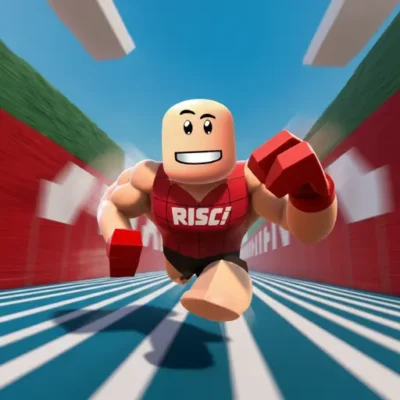
Race Clicker
Race Clicker is a fast-paced clicker racing game built around one direct challenge: create as much speed as possible before the race begins. Instead of relying on complicated…
 Works on Desktop & Mobile
Tested By BunaGames
- Test date
- July 11, 2026
- Tested on
- Chrome 150
- Device
- Desktop
- Operating system
- macOS and Windows
- Game loaded successfully
- Yes
- Fullscreen works
- Yes
- Sound works
- Yes
- Save progress
- Local browser storage
- Mobile compatibility
- Partially tested
- Keyboard controls
- Working
- Controller support
- Not detected
- Average loading time
- 4.2 seconds
- Known issues
- Minor delay after entering fullscreen
Race Clicker not loading?
- Refresh the page.
- Disable restrictive content blockers temporarily.
- Confirm JavaScript and WebGL are enabled.
- Clear the browser cache.
- Try another modern browser.
- Close unnecessary tabs.
- Switch off VPN if the game server is blocked.
- Use the Report a Problem button if the issue continues.
Continue Playing

Daily Challenge

Play 7 minutes today in Race Clicker.
Leaderboard
- 1Community rating4.5 ★
- 2Player likes539
- 3Total votes615
- 4Your local progress0%
Your progress is saved locally in this browser. No account required.
 Your progress is saved locally in this browser. No account required.
Game Progress & Challenges
Why Play This Game?
 Instant PlayPlay instantly in your browser.
 Mobile FriendlyOptimized for all devices.
 Free to PlayNo hidden fees.
About "Race Clicker"
Race Clicker is a fast-paced clicker racing game built around one direct challenge: create as much speed as possible before the race begins. Instead of relying on complicated driving controls, the game puts timing, rapid tapping, and sustained input at the center of every attempt. It combines the immediate feedback of an incremental clicker with the pressure of a racing countdown.
The main appeal is easy to understand. A race is approaching, the preparation window is short, and every click or tap matters. Players must react quickly, keep a steady rhythm, and turn that short burst of activity into better race momentum. The result is a compact arcade loop that is simple to start but rewarding to replay when you want to improve your pace.
Race Clicker is a good fit for players who enjoy quick browser challenges, tap-based games, and racing experiences that focus on speed rather than steering. The game is designed around short rounds, so it works well whether you have a few minutes for a casual run or want to repeat races while practicing a faster clicking rhythm.
Its strongest idea is the connection between preparation and performance: the work happens before the race, and the race shows the result of that effort. That clear cause-and-effect loop gives every countdown a purpose.
Gameplay
Race Clicker uses a clicker-first racing loop. Before a race, a countdown gives you a limited opportunity to click with a mouse or tap on a touch screen. Your objective during that window is to build speed as efficiently as possible. Once the preparation phase ends, the race outcome reflects the momentum you created through your input.
This structure is important because it changes what “racing” means. You are not asked to memorize a long track layout or make constant steering decisions. The main test is how well you handle a brief, high-pressure input phase. Fast reactions help, but controlled repetition matters too. Clicking wildly for a second and then losing pace can be less useful than maintaining a reliable rhythm through the full countdown.
A reported race setup includes a ten-second countdown, making the opening moments especially valuable. Treat that time as the core skill check. Begin immediately, establish a pace that you can sustain, and keep your attention on the active race screen instead of looking away mid-countdown.
The gameplay also has an incremental feel because improvement comes from repeated attempts and better execution. Each race gives you another chance to understand how your clicking pace affects speed. That makes Race Clicker approachable for new players: the goal is visible, the action is direct, and a new attempt is an opportunity to improve rather than learn a completely different control scheme.
For players searching for a simple racing game online, the key expectation is clear: Race Clicker is about rapid input, speed building, and short competitive-style race sessions, not realistic vehicle simulation.
Platform
Race Clicker is available as an online game experience, making it suitable for players who want to start a race from a compatible web browser. Browser play is especially convenient for a clicker game because the main interaction is straightforward: mouse clicks on desktop and taps on touch-enabled devices.
The game is also described in store listings as being available on Android and Windows. Availability can differ by version and service, so the most practical option on this page is the browser edition. You can open the game, focus on the countdown, and play without needing to learn a traditional racing-control layout.
For the smoothest session, use an up-to-date browser, keep the game tab active, and make sure your mouse or touch screen is responsive. Because the gameplay depends on rapid repeated input, avoiding background tabs and interruptions can help you maintain a consistent pace during the race preparation period.
Race Clicker works best as a quick-play arcade choice: open the page, begin a run, and return for another attempt whenever you want to test your tapping speed.
How to Play "Race Clicker"
Start Race Clicker and pay attention as soon as the pre-race countdown appears. The important work happens before the race begins. Use the available mouse or touch input to click or tap repeatedly and build as much speed as you can during the limited preparation time.
- Begin a race. Get ready for the countdown rather than waiting for the race phase to start.
- Click or tap immediately. Early seconds are valuable, so start your input as soon as the game accepts it.
- Keep a stable rhythm. Aim for consistent rapid input instead of a short burst followed by pauses.
- Use the full countdown. Continue clicking or tapping until the preparation period ends.
- Watch the race result. The race displays the effect of the speed you built before the start.
- Repeat and refine. Try another round and improve your opening reaction, rhythm, or consistency.
The most useful mindset is to treat each countdown as its own mini-challenge. Your target is not simply to click as hard as possible for a moment; it is to convert the entire available window into productive input. If you begin late, hesitate, or pause often, you give up time that could contribute to your race pace.
Players on a computer may find it helpful to settle their hand on the mouse before starting. On a phone or tablet, keep one finger positioned comfortably over the active area so you can begin tapping right away. Avoid changing your method in the middle of a run unless it is clearly slowing you down.
After several races, you should have a better feel for the pace you can sustain. This is where the clicker format becomes satisfying: small improvements in timing and repetition can make a noticeable difference to how prepared you are for the next race.
Controls
Race Clicker keeps its controls deliberately simple so the focus stays on speed building and race timing. On desktop, use the mouse to provide repeated clicks during the countdown. On a touch-enabled device, tap the active game area repeatedly.
| Device | Primary input |
|---|---|
| Desktop or laptop | Mouse click |
| Phone or tablet | Screen tap |
You do not need a complex driving setup to take part in the core loop. The key control skill is maintaining rapid, comfortable, repeated input for the full pre-race period. Keep your hand relaxed enough to avoid losing rhythm, but stay ready to react as soon as the countdown starts.
If clicks or taps do not register as expected, first make sure the game area is selected and that no browser overlay, notification, or inactive tab is taking focus. Since Race Clicker is centered on click and tap speed, responsive input is more important here than memorizing multiple keys.
Can "Race Clicker" Unblocked?
Race Clicker can be played online through a web browser when access to gaming sites is allowed on your network. This makes it a convenient choice for players looking for a quick clicker racing game without installing a separate program for the browser version.
Whether any game is “unblocked” depends on the device, browser settings, school, workplace, library, or network rules in use. Those restrictions are controlled by the local network administrator, so access cannot be guaranteed everywhere. If the game page does not load, it may be due to a content filter, disabled browser features, or a connection issue rather than the game itself.
For normal browser access, open the page in a current browser, allow the game page to finish loading, and keep the tab active while playing. If you are on a shared or managed device, follow the applicable rules before trying to play.
The short race format is well suited to browser sessions because you can jump into a countdown, focus on clicking or tapping, and finish a run without committing to a long racing event.
Tips for "Race Clicker"
The best Race Clicker strategy is not complicated, but it rewards discipline. The game concentrates its challenge into a short countdown, so preparation and consistency matter more than complicated tactics.
- React at the first moment. Start clicking or tapping as soon as the countdown permits. A delayed start reduces the time available to build speed.
- Prioritize rhythm over panic. Find a fast pace that you can hold. Random bursts often lead to pauses, while a steady pattern uses more of the countdown.
- Commit to the whole preparation phase. A ten-second window is brief, but every second is part of the speed-building opportunity. Keep input going until the phase ends.
- Use a comfortable hand position. On desktop, position your mouse hand before beginning. On touch devices, place your finger where you can tap rapidly without stretching.
- Limit distractions. Close notifications, avoid switching tabs, and look at the active game area. The loop is simple enough that attention is one of the biggest advantages.
- Practice repeatability. A good method is one you can reproduce over several races. Do not rely on a single exhausting burst if it makes later attempts less consistent.
- Learn from each result. If a run feels slow, ask whether you started late, lost rhythm, or stopped before the countdown fully ended. Make one small adjustment on the next attempt.
A useful way to improve is to separate speed from control. Try to tap or click quickly, but do not let your technique become so tense that your pace drops halfway through. The ideal input pattern is fast enough to feel purposeful and stable enough to survive the entire countdown.
Race Clicker also benefits from short practice sessions. Because races are compact, you can test your opening reaction several times without spending a long time in menus or on a track. This gives the game a clear skill path: react sooner, maintain pace longer, and make each pre-race second count.
Features "Race Clicker"
Race Clicker stands out by combining familiar clicker-game input with a racing objective. Its features center on direct interaction and quick feedback rather than a complicated simulation system.
- Clicker racing format: Rapid clicks or taps are tied directly to building speed before a race.
- Countdown-based challenge: The pre-race timer creates urgency and gives each attempt a clear start and finish.
- Short arcade sessions: The compact loop makes it easy to begin a race, review the result, and try again.
- Simple input design: Mouse clicking and touch tapping keep the game accessible for different device types.
- Speed and timing focus: Success depends on reaction, sustained rhythm, and making effective use of the available time.
- Replay-friendly structure: Repeated attempts let players work on faster starts and more consistent clicking.
- Browser convenience: The online format supports quick play in a compatible browser.
The strongest feature is the game’s clear feedback loop. You are given a limited preparation period, you provide repeated input, and the race translates that effort into a visible result. That relationship makes the game easy to read even for someone playing for the first time.
It also offers a different kind of racing-game appeal. Rather than emphasizing realistic driving controls, Race Clicker turns the pre-race buildup into the main event. Players who enjoy tapping games can pursue better racing performance, while racing fans can focus on a concentrated speed challenge.
This focused design is a practical benefit for casual play. There are no complicated control combinations required for the core action; the game asks you to react, click or tap, sustain momentum, and see how well your preparation carries into the race.
Best "Race Clicker" Similar Games & Top Picks
- Cupcake Clicker: Play Cupcake Clicker online. Click the cupcake, earn treats, buy upgrades, and build automatic cupcake production in this browser clicker game.
- Poop Clicker 2: Play Poop Clicker 2 online. Click the poop emoji, collect resources, buy upgrades, and build a bigger idle production pile.
- Little Farm Clicker Game: Play Little Farm Clicker Game online. Harvest crops, earn coins, unlock farm plots, and reinvest your money in this idle farming clicker.
- Minecraft Clicker: Play Minecraft Clicker online. Click, collect resources, pursue upgrades, and enjoy a Minecraft-inspired browser clicker game for free.
- Clicker Cookies: Play Clicker Cookies free in your browser. Click to bake cookies, buy automated production, and grow your cookie total.
FAQ - Race Clicker
What is Race Clicker?
Race Clicker is a fast-paced clicker racing game. Its core challenge is to click with a mouse or tap a screen rapidly before a race begins, building speed during the available countdown. The race then reflects the momentum created in that preparation phase.
How do you play Race Clicker?
Begin a race, watch for the pre-race countdown, and click or tap repeatedly as soon as input is available. Keep a steady pace through the full countdown. When the race starts, your prior speed-building effort determines how prepared you are for the racing phase. Repeat races to practice quicker reactions and better consistency.
What are the controls in Race Clicker?
On a desktop or laptop, use mouse clicks. On a phone or tablet with touch support, use screen taps. The central control task is repeated rapid input, so you do not need a complex steering setup for the main gameplay loop.
How long is the race countdown?
A race setup for Race Clicker is described with a ten-second countdown before the race. Use that entire period to click or tap and build speed. Because the window is short, beginning promptly and avoiding pauses are useful habits.
Is Race Clicker a racing game or a clicker game?
It is both. Race Clicker uses clicker-style repeated input as the main mechanic, while its goal and presentation are based on racing. The clicker element happens during the preparation period, and the racing element shows the outcome of the speed you build.
Can I play Race Clicker online for free?
Race Clicker is presented as an online browser game, so you can play through a compatible web browser on this page. Browser access may depend on your connection, device, and local network permissions, but no separate browser-game installation is required to begin playing here.
Is Race Clicker unblocked at school or work?
Access depends on the rules and filters used by that school, workplace, library, or other managed network. Some networks restrict gaming websites or browser content. Always follow local policies; if the page is blocked, only the network administrator can change that access setting.
What is the best way to improve in Race Clicker?
Start clicking or tapping immediately, maintain a pace you can sustain, and use every second of the countdown. A controlled rhythm is often more useful than an early burst followed by pauses. Keep the game tab active, reduce distractions, and use repeated races to refine your timing.
More Games Like This
 Room Clicker
Clicker ★ 4.8
Room Clicker
Clicker ★ 4.8
 Mr Mine
Clicker ★ 4.7
Mr Mine
Clicker ★ 4.7
 Clicker Heroes 2
Clicker ★ 4.5
Clicker Heroes 2
Clicker ★ 4.5
 Cookie Clicker 3
Clicker ★ 4.7
Cookie Clicker 3
Clicker ★ 4.7
 Pizza Clicker
Clicker ★ 4.7
Pizza Clicker
Clicker ★ 4.7
 Idle Mining Empire
Clicker ★ 4.6
Idle Mining Empire
Clicker ★ 4.6
 Papas Sushiria
Clicker ★ 4.6
Papas Sushiria
Clicker ★ 4.6
 Italian Brainrot Clicker 2
Clicker ★ 4.7
Italian Brainrot Clicker 2
Clicker ★ 4.7
 Papas Wingeria
Clicker ★ 4.6
Papas Wingeria
Clicker ★ 4.6
 Papas Scooperia
Clicker ★ 4.7
Papas Scooperia
Clicker ★ 4.7
 Papas Pizzeria
Clicker ★ 4.6
Papas Pizzeria
Clicker ★ 4.6
 Papas Freezeria
Clicker ★ 4.6
Papas Freezeria
Clicker ★ 4.6
 Italian Brainrot Clicker
Clicker ★ 4.6
Italian Brainrot Clicker
Clicker ★ 4.6
 Papas Taco Mia
Clicker ★ 4.6
Papas Taco Mia
Clicker ★ 4.6
 Papas Cupcakeria
Clicker ★ 4.6
Papas Cupcakeria
Clicker ★ 4.6
 Clicker Heroes
Clicker ★ 4.4
Clicker Heroes
Clicker ★ 4.4
 Capybara Clicker
Clicker ★ 4.5
Capybara Clicker
Clicker ★ 4.5
 Goo Goo Gaga Clicker
Clicker ★ 4.4
Goo Goo Gaga Clicker
Clicker ★ 4.4
 Report a Problem
Comments About Race Clicker