



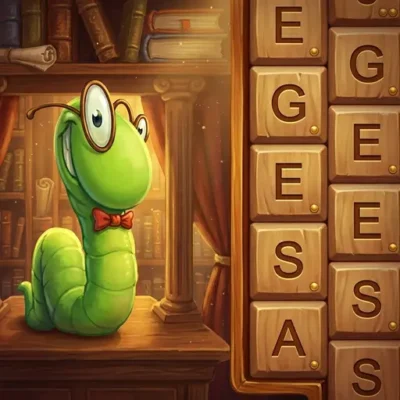
Bookworm
Bookworm is a classic word-forming puzzle game built around a grid of letter tiles. Your objective is simple to understand but rewarding to master: connect neighboring letters to…
 Works on Desktop & Mobile
Tested By BunaGames
- Test date
- August 12, 2026
- Tested on
- Chrome 150
- Device
- Desktop
- Operating system
- macOS and Windows
- Game loaded successfully
- Yes
- Fullscreen works
- Yes
- Sound works
- Yes
- Save progress
- Local browser storage
- Mobile compatibility
- Partially tested
- Keyboard controls
- Working
- Controller support
- Not detected
- Average loading time
- 4.2 seconds
- Known issues
- Minor delay after entering fullscreen
Bookworm not loading?
- Refresh the page.
- Disable restrictive content blockers temporarily.
- Confirm JavaScript and WebGL are enabled.
- Clear the browser cache.
- Try another modern browser.
- Close unnecessary tabs.
- Switch off VPN if the game server is blocked.
- Use the Report a Problem button if the issue continues.
Continue Playing
Daily Challenge

Play 6 minutes today in Bookworm.
Leaderboard
- 1Community rating4.7 ★
- 2Player likes1.0K
- 3Total votes1.1K
- 4Your local progress0%
Your progress is saved locally in this browser. No account required.
 Your progress is saved locally in this browser. No account required.
Game Progress & Challenges
Why Play This Game?
 Instant PlayPlay instantly in your browser.
 Mobile FriendlyOptimized for all devices.
 Free to PlayNo hidden fees.
About "Bookworm"
Bookworm is a classic word-forming puzzle game built around a grid of letter tiles. Your objective is simple to understand but rewarding to master: connect neighboring letters to make English words, remove the used tiles, and earn points from every successful find. Each move asks you to balance vocabulary knowledge, visual scanning, and careful tile selection.
Rather than solving a fixed crossword clue, you work with the letters currently available on the board. A short word can clear space and keep the grid moving, while a longer word can turn an overlooked letter pattern into a stronger scoring opportunity. Because the layout changes as tiles are cleared, every word affects the possibilities that follow.
This puzzle game suits players who enjoy word searches, spelling challenges, and relaxed score-based games. You can begin with obvious word combinations, then look for alternate paths through horizontal, vertical, and diagonal neighbors. The accessible rules make it easy to start, but building a consistently high score requires patience and a good eye for prefixes, endings, and useful letter combinations.
Bookworm is a focused browser puzzle experience for anyone who wants to turn a few spare minutes into a satisfying vocabulary challenge.
Gameplay
Bookworm gameplay centers on making valid English words from adjacent tiles in the letter field. Start on one letter and trace a path through neighboring tiles to spell a word. Tiles can connect horizontally, vertically, or diagonally, so the best answer is not always visible in a straight line. Looking in all directions is essential when the board becomes crowded.
Every accepted word gives you points and clears the letters used to create it. Clearing tiles changes the arrangement of the field and opens new combinations. That cause-and-effect loop is the heart of the game: find a word, create space, inspect the new board, and plan the next route. A move that seems modest may be valuable if it removes awkward letters or exposes a better sequence.
The game rewards both immediate recognition and deliberate search. Common short words are useful when you need to clear a specific area, but longer words may use more tiles and produce a more meaningful change to the grid. Do not look only for complete words at first glance. Notice letter pairs, familiar beginnings, and endings that can be extended through nearby tiles.
- Connect neighboring letter tiles to spell words.
- Use horizontal, vertical, and diagonal paths.
- Clear used tiles after successful word creation.
- Score points by finding words from the available grid.
- Adapt as each cleared group changes the board.
The key gameplay skill is board reading. Instead of treating every tile as separate, scan for connected clusters that can support several possible words. This makes Bookworm feel less like a simple spelling test and more like a tactical word puzzle.
Platform
Bookworm can be played online in a web browser, making it a convenient choice for players who want a word puzzle without installing a separate program. Open the game page, let the puzzle load, and use the on-screen letter field to begin building words.
A browser version is especially useful for short play sessions. You can focus on the grid, form a few words, and return to other tasks without managing downloads or device storage. The game’s tile-based design is also easy to understand visually: letters appear in the field, and your interaction is centered on connecting them into valid words.
For the most reliable experience, use a current browser and a stable internet connection. If the game does not load immediately, allow the page a moment to finish loading and check that browser settings or network rules are not preventing game content from running.
Bookworm belongs among accessible browser games because its main challenge comes from vocabulary, observation, and thoughtful choices rather than complicated setup.
How to Play "Bookworm"
Begin by studying the letter grid before selecting anything. Look for an easy word to confirm the possible connections, then use the board’s neighboring letters to build a path. Letters must be adjacent, which means the next tile needs to touch the previous tile horizontally, vertically, or diagonally.
- Find a letter that can begin a familiar English word.
- Check the tiles directly beside it, including diagonal neighbors.
- Continue through adjacent letters in the order needed to spell the word.
- Create the word to score points and clear its used tiles.
- Review the updated field and search for new connections.
Start with words you can see confidently, but do not rush through the entire board. After a successful word clears, pause to identify newly exposed possibilities. A changed grid can connect letters that previously had no useful path between them.
When you are stuck, reduce the problem. Instead of trying to see a long word immediately, locate a two-letter or three-letter beginning and test whether nearby letters can extend it. For example, recognize common patterns such as a starting consonant followed by a vowel, then search adjacent tiles for endings that turn the pattern into a complete word.
It also helps to scan the board in a consistent direction. Work across rows, then down columns, then inspect diagonals. This prevents your eyes from repeatedly checking the same obvious area while missing a path at the edge of the grid. The goal is not merely to form any word; it is to make choices that clear useful space and leave you with a more manageable letter field.
Controls
Bookworm uses straightforward point-and-select controls. The important action is choosing a chain of touching letters in the correct spelling order. On a desktop or laptop, use the mouse to select tiles. On a touch-enabled device, use taps or touch input when supported by the browser version.
| Action | Control |
|---|---|
| Select letters | Mouse click or touch |
| Build a word | Choose adjacent tiles |
| Change a choice | Adjust selection before confirming |
Take care to follow the word’s spelling from its first letter through its last. Since diagonal connections count, a valid route may turn several times across the grid. If a word does not work, inspect whether one letter is not adjacent to the previous one or whether the selected sequence does not form a recognized English word.
Accurate selection matters more than speed. Slow down when tracing a longer route so you can verify each neighboring connection.
Can "Bookworm" Unblocked?
Bookworm is designed to be played online from its game page, so you can access the word puzzle in a browser when the site and your network allow it. There is no need to install a separate application just to start connecting letters and creating words.
Availability can still depend on the device, browser, internet connection, and local network policies. Some school, library, workplace, or managed networks limit access to gaming pages or block web content. Those restrictions are set by the network administrator, so they should be respected rather than bypassed.
If the game is permitted but does not open properly, try refreshing the page, using a current browser, or checking your connection. Closing unnecessary browser tabs may also help on devices with limited resources. Once the game loads, the experience is centered on the letter grid and does not require a complicated setup process.
For players seeking a quick word challenge at home or during approved free time, Bookworm offers a simple browser-based format: open the page, read the grid, and begin forming words from adjacent tiles.
Tips for "Bookworm"
A strong Bookworm strategy combines vocabulary with board management. The most obvious word is not always the most useful one. Before making a selection, ask what will happen after those tiles disappear. Clearing a congested area can expose letters that create stronger options on your next move.
- Search every direction. Check horizontal, vertical, and diagonal connections. Diagonals are easy to miss and can transform a nearly complete word into a valid one.
- Spot word fragments first. Look for familiar beginnings, vowel pairs, and common endings. A fragment can guide your eyes toward a longer connected word.
- Use short words with purpose. Short answers are useful for removing a difficult tile, opening space, or changing an unhelpful part of the field.
- Do not ignore the edges. Border tiles have fewer neighbors, so inspect them early when they form easy combinations with nearby letters.
- Pause after each clear. The updated grid may contain a better route than the board you were originally studying.
- Read clusters, not isolated letters. Treat connected areas as possible paths. One central vowel or common consonant can support multiple word choices.
One valuable habit is to make a slow first scan before acting. Identify several possible words, then choose the one that improves the board most. This adds a tactical layer that competitors often overlook: clearing tiles is not only a scoring result, but also a way to shape the next vocabulary puzzle.
When your word search stalls, change your visual approach. Start at a different corner, search diagonally first, or focus on a single useful letter and map its immediate neighbors. A fresh scan often reveals a route that was hidden by your previous reading pattern.
Features "Bookworm"
Bookworm combines the familiar satisfaction of a word game with the changing layout of a tile-clearing puzzle. The rules are direct, but the grid creates enough variation to keep each search active. You are continually evaluating letters, paths, and the consequences of clearing a group.
- Word-forming puzzle play: Build English words from the letters available in the field.
- Adjacent-tile paths: Connect letters that touch horizontally, vertically, or diagonally.
- Tile clearing: Successful words remove their used tiles from the grid.
- Score-based progress: Earn points as you discover and create words.
- Dynamic board changes: Every cleared word changes the letter layout and potential future paths.
- Vocabulary-focused challenge: Useful for players who enjoy spelling, pattern recognition, and word discovery.
- Browser convenience: Play online without a separate installation process.
The standout feature is the relationship between language and spatial reasoning. Knowing a word is only one part of the solution; you must also find a legal route through neighboring tiles. This makes each successful answer feel earned, especially when a word bends through diagonal connections instead of appearing in a simple row.
Bookworm is approachable for casual players because the central task is immediately recognizable. At the same time, it offers depth for people who like improving their word-finding habits. Longer searches, better use of the grid, and more thoughtful clearing decisions can make a session feel progressively more strategic without changing the core rules.
It is a clean fit for players who prefer focused puzzle games over complex menus, character systems, or lengthy tutorials. The letters and the board are the challenge.
Best "Bookworm" Similar Games & Top Picks
- Candy Riddles: Play Candy Riddles, a free browser match-3 puzzle with colorful candies, cute cookies, and satisfying three-or-more matches.
- Color Sort: Play Color Sort online for free. Pour and organize mixed colored liquids into matching test tubes in this focused puzzle game.
- Screw Puzzle: Play Screw Puzzle online. Remove bolts, use open holes wisely, and solve satisfying logic challenges in your browser.
- 1010 Deluxe: Play 1010 Deluxe free in your browser. Drag colorful block shapes onto the 10x10 grid and clear complete rows and columns.
- Hexa Puzzle: Play Hexa Puzzle online for free. Study the target layout, drag pieces to swap positions, and solve each visual puzzle.
FAQ - Bookworm
What is Bookworm?
Bookworm is a word-forming puzzle game in which players connect letter tiles on a grid to create English words. Successful words earn points and clear the tiles used from the field.
How do I make words in Bookworm?
Select letters that are next to each other in the order needed to spell a word. Valid connections can run horizontally, vertically, or diagonally, so a word path may turn as it moves across the board.
Do letters need to be adjacent?
Yes. The core rule is that each letter in your selected word must connect to the next through a neighboring tile. You cannot jump across unrelated parts of the grid to use letters in the same word.
What happens after I create a word?
The letters used for a successful word are cleared from the grid, and you receive points. The resulting change to the field can reveal new letter combinations, so it is useful to inspect the board again after every word.
Can I play Bookworm online for free?
This Bookworm page provides an online browser game experience. Open the game page and begin playing when it has loaded. Access may depend on your browser, internet connection, and any rules set by the network you are using.
What are the controls for Bookworm?
Use your mouse to select letter tiles on desktop devices. On supported touch devices, use touch input to choose tiles. Select the letters in spelling order while ensuring each tile touches the previous one.
What is the best strategy for a higher score?
Look beyond the first short word you notice. Search for longer connected paths when possible, but also use short words strategically to clear crowded areas or remove letters that limit the board. Always check diagonals and review the grid after tiles disappear.
Why can’t I create a word I can see?
A visible word may fail if its letters are not connected by adjacent tiles in the required order. Check every step of the route, including diagonal links. It may also fail if the selected sequence is not recognized as a valid English word by the game.
More Games Like This
 4 Pics 1 Word
Puzzle ★ 4.5
4 Pics 1 Word
Puzzle ★ 4.5
 Jewel Quest
Puzzle ★ 4.7
Jewel Quest
Puzzle ★ 4.7
 Woodoku
Puzzle ★ 4.6
Woodoku
Puzzle ★ 4.6
 1010 Block Puzzle Game
Puzzle ★ 4.7
1010 Block Puzzle Game
Puzzle ★ 4.7
 Hexa Puzzle
Puzzle ★ 4.7
Hexa Puzzle
Puzzle ★ 4.7
 1010 Deluxe
Puzzle ★ 4.6
1010 Deluxe
Puzzle ★ 4.6
 Screw Puzzle
Puzzle ★ 4.7
Screw Puzzle
Puzzle ★ 4.7
 Color Sort
Puzzle ★ 4.6
Color Sort
Puzzle ★ 4.6
 Candy Riddles
Puzzle ★ 4.6
Candy Riddles
Puzzle ★ 4.6
 Hex Frvr
Puzzle ★ 4.5
Hex Frvr
Puzzle ★ 4.5
 Water Sort
Puzzle ★ 4.6
Water Sort
Puzzle ★ 4.6
 Brain Test Tricky Puzzles
Puzzle ★ 4.8
Brain Test Tricky Puzzles
Puzzle ★ 4.8
 Ball Sort
Puzzle ★ 4.5
Ball Sort
Puzzle ★ 4.5
 Bolts And Nuts
Puzzle ★ 4.6
Bolts And Nuts
Puzzle ★ 4.6
 Wheres My Water
Puzzle ★ 4.7
Wheres My Water
Puzzle ★ 4.7
 Hexagon
Puzzle ★ 4.6
Hexagon
Puzzle ★ 4.6
 Cut The Rope 2
Puzzle ★ 4.4
Cut The Rope 2
Puzzle ★ 4.4
 Fnaf 2
Puzzle ★ 4.5
Fnaf 2
Puzzle ★ 4.5
 Report a Problem
Comments About Bookworm