



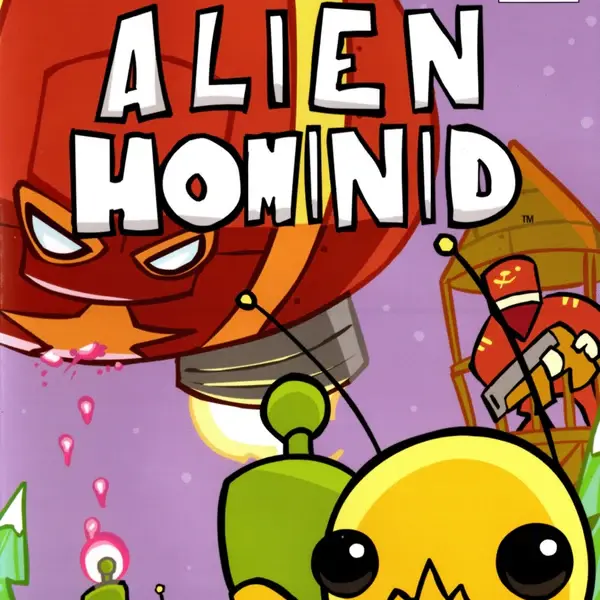
Alien Hominid
Alien Hominid is a fast, hand-drawn 2D run-and-gun action game about a small extraterrestrial whose spacecraft has been taken by government agents. Armed with a blaster, the alien…
 Works on Desktop & Mobile
Tested By BunaGames
- Test date
- August 7, 2002
- Tested on
- Chrome 150
- Device
- Desktop
- Operating system
- macOS and Windows
- Game loaded successfully
- Yes
- Fullscreen works
- Yes
- Sound works
- Yes
- Save progress
- Local browser storage
- Mobile compatibility
- Partially tested
- Keyboard controls
- Working
- Controller support
- Not detected
- Average loading time
- 4.2 seconds
- Known issues
- Minor delay after entering fullscreen
Alien Hominid not loading?
- Refresh the page.
- Disable restrictive content blockers temporarily.
- Confirm JavaScript and WebGL are enabled.
- Clear the browser cache.
- Try another modern browser.
- Close unnecessary tabs.
- Switch off VPN if the game server is blocked.
- Use the Report a Problem button if the issue continues.
Continue Playing

Daily Challenge

Play 6 minutes today in Alien Hominid.
Leaderboard
- 1Community rating4.6 ★
- 2Player likes990
- 3Total votes1.1K
- 4Your local progress0%
Your progress is saved locally in this browser. No account required.
 Your progress is saved locally in this browser. No account required.
Game Progress & Challenges
Why Play This Game?
 Instant PlayPlay instantly in your browser.
 Mobile FriendlyOptimized for all devices.
 Free to PlayNo hidden fees.
About "Alien Hominid"
Alien Hominid is a fast, hand-drawn 2D run-and-gun action game about a small extraterrestrial whose spacecraft has been taken by government agents. Armed with a blaster, the alien pushes through hostile forces in a determined attempt to reclaim the stolen craft.
The game is built around immediate arcade pressure: move through the side-scrolling action, aim at threats, fire quickly, and react before enemies or obstacles close in. Its simple-looking cartoon style contrasts with a demanding pace that rewards alert movement and deliberate aiming. Every encounter asks the player to balance survival with forward progress.
Originally released as a Flash game in 2002, Alien Hominid became known for its distinct visual identity and compact, high-energy action. The central idea remains easy to understand: an alien is stranded, agents stand in the way, and a powerful blaster is the clearest path forward. That direct setup makes it approachable for first-time players while leaving room to improve through repeated attempts.
Whether you are revisiting a recognizable arcade classic or trying it for the first time, this action game delivers a focused mission, memorable character design, and a brisk run-and-gun challenge without requiring a long introduction.
Gameplay
Alien Hominid centers on side-scrolling run-and-gun gameplay. You control the small alien as it travels through hostile territory, using directional movement to run and aim the blaster. The goal is not simply to keep firing; it is to maintain control of the screen, spot dangers early, and preserve a useful position while continuing toward the spacecraft.
Government agents are the main opposition in the game’s premise, turning the alien’s journey into a constant escape-and-recovery mission. The action has an arcade rhythm: enemies create pressure, roadblocks interrupt an easy route, and your response must be quick enough to keep momentum. The alien’s blaster is the primary tool, so aiming is as important as moving.
A notable gameplay element is the freak attack. This close-range option gives the character a more unusual response than ordinary shooting, making the action feel less like a standard military shooter. The game also allows the alien to ride enemy heads past roadblocks, adding a strange, playful tactic to an otherwise intense chase. These details give Alien Hominid its identity: it is a shooter, but one with exaggerated cartoon violence and offbeat movement ideas.
The strongest approach is to treat each screen as a changing space rather than a straight path. Watch where enemies appear, keep your aim useful as you move, and avoid committing to a direction before you understand what is blocking it. The result is a short-form action experience where awareness and timing matter more than complicated commands.
Platform
Alien Hominid began as a Flash game, which is important context for players looking for the original browser-era version. The game’s design comes from an arcade-oriented 2D format: readable hand-drawn characters, direct controls, and quick action built for short play sessions.
The Alien Hominid name has also been used for later HD releases on modern platforms. Those versions are associated with the same core 2D side-scroller identity, but this page is focused on playing Alien Hominid in a browser-based game setting. The essential experience is still easy to recognize: guide the alien, aim the blaster, confront agents, and continue toward the missing spacecraft.
For the smoothest session, use a current desktop or laptop browser with a physical keyboard. Arrow-key movement and aiming are central to the documented control scheme, so a keyboard is more practical than touch input. Close unnecessary tabs if your device is struggling, keep the game window in focus, and make sure browser shortcuts are not intercepting your key presses.
Browser play is especially useful when you want immediate action without a large installation. Open the game, focus the play area, learn the controls, and start working through the alien’s escape mission.
How to Play "Alien Hominid"
Start Alien Hominid by focusing on two jobs: moving the alien safely and keeping the blaster aimed toward danger. The alien’s spacecraft has been seized by government agents, so your direction of travel is tied to a clear objective: fight through resistance and work toward reclaiming the craft.
- Click or select the game area so the browser sends keyboard input to the game.
- Use the arrow keys to move the alien and direct the gun.
- Watch ahead as you travel. Enemies and roadblocks matter most when they limit your next safe route.
- Use the blaster to deal with threats before they can crowd your position.
- Use the freak attack when close-range pressure makes ordinary movement or shooting less reliable.
- When a roadblock interrupts progress, remember that riding enemy heads can help the alien move past it.
Do not treat every moment as a race to the edge of the screen. A small pause to aim in the correct direction can be more useful than moving blindly into danger. Because the game mixes movement and aiming through the directional controls, your route and your firing direction are connected. Think about where the alien needs to stand before committing to the next action.
New players should first practice making clean directional changes. Once movement feels natural, focus on recognizing when a target is far enough away for blaster fire and when an unusual close-range option is more appropriate. The game’s clarity is one of its strengths: the objective is straightforward, but surviving the trip depends on reading each active situation quickly.
If a section feels difficult, replay it with a narrower goal. Instead of trying to rush through, concentrate on safe positioning, accurate aim, or getting past a roadblock. That method turns a chaotic-looking run into a sequence of manageable decisions.
Controls
Alien Hominid uses a compact keyboard-centered control setup. The documented directional controls let you run around and aim the alien’s gun, which means your movement inputs are a core part of combat rather than a separate task.
| Input | Action |
|---|---|
| Arrow keys | Run and aim gun |
| Freak attack input | Close-range attack |
The arrow keys deserve practice because they control more than travel. Use them deliberately to reposition the alien while keeping the blaster pointed toward approaching threats. Avoid holding a direction without checking what is ahead; accurate direction changes are more valuable than frantic movement.
The available game information identifies a freak attack, but the exact key can vary by the browser version or game embed. If that action does not respond immediately, check the game’s own on-screen instructions after loading. Keep the game area selected before testing controls, since a browser page can otherwise receive the keyboard input instead of the game.
Can "Alien Hominid" Unblocked?
Alien Hominid is suited to players who want a quick browser action session with keyboard controls and no complicated setup. Availability can vary by network, browser settings, device policy, or whether a school, library, workplace, or shared connection restricts game sites. If the game page is available on your connection, open it in a supported browser and keep the game window active.
For a reliable session, use a personal device or a network where browser gaming is permitted. Do not try to bypass network rules or security restrictions. If the page does not load, the sensible options are to refresh once, verify your connection, disable conflicting browser extensions if appropriate, or try again later from an allowed connection.
Keyboard focus is often the simplest issue to fix. Click inside the game area before using the arrow keys, especially after switching tabs or scrolling the page. On a desktop browser, this helps ensure that movement and aiming commands go to Alien Hominid rather than the page itself.
The game’s short, direct format makes it a good fit for a break when access is available: load the action, learn the directional controls, and jump into the alien’s mission to recover its spacecraft.
Tips for "Alien Hominid"
Start with control, not speed. Alien Hominid rewards players who can keep the alien positioned safely while aiming in the useful direction. Before trying to rush through an active area, identify where agents are appearing and which direction leaves the most room to respond.
- Keep your aim intentional. The arrow keys are used to run around and aim the gun, so avoid treating movement as separate from combat. Move with a reason and keep the blaster oriented toward the next likely threat.
- Read roadblocks early. A roadblock is not just scenery; it changes how you need to progress. Notice it before you arrive so you can prepare to use the enemy-head riding option rather than stopping with no plan.
- Use the freak attack as a situational tool. The freak attack stands out because it gives the alien a different kind of response from blaster fire. Save your attention for moments when close pressure makes it relevant.
- Do not overcommit. Moving too far in one direction can leave little time to change aim or react. Short, controlled adjustments are often safer than a long run into an unknown part of the screen.
- Practice one skill at a time. On an early attempt, focus on directional control. On the next, focus on aim. Then work on handling roadblocks. Breaking the game into small skills makes the action easier to understand.
The biggest improvement usually comes from recognizing that the alien is not merely traveling forward. It is navigating a hostile route while managing the location of enemies, the direction of the blaster, and the obstacles that interrupt progress. Good runs feel calm because each input has a purpose.
When the screen becomes busy, prioritize survival space. A clear route and correctly aimed blaster are more useful than uncontrolled movement. As you become comfortable with the pace, the hand-drawn action becomes easier to read and the game’s unusual tactics become more satisfying to use.
Features "Alien Hominid"
Alien Hominid combines a recognizable cartoon look with focused arcade action. Its core features are built around a simple premise and a mechanically active journey: a small extraterrestrial is separated from its spacecraft, government agents are responsible, and the player must fight through the opposition.
- Run-and-gun action: Move through a 2D side-scrolling environment while using a blaster against hostile agents.
- Hand-drawn presentation: The game is associated with a distinct illustrated visual style that makes its alien hero and action scenes immediately recognizable.
- Directional movement and aiming: Arrow-key input is used to run around and aim the gun, placing movement at the center of every encounter.
- Freak attack: A named special attack gives the alien an unusual close-range option beyond ordinary blaster fire.
- Enemy-head riding: The ability to ride enemy heads past roadblocks adds an eccentric tactical element to the journey.
- Clear recovery mission: The stolen spacecraft provides a direct narrative reason for the action and keeps the game’s objective easy to follow.
- Arcade-friendly structure: The direct controls and immediate conflict make the game suitable for players who want action without a lengthy tutorial.
What makes Alien Hominid stand apart is the way those elements support the same tone. The hero is small, the opposition is official and threatening, and the solutions are exaggerated. Shooting is important, yet the game also makes room for a freak attack and head-riding movement, so its action never feels entirely conventional.
For browser-game players, the benefit is a concentrated experience with a strong identity. You are not asked to memorize a large system before the action begins. Instead, you learn by moving, aiming, reacting to agents, and finding practical ways around the obstacles placed in front of the alien.
Best "Alien Hominid" Similar Games & Top Picks
- I’m Not a Robot: Prove your humanity in I'm Not a Robot, a free browser puzzle game by Neal Agarwal. Solve CAPTCHA challenges, unlock levels, and test your…
- Temple Run 3: Run through dangerous temple paths in Temple Run 3. Dodge traps, collect coins, make fast turns, and chase a higher score.
- Brutalmania IO: Play Brutalmania IO, a fast online gladiator arena game about fighting opponents, earning gold, evolving, and chasing glory.
- King Of Fighters: Play King Of Fighters online and enjoy classic 2D versus fighting action inspired by SNK's legendary tournament series.
- Super Smash Flash: Play Super Smash Flash online. Choose from 28 characters, battle opponents, explore Classic Mode, and learn smart fighting-game tactics.
FAQ - Alien Hominid
What is Alien Hominid?
Alien Hominid is a 2D run-and-gun action game developed by The Behemoth. It follows a small extraterrestrial whose spacecraft has been seized by government agents. The player guides the alien through hostile action while trying to reclaim the stolen craft.
Is Alien Hominid a browser game?
Alien Hominid was first released as a Flash game in 2002, making it closely connected to browser-game history. This page presents it in a browser-based play setting. Later HD versions of the game have also appeared on modern platforms, but the original game’s browser-era roots remain an important part of its identity.
How do you control Alien Hominid?
The documented controls use the arrow keys to run around and aim the alien’s gun. Because movement and aiming are connected, it is helpful to click inside the game area before playing and make sure the browser is sending keyboard input to the game.
What is the goal in Alien Hominid?
The main goal is to help the alien fight through government-agent opposition and recover its spacecraft. This gives the game a clear action-game structure: travel forward, handle threats, deal with roadblocks, and keep progressing toward the missing craft.
What is the freak attack?
The freak attack is a named attack option in Alien Hominid. It gives the alien an unconventional response in addition to using the blaster. Since it is associated with close-range pressure, it is most useful to remember when enemies or obstacles make ordinary movement and shooting difficult.
Can you get past roadblocks in Alien Hominid?
Yes. Alien Hominid includes the ability to ride enemy heads past roadblocks. This mechanic is one of the game’s most unusual features and can help when a normal route forward is blocked. Watch for the roadblock before reaching it so you have time to react.
Who developed Alien Hominid?
Alien Hominid was developed by The Behemoth. The game is recognized for its hand-drawn 2D presentation, energetic run-and-gun action, and unusual alien-focused mechanics.
Why are the arrow keys not working?
First, click inside the active game area, then try the arrow keys again. If the page rather than the game has keyboard focus, directional inputs may scroll the browser or do nothing in the game. Switching back to the game tab, refreshing the page, or closing conflicting overlays can also help restore proper keyboard input.
More Games Like This
 Super Smash Flash
Action ★ 4.5
Super Smash Flash
Action ★ 4.5
 Street Fighter 2
Action ★ 4.7
Street Fighter 2
Action ★ 4.7
 King Of Fighters
Action ★ 4.8
King Of Fighters
Action ★ 4.8
 Bloons Td 6
Action ★ 4.6
Bloons Td 6
Action ★ 4.6
 Brutalmania IO
Action ★ 4.7
Brutalmania IO
Action ★ 4.7
 Temple Run 3
Action ★ 4.7
Temple Run 3
Action ★ 4.7
 Plants Vs Zombies 2
Action ★ 4.6
Plants Vs Zombies 2
Action ★ 4.6
 Plants Vs Zombies 3
Action ★ 4.6
Plants Vs Zombies 3
Action ★ 4.6
 Counter Strike Online
Action ★ 4.4
Counter Strike Online
Action ★ 4.4
 Red Ball 3
Action ★ 4.7
Red Ball 3
Action ★ 4.7
 Kpop Demon Hunters
Action ★ 4.7
Kpop Demon Hunters
Action ★ 4.7
 Dynamons World
Action ★ 4.7
Dynamons World
Action ★ 4.7
 Stick Run
Action ★ 4.6
Stick Run
Action ★ 4.6
 Stickman War
Action ★ 4.6
Stickman War
Action ★ 4.6
 Paint Hide & Seek
Action ★ 4.6
Paint Hide & Seek
Action ★ 4.6
 Fly the Plane
Action ★ 4.8
Fly the Plane
Action ★ 4.8
 Agent Smith
Action ★ 4.4
Agent Smith
Action ★ 4.4
 Mortal Kombat
Action ★ 4.6
Mortal Kombat
Action ★ 4.6
 Report a Problem
Comments About Alien Hominid