



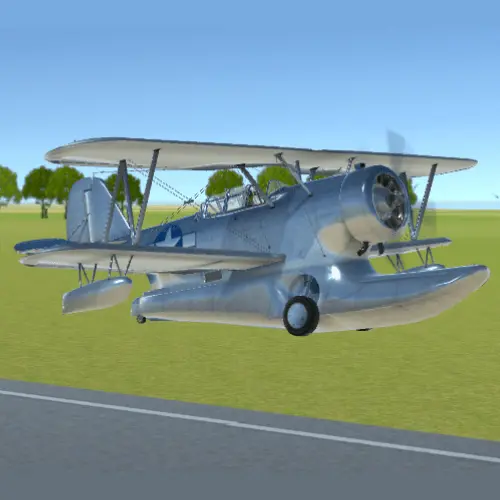
Fly the Plane
Fly the Plane is an airplane-themed title in the Action Games category on BunaGames. It is built for players looking for a quick flight-game experience in a browser…
 Works on Desktop & Mobile
Tested By BunaGames
- Test date
- July 31, 2026
- Tested on
- Chrome 150
- Device
- Desktop
- Operating system
- macOS and Windows
- Game loaded successfully
- Yes
- Fullscreen works
- Yes
- Sound works
- Yes
- Save progress
- Local browser storage
- Mobile compatibility
- Partially tested
- Keyboard controls
- Working
- Controller support
- Not detected
- Average loading time
- 4.2 seconds
- Known issues
- Minor delay after entering fullscreen
Fly the Plane not loading?
- Refresh the page.
- Disable restrictive content blockers temporarily.
- Confirm JavaScript and WebGL are enabled.
- Clear the browser cache.
- Try another modern browser.
- Close unnecessary tabs.
- Switch off VPN if the game server is blocked.
- Use the Report a Problem button if the issue continues.
Continue Playing
Daily Challenge

Play 7 minutes today in Fly the Plane.
Leaderboard
- 1Community rating4.8 ★
- 2Player likes937
- 3Total votes999
- 4Your local progress0%
Your progress is saved locally in this browser. No account required.
 Your progress is saved locally in this browser. No account required.
Game Progress & Challenges
Why Play This Game?
 Instant PlayPlay instantly in your browser.
 Mobile FriendlyOptimized for all devices.
 Free to PlayNo hidden fees.
About "Fly the Plane"
Fly the Plane is an airplane-themed title in the Action Games category on BunaGames. It is built for players looking for a quick flight-game experience in a browser setting, with the plane as the central on-screen entity and movement as the core idea behind the game.
Airplane games cover a wide spectrum. Some focus on detailed simulation, aircraft handling, wind, ground effects, combat, missions, or airport management. Fly the Plane should instead be approached through the information available on its game page: an action-game listing designed for direct play rather than a promise of a full aviation simulator. That distinction matters when choosing the right expectations before starting.
Use the game screen as the authority for its current goal, available inputs, scoring rules, restart flow, and any level-specific instructions. This page helps players recognize the game’s airplane-action context, prepare for a focused session, and make better decisions once the active playfield appears.
Whether you are trying an airplane game for a short break or browsing for a new action challenge, the useful first step is simple: open the game, identify what advances play, and learn how the plane responds before committing to a fast run.
Gameplay
Fly the Plane belongs to the broad airplane-game space, where the main visual and thematic focus is flight. The supplied game information supports its Action Games classification, but it does not establish a specific simulation model, aircraft type, mission structure, combat system, airport-management mode, or progression format. For that reason, the live game screen should determine the exact rules of a session.
A practical way to read the gameplay is to separate three things as soon as play begins: the player-controlled plane, the immediate objective, and the condition that ends or advances a run. Look for the starting position of the aircraft, any visible indicators, the direction of travel, and objects that appear relevant to success. These details reveal more than an assumed genre label can.
In airplane action games, attention is usually split between steering the aircraft, judging space around it, and reacting to the changing playfield. Do not assume that every airplane game uses the same loop. A game may emphasize precision movement, timing, navigation, survival, collecting, or a score target; the current interface is the reliable place to confirm which one applies here.
The strongest first-session approach is observation rather than speed. Make a controlled opening attempt, see how the game communicates feedback, and note what happens after a mistake or completed action. Once the rule loop is clear, repeat the parts that produce useful progress instead of relying on random movement.
Platform
Fly the Plane is presented on BunaGames as an online action game for browser play. That makes it suitable for players who want to open a game page and begin from a web browser without treating it as a claim about a separate desktop, console, mobile-app, or downloadable release.
Browser games can behave differently depending on the device, browser window, and available screen space. Before starting, allow the game area to load fully and check whether the page displays an instruction panel, start control, sound option, or input prompt. The on-page interface is the best source for the currently supported interaction method.
For a clearer view of the playfield, avoid crowding the browser window with extra tabs or overlays. On smaller screens, rotate or resize only if the game itself indicates that doing so improves access. If the game is not responding, refresh the page and wait for the playable area to finish loading before trying again.
Players who enjoy short web sessions can also explore more browser games on BunaGames after finishing a run.
How to Play "Fly the Plane"
- Open the game and wait for the play area. Let the Fly the Plane game screen load before entering inputs. Look for a visible start prompt, instruction overlay, or introductory message.
- Identify the plane. Confirm which aircraft or airplane graphic represents the player. This is the object whose movement, position, and feedback matter most during active play.
- Read the goal shown by the interface. Check for a score, timer, target, route, finish marker, life indicator, or other instruction. Do not assume the objective from the title alone; use the live game display.
- Test the available input gently. Follow any control guidance shown in the game. Start with short, deliberate actions so you can learn how quickly the plane changes direction or responds.
- Watch the result of each action. Notice whether movement affects speed, altitude, direction, position, score, or another on-screen value. This feedback defines the game’s actual control loop.
- Prioritize clear space and timing. If the playfield includes moving elements, boundaries, targets, or hazards, focus on reading their placement before making a large correction.
- Use each attempt as information. If a run ends, identify the last event before the reset. A single observed cause is more useful than repeatedly restarting without changing your approach.
- Repeat with a plan. Once you know the objective and response pattern, use steadier inputs and set a small target for the next attempt, such as lasting longer, reaching a marker, or improving a visible score.
This method is useful because it works without claiming mechanics that are not confirmed by the available game research. The screen itself supplies the current rules; your job is to turn those rules into a repeatable flight routine.
Controls
The available research does not confirm a fixed keyboard, mouse, touch, tilt, or gamepad control scheme for Fly the Plane. Rather than presenting unverified inputs as fact, check the game’s own opening screen for its current control instructions.
When testing controls, use a short input first and observe the plane’s response. This helps you learn whether an action causes continuous movement, a brief adjustment, a change in direction, or another effect. Avoid holding an input for too long until you understand how quickly the game reacts.
| Check | Why it helps |
|---|---|
| Start prompt | Shows active input |
| Instruction overlay | Confirms controls |
| First response | Reveals sensitivity |
| Restart screen | Explains retry flow |
If the game window does not react, click or tap inside the active game area only when prompted, then review the displayed instructions again. Browser focus can affect input recognition, especially after switching tabs.
Can "Fly the Plane" Unblocked?
Fly the Plane is available as an online game page on BunaGames, so the intended way to access it is through a supported web browser. “Unblocked” commonly describes players looking for browser games that can be opened without installing a separate application, but access can still depend on the network, browser settings, device policy, and the availability of the game page.
Do not use workarounds to bypass school, workplace, library, or network restrictions. Those policies are set by the organization operating the connection or device. If a page is unavailable where you are playing, use an approved connection or try again later from a permitted environment.
For normal access, load the page directly, allow the game area time to initialize, and make sure your browser is not blocking the content required for the game to display. A refresh can help when a temporary loading issue occurs. If you are on a managed device, follow its usage rules.
The most reliable experience is to play responsibly on a browser and network where online games are allowed.
Tips for "Fly the Plane"
Start by learning, not chasing a result. The first run should answer basic questions: What is the plane’s goal? What changes when you use an input? Which visual cue signals progress, danger, or completion? This reduces wasted attempts and prevents assumptions borrowed from unrelated flight games.
Use small corrections. In airplane-themed action play, large or repeated inputs can make it harder to understand the plane’s response. Test one adjustment at a time, then allow the screen to show its effect. Controlled input is especially valuable when the playfield contains narrow paths, moving elements, or time-sensitive decisions.
Read the center and edges of the playfield. Keep track of the plane’s position while also scanning ahead for relevant objects. If the interface uses borders, lanes, targets, indicators, or a changing background, treat them as information rather than decoration. The best route is usually the one that gives you time to react.
Watch for repeatable patterns. If an element appears at regular intervals or a sequence repeats after restarting, use that consistency. A pattern is an opportunity to plan an action early rather than responding at the final moment.
Separate speed from precision. A fast response is not automatically a good response. Wait until you understand the effect of an input, then act decisively. This habit improves control in games where a plane’s movement feels continuous or where the consequences of a mistake are immediate.
Review every reset. After a failed attempt, name one specific reason for it: late input, early turn, missed instruction, poor spacing, or an unclear objective. Change only that one thing on the next run. Focused adjustment produces better improvement than changing your entire approach after every restart.
Follow the live instructions over generic advice. The game screen is more authoritative than broad airplane-game conventions. If Fly the Plane displays a rule that differs from what you expected, use the displayed rule and adapt your strategy accordingly.
Features "Fly the Plane"
Fly the Plane’s strongest confirmed identity is its airplane-themed action-game setting. The game is listed in the Action Games category and is presented for online browser play on BunaGames. That combination is useful for players seeking a direct game-page experience built around a flight-related central entity rather than a detailed claim about real-world aviation simulation.
The broader airplane-game category includes several familiar directions, including realistic flight simulation, aerial combat, and airport management. Those are useful search concepts, but they should not be treated as guaranteed Fly the Plane features unless the active game interface shows them. This page deliberately separates category context from confirmed game mechanics so players receive more reliable guidance.
- Plane-centered presentation: the title and game context make the airplane the primary entity.
- Action category placement: suitable for players browsing action-focused online games.
- Browser access: play is presented through the BunaGames game page.
- On-screen rule discovery: the live interface can communicate the current objective, controls, feedback, and restart process.
- Short-session fit: browser game pages are practical for trying a run, learning the loop, and returning when you want another attempt.
The key player benefit is clarity. Instead of promising unverified aircraft systems, missions, weapons, weather behavior, or management tools, the page encourages you to confirm the actual play loop where it matters: inside the game. That makes it easier to decide whether the game matches your preferred kind of airplane action.
Best "Fly the Plane" Similar Games & Top Picks
- Agent Smith: Play Agent Smith, a free top-down action shooter with marked targets, mission maps, exploration, and covert-operation action.
- Mortal Kombat: Learn about Mortal Kombat, its fighting-game roots, play approach, controls guidance, strategy tips, and browser access questions.
- Fatal Fury: Play Fatal Fury online and discover the classic SNK fighting game series known for intense battles, iconic fighters, and arcade roots.
- Awesome Tanks 3: Play Awesome Tanks 3 online, a top-down tank shooter with enemy armor, hidden areas, customizable tanks, and action-packed levels.
- Jetpack Joyride: Play Jetpack Joyride online and guide Barry Steakfries through a high-tech lab full of coins, obstacles, jetpacks, and wild vehicles.
FAQ - Fly the Plane
What is Fly the Plane?
Fly the Plane is an airplane-themed online title listed in the Action Games category on BunaGames. Its confirmed page context is browser-based action play with a plane as the central game entity. The available research does not verify a specific aircraft model, story, mission system, or simulation engine.
Can I play Fly the Plane online?
Yes. Fly the Plane is presented as an online game on BunaGames. Open the game page in a supported web browser and allow the playable area to load. The page and game interface provide the current start and play instructions.
Is Fly the Plane a realistic flight simulator?
There is no supported basis for describing Fly the Plane as a realistic flight simulator. Airplane games can include highly detailed simulation features such as aircraft handling, wind effects, and ground effects, but those features are not confirmed for this specific game. Treat it as an action-game listing unless the game screen explicitly states otherwise.
What are the controls for Fly the Plane?
The provided research does not confirm exact controls. Check the opening prompt or instruction overlay in the live game for the current input method. Test inputs gradually so you can see how the plane responds before attempting faster actions.
What is the objective in Fly the Plane?
The exact objective is not established by the available source material. When the game loads, look for a score display, timer, target, route indicator, finish point, or instruction text. Those on-screen elements are the reliable guide to what counts as progress in the current version.
Does Fly the Plane include combat or airport management?
Neither combat nor airport management is confirmed for Fly the Plane. Both are common concepts in the wider airplane-game category, alongside simulation-focused gameplay, but they should not be assigned to this game without clear confirmation from its own interface.
Can I play Fly the Plane for free?
The game is presented on BunaGames as an online browser game page. Availability and access can depend on your browser, network, and local device policies. Check the page directly for the current play option and follow any displayed prompts.
Why is the game not responding in my browser?
First, wait for the game area to finish loading and review any visible instructions. If needed, refresh the page, make sure the browser window is active, and try the indicated input inside the game area. Network restrictions, browser settings, or managed-device policies can also affect whether online game content loads correctly.
More Games Like This
 Super Smash Flash
Action ★ 4.5
Super Smash Flash
Action ★ 4.5
 Street Fighter 2
Action ★ 4.7
Street Fighter 2
Action ★ 4.7
 Alien Hominid
Action ★ 4.6
Alien Hominid
Action ★ 4.6
 King Of Fighters
Action ★ 4.8
King Of Fighters
Action ★ 4.8
 Bloons Td 6
Action ★ 4.6
Bloons Td 6
Action ★ 4.6
 Brutalmania IO
Action ★ 4.7
Brutalmania IO
Action ★ 4.7
 Temple Run 3
Action ★ 4.7
Temple Run 3
Action ★ 4.7
 Plants Vs Zombies 2
Action ★ 4.6
Plants Vs Zombies 2
Action ★ 4.6
 Plants Vs Zombies 3
Action ★ 4.6
Plants Vs Zombies 3
Action ★ 4.6
 Papas Sushiria
Action ★ 4.6
Papas Sushiria
Action ★ 4.6
 Papas Wingeria
Action ★ 4.6
Papas Wingeria
Action ★ 4.6
 Papas Scooperia
Action ★ 4.7
Papas Scooperia
Action ★ 4.7
 Papas Pizzeria
Action ★ 4.6
Papas Pizzeria
Action ★ 4.6
 Papas Freezeria
Action ★ 4.6
Papas Freezeria
Action ★ 4.6
 Papas Taco Mia
Action ★ 4.6
Papas Taco Mia
Action ★ 4.6
 Papas Cupcakeria
Action ★ 4.6
Papas Cupcakeria
Action ★ 4.6
 Counter Strike Online
Action ★ 4.4
Counter Strike Online
Action ★ 4.4
 Red Ball 3
Action ★ 4.7
Red Ball 3
Action ★ 4.7
 Report a Problem
Comments About Fly the Plane