



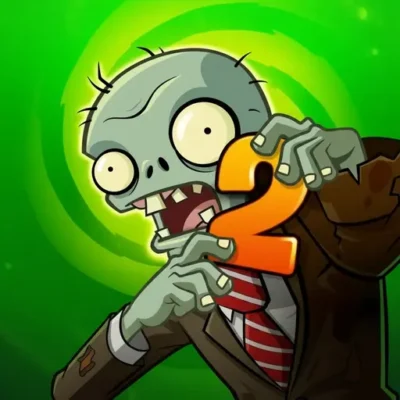
Plants Vs Zombies 2
Plants Vs Zombies 2 is an action-strategy adventure centered on the playful conflict between plants and legions of zombies. Its core appeal comes from mixing approachable arcade action…
 Works on Desktop & Mobile
Tested By BunaGames
- Test date
- August 19, 2026
- Tested on
- Chrome 150
- Device
- Desktop
- Operating system
- macOS and Windows
- Game loaded successfully
- Yes
- Fullscreen works
- Yes
- Sound works
- Yes
- Save progress
- Local browser storage
- Mobile compatibility
- Partially tested
- Keyboard controls
- Working
- Controller support
- Not detected
- Average loading time
- 4.2 seconds
- Known issues
- Minor delay after entering fullscreen
Plants Vs Zombies 2 not loading?
- Refresh the page.
- Disable restrictive content blockers temporarily.
- Confirm JavaScript and WebGL are enabled.
- Clear the browser cache.
- Try another modern browser.
- Close unnecessary tabs.
- Switch off VPN if the game server is blocked.
- Use the Report a Problem button if the issue continues.
Continue Playing

Daily Challenge

Play 5 minutes today in Plants Vs Zombies 2.
Leaderboard
- 1Community rating4.6 ★
- 2Player likes828
- 3Total votes916
- 4Your local progress0%
Your progress is saved locally in this browser. No account required.
 Your progress is saved locally in this browser. No account required.
Game Progress & Challenges
Why Play This Game?
 Instant PlayPlay instantly in your browser.
 Mobile FriendlyOptimized for all devices.
 Free to PlayNo hidden fees.
About "Plants Vs Zombies 2"
Plants Vs Zombies 2 is an action-strategy adventure centered on the playful conflict between plants and legions of zombies. Its core appeal comes from mixing approachable arcade action with tactical decision-making: players must react to incoming threats, consider their available options, and work toward defeating waves of undead opponents.
The game is known for taking its zombie battles across a broad time-traveling premise, from the dawn of time through the end of days. That setting gives the adventure a larger scope than a single battlefield and supports the series' colorful, humorous take on zombie survival. Rather than presenting horror, the experience emphasizes exaggerated characters, comic conflict, and strategy-focused challenges.
This page is designed for players looking to start an online version without treating the game like a long installation project. It is a useful choice when you want a familiar action-strategy game, a quick browser session, or a chance to revisit the Plants Vs Zombies universe on a computer or mobile-compatible device.
Expect the central idea to stay simple: plants and zombies are opposing forces, and successful play depends on making sensible decisions while pressure builds. That easy-to-understand setup makes the game welcoming for newcomers while still leaving room for players who enjoy planning ahead.
Gameplay
Plants Vs Zombies 2 is commonly described as an action-strategy adventure, and that combination explains its lasting appeal. The action comes from facing active zombie opposition, while the strategy comes from choosing how to respond instead of relying only on speed. A strong run is not just about reacting at the last moment; it is about recognizing the situation early and using the resources or options available in the current challenge effectively.
The primary conflict is clear and highly readable: plants are used against zombies. This makes the game easy to scan even when a stage becomes busy. Players can focus on the incoming zombie threat, assess the space in front of them, and make decisions that support a stable defense. The time-spanning adventure theme also adds variety to the broader journey, with zombie encounters framed across different eras rather than in one fixed setting.
For new players, the best mindset is to treat each encounter as a small tactical puzzle. Observe what is happening before committing too quickly. If a tactic is working, keep it consistent rather than changing plans without a reason. If pressure rises, identify the immediate danger first instead of trying to solve every possible future problem at once.
- Action focus: respond to zombie pressure as it develops.
- Strategy focus: make deliberate choices instead of random inputs.
- Theme: face zombies from different points in time.
- Player goal: defeat the zombie opposition and continue the adventure.
The result is a game that can fit both short sessions and more focused play. Its readable plant-versus-zombie premise helps players understand the objective quickly, while the strategy layer rewards calm observation and better decision-making.
Platform
Plants Vs Zombies 2 is widely associated with mobile distribution, including official listings for Android through Google Play and for Apple devices through the App Store. The game is also presented online by browser-game publishers as a no-download option for mobile devices or computers.
For BunaGames visitors, the important distinction is that a browser play page and an official app listing are different ways to access the same game name. Browser availability can be convenient when you want to play from a computer without going through an app-store installation flow. Device compatibility, saved progress, purchase options, and exact interface behavior may differ between a browser version and a mobile app.
Before starting, allow the game area to finish loading and keep your browser updated. If you are playing on a phone or tablet, a stable connection and enough free screen space can make menus and game interactions easier to read. You can also explore more browser games when you want quick-access entertainment without leaving the site.
How to Play "Plants Vs Zombies 2"
Start by opening the game and giving the first screen enough time to load. Plants Vs Zombies 2 is built around a direct objective: use the plant side of the conflict to overcome the zombie side. Pay attention to any on-screen instructions at the beginning, because the playable version may introduce its own sequence, interface prompts, or tutorial guidance.
Approach the game as a series of controlled decisions. First, identify what the current screen asks you to do. Next, watch the zombie threat rather than clicking or tapping rapidly without a plan. Then choose the available plant-related option or action that best supports your response. As the encounter develops, continue checking whether your current approach is protecting you effectively.
- Open the game and wait for the play area to become responsive.
- Read the initial directions and note the current objective.
- Watch where zombie pressure is appearing or increasing.
- Select and use the available plant options deliberately.
- Prioritize the most urgent threat before making extra changes.
- Continue until the current zombie challenge is cleared or the game presents the next step.
New players often improve faster by slowing down at the start of a challenge. A few seconds spent reading the board or interface can prevent wasteful choices later. Try to understand the purpose of each available option before depending on it in a difficult moment. When a plan fails, do not assume every decision was wrong; identify the specific moment where the zombie pressure became too strong and adjust that part of your approach on the next attempt.
The best way to learn is through repeatable habits: observe, choose, check the result, and adapt. This keeps Plants Vs Zombies 2 accessible as an arcade-style game while preserving the thoughtful strategy that defines the experience.
Controls
Controls can depend on the version and device used to open Plants Vs Zombies 2. Browser game pages generally rely on the input method available to the player, so follow the prompts displayed inside the game before beginning a serious attempt.
| Device | Typical input |
|---|---|
| Computer | Mouse or trackpad |
| Mobile device | Touch screen |
On a computer, use the pointer to select visible game options and interact with the play area when the interface requests it. On a touch-enabled phone or tablet, tap the on-screen option or area indicated by the game. If a tutorial appears, complete it before judging the controls; it may explain the order in which selections need to be made.
If an input does not register, wait briefly for the page to finish loading, then try a single deliberate click or tap. Avoid repeated rapid inputs while a transition, menu, or instruction panel is still active. Clear, patient interaction is especially helpful in an action-strategy game where each choice can matter.
Can "Plants Vs Zombies 2" Unblocked?
This Plants Vs Zombies 2 page is intended for players seeking browser access without a separate download process. That can be useful at home or anywhere you are allowed to use browser-based entertainment on your own device. Open the game page, wait for it to load, and use the available on-screen play option.
“Unblocked” does not mean bypassing a school, workplace, library, network, parental-control, or device restriction. Always follow the rules of the network and the person or organization responsible for the device. If a game page is unavailable because of a local filter, use it later on an approved personal connection rather than attempting to work around the restriction.
For the smoothest permitted session, use a current browser, keep a reliable internet connection, and close unnecessary tabs if your device is struggling. A browser version is particularly convenient for players who want a quick game session on a computer or mobile device without installing an app. Availability and performance can still vary by browser, region, device, and connection.
Tips for "Plants Vs Zombies 2"
Good Plants Vs Zombies 2 play starts with attention, not speed. Because the game combines action and strategy, the strongest general habit is to understand the immediate zombie problem before choosing a response. Look at the active challenge, determine where the pressure is greatest, and avoid making several unrelated decisions at once.
- Read before reacting: use opening moments to understand the current objective and visible threats.
- Handle urgent pressure first: a nearby or immediate zombie danger deserves attention before optional changes.
- Use one clear plan: do not switch approaches constantly unless the current plan is failing.
- Learn from each attempt: notice the point where your defense or response stopped being effective.
- Follow in-game guidance: tutorials and prompts are the best source for version-specific actions.
- Stay deliberate: rapid clicking or tapping can make it harder to understand what worked.
Players sometimes make strategy games harder by treating every available choice as something that must be used immediately. Instead, consider whether an action answers a real need on the screen. If the current plant-related option improves your position against the zombie threat, it may be useful. If it does not address the immediate situation, waiting for a clearer opportunity can be the smarter move.
It also helps to separate learning sessions from serious attempts. During an early run, focus on discovering what the interface shows you and how the game responds. Once you recognize the basic rhythm, aim for consistency: observe the zombies, choose a useful answer, then reassess. This approach fits the game's action-strategy identity better than relying on luck.
Finally, do not let a difficult challenge rush you into poor decisions. The Plants Vs Zombies theme is lighthearted, but the strategic layer rewards patience. A calm player who notices the most important threat usually has a better chance than a player who tries to solve everything at once.
Features "Plants Vs Zombies 2"
Plants Vs Zombies 2 stands out through a recognizable mix of comic zombie action, plant-based opposition, and accessible strategic play. The game is framed as an adventure rather than a single isolated challenge, and its time-traveling premise expands the setting from the dawn of time to the end of days.
- Action-strategy format: combines active zombie encounters with thoughtful player decisions.
- Plants versus zombies theme: a clear central conflict that is easy to understand quickly.
- Time-spanning adventure: presents zombie battles across a broad range of eras.
- Colorful tone: focuses on humorous, exaggerated zombie encounters rather than serious horror.
- Mobile and browser relevance: the game name appears in official mobile-store listings and browser-play listings.
- Optional purchase notice: official mobile information notes optional in-game purchases involving virtual currency and virtual items, including random selections of virtual items.
That final point matters for players comparing ways to access the game. Optional purchases are mentioned in official mobile-store information, but they should not be assumed to work the same way in every version of the game. A browser play page, a mobile app, and another authorized distribution format may not present identical menus, account systems, progression, or purchase choices.
The most durable feature is the balance between immediate clarity and repeatable strategy. You immediately understand that plants must contend with zombies, but each challenge can encourage a more careful response. That makes the game suitable for players who enjoy arcade pacing without wanting a purely reflex-driven experience.
Its broad appeal also comes from the way the premise communicates the goal without lengthy explanation. The visual identity, zombie opposition, and adventure framing make it easy to enter a session, while the strategic decisions give players a reason to improve over time.
Best "Plants Vs Zombies 2" Similar Games & Top Picks
- I’m Not a Robot: Prove your humanity in I'm Not a Robot, a free browser puzzle game by Neal Agarwal. Solve CAPTCHA challenges, unlock levels, and test your…
- Temple Run 3: Run through dangerous temple paths in Temple Run 3. Dodge traps, collect coins, make fast turns, and chase a higher score.
- Brutalmania IO: Play Brutalmania IO, a fast online gladiator arena game about fighting opponents, earning gold, evolving, and chasing glory.
- King Of Fighters: Play King Of Fighters online and enjoy classic 2D versus fighting action inspired by SNK's legendary tournament series.
- Super Smash Flash: Play Super Smash Flash online. Choose from 28 characters, battle opponents, explore Classic Mode, and learn smart fighting-game tactics.
FAQ - Plants Vs Zombies 2
What is Plants Vs Zombies 2?
Plants Vs Zombies 2 is an action-strategy adventure in the Plants Vs Zombies series. It centers on using the plant side of the conflict against legions of zombies. The game is known for a humorous tone and a time-spanning adventure premise that moves from the dawn of time to the end of days.
Can I play Plants Vs Zombies 2 in a browser?
Browser-game listings present Plants Vs Zombies 2 as a no-download game for computer or mobile play. On this page, open the playable area and wait for it to load. Exact availability, loading behavior, saved progress, and interface details can vary by device and version.
Is Plants Vs Zombies 2 an action game or a strategy game?
It is both. The game is described as an action-strategy adventure. Zombies create active pressure that players need to address, while the plant-versus-zombie setup asks players to make purposeful decisions rather than relying only on fast reactions. This blend is why careful observation is useful during play.
What is the main goal in Plants Vs Zombies 2?
The central goal is to defeat the zombie opposition by using the available plant-related options and following the objective shown in the game. Each playable challenge may present instructions or guidance through its own interface, so read the opening prompts before making major decisions.
What controls does the online version use?
Controls depend on the device. A computer browser commonly uses a mouse or trackpad, while a phone or tablet commonly uses touch input. Follow the instructions shown in the game itself, especially if it displays a tutorial or asks you to select a particular option before play begins.
Does Plants Vs Zombies 2 require a download?
Browser listings describe a no-download way to play on mobile or computer. Official versions are also associated with Android and Apple mobile app stores, which use their own installation process. The access method depends on the version you choose, so browser play and app play should not be treated as identical.
Are there in-game purchases in Plants Vs Zombies 2?
Official mobile-store information states that the game includes optional in-game purchases of virtual currency that can be used to acquire virtual in-game items, including a random selection of virtual items. Purchase systems may differ across versions, so check the information displayed in the version you are using before making any transaction.
How can I improve at Plants Vs Zombies 2?
Start by reading the current objective and watching the zombie threat before reacting. Prioritize the most urgent problem, make deliberate use of the available plant options, and review what happened after each attempt. Instead of clicking or tapping repeatedly, use a simple loop: observe the situation, choose a response, check the result, and adapt your next decision.
More Games Like This
 Super Smash Flash
Action ★ 4.5
Super Smash Flash
Action ★ 4.5
 Street Fighter 2
Action ★ 4.7
Street Fighter 2
Action ★ 4.7
 Alien Hominid
Action ★ 4.6
Alien Hominid
Action ★ 4.6
 King Of Fighters
Action ★ 4.8
King Of Fighters
Action ★ 4.8
 Bloons Td 6
Action ★ 4.6
Bloons Td 6
Action ★ 4.6
 Brutalmania IO
Action ★ 4.7
Brutalmania IO
Action ★ 4.7
 Temple Run 3
Action ★ 4.7
Temple Run 3
Action ★ 4.7
 Plants Vs Zombies 3
Action ★ 4.6
Plants Vs Zombies 3
Action ★ 4.6
 Counter Strike Online
Action ★ 4.4
Counter Strike Online
Action ★ 4.4
 Red Ball 3
Action ★ 4.7
Red Ball 3
Action ★ 4.7
 Kpop Demon Hunters
Action ★ 4.7
Kpop Demon Hunters
Action ★ 4.7
 Dynamons World
Action ★ 4.7
Dynamons World
Action ★ 4.7
 Stick Run
Action ★ 4.6
Stick Run
Action ★ 4.6
 Stickman War
Action ★ 4.6
Stickman War
Action ★ 4.6
 Paint Hide & Seek
Action ★ 4.6
Paint Hide & Seek
Action ★ 4.6
 Fly the Plane
Action ★ 4.8
Fly the Plane
Action ★ 4.8
 Agent Smith
Action ★ 4.4
Agent Smith
Action ★ 4.4
 Mortal Kombat
Action ★ 4.6
Mortal Kombat
Action ★ 4.6
 Report a Problem
Comments About Plants Vs Zombies 2