



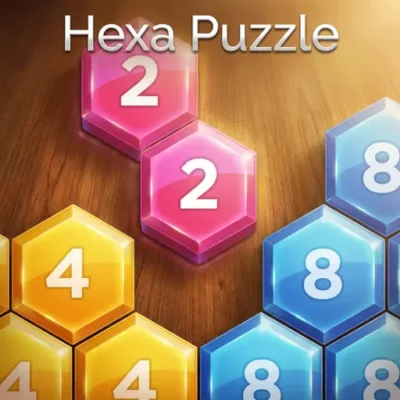
Hexa Puzzle
Hexa Puzzle is a visual arrangement game built around observation, memory, and careful swapping. Instead of relying on quick reactions, the challenge is to look at the puzzle…
 Works on Desktop & Mobile
Tested By BunaGames
- Test date
- August 24, 2026
- Tested on
- Chrome 150
- Device
- Desktop
- Operating system
- macOS and Windows
- Game loaded successfully
- Yes
- Fullscreen works
- Yes
- Sound works
- Yes
- Save progress
- Local browser storage
- Mobile compatibility
- Partially tested
- Keyboard controls
- Working
- Controller support
- Not detected
- Average loading time
- 4.2 seconds
- Known issues
- Minor delay after entering fullscreen
Hexa Puzzle not loading?
- Refresh the page.
- Disable restrictive content blockers temporarily.
- Confirm JavaScript and WebGL are enabled.
- Clear the browser cache.
- Try another modern browser.
- Close unnecessary tabs.
- Switch off VPN if the game server is blocked.
- Use the Report a Problem button if the issue continues.
Continue Playing
Daily Challenge

Play 5 minutes today in Hexa Puzzle.
Leaderboard
- 1Community rating4.7 ★
- 2Player likes1.0K
- 3Total votes1.1K
- 4Your local progress0%
Your progress is saved locally in this browser. No account required.
 Your progress is saved locally in this browser. No account required.
Game Progress & Challenges
Why Play This Game?
 Instant PlayPlay instantly in your browser.
 Mobile FriendlyOptimized for all devices.
 Free to PlayNo hidden fees.
About "Hexa Puzzle"
Hexa Puzzle is a visual arrangement game built around observation, memory, and careful swapping. Instead of relying on quick reactions, the challenge is to look at the puzzle you are meant to create, compare it with the pieces currently on the board, and move each piece into a more useful position.
The central mechanic is simple: drag one piece onto another to swap their places. The deeper challenge comes from deciding which swap improves the layout without disrupting progress elsewhere. A piece may appear close to its destination while still blocking another important move, so every exchange benefits from a quick check of the overall picture.
Use the question mark icon when you need to view the intended puzzle. That reference gives each attempt a clear goal and turns the game into a satisfying exercise in pattern recognition. Players who enjoy orderly visual problems, picture-based challenges, and relaxed browser puzzles can take their time, test a plan, and steadily bring the board closer to the target arrangement.
Because the action is based on clicking, tapping, and dragging, the game is approachable from the first move while still rewarding concentration. It is a focused puzzle experience: identify what is misplaced, choose a productive swap, and repeat until the completed image matches the reference.
Gameplay
Each round of Hexa Puzzle begins with a board whose pieces are not yet arranged in the correct order. Your job is to reconstruct the intended layout by exchanging the positions of two pieces at a time. The reference image is available through the question mark icon, so the solution is not hidden; success depends on how accurately you read the visual relationships between pieces.
A productive turn has three parts. First, inspect the target layout and identify a recognizable feature, such as a color area, edge, line, or distinctive visual detail. Next, find where that feature currently sits on the board. Finally, swap it with the piece occupying the place where it belongs. After every move, reassess the board rather than automatically continuing with the first plan you made.
This creates a puzzle loop that is easy to understand but more thoughtful than random dragging. A swap can place one piece correctly while moving another out of place. That trade-off makes board awareness important. When two pieces clearly belong in each other’s locations, exchanging them is usually efficient. When the relationship is less certain, checking the target again can prevent unnecessary moves.
The game is especially suited to players who like visual matching without time-pressure-heavy action. It asks for spatial comparison, attention to detail, and short-term memory: remember a section of the target, locate the corresponding pieces, and restore that section step by step. Progress becomes easier to see as correct regions begin to form and the remaining misplaced pieces stand out.
Rather than treating every piece as an isolated object, read the board as connected areas. Completing one recognizable region gives you reliable landmarks for solving the surrounding spaces. This method turns a potentially confusing mixed layout into a sequence of smaller, manageable arrangement problems.
Platform
Hexa Puzzle is available to play in a web browser on BunaGames. Open the game page, let the puzzle load, and begin interacting with the board directly. The browser format is well suited to a swap-based puzzle because the main actions are visual and immediate: view the reference, select a piece, and drag it onto another piece.
The game supports the interaction styles described by its puzzle design: click and drag with a mouse on desktop or laptop devices, and tap and drag on touch-enabled devices. A larger screen can make it easier to compare small visual details across the board, while a phone or tablet offers a convenient way to work through a puzzle with touch input.
For the clearest experience, use a current browser and allow the game area to remain fully visible. Avoid zooming so far in that you cannot compare distant parts of the layout at a glance. Since the target image is an essential solving tool, being able to comfortably view both the reference and board supports more deliberate swaps.
You can explore more online games on BunaGames when you want another browser-based challenge.
How to Play "Hexa Puzzle"
Start by looking over the unsolved board without making an immediate move. The fastest-looking swap is not always the most useful one. Before you drag anything, open the question mark icon to see the puzzle you are trying to make. Focus on one distinctive area of that reference rather than trying to memorize every piece at once.
- View the target layout. Use the question mark icon to inspect the completed puzzle and choose a recognizable visual area to work on.
- Locate the matching piece. Find the piece on the current board that contains the color, edge, pattern, or detail you noticed in the target.
- Check its destination. Identify the position where that piece belongs in the completed arrangement.
- Find the occupying piece. Look at the piece currently sitting in that destination position.
- Drag to swap. Drag one piece onto the other to exchange their places.
- Re-evaluate the board. Confirm whether the moved piece now fits its neighbors and decide on the next most certain correction.
Work from obvious matches toward ambiguous ones. Pieces on a visual boundary or pieces containing an unusual color combination are often easier to place than pieces from a uniform-looking area. Once a section is correct, treat it as a fixed landmark and avoid swapping it again unless you discover that your comparison was mistaken.
If the board begins to feel confusing, pause instead of making random exchanges. Reopen the target view and compare only a small region. This reduces the mental load: solve one portion, then use its correct placement to orient yourself for the next portion. The aim is not simply to move pieces often; it is to make every swap increase the similarity between the current board and the target.
Controls
The controls are intentionally direct. Hexa Puzzle uses pointer-based swapping, so there are no complex key combinations to learn. The same basic interaction works whether you play with a mouse or a touchscreen.
| Action | Control |
|---|---|
| View target | Click or tap ? |
| Select a piece | Click or touch |
| Swap pieces | Drag onto another |
On a computer, place the cursor over the piece you want to move, hold the mouse button, and drag it onto the piece you want to exchange it with. On a touch device, press a piece with your finger and drag it to the second piece. The pieces swap positions when the drag is completed.
For better accuracy, make deliberate drags and release only when the destination piece is clearly selected. If you are unsure where a piece belongs, use the question mark reference before moving it. The control scheme is simple enough for casual play, but careful input helps keep your solving plan organized.
Can "Hexa Puzzle" Unblocked?
Hexa Puzzle can be played from its BunaGames page in a compatible web browser, making it a convenient option when you want a visual puzzle without installing a separate application. Visit the game page, wait for the board to load, and use the on-screen controls to inspect the target and swap pieces.
Availability can still depend on the browser, device settings, and the network you are using. If a game does not load as expected, refresh the page, check your internet connection, and make sure the browser is allowed to run the game content. A current browser and a stable connection generally provide the most reliable experience.
School, workplace, library, and public networks sometimes apply their own access rules. Those rules are controlled by the network administrator rather than by the game itself. Use Hexa Puzzle where browser gaming is permitted and follow the policies for the device or connection you are using.
The game’s short, self-contained puzzle format also makes it useful for a quick break. You can inspect the board, make a few thoughtful swaps, and return to the target image whenever you need to reset your visual plan.
Tips for "Hexa Puzzle"
The most effective Hexa Puzzle strategy is to prioritize certainty. Do not begin by scanning every possible swap. Instead, use the target image to find one piece whose correct location is obvious. Place that piece, then build outward from the newly correct area. This creates visual anchors that make later decisions easier.
- Study before dragging. Spend a moment comparing the target and current board. A short observation phase can save several corrective swaps.
- Use distinctive details first. Look for unusual colors, sharp edges, prominent lines, or details that appear only once. These are easier to match than broad, similar-looking regions.
- Check both sides of a swap. Before moving a piece, consider where the displaced piece will land. A good exchange improves two positions, not only one.
- Build stable regions. When neighboring pieces clearly match the target, leave that area alone and solve around it.
- Compare small sections. If the full image feels difficult to hold in memory, focus on a corner, edge, or compact visual cluster at a time.
- Reopen the reference often. The question mark icon is a solving aid, not a last resort. Use it whenever a detail is uncertain.
A useful mental method is destination-first solving. Pick an empty-looking role in the target layout, identify which piece should occupy that role, and then locate it on the board. This is often clearer than choosing a random piece and trying to guess where it belongs.
Also watch for nearly completed areas. When most of a region looks correct, the final misplaced piece is often easier to identify by comparing its neighbors with the reference. Conversely, avoid repeatedly changing a region that already seems right. Unnecessary swaps can remove useful landmarks and make the remaining puzzle harder to read.
Patience matters more than speed. The board gives you all the information needed to solve it through the target view and piece positions. Treat every drag as a decision supported by visual evidence, and the puzzle becomes a sequence of clear corrections rather than trial and error.
Features "Hexa Puzzle"
Hexa Puzzle focuses on a clean visual puzzle format with a clear objective: recreate the displayed target arrangement by swapping misplaced pieces. Its design emphasizes observation and spatial reasoning rather than fast action, making it accessible for players who prefer to think through each move.
- Target-image guidance: The question mark icon lets you view the puzzle layout you are working toward.
- Swap-based interaction: Drag one piece onto another to exchange their positions on the board.
- Visual pattern solving: Compare colors, edges, lines, and details to determine where each piece belongs.
- Mouse and touch support: The click, tap, and drag controls suit both desktop-style and touch-enabled play.
- Easy-to-learn objective: The basic rule is immediately understandable, even for players new to visual arrangement games.
- Thoughtful replay value: The satisfaction comes from noticing relationships, planning better swaps, and watching the intended image take shape.
The strongest feature is the balance between transparency and challenge. You are shown the desired outcome, so you never have to guess what the finished puzzle should look like. However, the board still requires close comparison because the correct solution depends on the positions of all the individual pieces. Knowing the destination is different from seeing the most efficient route to it.
This makes the game useful as a low-pressure concentration activity. It rewards visual attention without asking players to learn a complicated ruleset. Each successful swap provides immediate feedback: the board either resembles the target more closely or reveals another relationship that needs correction.
The browser-based format keeps the experience focused on the puzzle itself. Load the page, inspect the reference, and begin organizing the board. Whether you solve carefully from one recognizable area or scan for direct exchanges, the game supports a methodical style of play centered on visual logic.
Best "Hexa Puzzle" Similar Games & Top Picks
- Candy Riddles: Play Candy Riddles, a free browser match-3 puzzle with colorful candies, cute cookies, and satisfying three-or-more matches.
- Color Sort: Play Color Sort online for free. Pour and organize mixed colored liquids into matching test tubes in this focused puzzle game.
- Screw Puzzle: Play Screw Puzzle online. Remove bolts, use open holes wisely, and solve satisfying logic challenges in your browser.
- 1010 Deluxe: Play 1010 Deluxe free in your browser. Drag colorful block shapes onto the 10x10 grid and clear complete rows and columns.
- 4 Pics 1 Word: Play 4 Pics 1 Word online for free on BunaGames. Enjoy visual word puzzles and vocabulary clues directly in your browser with quick access…
FAQ - Hexa Puzzle
What is Hexa Puzzle?
Hexa Puzzle is a visual arrangement game in which you recreate a target puzzle layout. The board starts with pieces in the wrong positions, and you solve the puzzle by dragging pieces onto one another to swap them. The challenge is to compare the current board with the intended image and decide which exchange will improve the arrangement.
How do I see the puzzle I need to make?
Use the question mark icon to view the target puzzle. This reference shows the layout you are trying to recreate. Check it before making a move and return to it whenever you are uncertain about a color, edge, line, or piece position. It is especially helpful when several pieces look similar.
How do I move pieces in Hexa Puzzle?
Move a piece by dragging it onto another piece. The two pieces swap positions. On desktop, click and hold a piece with the mouse, then drag it to the piece you want to exchange it with. On a touchscreen, tap and drag using your finger.
Is Hexa Puzzle a matching or stacking game?
Hexa Puzzle is centered on arranging and swapping pieces to match a visual target. The key task is not stacking pieces or clearing color matches. Instead, study where each piece belongs in the completed image and use swaps to place it in the correct position.
What is the best way to solve the puzzle?
Start with the most recognizable details in the target image. Find a piece with a distinctive color combination, line, or boundary, identify its correct destination, and swap it into place. Then use that completed area as a landmark. Working from clear matches to less obvious ones is more reliable than making random swaps.
Can I play Hexa Puzzle on a phone or tablet?
Yes. The game’s described controls include tapping and dragging, which suit touch-enabled devices. On a phone or tablet, touch the piece you want to move and drag it onto the piece you want to swap with. A larger screen may make close visual comparisons more comfortable, but the core interaction remains the same.
Is Hexa Puzzle free to play in a browser?
Hexa Puzzle is available on BunaGames as a browser game. You can open the game page and play using the on-screen puzzle controls without needing to describe the puzzle through keyboard commands. Access may depend on your device, browser, connection, and any rules applied by the network you use.
Why should I use the question mark icon repeatedly?
The target image is the most important source of puzzle information. Rechecking it prevents you from relying only on memory, especially when the board contains similar-looking pieces. Frequent comparison helps you make intentional swaps, preserve areas that are already correct, and spot the remaining misplaced pieces more efficiently.
More Games Like This
 4 Pics 1 Word
Puzzle ★ 4.5
4 Pics 1 Word
Puzzle ★ 4.5
 Jewel Quest
Puzzle ★ 4.7
Jewel Quest
Puzzle ★ 4.7
 Woodoku
Puzzle ★ 4.6
Woodoku
Puzzle ★ 4.6
 1010 Block Puzzle Game
Puzzle ★ 4.7
1010 Block Puzzle Game
Puzzle ★ 4.7
 1010 Deluxe
Puzzle ★ 4.6
1010 Deluxe
Puzzle ★ 4.6
 Screw Puzzle
Puzzle ★ 4.7
Screw Puzzle
Puzzle ★ 4.7
 Color Sort
Puzzle ★ 4.6
Color Sort
Puzzle ★ 4.6
 Candy Riddles
Puzzle ★ 4.6
Candy Riddles
Puzzle ★ 4.6
 Hex Frvr
Puzzle ★ 4.5
Hex Frvr
Puzzle ★ 4.5
 Water Sort
Puzzle ★ 4.6
Water Sort
Puzzle ★ 4.6
 Brain Test Tricky Puzzles
Puzzle ★ 4.8
Brain Test Tricky Puzzles
Puzzle ★ 4.8
 Ball Sort
Puzzle ★ 4.5
Ball Sort
Puzzle ★ 4.5
 Bolts And Nuts
Puzzle ★ 4.6
Bolts And Nuts
Puzzle ★ 4.6
 Wheres My Water
Puzzle ★ 4.7
Wheres My Water
Puzzle ★ 4.7
 Hexagon
Puzzle ★ 4.6
Hexagon
Puzzle ★ 4.6
 Cut The Rope 2
Puzzle ★ 4.4
Cut The Rope 2
Puzzle ★ 4.4
 Fnaf 2
Puzzle ★ 4.5
Fnaf 2
Puzzle ★ 4.5
 Mahjong
Puzzle ★ 4.7
Mahjong
Puzzle ★ 4.7
 Report a Problem
Comments About Hexa Puzzle