



Unblock Me
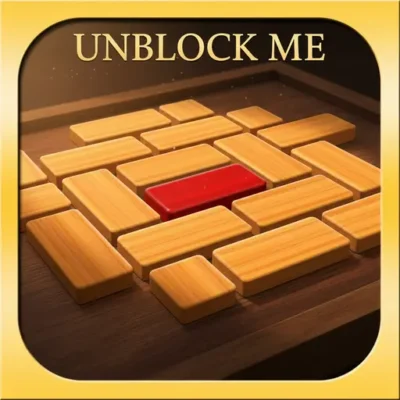
Unblock Me is a classic sliding-block puzzle built around one direct objective: move the red block out of the board. The route is blocked by a tight arrangement…
 Works on Desktop & Mobile
Tested By BunaGames
- Test date
- July 11, 2026
- Tested on
- Chrome 150
- Device
- Desktop
- Operating system
- macOS and Windows
- Game loaded successfully
- Yes
- Fullscreen works
- Yes
- Sound works
- Yes
- Save progress
- Local browser storage
- Mobile compatibility
- Partially tested
- Keyboard controls
- Working
- Controller support
- Not detected
- Average loading time
- 4.2 seconds
- Known issues
- Minor delay after entering fullscreen
Unblock Me not loading?
- Refresh the page.
- Disable restrictive content blockers temporarily.
- Confirm JavaScript and WebGL are enabled.
- Clear the browser cache.
- Try another modern browser.
- Close unnecessary tabs.
- Switch off VPN if the game server is blocked.
- Use the Report a Problem button if the issue continues.
Continue Playing
Daily Challenge

Play 4 minutes today in Unblock Me.
Leaderboard
- 1Community rating4.7 ★
- 2Player likes875
- 3Total votes948
- 4Your local progress0%
Your progress is saved locally in this browser. No account required.
 Your progress is saved locally in this browser. No account required.
Game Progress & Challenges
Why Play This Game?
 Instant PlayPlay instantly in your browser.
 Mobile FriendlyOptimized for all devices.
 Free to PlayNo hidden fees.
About "Unblock Me"
Unblock Me is a classic sliding-block puzzle built around one direct objective: move the red block out of the board. The route is blocked by a tight arrangement of wooden pieces, so every move matters. Rather than removing blocks, you slide them into open spaces and gradually create a clear path to the exit.
The appeal comes from the contrast between a simple rule and a demanding layout. At first, the solution may look obvious: move the nearest obstacle and send the red block toward the opening. A few moves later, that plan can reveal another blocked lane, a piece with nowhere useful to go, or a position that needs to be reversed. Success depends on seeing how several moves connect, not just on finding one empty space.
This puzzle is a good fit for players who enjoy calm, focused challenges with clear goals. Each board asks you to read the arrangement, test a route, and refine your plan until the exit is open. Whether you solve a level quickly or work through a stubborn traffic jam, the result is easy to understand: the red block is free.
Gameplay
In Unblock Me, the board functions like a compact wooden traffic puzzle. The red block is the priority piece, while the surrounding blocks create the obstruction. Your task is to slide the other pieces away from the red block's route until it can leave through the board's exit.
Gameplay rewards spatial planning. An open space is not automatically helpful; it has value only when it lets an important block move into a better position. Some moves clear a route immediately, while others are setup moves that create room for a later shift. This gives each puzzle a chain-of-actions structure: move one blocker, uncover a lane, relocate another blocker, then reassess the red block's path.
A useful way to read a board is to begin at the exit and work backward. Identify the pieces directly between the red block and freedom. Then look for what prevents those pieces from moving. This turns a crowded layout into a smaller sequence of problems instead of a collection of random blocks.
The core challenge is efficiency as well as completion. A solution can free the red block after many exploratory slides, but a cleaner solution usually avoids undoing moves and preserves useful empty spaces. That makes Unblock Me satisfying for quick puzzle sessions: every attempt teaches you more about the board, even if the first route does not work.
Platform
Unblock Me is available here as a browser puzzle experience, so you can start working on the board from the game page without treating it like a long, complicated setup. Its clear visual goal also suits short sessions: inspect the layout, make a plan, and try to release the red block.
The game concept is easy to understand on a desktop or laptop screen because the pieces, board lanes, and exit route are visible at once. It also suits touch-friendly play where supported, since the main interaction is moving puzzle pieces across the board rather than managing many commands.
For players looking for more quick-play options, BunaGames also offers a wider collection of browser games. Unblock Me stands out in that format because the objective remains consistent from board to board while the block arrangement changes the reasoning required.
Before making a move, take a moment to inspect the red block, the exit direction, and the nearest bottlenecks. That brief overview is often more useful than immediately sliding the first available piece.
How to Play "Unblock Me"
Start by locating the red block and the opening it must reach. The winning condition is not to clear the entire board or move every wooden piece; it is to create an unobstructed route that allows the red block to leave.
- Read the exit lane. Look at the space between the red block and the board edge. Note every piece that currently blocks that route.
- Find the first movable blocker. Choose a block that can be shifted into an available space without closing off an important lane.
- Create working room. Use open areas carefully. Moving a piece aside may be useful only because it gives another piece the room it needs.
- Recheck the route. After each meaningful move, look again at the red block. A new opening may have appeared, or a different block may now be the main obstacle.
- Slide the red block out. Once its path to the exit is clear, move the red block through the opening to finish the puzzle.
Do not assume that the block closest to the red piece must move first. In many layouts, a farther block controls the empty space needed to move the closer one. If a plan stops working, pause and restore a useful open lane rather than making more random slides. The strongest solutions usually come from recognizing dependencies between blockers.
Controls
Unblock Me uses straightforward sliding-puzzle interaction. Select a wooden block, then move it along its available track into open space. The goal is to reposition the blocking pieces, not to click them away or rotate them.
| Action | Control |
|---|---|
| Move a block | Click or touch, then drag |
| Inspect the board | Pause before sliding |
| Finish a level | Clear the red block's route |
On a mouse-based device, use a deliberate click-and-drag motion so you can see where a block can fit before releasing it. On touch-capable devices, drag the selected piece with a finger. If a block will not move in the direction you expect, check whether another piece is occupying the required space.
Because this is a precision-and-planning game, slow intentional movement is usually better than fast input. Study the board first, then make the move that supports the next part of your route.
Can "Unblock Me" Unblocked?
Unblock Me is presented on BunaGames as a browser-play puzzle, giving players a direct way to enjoy a sliding-block challenge online. The game does not depend on a story, complicated character system, or a large list of commands. Its focus is the board in front of you: identify the traffic jam, move the wooden pieces, and free the red block.
That accessible format makes it suitable when you want a short logic break, a calm puzzle between other activities, or a board worth revisiting to seek a cleaner solution. The rules remain easy to follow, but the layouts can still demand patience and careful route planning.
If the board seems difficult, treat the puzzle as a sequence of smaller tasks. First make space. Then move the block that controls the main lane. Finally, check whether the red block can reach the exit. This approach keeps the objective visible and avoids getting distracted by moves that do not improve the route.
Tips for "Unblock Me"
Strong Unblock Me play is less about moving constantly and more about protecting useful space. Use these ideas when a board feels crowded:
- Trace the red block's route first. Begin with the exit lane. The pieces that occupy or control that lane deserve your attention before distant blocks.
- Work backward from the obstacle. If a blocker cannot move, ask which piece prevents it from shifting. Continue that chain until you find a move that creates space.
- Value empty spaces. An open area is a resource. Avoid filling it with a piece unless that move enables the next step of your plan.
- Do not chase every possible move. A legal slide is not necessarily a productive slide. Prefer moves that open the red block's path or improve access to a key blocker.
- Watch for temporary parking moves. Some blocks need to move aside only briefly. Plan where they can return or how their new position affects the next lane.
- Reassess after a breakthrough. When one important piece moves, the whole board can change. Look for a newly open route before continuing an older plan.
- Reduce backtracking. If you repeatedly move the same piece back and forth, pause. The puzzle may require a different setup order.
A practical routine is to make one move, scan the exit lane, and decide whether the position is better than before. This keeps your attention on progress rather than on the number of pieces moved. Over time, you will notice recurring patterns: a direct blocker, a supporting blocker, and one open space that determines whether the plan can work.
Features "Unblock Me"
Unblock Me concentrates its challenge into a clean sliding-block format. The familiar wooden puzzle-board presentation keeps the important information visible: the red target block, the surrounding pieces, the open spaces, and the exit that defines the solution.
- Clear central objective: free the red block by moving the pieces that obstruct its route.
- Sliding-block logic: progress comes from rearranging the board rather than removing obstacles.
- Spatial problem solving: each layout asks you to judge routes, open spaces, and the order of useful moves.
- Easy-to-learn interaction: move pieces directly across the board with simple drag-based input.
- Short-session friendly: the game is suited to quick attempts while still rewarding careful thought.
- Replay value through efficiency: after finding a solution, players can revisit the board mentally and look for a less wasteful route.
The most important feature is the relationship between simplicity and depth. The game does not need many separate systems to create a meaningful challenge. A fixed objective and a crowded board are enough to produce decisions about timing, position, and sequence.
It also provides useful feedback through the board itself. When a route remains blocked, you can see exactly where the problem is. When a move creates space, the benefit is immediately visible. That visual clarity makes the puzzle approachable for new players while giving experienced problem solvers room to improve their planning.
Best "Unblock Me" Similar Games & Top Picks
- Brian Test 4: Sneaky Friends: Play Brian Test 4: Sneaky Friends online and solve cartoon riddles with careful taps, lateral thinking, and smart puzzle strategies.
- Brain Test 3: Tricky Puzzles: Play Brain Test 3: Tricky Puzzles online. Solve reverse-logic riddles, collect useful items, and follow a story through tricky quests.
- Brain Test 2: Tricky Puzzles: Play Brain Test 2: Tricky Puzzles online free. Read quirky riddles, study hand-drawn scenes, and solve clever brain teasers.
- Idle Dice: Play Idle Dice online and roll for earnings. Learn the gameplay, controls, dice-combo strategy, browser access, and save options.
- Pac-Man 256: Play Pac-Man 256 online and outrun the Glitch in an endless maze. Collect dots, use power-ups, avoid ghosts, and chase a 256 combo.
FAQ - Unblock Me
What is the goal of Unblock Me?
The goal is to move the red block out of the board through its exit. To do that, you slide the surrounding wooden blocks into available spaces until the red block has a clear route.
How do I win a level?
You win when the red block can travel through the opening at the edge of the board. You do not need to move every block or clear the entire board; only the red block's exit path needs to be open.
Is Unblock Me a puzzle game?
Yes. Unblock Me is a sliding-block puzzle game focused on spatial reasoning. The challenge is understanding which blocks must move, where they can go, and in what order the moves should happen.
How do I move blocks in Unblock Me?
Select a block and drag it into open space along its available path. On a computer this is typically done with a mouse or trackpad, while touch-capable devices use a finger drag. Blocks cannot pass through occupied spaces.
Why can’t I move the red block to the exit?
One or more blocks are still blocking its lane. Look directly between the red block and the exit, then identify what stops the nearest blocker from moving. Often you must move another piece first to create enough working room.
What is the best strategy for difficult boards?
Start at the exit and work backward. Focus on the pieces that control the red block's route, preserve useful empty spaces, and avoid making moves simply because they are available. After each key slide, check whether the exit lane has improved.
Can I play Unblock Me online?
Yes. This BunaGames page provides Unblock Me as an online browser puzzle. Open the game, inspect the layout, and begin sliding the blocks to free the red piece.
Is there more than one way to solve a puzzle?
A board may allow different move sequences that eventually clear the red block. Some routes can involve extra setup or backtracking, while others may be more direct. Once you solve a board, try reviewing the path to see whether a cleaner sequence is possible.
More Games Like This
 4 Pics 1 Word
Puzzle ★ 4.5
4 Pics 1 Word
Puzzle ★ 4.5
 Jewel Quest
Puzzle ★ 4.7
Jewel Quest
Puzzle ★ 4.7
 Woodoku
Puzzle ★ 4.6
Woodoku
Puzzle ★ 4.6
 1010 Block Puzzle Game
Puzzle ★ 4.7
1010 Block Puzzle Game
Puzzle ★ 4.7
 Hexa Puzzle
Puzzle ★ 4.7
Hexa Puzzle
Puzzle ★ 4.7
 1010 Deluxe
Puzzle ★ 4.6
1010 Deluxe
Puzzle ★ 4.6
 Screw Puzzle
Puzzle ★ 4.7
Screw Puzzle
Puzzle ★ 4.7
 Color Sort
Puzzle ★ 4.6
Color Sort
Puzzle ★ 4.6
 Candy Riddles
Puzzle ★ 4.6
Candy Riddles
Puzzle ★ 4.6
 Hex Frvr
Puzzle ★ 4.5
Hex Frvr
Puzzle ★ 4.5
 Water Sort
Puzzle ★ 4.6
Water Sort
Puzzle ★ 4.6
 Brain Test Tricky Puzzles
Puzzle ★ 4.8
Brain Test Tricky Puzzles
Puzzle ★ 4.8
 Ball Sort
Puzzle ★ 4.5
Ball Sort
Puzzle ★ 4.5
 Bolts And Nuts
Puzzle ★ 4.6
Bolts And Nuts
Puzzle ★ 4.6
 Wheres My Water
Puzzle ★ 4.7
Wheres My Water
Puzzle ★ 4.7
 Hexagon
Puzzle ★ 4.6
Hexagon
Puzzle ★ 4.6
 Cut The Rope 2
Puzzle ★ 4.4
Cut The Rope 2
Puzzle ★ 4.4
 Papas Sushiria
Puzzle ★ 4.6
Papas Sushiria
Puzzle ★ 4.6
 Report a Problem
Comments About Unblock Me