



Animal Craft
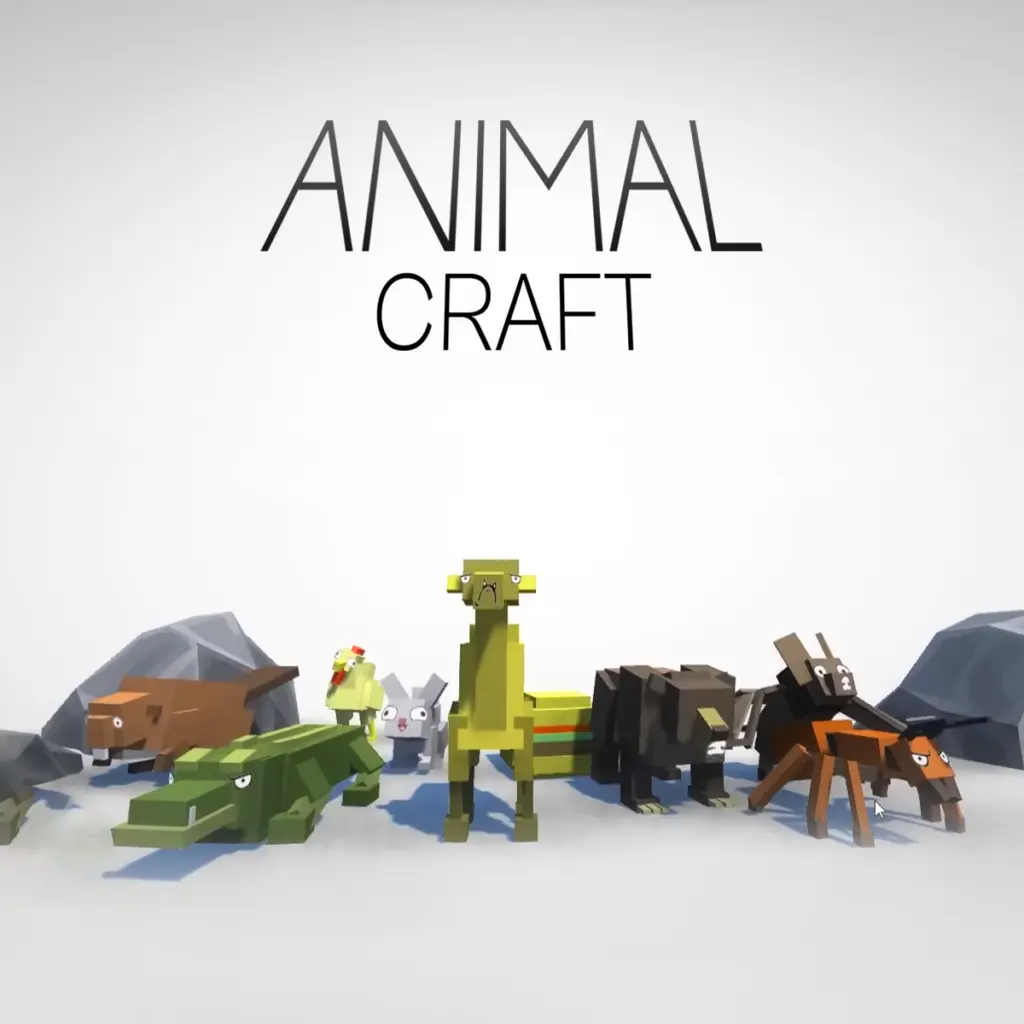
Animal Craft is an animal-fusion adventure game built around a simple but imaginative idea: combine different creatures and see what kind of hybrid you can make. Instead of…
 Works on Desktop & Mobile
Tested By BunaGames
- Test date
- June 21, 2026
- Tested on
- Chrome 150
- Device
- Desktop
- Operating system
- macOS and Windows
- Game loaded successfully
- Yes
- Fullscreen works
- Yes
- Sound works
- Yes
- Save progress
- Local browser storage
- Mobile compatibility
- Partially tested
- Keyboard controls
- Working
- Controller support
- Not detected
- Average loading time
- 4.2 seconds
- Known issues
- Minor delay after entering fullscreen
Animal Craft not loading?
- Refresh the page.
- Disable restrictive content blockers temporarily.
- Confirm JavaScript and WebGL are enabled.
- Clear the browser cache.
- Try another modern browser.
- Close unnecessary tabs.
- Switch off VPN if the game server is blocked.
- Use the Report a Problem button if the issue continues.
Continue Playing
Daily Challenge

Play 7 minutes today in Animal Craft.
Leaderboard
- 1Community rating4.4 ★
- 2Player likes303
- 3Total votes359
- 4Your local progress0%
Your progress is saved locally in this browser. No account required.
 Your progress is saved locally in this browser. No account required.
Game Progress & Challenges
Why Play This Game?
 Instant PlayPlay instantly in your browser.
 Mobile FriendlyOptimized for all devices.
 Free to PlayNo hidden fees.
About "Animal Craft"
Animal Craft is an animal-fusion adventure game built around a simple but imaginative idea: combine different creatures and see what kind of hybrid you can make. Instead of choosing from a fixed cast alone, players experiment with animal combinations to create strange, cute, powerful, or dinosaur-sized results. The focus is on discovery, creative choices, and finding combinations that suit the next part of the journey.
The game is described as a sandbox-style crafting experience with exploration and gentle battle elements. That makes it a good fit for players who enjoy testing possibilities rather than following one rigid solution. A small animal can become part of a much more unusual creation, while familiar options such as dogs, cats, deer, pandas, and dinosaurs help establish the wide range of creature ideas available.
Animal Craft balances casual experimentation with survival-style progress. You can spend time trying new fusions, then take your creations into an arena or exploration setting where their usefulness matters. The strongest approach is not just making the strangest hybrid; it is learning which combinations feel effective for the situation in front of you.
For players looking for creative browser games, Animal Craft offers a compact loop of combining, exploring, improving, and trying again with a new creature concept.
Gameplay
Animal Craft gameplay begins with animal fusion. Players combine creatures to make hybrids, turning recognizable animal types into unexpected new forms. Each fusion is part of the game’s creative sandbox appeal: choose a starting idea, test the result, and continue experimenting when a design does not match your goal.
Creation is connected to exploration and light combat rather than existing as a purely cosmetic system. The game’s creature-making loop encourages players to prepare a hybrid, enter the active play area, and see how that choice performs during a journey or battle. This gives each new combination a purpose. A player may prefer a cute-looking result, while another may concentrate on building a larger or more imposing creature.
The available game descriptions also point to survival and arena-style activity. These elements make experimentation more meaningful because a hybrid can be evaluated through play, not only through its appearance. When an attempt feels less useful, the practical answer is to return to the fusion process and try another pairing.
- Combine animal types into original hybrids.
- Explore creative creature possibilities instead of relying on one preset character.
- Use creations in journey, arena, survival, or battle-oriented moments.
- Experiment with familiar animals and larger dinosaur-inspired possibilities.
- Use upgrades to support faster block stacking where available.
The key gameplay value is iteration. Animal Craft rewards players who treat each fusion as an experiment: make a creature, test it in the active game space, notice what you want to change, and create a different hybrid for the next attempt.
Platform
Animal Craft is available to play on this BunaGames page as a browser-based adventure game. Open the game page in a current web browser, wait for the game area to load, and begin from the displayed start screen. This format is useful when you want to play without searching for a separate download or installing a dedicated game client.
Because browser performance can vary by device, a stable internet connection and an up-to-date browser can help the game load more reliably. If the game window does not respond immediately, allow the page a moment to finish loading before refreshing. Closing unused tabs may also help on devices with limited available memory.
Animal Craft has also appeared in mobile-store listings, but those listings should not be treated as instructions for this browser version. The practical way to play here is through the game embedded on this page. Use the on-screen interface and prompts shown by the current build, since interface details can differ between versions.
Players browsing for more quick-play options can also explore BunaGames online games after finishing a fusion experiment.
How to Play "Animal Craft"
Start Animal Craft by entering the game and looking for the available animal-creation choices. The central objective is to combine animals into a hybrid, then use that creation as part of the game’s exploration and battle-oriented activity. There is no need to rush the first decision: the main appeal comes from seeing what each pairing can produce.
- Begin the game from the play screen and follow the visible opening prompt.
- Choose the available animals or creature options presented by the game.
- Fuse the selections to create a hybrid animal.
- Observe the result and decide whether it fits the kind of creature you want to use.
- Take the hybrid into the available journey, arena, exploration, or battle activity.
- Repeat the process with different combinations to discover more unusual creations.
Think of every fusion as both a creative choice and a gameplay test. A combination may be interesting because it mixes familiar animal identities, because it creates a larger-looking creature, or because it seems better suited to the current activity. The game descriptions emphasize that more than 100 animal types can be created, so variety is an important part of the experience.
Upgrades are another reason to keep progressing. Available descriptions specifically mention upgrades that can make block stacking faster. When the game presents an upgrade opportunity, consider whether it supports the task you are currently repeating rather than choosing only by appearance. Faster stacking can reduce downtime and keep the creation-and-action loop moving.
If you are unsure what to do next, return to the core loop: combine animals, test the hybrid in play, and adjust the next creation based on what you learned. This approach makes Animal Craft approachable for newcomers while leaving room for players who want to pursue more inventive results.
Controls
Animal Craft is played through the controls and interaction prompts shown in the current browser game build. The supplied game information confirms the fusion, exploration, battle, and upgrade concepts, but it does not provide a verified keyboard or touchscreen control map. For accuracy, use the input instructions displayed inside the game rather than relying on an assumed set of keys.
Before beginning an active journey or arena attempt, take a few seconds to identify the visible action prompts. In a creature-fusion game, the most important early interactions are usually the options used to select animals, confirm a combination, and continue into the next activity. During play, watch for prompts related to movement, actions, upgrades, or progressing to another stage.
- Follow the start prompt shown in the game window.
- Select animal options through the current interface.
- Confirm fusion choices before testing a hybrid.
- Check on-screen prompts whenever a new activity begins.
- Use the game’s displayed upgrade controls when they appear.
Checking the live instructions is especially helpful on different devices, where the available input method may not look exactly the same.
Can "Animal Craft" Unblocked?
Animal Craft can be played from its BunaGames browser page when access to the site and game content is available on your network. Load the page in a supported browser and use the game window directly; no third-party game portal is needed to begin playing here.
“Unblocked” can mean different things depending on where you are playing. At home, it usually means opening the game normally in a browser. On a school, library, workplace, or managed public network, access may be controlled by local rules, filters, or administrator settings. Those restrictions are set by the network owner, not by the game itself.
If Animal Craft does not load, try practical troubleshooting first: refresh the page after it has fully opened, check your connection, disable only browser extensions that you trust and that may interfere with game content, or try an updated browser. Avoid attempts to bypass network restrictions. The appropriate option on a managed network is to follow its acceptable-use policy or ask the administrator whether browser games are permitted.
When the page loads correctly, you can focus on the game’s animal fusion, hybrid experimentation, exploration, and gentle battle loop without installing separate software.
Tips for "Animal Craft"
The best Animal Craft strategy is to experiment with a purpose. Since the game centers on fusing animals into hybrids, avoid treating your first result as the final answer. Try a combination, take it into the available activity, and use the outcome to guide the next creature you make. A change in one animal choice can lead to a substantially different-looking hybrid and may better match your own play goal.
- Start with recognizable animals. Dogs, cats, deer, and pandas provide clear starting points for understanding the fusion theme before you pursue more unusual concepts.
- Try large-scale ideas. Dinosaur-related creations are specifically part of the game’s animal range, making them a natural option when you want a more dramatic hybrid.
- Test instead of guessing. Exploration, arena, and battle activity give you a chance to see a creation in action. Make another fusion if the previous one does not feel right.
- Separate appearance from utility. A creature can be visually amusing and still be worth replacing when you want a hybrid better suited to the next challenge.
- Use upgrades deliberately. The available descriptions mention upgrades that improve block-stacking speed. Prioritize them when faster stacking supports your current progress.
- Learn the interface before rushing. Read the game’s own prompts so that you know how to move from fusion choices into active play.
A useful mental routine is create, test, refine. Create a hybrid from two available animal ideas. Test it during the next exploration or battle-oriented sequence. Refine your approach by selecting a new pairing or using an upgrade when the game gives you that option. This keeps progress active and avoids repeating the same experiment without learning from it.
Players who enjoy sandbox games may also want to set their own mini-goals: make the cutest result, pursue the most bizarre-looking fusion, or see how many different creature concepts they can discover. These goals add replay value without requiring unsupported assumptions about hidden systems or fixed best combinations.
Features "Animal Craft"
Animal Craft stands out through a creature-creation concept that connects imagination with active gameplay. Rather than simply collecting standard animals, players fuse them into hybrids and use those creations across exploration, journey, arena, survival, or light-battle contexts described for the game. The result is a casual experience with room for repeated experimentation.
- Animal fusion system: Combine different animals to create unusual hybrid creatures.
- Broad creature variety: Game descriptions state that players can create more than 100 kinds of animals.
- Familiar animal inspiration: Available examples include dogs, cats, deer, pandas, and dinosaurs.
- Creative sandbox feel: Make creature choices based on your own ideas rather than a single required design.
- Exploration and journeys: Take hybrids beyond the creation step and into active game spaces.
- Gentle battle elements: The game is presented as including light monster-battle or arena-oriented action.
- Survival-style context: Creature choices can matter while progressing through the game’s described survival activity.
- Upgrade support: Certain upgrades can help players stack blocks faster.
- Browser access: Play Animal Craft directly from the BunaGames game page.
The strongest feature is the connection between creativity and replayability. More than 100 possible animal kinds means the game’s concept is larger than one novelty fusion. Players can return with a different starting animal, try a more ambitious dinosaur-inspired idea, or build a hybrid that better suits the current activity.
Another useful distinction is that Animal Craft is not described only as a crafting game or only as a battle game. Its identity comes from the overlap: create an animal hybrid, then put that invention into a setting with exploration and combat-related stakes. That combination gives each new creature a reason to exist beyond its visual design.
Best "Animal Craft" Similar Games & Top Picks
- Stickman Parkour: Play Stickman Parkour online and master 30 side-scrolling levels filled with spikes, water, ropeways, keys, chests, and platforms.
- Undertale Yellow: Play Undertale Yellow online. Learn about Clover’s Underground prequel journey, browser access, controls, and helpful beginner tips.
- Hotline Miami: Learn about Hotline Miami’s 1989 Miami setting, brutal gunplay, close combat, browser access notes, controls guidance, and practical tips.
- Hidden Object: Clues and Mysteries: Play Hidden Object: Clues and Mysteries online. Search illustrated scenes, solve riddles, and uncover secrets in this cozy puzzle adventure.
- Sprunki Adventure 3: Explore colorful block worlds in Sprunki Adventure 3, find 15 hidden keys, meet NPCs, complete fetch quests, and unlock the treasure chest.
FAQ - Animal Craft
What is Animal Craft?
Animal Craft is a sandbox-style animal fusion adventure game. Players combine different animals to create hybrids, then use those creations in exploration, journey, arena, survival, or gentle battle-oriented gameplay. Its main appeal is experimenting with creature ideas instead of relying only on a fixed roster.
Can I play Animal Craft online?
Yes. Animal Craft is available through its BunaGames page as a browser game. Open the game page, allow the game area to load, and follow the start prompt shown in the current game build.
Is Animal Craft free to play on BunaGames?
Animal Craft is presented on BunaGames as a browser game that you can start from this page. You do not need to install a separate client to access the browser version here. Availability can still depend on your browser, connection, and any network rules that apply where you are playing.
What animals can you create in Animal Craft?
Available descriptions say the game can create more than 100 kinds of animals. Examples specifically mentioned include dogs, cats, deer, pandas, and dinosaurs. The central mechanic is combining animals to produce creative and unusual hybrid results.
Does Animal Craft include battles?
Yes, game descriptions mention arena, battle, and survival-style elements alongside animal fusion and exploration. The combat is described as gentle or light rather than as the game’s only focus. Creating and testing hybrids remains a major part of the experience.
How do I make a hybrid animal?
Begin from the game’s creation interface, choose the available animal options, and confirm the fusion through the on-screen prompts. Once the hybrid is made, use it in the game’s active exploration or battle-related activity. If you want a different result, repeat the process with another combination.
What are upgrades used for in Animal Craft?
The supplied game information mentions upgrades that can allow faster block stacking. When an upgrade is offered, use the visible in-game description to understand its current effect and decide whether it helps your progress. Upgrades are useful when they reduce repeated task time and keep the game moving.
What controls does Animal Craft use?
The research information does not provide a verified universal control list. Use the controls and prompts displayed in the browser game itself, especially when selecting animals, confirming fusions, entering an activity, or using an upgrade. Checking the live interface is the most reliable approach because control presentation can vary by device or version.
More Games Like This
 Short Ride
Adventure ★ 4.6
Short Ride
Adventure ★ 4.6
 Papas Sushiria
Adventure ★ 4.6
Papas Sushiria
Adventure ★ 4.6
 Papas Wingeria
Adventure ★ 4.6
Papas Wingeria
Adventure ★ 4.6
 Papas Scooperia
Adventure ★ 4.7
Papas Scooperia
Adventure ★ 4.7
 Papas Pizzeria
Adventure ★ 4.6
Papas Pizzeria
Adventure ★ 4.6
 Papas Freezeria
Adventure ★ 4.6
Papas Freezeria
Adventure ★ 4.6
 Papas Taco Mia
Adventure ★ 4.6
Papas Taco Mia
Adventure ★ 4.6
 Papas Cupcakeria
Adventure ★ 4.6
Papas Cupcakeria
Adventure ★ 4.6
 Duck Life 3
Adventure ★ 4.6
Duck Life 3
Adventure ★ 4.6
 Jacksmith
Adventure ★ 4.5
Jacksmith
Adventure ★ 4.5
 Duck Life 4
Adventure ★ 4.6
Duck Life 4
Adventure ★ 4.6
 Under The Red Sky
Adventure ★ 4.5
Under The Red Sky
Adventure ★ 4.5
 Pokémon Infinite Fusion
Adventure ★ 4.4
Pokémon Infinite Fusion
Adventure ★ 4.4
 Sailor Piece
Adventure ★ 4.7
Sailor Piece
Adventure ★ 4.7
 Hello Neighbor
Adventure ★ 4.7
Hello Neighbor
Adventure ★ 4.7
 sprunki phase 8
Adventure ★ 4.7
sprunki phase 8
Adventure ★ 4.7
 Fly the Plane
Adventure ★ 4.8
Fly the Plane
Adventure ★ 4.8
 Melon Playground
Adventure ★ 4.7
Melon Playground
Adventure ★ 4.7
 Report a Problem
Comments About Animal Craft