



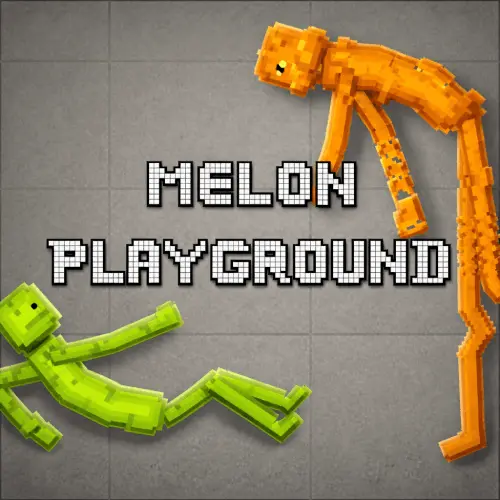
Melon Playground
Melon Playground is a creative physics sandbox built around open-ended experiments rather than a fixed campaign. The central idea is simple: place ragdoll characters and objects into a…
 Works on Desktop & Mobile
Tested By BunaGames
- Test date
- July 30, 2026
- Tested on
- Chrome 150
- Device
- Desktop
- Operating system
- macOS and Windows
- Game loaded successfully
- Yes
- Fullscreen works
- Yes
- Sound works
- Yes
- Save progress
- Local browser storage
- Mobile compatibility
- Partially tested
- Keyboard controls
- Working
- Controller support
- Not detected
- Average loading time
- 4.2 seconds
- Known issues
- Minor delay after entering fullscreen
Melon Playground not loading?
- Refresh the page.
- Disable restrictive content blockers temporarily.
- Confirm JavaScript and WebGL are enabled.
- Clear the browser cache.
- Try another modern browser.
- Close unnecessary tabs.
- Switch off VPN if the game server is blocked.
- Use the Report a Problem button if the issue continues.
Continue Playing
Daily Challenge

Play 4 minutes today in Melon Playground.
Leaderboard
- 1Community rating4.7 ★
- 2Player likes1.1K
- 3Total votes1.2K
- 4Your local progress0%
Your progress is saved locally in this browser. No account required.
 Your progress is saved locally in this browser. No account required.
Game Progress & Challenges
Why Play This Game?
 Instant PlayPlay instantly in your browser.
 Mobile FriendlyOptimized for all devices.
 Free to PlayNo hidden fees.
About "Melon Playground"
Melon Playground is a creative physics sandbox built around open-ended experiments rather than a fixed campaign. The central idea is simple: place ragdoll characters and objects into a scene, then test what happens when tools, weapons, vehicles, and physics interact. Every setup can become a small experiment, an action sequence, or an unusual machine of your own design.
Its appeal comes from player choice. There is no single required solution to chase when you enter the playground. You can begin with one character and one object, build toward a larger scenario, or reset and try a completely different approach. Ragdoll physics makes each interaction feel reactive, so position, timing, and the arrangement of objects matter.
This is a game for players who enjoy experimenting, observing chain reactions, and creating their own scenes at a comfortable pace. Whether you want a quick physics test or a longer construction challenge, the sandbox format leaves room to decide your own goal. It is also part of the wide world of browser games designed for straightforward online play.
Gameplay
Gameplay in Melon Playground revolves around creating a situation and watching the simulation respond. Start by choosing the characters or objects that fit your idea, place them in the scene, and introduce tools, weapons, or vehicles to change the result. The game’s ragdoll-focused physics is the connective system: characters react to force and collisions, while objects can become useful parts of a larger setup.
Instead of progressing through a traditional sequence of missions, players can make their own challenges. A simple session might involve testing how one item affects a ragdoll character. A more involved session can become a constructed scenario with several objects arranged to collide, move, or trigger one another. The important gameplay loop is experimentation: place, test, observe, adjust, and test again.
That loop gives the game replay value without requiring complicated objectives. One attempt may reveal that an object needs a different position; another may show that a vehicle or tool changes the entire balance of a scene. Because outcomes depend on the arrangement you create, small edits can produce noticeably different results.
- Build scenes with ragdoll characters and interactive objects.
- Use physics interactions to test force, collisions, and movement.
- Combine tools, weapons, and vehicles into custom situations.
- Restart or revise a setup whenever you want to explore another result.
The best way to approach the gameplay is as a creative laboratory. There is value in a quick test, but the most interesting moments often come from refining an idea after seeing the first result.
Platform
Melon Playground is presented here for free online browser play. That means you can open the game page and focus on the sandbox experience without treating it like a long installation process. The browser format suits a game based on short experiments as well as longer creative sessions: load the page, create a scenario, and return to it when you want another physics challenge.
The available browser version is the version to follow for interface details, item availability, and control prompts. Physics sandbox games can feature different layouts across releases or versions, so the instructions visible in the game are the best guide to the actions currently offered on this page.
For smooth play, allow the game to finish loading before building a large scene. A smaller first experiment is also a practical way to understand how the current version handles placement and interaction before you add many characters or objects at once.
How to Play "Melon Playground"
Begin with a simple purpose rather than trying to fill the entire playground immediately. Choose a character or object, place it in the scene, and observe how the game’s physics responds. Once you understand one interaction, introduce another item and see how the new arrangement changes the outcome.
- Open the game and wait for the playable area and available item options to load.
- Choose an item that fits your first experiment, such as a ragdoll character, tool, weapon, or vehicle.
- Place the item carefully and check its position before adding more pieces.
- Run or interact with the setup using the controls shown in the current browser version.
- Watch the result, including movement, collision behavior, and changes caused by the objects involved.
- Adjust one part of the scene and try again to compare the new outcome.
A controlled approach is usually more rewarding than adding everything at once. If a setup does not behave as expected, move one item, change the order in which you add objects, or simplify the scene. This makes it easier to identify what caused the result.
There is no need to treat every session as a final creation. A physics sandbox rewards iteration. You might start by learning how a single ragdoll reacts, then move to object combinations, then build a more elaborate sequence involving several characters or a vehicle. Let each result guide the next experiment.
Players looking for a creative goal can set their own rules: make a balanced arrangement, test a chain reaction, construct a scene around a vehicle, or compare the effect of different tools. Personal objectives give the open sandbox structure while preserving the freedom that defines the game.
Controls
Use the control guidance displayed inside the browser version on this page. The on-screen interface is the reliable reference for selecting available items, placing them in the playground, and activating the interactions supported by the current build.
Take a moment to inspect the game interface before beginning a larger experiment. Look for its item-selection area, placement options, and any visible prompts for starting, adjusting, or resetting a scenario. These instructions matter because a sandbox is most enjoyable when you can quickly return to a clean setup and test a new idea.
- Select an available character, object, tool, weapon, or vehicle.
- Place items with the interaction method shown in the game.
- Use visible interface prompts to test or modify the scene.
- Reset or rebuild a setup when you want to compare results.
Avoid relying on an assumed keyboard layout from another version. Follow the controls provided by the playable browser version for the most accurate experience.
Can "Melon Playground" Unblocked?
Melon Playground is available to play free online on this page, making it a convenient option when you want a physics sandbox without moving to a separate download screen. Open the page in a supported browser, let the game load, and use the on-screen interface to begin creating a scene.
The word “unblocked” can mean different things to different players. A game being playable in a browser does not override network, device, school, workplace, or regional restrictions. If a page cannot load on a particular connection, check the local network rules or try again on a permitted personal connection.
For the best chance of a clean session, use a current browser, keep the page open while the game loads, and avoid running too many demanding browser tabs at the same time. If the game takes longer to start, give the playable area time to finish loading before refreshing.
Once it is running, the sandbox format is ideal for quick play: build a small physics test, observe it, reset, and continue whenever you have time.
Tips for "Melon Playground"
The strongest Melon Playground creations usually begin with restraint. Start with one character and one interactive item so you can see a clear cause-and-effect relationship. When a result surprises you, keep the basic setup and change only one variable. This method turns random experimentation into a useful physics test.
- Build from a stable base: Place core objects carefully before adding moving parts, tools, or vehicles.
- Test in layers: Confirm that one interaction works before introducing another character or object.
- Watch the first result: Movement and collisions can reveal positioning problems that are easier to fix early.
- Change one thing at a time: Adjusting several items together makes it harder to know what changed the outcome.
- Use resets as a creative tool: Rebuilding is not failure; it is the fastest way to compare two ideas.
- Create a player-made objective: Try to produce a controlled collision, a multi-object reaction, or a scene that uses a vehicle in a meaningful way.
Consider the order of events in a scenario. An item that is useful at the beginning may be less effective after other objects have shifted. Planning the initial arrangement can make a chain reaction easier to understand and repeat.
For a longer session, divide your creation into stages. First establish the characters. Next add the main object or vehicle. Then introduce tools or weapons one by one. This gives you a clearer view of how the scene develops and prevents a complex setup from becoming impossible to troubleshoot.
Finally, let unexpected results inspire the next experiment. The fun of ragdoll sandbox play is not only achieving a planned outcome; it is noticing a surprising reaction and turning it into a new scenario.
Features "Melon Playground"
Melon Playground focuses on the features that make a physics sandbox flexible and replayable. Its core is a ragdoll-based simulation where characters and objects can be arranged into player-made scenes. Rather than asking everyone to follow the same route, the game gives players materials for experimentation and leaves the scenario design in their hands.
- Ragdoll physics: Characters react to movement, force, and collisions in a simulation-driven playground.
- Creative sandbox structure: Build experiments without needing to follow a fixed story or mission sequence.
- Character-based scenes: Use ragdoll characters as the starting point for tests, action setups, and custom situations.
- Interactive equipment: Tools and weapons can be used to change the conditions of an experiment.
- Vehicles: Add vehicles to create different movement and collision possibilities.
- Experiment-and-revise loop: Observe an outcome, alter the arrangement, and run another test.
- Free online access: Play through the browser page when you want a quick creative physics session.
The important feature is not simply the number of item types. It is how those categories can work together. A vehicle can alter movement in a scene; a tool can introduce a new interaction; a character can show the result through ragdoll behavior. Combining those elements gives each player room to create something different.
This open design also supports different play styles. Some players will make compact tests to understand the physics. Others will spend more time arranging a larger sequence. Both approaches fit the game because the playground does not demand one correct solution.
Best "Melon Playground" Similar Games & Top Picks
- Papas Taco Mia: Play Papa's Taco Mia online. Take taco orders, cook seasoned meats, add toppings, earn coins, and improve your busy taqueria.
- Papas Cupcakeria: Play Papas Cupcakeria online. Take orders, bake cupcakes, add frosting and toppings, then serve each customer with care.
- Incredibox: Play Incredibox online and build a layered beatbox mix with animated performers, beats, melodies, effects, voices, and bonuses.
- Blob Opera: Play Blob Opera online and conduct four AI-powered opera voices. Drag the singing blobs to create playful harmonies in your browser.
- Spiral Roll: Play Spiral Roll online and carve wood into powerful spirals that smash obstacles in this satisfying casual browser game.
FAQ - Melon Playground
What is Melon Playground?
Melon Playground is a creative physics sandbox game centered on ragdoll characters and player-made experiments. You can arrange characters, objects, tools, weapons, and vehicles into a scene, then observe how the physics interactions develop.
It is not defined by one fixed campaign path. The main activity is creating a setup, testing it, changing it, and discovering new outcomes through experimentation.
Can I play Melon Playground online for free?
Yes. This page presents Melon Playground as a free online browser game. You can load the playable version from the page and begin building physics-based scenarios without needing to follow a traditional installation process.
Loading time can vary by browser and connection, so allow the game area to finish loading before starting a more detailed experiment.
What do you do in Melon Playground?
You create and test your own sandbox scenes. A session can be as simple as placing one ragdoll character with an object, or as involved as building a multi-part situation using tools, weapons, vehicles, and several interactive elements.
The goal is player-directed experimentation. Watch what happens, then refine the placement or object combination to explore a different result.
Does Melon Playground have ragdoll physics?
Yes. Ragdoll physics is a central part of the game’s identity. Characters respond to movement, collisions, and forces generated by the scene you create, which makes placement and timing important when you are testing an idea.
That physics-driven behavior is why small changes can produce different outcomes. Moving one item or changing the order of a setup may alter the whole experiment.
What items can be used in the sandbox?
The game is associated with ragdoll characters, tools, weapons, and vehicles. These categories provide the material for building custom experiments and scenarios.
The exact options and interface arrangement should be checked in the version loaded on this page. Start with a few available items, learn how they interact, and then expand the scene.
How do I control Melon Playground in a browser?
Follow the controls and prompts displayed by the browser version. Use its visible interface to choose items, place them in the playground, interact with the scene, and reset or revise your experiment.
Control layouts can differ between versions, so the instructions shown in the active game are more dependable than a generic control list.
Is Melon Playground a level-based game?
It is primarily described as an open physics sandbox rather than a game built around a required sequence of levels. Players create their own situations and decide what they want to test.
You can still give yourself structure by setting a challenge, such as making a chain reaction, arranging a controlled collision, or designing a scene around a vehicle.
What is the best way to start playing?
Start small. Place one character and one object, test the interaction, and observe the result. Add another element only after you understand what the first setup does.
This step-by-step approach makes the physics easier to read and gives you better control when you decide to build a more complex sandbox scenario.
More Games Like This
 Sprunki Retake 2
Casual ★ 4.8
Sprunki Retake 2
Casual ★ 4.8
 Sprunki Phase 3 Remastered
Casual ★ 4.7
Sprunki Phase 3 Remastered
Casual ★ 4.7
 Helix Jump
Casual ★ 4.6
Helix Jump
Casual ★ 4.6
 Sprunki Incredibox
Casual ★ 4.5
Sprunki Incredibox
Casual ★ 4.5
 Good Pizza Great Pizza
Casual ★ 4.7
Good Pizza Great Pizza
Casual ★ 4.7
 Eagle Craft
Casual ★ 4.7
Eagle Craft
Casual ★ 4.7
 Storm The House
Casual ★ 4.7
Storm The House
Casual ★ 4.7
 Papas Sushiria
Casual ★ 4.6
Papas Sushiria
Casual ★ 4.6
 Papas Wingeria
Casual ★ 4.6
Papas Wingeria
Casual ★ 4.6
 Papas Scooperia
Casual ★ 4.7
Papas Scooperia
Casual ★ 4.7
 Papas Pizzeria
Casual ★ 4.6
Papas Pizzeria
Casual ★ 4.6
 Papas Freezeria
Casual ★ 4.6
Papas Freezeria
Casual ★ 4.6
 Sled Rider 3D
Casual ★ 4.7
Sled Rider 3D
Casual ★ 4.7
 Fnaf
Casual ★ 4.5
Fnaf
Casual ★ 4.5
 Tropical Merge
Casual ★ 4.6
Tropical Merge
Casual ★ 4.6
 Flip Bottle
Casual ★ 4.6
Flip Bottle
Casual ★ 4.6
 Papas Taco Mia
Casual ★ 4.6
Papas Taco Mia
Casual ★ 4.6
 Farm Merge Valley
Casual ★ 4.7
Farm Merge Valley
Casual ★ 4.7
 Report a Problem
Comments About Melon Playground