



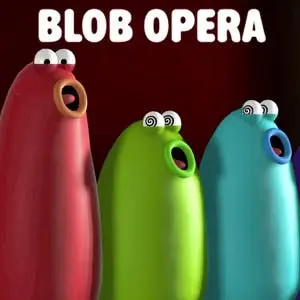
Blob Opera
Blob Opera is an interactive music experiment where you conduct four animated opera singers in real time. Created by David Li, the experience uses a machine-learning model trained…
 Works on Desktop & Mobile
Tested By BunaGames
- Test date
- July 7, 2026
- Tested on
- Chrome 150
- Device
- Desktop
- Operating system
- macOS and Windows
- Game loaded successfully
- Yes
- Fullscreen works
- Yes
- Sound works
- Yes
- Save progress
- Local browser storage
- Mobile compatibility
- Partially tested
- Keyboard controls
- Working
- Controller support
- Not detected
- Average loading time
- 4.2 seconds
- Known issues
- Minor delay after entering fullscreen
Blob Opera not loading?
- Refresh the page.
- Disable restrictive content blockers temporarily.
- Confirm JavaScript and WebGL are enabled.
- Clear the browser cache.
- Try another modern browser.
- Close unnecessary tabs.
- Switch off VPN if the game server is blocked.
- Use the Report a Problem button if the issue continues.
Continue Playing
Daily Challenge

Play 7 minutes today in Blob Opera.
Leaderboard
- 1Community rating4.7 ★
- 2Player likes812
- 3Total votes868
- 4Your local progress0%
Your progress is saved locally in this browser. No account required.
 Your progress is saved locally in this browser. No account required.
Game Progress & Challenges
Why Play This Game?
 Instant PlayPlay instantly in your browser.
 Mobile FriendlyOptimized for all devices.
 Free to PlayNo hidden fees.
About "Blob Opera"
Blob Opera is an interactive music experiment where you conduct four animated opera singers in real time. Created by David Li, the experience uses a machine-learning model trained on real voices to turn simple dragging into surprisingly rich vocal music. You do not need vocal training, music theory, or experience with opera to start making a performance.
The central idea is wonderfully direct: choose a blob singer, drag it, and listen as the group responds with an opera-style sound. Rather than asking you to read notes or follow a score, the game lets you explore through movement and listening. A small adjustment can produce a new pitch relationship, a different musical mood, or a playful response from the other voices.
Blob Opera works especially well as a casual browser music game because there is no long setup between curiosity and creation. It is part instrument, part animated performance, and part machine-learning demonstration. Players can experiment freely, try unusual combinations, and hear how four coordinated voices can create a fuller operatic texture than a single singer alone.
Whether you want a quick creative break, a funny sound experiment, or an approachable introduction to vocal harmony, this game makes the process immediate. The goal is not to achieve a perfect recital; it is to explore how your gestures influence an ensemble and make the blobs sing.
Gameplay
Gameplay in Blob Opera centers on four opera voices that perform together as an ensemble. Each colorful blob represents a singer, and your actions influence the sound produced by the group. The experience is open-ended: there are no enemies, timers, difficult levels, or failure states to interrupt experimentation. Instead, every session is a chance to shape a short vocal performance.
When you drag a singer upward or downward, you change its musical behavior and hear the result immediately. The real-time response is important because it makes the game feel less like a music quiz and more like conducting. You can move one voice gradually, make a larger motion for a more dramatic change, pause to hear the ensemble settle, then adjust another singer to explore a new blend.
The machine-learning model supplies the opera-like vocal quality, so a player does not have to manually create every sound. This is the game’s most useful design choice: simple input produces a coordinated musical result. The blobs retain their expressive visual character while the voices provide the main feedback loop, encouraging players to listen closely to changes in pitch and harmony.
- Control four distinct animated opera voices.
- Drag singers in real time to alter the performance.
- Experiment without a score, musical lesson, or singing ability.
- Hear machine-learning-assisted vocal sounds modeled from real voices.
- Create short, improvised opera-style arrangements at your own pace.
Because there is no single correct song, gameplay rewards curiosity. Try moving one blob at a time to notice its role, then make adjustments across multiple singers to hear how a simple vocal group can become more animated, tense, light, or theatrical.
Platform
Blob Opera is presented as an online, browser-based music experience. That format fits its design: the game is built around immediate interaction with animated singers rather than a long download, account system, or complicated music-production interface. Open the game page, begin dragging the blobs, and focus on the performance.
A browser session is particularly useful for a casual creative activity because it keeps the controls visible and the feedback instant. The main activity happens directly on the play screen, where you can see the four singers and hear their opera voices react to your movements in real time.
For the clearest audio feedback, play somewhere you can hear the vocal changes without distraction. Headphones or speakers can make it easier to notice how a small movement affects the ensemble, although the essential appeal remains the same: direct musical exploration through a simple online interface.
Blob Opera is a good fit for players looking for lightweight browser games that are expressive rather than competitive. It can be enjoyed in a short break, revisited to try a different arrangement, or shared as a playful demonstration of how machine learning can support interactive music.
How to Play "Blob Opera"
Start by looking at the four animated blob singers. They form the vocal ensemble, and each one can be manipulated directly. There is no need to select a song, learn a notation system, or prepare an instrument before making sound.
- Choose one blob singer on the game screen.
- Click or press on the singer and drag it upward or downward.
- Listen to the voice change as you move it.
- Release and let the other opera voices continue around the new sound.
- Repeat with another blob to explore a different vocal relationship.
- Make small adjustments for subtle changes or broader movements for a more noticeable shift.
The best way to learn is to work in layers. Begin with one singer and make a slow vertical movement while listening for the change. Then leave that voice in place and move another blob. This makes it easier to notice that Blob Opera is not only about an individual sound; it is about how the four voices coexist as a group.
You do not have to reproduce a famous opera melody. The game is designed for original, improvised play. If a combination sounds amusing, dramatic, strange, or unexpectedly pleasant, keep exploring it. Pause between movements so your ears can compare the current arrangement with the previous one.
Players who feel unsure about music should treat the interface like a sound toy with a responsive ensemble. Players with an interest in harmony can take a more deliberate approach, moving singers one by one and listening for consonant or contrasting combinations. Both approaches use the same core interaction, and both can lead to a memorable mini-performance.
Controls
Blob Opera keeps its controls focused on one essential action: dragging the singers. The interface does not require a large control scheme, which helps players spend more time listening and less time learning commands.
| Action | Result |
|---|---|
| Drag a blob up | Changes its vocal sound |
| Drag a blob down | Changes its vocal sound |
| Release the blob | Hear the ensemble continue |
Use steady, deliberate movements when first trying the game. A slow drag gives you time to connect the blob’s position with the voice you hear. Once you understand the response, experiment with quicker or larger movements to make the performance feel more animated.
There are four voices available, so avoid changing every singer at once when you are learning. Moving one blob, listening, and then moving a second blob provides clearer feedback. The control system is simple by design, but the range of possible vocal combinations comes from how you sequence and combine those small gestures.
Can "Blob Opera" Unblocked?
Players often search for “Blob Opera unblocked” when they want a version they can open and play freely in a browser. The game’s online format and simple drag-based interaction make it suitable for a quick session without needing a complex installation process.
Access can still depend on the browser, internet connection, device settings, and rules of the network you are using. A school, workplace, library, or managed device may limit access to game pages or audio-based websites. In those cases, respect the local network policy rather than attempting to bypass restrictions.
When the game page is available, Blob Opera is easy to begin because it does not demand prior music knowledge. Open the page, allow yourself to hear the audio clearly, and drag the four opera blobs to create a performance. Its short-session format is useful when you want a creative browser activity without committing to a lengthy game.
The most reliable way to enjoy the experience is on a permitted personal or public connection where browser games and sound are allowed. Since listening is central to the gameplay, check that your device audio is enabled before deciding whether the page is working as expected.
Tips for "Blob Opera"
The strongest Blob Opera performances usually come from listening before making the next move. Since the game responds in real time, every adjustment teaches you something about the current vocal blend. You do not need formal opera knowledge, but a patient approach can make the four singers sound more intentional.
- Start with one voice. Move a single blob upward and downward first. This helps you recognize its response before the other singers complicate the sound.
- Use small movements. Gradual adjustments make it easier to hear a change and decide whether you want to continue in that direction.
- Build the group in stages. Set one voice, then adjust a second, then revisit the first. Layered changes are easier to evaluate than moving all four at once.
- Pause to listen. Briefly stop dragging after a change. Let the ensemble’s current sound register before you alter it again.
- Try contrast. If the group sounds too uniform, shift one singer and hear how a contrasting voice changes the overall mood.
- Experiment without judging. Unexpected results are part of the appeal. Funny, exaggerated, or unusual combinations can be as satisfying as smoother ones.
A useful mini-challenge is to create three different moods in one session. First, make a calm arrangement using slow, modest movements. Next, try a more dramatic version with wider changes. Finally, return to a simpler blend and compare how the same four voices can feel different depending on your choices.
For repeat sessions, avoid trying to remember an exact previous arrangement. Blob Opera is better approached as a live experiment. The player benefit is not only the final sound but also the immediate connection between gesture, voice, animation, and ensemble harmony.
Features "Blob Opera"
Blob Opera combines a minimal control system with a distinctive musical concept. Its main feature is the ability to guide four opera voices through direct on-screen movement, creating an experience that is approachable for casual players while still interesting for people who enjoy sound, performance, or creative technology.
- Four-voice ensemble: Conduct four animated singers instead of controlling a single instrument or voice.
- Real-time interaction: Hear the vocal performance respond as you drag the blobs.
- Machine-learning experiment: The game uses a model trained on real voices to produce its opera-style sound.
- No singing skills required: Players can create vocal music without needing to sing, read music, or understand opera terminology.
- Direct drag gameplay: Up-and-down movement provides a fast, understandable way to affect the singers.
- Open-ended creativity: There are no fixed levels or one required composition, leaving room for improvisation.
- Animated visual feedback: The blobs make the performance feel expressive as well as audible.
- Short-session friendly: A player can experiment for a moment or stay longer to refine a vocal arrangement.
The game’s notable information advantage is that it makes an advanced-sounding concept feel physical. Machine learning and opera can sound technical or intimidating, yet the player interacts through a familiar action: dragging a character on screen. That simple bridge between technology and play is why the experience works for a wide audience.
Blob Opera also supports different styles of play. Some players may make quick comic sounds and enjoy the animated reactions. Others may carefully adjust each singer, listening for a more balanced group sound. The same browser game supports both because the result is generated through exploration rather than a strict win condition.
Best "Blob Opera" Similar Games & Top Picks
- Papas Taco Mia: Play Papa's Taco Mia online. Take taco orders, cook seasoned meats, add toppings, earn coins, and improve your busy taqueria.
- Papas Cupcakeria: Play Papas Cupcakeria online. Take orders, bake cupcakes, add frosting and toppings, then serve each customer with care.
- Melon Playground: Play Melon Playground online, a creative ragdoll physics sandbox for building experiments with characters, tools, weapons, and vehicles.
- Incredibox: Play Incredibox online and build a layered beatbox mix with animated performers, beats, melodies, effects, voices, and bonuses.
- Spiral Roll: Play Spiral Roll online and carve wood into powerful spirals that smash obstacles in this satisfying casual browser game.
FAQ - Blob Opera
What is Blob Opera?
Blob Opera is an interactive online music experiment created by David Li. It lets players guide four animated opera voices in real time by dragging the blob singers on screen. The experience uses a machine-learning model trained on real voices to produce its vocal sound.
How do you play Blob Opera?
Choose one of the four blob singers and drag it upward or downward. Listen to how the voice changes, then adjust another singer to alter the group performance. There is no required score or level objective, so the main activity is experimenting with the ensemble.
Do I need to know how to sing or read music?
No. Blob Opera is designed so that players can make opera-style music without singing skills or music theory knowledge. The game translates simple dragging into a responsive vocal performance, making it accessible to beginners and casual players.
How many singers are in Blob Opera?
The game features four opera voices. Each blob contributes to the ensemble, so changing one singer can affect how you perceive the overall harmony and mood. Try adjusting them one at a time to hear their roles more clearly.
What does the machine-learning element do?
The machine-learning model helps generate the opera-style vocal response from your movements. It was trained on real voices, allowing the game to make coordinated vocal sounds from simple player input instead of requiring you to perform every musical detail yourself.
Is Blob Opera a rhythm game?
Blob Opera is better described as an open-ended music and creativity game than a conventional rhythm game. It does not focus on matching timed prompts, earning a score, or completing a song chart. You create and reshape a vocal performance at your own pace.
Can I play Blob Opera for free in a browser?
Blob Opera is available as an online browser experience and is commonly presented as free to play. Availability may depend on your connection, browser, and local network rules. When the game page is accessible, you can begin by interacting directly with the four singers.
Why is there no single correct way to play?
The game is built around experimentation rather than a fixed solution. Different movements create different vocal combinations, and the purpose is to explore how the four voices respond together. A playful, unusual arrangement is as valid as a smoother or more carefully balanced one.
More Games Like This
 Sprunki Retake 2
Casual ★ 4.8
Sprunki Retake 2
Casual ★ 4.8
 Sprunki Phase 3 Remastered
Casual ★ 4.7
Sprunki Phase 3 Remastered
Casual ★ 4.7
 Helix Jump
Casual ★ 4.6
Helix Jump
Casual ★ 4.6
 Sprunki Incredibox
Casual ★ 4.5
Sprunki Incredibox
Casual ★ 4.5
 Good Pizza Great Pizza
Casual ★ 4.7
Good Pizza Great Pizza
Casual ★ 4.7
 Eagle Craft
Casual ★ 4.7
Eagle Craft
Casual ★ 4.7
 Storm The House
Casual ★ 4.7
Storm The House
Casual ★ 4.7
 Papas Sushiria
Casual ★ 4.6
Papas Sushiria
Casual ★ 4.6
 Papas Wingeria
Casual ★ 4.6
Papas Wingeria
Casual ★ 4.6
 Papas Scooperia
Casual ★ 4.7
Papas Scooperia
Casual ★ 4.7
 Papas Pizzeria
Casual ★ 4.6
Papas Pizzeria
Casual ★ 4.6
 Papas Freezeria
Casual ★ 4.6
Papas Freezeria
Casual ★ 4.6
 Sled Rider 3D
Casual ★ 4.7
Sled Rider 3D
Casual ★ 4.7
 Fnaf
Casual ★ 4.5
Fnaf
Casual ★ 4.5
 Tropical Merge
Casual ★ 4.6
Tropical Merge
Casual ★ 4.6
 Flip Bottle
Casual ★ 4.6
Flip Bottle
Casual ★ 4.6
 Papas Taco Mia
Casual ★ 4.6
Papas Taco Mia
Casual ★ 4.6
 Farm Merge Valley
Casual ★ 4.7
Farm Merge Valley
Casual ★ 4.7
 Report a Problem
Comments About Blob Opera