



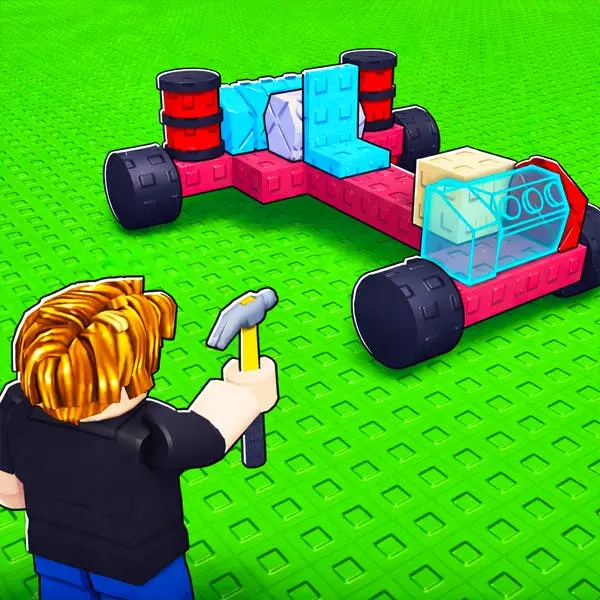
Build a Car
Build a Car is a vehicle construction and driving simulator that combines creative design with hands-on assembly. Players start with a bare chassis and progressively select, attach, and…
 Works on Desktop & Mobile
Tested By BunaGames
- Test date
- May 28, 2026
- Tested on
- Chrome 150
- Device
- Desktop
- Operating system
- macOS and Windows
- Game loaded successfully
- Yes
- Fullscreen works
- Yes
- Sound works
- Yes
- Save progress
- Local browser storage
- Mobile compatibility
- Partially tested
- Keyboard controls
- Working
- Controller support
- Not detected
- Average loading time
- 4.2 seconds
- Known issues
- Minor delay after entering fullscreen
Build a Car not loading?
- Refresh the page.
- Disable restrictive content blockers temporarily.
- Confirm JavaScript and WebGL are enabled.
- Clear the browser cache.
- Try another modern browser.
- Close unnecessary tabs.
- Switch off VPN if the game server is blocked.
- Use the Report a Problem button if the issue continues.
Continue Playing
Daily Challenge

Play 4 minutes today in Build a Car.
Leaderboard
- 1Community rating4.5 ★
- 2Player likes706
- 3Total votes801
- 4Your local progress0%
Your progress is saved locally in this browser. No account required.
 Your progress is saved locally in this browser. No account required.
Game Progress & Challenges
Why Play This Game?
 Instant PlayPlay instantly in your browser.
 Mobile FriendlyOptimized for all devices.
 Free to PlayNo hidden fees.
About "Build a Car"
Build a Car is a vehicle construction and driving simulator that combines creative design with hands-on assembly. Players start with a bare chassis and progressively select, attach, and configure individual automotive components including engines, wheels, body panels, and suspension systems. Unlike passive customization tools, this game emphasizes the mechanical assembly process, requiring players to understand how parts fit together before testing their creation on dynamic driving courses. The result is a online game that rewards both aesthetic vision and functional engineering, making it ideal for car enthusiasts who want deeper interaction than standard tuning simulators offer.
Gameplay
The core gameplay loop revolves around three distinct phases: part selection, assembly, and performance testing. During the construction phase, players access a parts inventory organized by component type—drivetrain, chassis, body, wheels, and accessories. Each part must be positioned correctly on the vehicle frame, with the interface providing visual feedback on compatibility and structural integrity.
Once assembly is complete, the game transitions to a driving mode where players test their vehicle's handling, acceleration, and stability across varied terrain. The physics engine responds directly to design choices: heavier body panels affect speed, wheel size influences traction, and engine placement impacts balance. This immediate cause-and-effect relationship between construction decisions and driving performance creates a satisfying feedback loop that encourages iterative refinement.
Players can return to the workshop at any time to modify their design, swap components, or rebuild entirely from scratch. This non-linear structure supports both experimental builders who test radical configurations and methodical designers who optimize every detail for specific performance goals.
Platform
Build a Car runs entirely within modern web browsers, requiring no downloads, installations, or account creation. The game utilizes HTML5 and WebGL technologies to deliver real-time 3D rendering and physics simulation directly through the browser window. This architecture ensures compatibility across desktop and laptop systems running Chrome, Firefox, Safari, and Edge.
As a browser game, it offers instant access—players simply load the page and begin building. The lightweight framework maintains smooth performance even on mid-range hardware, with the game automatically adjusting visual fidelity based on available system resources. All progress exists within the current session, allowing players to experiment freely without commitment, though some implementations may support local browser storage for saving favorite designs.
How to Play "Build a Car"
Begin by selecting your base chassis from the available options. This foundation determines the overall size and structure of your vehicle. Next, navigate through the component categories displayed in the interface menu. Click on engines to view power options, then drag your selected engine onto the designated mounting point on the chassis.
Continue adding essential components in logical order: attach the transmission system, mount wheels to each axle point, and install the body shell. The game highlights compatible attachment points as you hover components over the chassis. Once all critical parts are installed, review your build for completeness—missing essential components will prevent the vehicle from functioning.
When satisfied with your construction, activate the test drive mode. Use the provided controls to accelerate, steer, and brake while observing how your design performs. Note any handling issues, speed limitations, or stability problems, then return to the workshop to make targeted improvements. Repeat this cycle of building, testing, and refining until you achieve your desired performance profile.
Controls
The game employs two distinct control schemes depending on the active mode. During the construction phase, use your mouse to navigate the parts menu and workshop interface. Left-click selects components from the inventory, and click-and-drag places parts onto the chassis. Right-click or designated buttons remove installed components. The mouse wheel or on-screen buttons zoom the camera view, while click-and-drag on empty space rotates the 3D workspace for better viewing angles.
In driving mode, keyboard controls manage vehicle operation: Arrow Keys or W/A/S/D handle acceleration, braking, and steering. The Up Arrow or W accelerates, Down Arrow or S brakes or reverses, and Left/Right Arrows or A/D steer. Some versions include Spacebar for handbrake functionality. The Escape key or designated menu button returns you to the workshop from the driving test area.
Can "Build a Car" Unblocked?
Build a Car functions as an unblocked browser-based game accessible from most networks including schools, workplaces, and public institutions. Because it operates through standard web protocols without requiring executable downloads or plugin installations, it typically bypasses common content filters that target gaming platforms or downloadable applications.
The game's educational value—teaching mechanical relationships, spatial reasoning, and cause-effect analysis through vehicle construction—further supports its accessibility in restricted environments. Players can play free without registration barriers, making it a practical choice when access to traditional gaming platforms is limited. For optimal performance on restricted networks, ensure JavaScript is enabled in your browser settings, as the game relies on client-side scripting for its interactive features.
Tips for "Build a Car"
- Balance weight distribution: Position heavier components like engines toward the center of the chassis to improve handling stability and reduce oversteer or understeer during turns.
- Match wheel size to vehicle mass: Larger, wider wheels provide better traction for heavier builds, while smaller wheels suit lightweight speed-focused designs.
- Test incrementally: Rather than building a complete vehicle before testing, add components in stages and conduct brief test drives to identify problems early in the construction process.
- Prioritize essential systems first: Always install engine, transmission, and wheels before adding cosmetic body panels—this ensures you have a functional vehicle to test even if you run out of time or parts budget.
- Observe physics feedback: Pay attention to how your vehicle leans, bounces, or slides during test drives. These behaviors directly indicate which components need adjustment or replacement.
- Experiment with suspension settings: If available, adjust suspension stiffness to match your intended terrain—softer settings for rough surfaces, firmer for smooth tracks.
- Use the camera rotation: Rotate your view frequently during assembly to ensure parts align correctly from all angles, preventing asymmetrical builds that cause handling issues.
Features "Build a Car"
- Component-level assembly system: Build vehicles from individual parts rather than selecting preset templates, offering granular control over every mechanical element.
- Real-time physics testing: Drive your creation immediately after construction to experience how design choices affect performance, creating a direct learning loop.
- Modular part library: Access diverse components across multiple categories including engines, body panels, wheels, and accessories, each with distinct performance characteristics.
- 3D workspace navigation: Rotate, zoom, and pan the construction environment to view your build from any angle, ensuring precise part placement.
- Iterative design workflow: Seamlessly switch between building and testing modes, allowing continuous refinement without restarting projects.
- No-download browser access: Play instantly through any modern web browser without installations, updates, or account requirements.
- Performance-based feedback: Experience how weight, wheel size, engine power, and component placement directly influence acceleration, handling, and stability.
- Free-form creativity: No forced progression or locked content—all parts available from the start, supporting both practical and experimental designs.
Best "Build a Car" Similar Games & Top Picks
- Speed Racing Pro 2: Race 12 free supercars in Speed Racing Pro 2. Choose regular or elimination events and compete on fast 3D circuit tracks.
- Cyber Cars Punk Racing 2: Play Cyber Cars Punk Racing 2 online free. Explore futuristic racing modes, neon roads, cars, challenges, and helpful beginner tips.
- Cyber Cars Punk Racing: Play Cyber Cars Punk Racing online: a 3D futuristic driving game with neon city races, career progress, many tracks, and 2-player action.
- Crash X: Play Crash X online free: drive across steep descents and climbs, test car control, and watch realistic vehicle deformation in crashes.
- Cars Arena: Play Cars Arena, a 3D physics-based drifting battle game where rivals compete for space on a breaking hex platform.
FAQ - Build a Car
Can I save my custom vehicle designs in Build a Car?
Save functionality depends on the specific implementation. Most browser versions maintain your current build during the active session, but designs typically reset when you close the browser tab. Some versions may use local browser storage to preserve recent creations, allowing you to return to previous designs when you reload the game.
What makes Build a Car different from standard car customization games?
Build a Car emphasizes mechanical assembly and functional engineering rather than purely cosmetic customization. Instead of selecting paint colors and decals on a pre-built vehicle, you construct the car from individual components, then immediately test how your design choices affect driving physics and performance.
Do I need a powerful computer to play Build a Car?
No. The game is optimized for browser-based play and runs smoothly on most modern computers including mid-range laptops. The WebGL rendering engine automatically adjusts visual quality based on your system capabilities, ensuring playable performance across a wide range of hardware configurations.
Can I play Build a Car on mobile devices or tablets?
While the game is primarily designed for desktop browsers with mouse and keyboard input, some mobile browsers may load the game. However, the construction interface relies heavily on precise mouse controls and drag-and-drop interactions that are difficult to replicate on touchscreens, making desktop play the recommended experience.
Are there specific goals or missions in Build a Car?
The game focuses on open-ended creative construction rather than structured missions. Your primary goal is to build a functional vehicle that performs well during test drives, but you define your own success criteria—whether that means maximum speed, best handling, most unusual design, or perfect aesthetic balance.
What happens if I build a vehicle with missing essential parts?
The game typically prevents you from entering driving mode if critical components like the engine, wheels, or transmission are missing. Visual indicators or warning messages alert you to incomplete builds, guiding you to add necessary parts before testing your vehicle.
More Games Like This
 Bike Hero
Car ★ 4.6
Bike Hero
Car ★ 4.6
 Crazy Stunt Cars Multiplayer
Car ★ 4.6
Crazy Stunt Cars Multiplayer
Car ★ 4.6
 Stunt Car Challenge 3
Car ★ 4.7
Stunt Car Challenge 3
Car ★ 4.7
 Drive Mad 3
Car ★ 4.6
Drive Mad 3
Car ★ 4.6
 Papas Sushiria
Car ★ 4.6
Papas Sushiria
Car ★ 4.6
 Papas Wingeria
Car ★ 4.6
Papas Wingeria
Car ★ 4.6
 Papas Scooperia
Car ★ 4.7
Papas Scooperia
Car ★ 4.7
 Car Rush
Car ★ 4.6
Car Rush
Car ★ 4.6
 Papas Pizzeria
Car ★ 4.6
Papas Pizzeria
Car ★ 4.6
 Papas Freezeria
Car ★ 4.6
Papas Freezeria
Car ★ 4.6
 Madalin Stunt Cars 3
Car ★ 4.5
Madalin Stunt Cars 3
Car ★ 4.5
 Papas Taco Mia
Car ★ 4.6
Papas Taco Mia
Car ★ 4.6
 Papas Cupcakeria
Car ★ 4.6
Papas Cupcakeria
Car ★ 4.6
 Moto X3m Spooky Land
Car ★ 4.7
Moto X3m Spooky Land
Car ★ 4.7
 Moto X3m Winter
Car ★ 4.7
Moto X3m Winter
Car ★ 4.7
 Retro Highway
Car ★ 4.4
Retro Highway
Car ★ 4.4
 Speed Master
Car ★ 4.7
Speed Master
Car ★ 4.7
 Loop Crash
Car ★ 4.6
Loop Crash
Car ★ 4.6
 Report a Problem
Play Anytime, Anywhere
Add BunaGames to your home screen for quick access to your favorite games!
Comments About Build a Car