



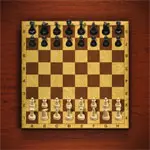
Chess Master 3D
Chess Master 3D is a casual chess game that presents the classic strategy board game with three-dimensional pieces and a more visual board view. The objective remains the…
 Works on Desktop & Mobile
Tested By BunaGames
- Test date
- June 15, 2026
- Tested on
- Chrome 150
- Device
- Desktop
- Operating system
- macOS and Windows
- Game loaded successfully
- Yes
- Fullscreen works
- Yes
- Sound works
- Yes
- Save progress
- Local browser storage
- Mobile compatibility
- Partially tested
- Keyboard controls
- Working
- Controller support
- Not detected
- Average loading time
- 4.2 seconds
- Known issues
- Minor delay after entering fullscreen
Chess Master 3D not loading?
- Refresh the page.
- Disable restrictive content blockers temporarily.
- Confirm JavaScript and WebGL are enabled.
- Clear the browser cache.
- Try another modern browser.
- Close unnecessary tabs.
- Switch off VPN if the game server is blocked.
- Use the Report a Problem button if the issue continues.
Continue Playing
Daily Challenge

Play 6 minutes today in Chess Master 3D.
Leaderboard
- 1Community rating4.7 ★
- 2Player likes1.3K
- 3Total votes1.4K
- 4Your local progress0%
Your progress is saved locally in this browser. No account required.
 Your progress is saved locally in this browser. No account required.
Game Progress & Challenges
Why Play This Game?
 Instant PlayPlay instantly in your browser.
 Mobile FriendlyOptimized for all devices.
 Free to PlayNo hidden fees.
About "Chess Master 3D"
Chess Master 3D is a casual chess game that presents the classic strategy board game with three-dimensional pieces and a more visual board view. The objective remains the same as traditional chess: build a position, attack carefully, defend your king, and work toward checkmate. Every move matters because a single unprotected piece, missed threat, or rushed exchange can change the entire match.
This version is a good fit for players who want a chess experience with a more physical-looking board rather than a flat diagram. You can approach each game as a short tactical challenge or as a slower strategic battle. The game supports the familiar appeal of chess: planning ahead, recognizing patterns, managing material, and adapting when your opponent creates a threat.
Chess Master 3D is designed for players who want to challenge AI opponents or play against friends while practicing logical decision-making. Newer players can use it to become comfortable with piece movement and common checkmate ideas, while experienced players can focus on opening development, tactical exchanges, and king safety. It is a straightforward browser chess option for anyone who enjoys thoughtful turns over fast reactions.
Gameplay
Chess Master 3D follows the established rules of chess on an eight-by-eight board. Each side begins with a king, queen, two rooks, two bishops, two knights, and eight pawns. White moves first, then players alternate turns. A move is only useful when it improves your position without exposing the king to attack.
The 3D presentation gives the pieces depth, but the strategic priorities are classic chess priorities. Pawns move forward and capture diagonally; knights jump in an L-shape; bishops travel diagonally; rooks move along ranks and files; the queen combines rook and bishop movement; and the king moves one square at a time. The king cannot move into check, and a player must answer an attack on their king immediately.
A typical match develops through three connected stages:
- Opening: Bring pieces into play, claim useful central squares, and avoid moving the same piece repeatedly without a reason.
- Middlegame: Look for attacks, defended pieces, pins, forks, exchanges, and open lines toward the king.
- Endgame: Use the king more actively, advance passed pawns, and convert a material advantage with accurate moves.
Rather than treating each turn as an isolated choice, ask what your opponent can do after your move. That habit is the core of practical chess. A move that attacks a piece may look strong, but it is only sound if the attacked piece cannot capture something important, create a counterattack, or expose your own king.
Platform
Chess Master 3D is available to play from its BunaGames game page in a compatible web browser. That makes it a convenient choice when you want a chess match without treating it like a long software setup. Open the game page, allow the game to load, and begin a board session from your desktop, laptop, or a touch-capable device.
The browser format is especially useful for short breaks, casual practice, and repeated matches against computer opponents or friends. A larger screen can make it easier to inspect the 3D board, compare defended squares, and follow long diagonals or open files. On a smaller touch screen, take an extra moment to confirm the selected piece and destination square before completing a move.
For the smoothest session, use a current browser, maintain a stable connection while the page loads, and close demanding background tabs if the board feels slow. The game remains centered on turn-based chess, so careful thinking is more important than fast input.
How to Play "Chess Master 3D"
Start Chess Master 3D by choosing the available match option, then study the board before making your first move. White moves first in chess. Your immediate goal is not to attack everything at once; it is to develop pieces safely, create useful control of the center, and keep your king protected.
- Choose a pawn or piece. Select the piece you want to move from its current square.
- Choose a legal destination. Make sure the move follows that piece's movement rule and does not leave your king in check.
- Review the reply. Before committing mentally to your plan, consider your opponent's strongest response.
- Develop efficiently. Bring knights and bishops into active positions, then connect your heavier pieces when possible.
- Watch the king. If your king is in check, you must move the king, block the attack when possible, or capture the attacking piece.
- Finish with checkmate. Checkmate occurs when the king is under attack and has no legal escape, block, or capture available.
Capturing pieces can create an advantage, but material is not the only factor. A queen is valuable, yet an unprotected queen can be trapped. A pawn may appear minor, yet a passed pawn near promotion can decide the endgame. Keep track of which pieces are defended before exchanging.
Castling is an important king-safety idea when the conditions are met: the king and selected rook must not have moved, the squares between them must be empty, and the king cannot castle out of, through, or into check. Pawn promotion is another key rule. When a pawn reaches the farthest rank, it can usually become a stronger piece, commonly a queen. These rules turn simple-looking positions into deeper strategic choices.
Controls
Chess Master 3D uses simple point-and-select controls suited to a browser chessboard. The key skill is not complex button input; it is choosing a legal move after checking the position. Use a mouse on desktop or tap the board on a touch device.
| Action | Control |
|---|---|
| Select piece | Click or tap it |
| Move piece | Click or tap a square |
| Make a capture | Select the target square |
| Review board | Pause before moving |
Before selecting a destination, check three things: whether the square is reachable for that piece, whether an opposing piece can capture it, and whether moving the piece exposes your king. This short review prevents many avoidable mistakes.
Can "Chess Master 3D" Unblocked?
Chess Master 3D can be played through the BunaGames browser page wherever access to browser games is permitted. Because it is a turn-based chess experience, it works well for players looking for a calmer strategy game during a break, at home, or on a personal device.
Access can still depend on a school, workplace, library, or public network's local filtering rules. If a network restricts game pages, do not attempt to bypass its security or access policies. Instead, play from a permitted connection or return when you are using a device and network where browser gaming is allowed.
When the game is available, allow the page time to load fully before starting a match. If the board does not respond as expected, refreshing the permitted game page or trying a current browser may help. For more casual options, BunaGames also offers a broad selection of online games.
Tips for "Chess Master 3D"
Strong Chess Master 3D play comes from reducing mistakes before searching for brilliant moves. Use each turn to scan the whole board, not only the piece you want to move. Many losses happen because a player notices an attack but misses a defended square, a hanging piece, or a line opened toward their king.
- Develop before launching an attack. Early queen moves can be tempting, but knights and bishops usually need to join the game first.
- Fight for the center. Central pawns and pieces influence more squares, giving you more options on later turns.
- Do not leave pieces undefended. After every move, identify what your opponent can capture immediately.
- Count attackers and defenders. Before trading on a square, compare how many pieces support each side.
- Look for forcing moves. Checks, captures, and direct threats narrow the opponent's choices and are easier to calculate.
- Respect knight forks. Knights can attack two valuable targets at once, especially a king and queen or a king and rook.
- Keep the king safe. Avoid opening lines around your own king unless you have a clear reason and adequate defense.
- Use the endgame patiently. When queens are off the board, activate the king and protect advancing pawns.
A useful decision routine is: first ask whether you are in check; second, look for your opponent's immediate threats; third, inspect checks, captures, and threats of your own; finally, choose the move that leaves the fewest tactical problems behind. This practical routine adds more value than moving quickly.
If you lose a game, replay the critical moment in your mind. Find the first move where a piece became loose, a king line opened, or a tactical threat was missed. That specific lesson is more useful than simply remembering the final checkmate.
Features "Chess Master 3D"
Chess Master 3D combines the enduring structure of chess with a three-dimensional visual presentation. The game is built around strategic turns rather than reflex-based action, making every position an opportunity to calculate, evaluate, and improve.
- 3D chess presentation: Play on a board with dimensional pieces that give the match a more tangible visual feel.
- Classic chess strategy: Use standard piece roles, king safety, material balance, tactical patterns, and checkmate goals.
- AI challenge: Test your planning against computer-controlled opponents and practice reading positions at your own pace.
- Friend-focused play: Chess is naturally suited to competing against another player and comparing strategic ideas.
- Accessible browser format: Start a chess session from the game page without needing to turn it into a lengthy setup process.
- Useful for different experience levels: Beginners can learn piece movement and basic tactics, while regular players can work on openings and endgames.
- Replay value: No two chess positions develop in exactly the same way, so each match can test a different plan.
The most important feature is the decision space created by the board. A quiet pawn move may prevent an attack several turns later. A simple exchange may open a file for a rook. A knight move may create a fork. This balance between visible 3D presentation and deep chess logic gives the game lasting value beyond a single round.
Players who prefer deliberate challenges can use Chess Master 3D as a short practice board: focus on one goal per game, such as developing all minor pieces, avoiding one-move blunders, or identifying every check available before moving.
Best "Chess Master 3D" Similar Games & Top Picks
- Brian Test 4: Sneaky Friends: Play Brian Test 4: Sneaky Friends online and solve cartoon riddles with careful taps, lateral thinking, and smart puzzle strategies.
- Brain Test 3: Tricky Puzzles: Play Brain Test 3: Tricky Puzzles online. Solve reverse-logic riddles, collect useful items, and follow a story through tricky quests.
- Brain Test 2: Tricky Puzzles: Play Brain Test 2: Tricky Puzzles online free. Read quirky riddles, study hand-drawn scenes, and solve clever brain teasers.
- Idle Dice: Play Idle Dice online and roll for earnings. Learn the gameplay, controls, dice-combo strategy, browser access, and save options.
- Unblock Me: Play Unblock Me online and slide the wooden blocks aside to guide the red block out of the board.
FAQ - Chess Master 3D
What is Chess Master 3D?
Chess Master 3D is a casual 3D chess game based on the traditional rules and objectives of chess. Players move familiar chess pieces, protect their king, create tactical threats, and try to checkmate the opposing king. Its visual focus is a dimensional chessboard rather than a flat board display.
Can I play Chess Master 3D online for free?
You can play Chess Master 3D from its BunaGames page in a compatible browser. The browser format is useful for players who want to begin a chess session without a separate installation process. Availability may depend on whether your current device and network permit access to game websites.
How do I move pieces in Chess Master 3D?
Use a mouse click or screen tap to select a piece, then select the square where you want it to go. The move must follow normal chess rules. For example, bishops move diagonally, rooks move in straight lines, knights move in an L-shape, and pawns normally move forward while capturing diagonally.
Can I play against AI or friends?
Chess Master 3D is presented as a chess game for challenging friends or AI opponents. Playing against AI is useful when you want to practice at your own pace, while playing another person can test whether your plans remain effective against an unpredictable opponent.
What is the main goal of the game?
The goal is checkmate. Checkmate happens when the opposing king is in check and cannot legally move away, capture the attacking piece, or block the attack. Capturing pieces helps create an advantage, but taking the king is not the objective; delivering checkmate is.
Is Chess Master 3D suitable for beginners?
Yes. Beginners can use the game to become familiar with the board, learn how each piece moves, and practice basic ideas such as developing pieces, protecting the king, and avoiding undefended pieces. Start slowly and review your opponent's possible reply before every move. Chess rewards accuracy more than speed.
What should I do when my king is in check?
You must respond immediately. Depending on the position, you can move the king to a safe square, capture the attacking piece, or block the attack with another piece. If none of those responses is legal, the position is checkmate and the game ends.
What is the best beginner strategy in Chess Master 3D?
Develop knights and bishops early, contest the center, castle when it is legal and safe, and avoid moving your queen into danger too soon. Before making any move, ask whether your opponent can capture one of your pieces or give check on the next turn. This simple habit prevents many early-game errors.
More Games Like This
 4 Pics 1 Word
Puzzle ★ 4.5
4 Pics 1 Word
Puzzle ★ 4.5
 Jewel Quest
Puzzle ★ 4.7
Jewel Quest
Puzzle ★ 4.7
 Woodoku
Puzzle ★ 4.6
Woodoku
Puzzle ★ 4.6
 1010 Block Puzzle Game
Puzzle ★ 4.7
1010 Block Puzzle Game
Puzzle ★ 4.7
 Hexa Puzzle
Puzzle ★ 4.7
Hexa Puzzle
Puzzle ★ 4.7
 1010 Deluxe
Puzzle ★ 4.6
1010 Deluxe
Puzzle ★ 4.6
 Screw Puzzle
Puzzle ★ 4.7
Screw Puzzle
Puzzle ★ 4.7
 Color Sort
Puzzle ★ 4.6
Color Sort
Puzzle ★ 4.6
 Candy Riddles
Puzzle ★ 4.6
Candy Riddles
Puzzle ★ 4.6
 Hex Frvr
Puzzle ★ 4.5
Hex Frvr
Puzzle ★ 4.5
 Water Sort
Puzzle ★ 4.6
Water Sort
Puzzle ★ 4.6
 Brain Test Tricky Puzzles
Puzzle ★ 4.8
Brain Test Tricky Puzzles
Puzzle ★ 4.8
 Ball Sort
Puzzle ★ 4.5
Ball Sort
Puzzle ★ 4.5
 Bolts And Nuts
Puzzle ★ 4.6
Bolts And Nuts
Puzzle ★ 4.6
 Wheres My Water
Puzzle ★ 4.7
Wheres My Water
Puzzle ★ 4.7
 Hexagon
Puzzle ★ 4.6
Hexagon
Puzzle ★ 4.6
 Cut The Rope 2
Puzzle ★ 4.4
Cut The Rope 2
Puzzle ★ 4.4
 Papas Sushiria
Puzzle ★ 4.6
Papas Sushiria
Puzzle ★ 4.6
 Report a Problem
Comments About Chess Master 3D