



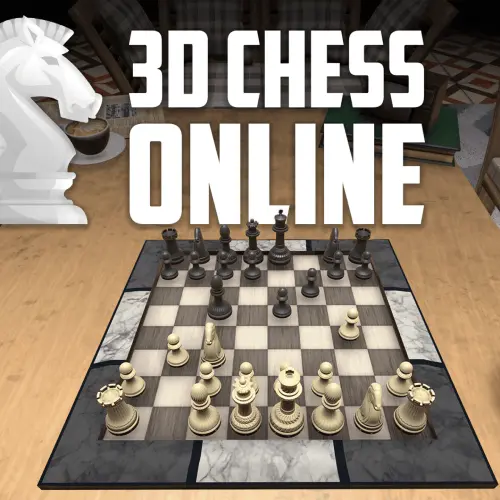
Chess Online 3D
Chess Online 3D brings the familiar tactics, planning, and piece movement of classic chess into a three-dimensional board presentation. Instead of viewing every position only from directly overhead,…
 Works on Desktop & Mobile
Tested By BunaGames
- Test date
- June 28, 2026
- Tested on
- Chrome 150
- Device
- Desktop
- Operating system
- macOS and Windows
- Game loaded successfully
- Yes
- Fullscreen works
- Yes
- Sound works
- Yes
- Save progress
- Local browser storage
- Mobile compatibility
- Partially tested
- Keyboard controls
- Working
- Controller support
- Not detected
- Average loading time
- 4.2 seconds
- Known issues
- Minor delay after entering fullscreen
Chess Online 3D not loading?
- Refresh the page.
- Disable restrictive content blockers temporarily.
- Confirm JavaScript and WebGL are enabled.
- Clear the browser cache.
- Try another modern browser.
- Close unnecessary tabs.
- Switch off VPN if the game server is blocked.
- Use the Report a Problem button if the issue continues.
Continue Playing
Daily Challenge

Play 5 minutes today in Chess Online 3D.
Leaderboard
- 1Community rating4.5 ★
- 2Player likes495
- 3Total votes567
- 4Your local progress0%
Your progress is saved locally in this browser. No account required.
 Your progress is saved locally in this browser. No account required.
Game Progress & Challenges
Why Play This Game?
 Instant PlayPlay instantly in your browser.
 Mobile FriendlyOptimized for all devices.
 Free to PlayNo hidden fees.
About "Chess Online 3D"
Chess Online 3D brings the familiar tactics, planning, and piece movement of classic chess into a three-dimensional board presentation. Instead of viewing every position only from directly overhead, players can appreciate the board as a physical-looking chess set, with depth, perspective, and a more immersive sense of where each piece stands.
The objective remains the central challenge of chess: protect your king while creating threats against the opposing king. Every pawn advance changes the structure of the position, every developed piece adds pressure, and every exchange can alter the balance between attack and defense. The 3D presentation does not turn chess into a different rule set; it gives a traditional strategic game a more spatial way to read the board.
This puzzle-style chess experience suits players who enjoy thinking several moves ahead. A quick match can become a lesson in opening development, tactical awareness, king safety, or endgame technique. Take time to inspect the position, identify defended and undefended pieces, and choose moves with a clear purpose rather than moving only because a piece is available.
Whether you are learning how the pieces work or returning for a thoughtful board-game challenge, Chess Online 3D emphasizes the satisfying core of chess: analyze the position, make a legal move, and respond intelligently to the opponent's plan.
Gameplay
Chess Online 3D centers on turn-based decision-making. Players alternate moves across a standard chessboard, using pawns, knights, bishops, rooks, queens, and kings according to their established movement patterns. The match is won by checkmating the enemy king: placing it under attack when no legal reply can remove the threat.
At the start of a game, the opening is about developing pieces efficiently and contesting useful central squares. Pawns can claim space, knights and bishops can enter active positions, and castling can help move the king toward safety. A move that looks natural from one camera angle may reveal a different relationship between pieces when the board is viewed in depth, so it is worth checking lines before committing.
The middle game is where tactics and strategy overlap. Look for forks, pins, skewers, discovered attacks, overloaded defenders, and open files for rooks. A tactical opportunity often appears because one side has left a piece undefended or allowed an important square to become weak. Before capturing, ask what the opponent can capture in return.
As material comes off the board, the endgame rewards precision. Kings become more active, passed pawns become increasingly valuable, and a small advantage can matter more than a dramatic attack. The 3D board helps make the pieces feel tangible, but successful play still depends on accurate calculation, patient defense, and a reliable scan of the whole position after every move.
Platform
Chess Online 3D is available as a browser-based game on BunaGames, so you can open the game page and play without installing a separate chess application. A modern web browser and a stable internet connection are the practical essentials for loading and using the game.
The game is designed around a visual 3D chessboard, making it especially suitable for players who prefer a more physical board-game feel than a flat diagram. Use a screen size that lets you clearly distinguish every piece, rank, file, and possible line of attack. Larger displays can be helpful when a position becomes crowded, while careful viewing remains important on smaller screens.
If you enjoy thoughtful games that work directly online, browse more browser games after your match. Chess is ideal for short tactical sessions as well as longer games where you want time to consider each position.
How to Play "Chess Online 3D"
Begin by treating the board as a complete position rather than focusing only on the piece you want to move. First locate both kings, then check which pieces are attacking, defending, or left without protection. In chess, a move is only useful when it improves your position or answers a genuine threat.
- Study the opening layout and identify your king, queen, rooks, bishops, knights, and pawns.
- Develop minor pieces toward useful squares while avoiding unnecessary repeat moves early in the game.
- Watch the center. Central squares influence many routes for knights, bishops, queens, and pawns.
- Keep your king safe. If castling is available under the normal rules of chess, it can help connect your rooks and reduce exposure.
- Before making a capture, calculate the opponent's most direct response. Check whether the capturing piece will be lost or whether another piece is defending the target.
- After each move, reassess the board from the opponent's perspective: checks, captures, and threats are the first ideas to examine.
A legal move is not automatically a good move. For example, a pawn push may open a diagonal toward your king, while an attractive capture may abandon a defender. Use the 3D perspective to inspect long diagonals, straight rook and queen lines, and squares hidden behind foreground pieces. If the board view can be adjusted, use that view deliberately to confirm the position rather than relying on a single angle.
When you have an advantage, simplify only when the resulting position remains favorable. When you are behind, look for active counterplay, checks, threats, and tactical resources instead of surrendering more material without a reason.
Controls
Chess Online 3D is played through its on-screen board interface. The essential action is choosing a piece and choosing a legal destination square on your turn. Pay close attention to the selected piece, the square you intend to use, and whether the resulting move leaves your own king in check.
The 3D board is more than decoration: perspective can make pieces overlap visually from certain viewpoints. Take a moment to inspect the board before a move, particularly when queens, rooks, or bishops have long attacking lines. A rotated or shifted board view, when available in the game interface, can help reveal squares and pieces that are less obvious from the initial angle.
- Move selection: choose the piece, then its legal destination.
- Board review: inspect ranks, files, diagonals, and king safety.
- 3D viewing: use available board-view options to clarify the position.
- Turn discipline: confirm checks, captures, and threats before finalizing a move.
Because chess decisions can be irreversible, accuracy matters more than speed. A calm second look is often the best control technique.
Can "Chess Online 3D" Unblocked?
Chess Online 3D can be accessed from its BunaGames page in a compatible web browser, making it a convenient choice when you want a chess game without downloading separate software. Open the game page, allow the browser to load the board, and begin when access is available on your device and network.
The term “unblocked” can mean different things in different places. BunaGames can provide browser access, but school, workplace, library, family, or public-network rules may restrict gaming websites. Those restrictions are controlled by the network administrator or device settings, not by the game itself.
For the smoothest session, use your own permitted connection, keep your browser updated, and avoid attempting to bypass local content filters or usage policies. If a page does not load, check your connection and browser permissions first. Chess remains a strong choice for a short mental break because each match can be approached at your own pace, from a few opening moves to a deeper strategic battle.
Tips for "Chess Online 3D"
Strong Chess Online 3D play begins with a consistent thinking routine. Before every move, search for forcing ideas in order: checks, captures, and threats. These moves demand an immediate answer and can expose tactical opportunities that are easy to miss when you only look at your own preferred plan.
- Develop before attacking: Bring knights and bishops into play before launching unsupported queen adventures. Active pieces create more tactical options.
- Do not neglect king safety: Open lines near an uncastled or exposed king can become dangerous quickly. Consider how each pawn move changes diagonals and files.
- Count attackers and defenders: Before taking a piece, compare how many pieces attack the square with how many protect it. Material often changes hands in sequences, not single moves.
- Respect pawn structure: Pawns cannot move backward. A pawn advance can gain space, but it can also leave weak squares behind permanently.
- Use the board perspective carefully: A 3D view can make a chess set easier to appreciate, yet it is important to scan the entire board for long-range bishop, rook, and queen attacks.
- Improve your worst-placed piece: When no tactic is available, find the piece with the fewest useful squares and make it more active.
A useful habit is to pause after the opponent moves and ask, “What changed?” Perhaps a line opened, a defender moved away, a pawn became loose, or your king now faces a new threat. This single question prevents many one-move blunders.
In winning positions, avoid giving the opponent unnecessary chances. Keep pieces coordinated, trade only when it helps your plan, and convert extra material steadily. In difficult positions, stay alert: a protected passed pawn, a perpetual series of checks, or one overlooked fork can change the game.
Features "Chess Online 3D"
Chess Online 3D combines the enduring strategic depth of chess with a board presentation designed to feel more like a real set on a table. Its key appeal is not a replacement of classic chess principles, but a visual format that makes every move, capture, diagonal, and piece relationship feel more spatial.
- Three-dimensional chessboard: A 3D board creates depth and a physical chess-set atmosphere.
- Traditional chess objective: Plan attacks against the opposing king while keeping your own king safe.
- Strategic puzzle gameplay: Each turn asks you to evaluate material, development, space, tactical threats, and future plans.
- Rotating or shifting board perspective: A flexible view can help players inspect the position from more than one angle.
- Beginner-to-experienced appeal: Newer players can practice piece awareness and basic tactics, while experienced players can focus on calculation and positional decisions.
- Browser access: Play from the game page without relying on a separate installed chess client.
The strongest feature is the connection between visual immersion and analytical play. The board may look more lifelike, but it still asks the timeless questions that make chess rewarding: Which squares are weak? Which piece is under pressure? Can the king escape? Is there a better move after the obvious one?
For players who enjoy logic games, Chess Online 3D offers a repeatable challenge with real variety. No two positions unfold in exactly the same way, and even a familiar opening can lead to new tactical patterns when one player chooses a different plan.
Best "Chess Online 3D" Similar Games & Top Picks
- Brian Test 4: Sneaky Friends: Play Brian Test 4: Sneaky Friends online and solve cartoon riddles with careful taps, lateral thinking, and smart puzzle strategies.
- Brain Test 3: Tricky Puzzles: Play Brain Test 3: Tricky Puzzles online. Solve reverse-logic riddles, collect useful items, and follow a story through tricky quests.
- Brain Test 2: Tricky Puzzles: Play Brain Test 2: Tricky Puzzles online free. Read quirky riddles, study hand-drawn scenes, and solve clever brain teasers.
- Idle Dice: Play Idle Dice online and roll for earnings. Learn the gameplay, controls, dice-combo strategy, browser access, and save options.
- Unblock Me: Play Unblock Me online and slide the wooden blocks aside to guide the red block out of the board.
FAQ - Chess Online 3D
What is Chess Online 3D?
Chess Online 3D is a browser chess game presented on a three-dimensional board. It uses the strategic foundation of traditional chess while giving the pieces and board a more immersive, spatial appearance.
Does the 3D board change the rules of chess?
No. The 3D presentation changes how the board is viewed, not the core objective of chess. You still aim to checkmate the opposing king while following the normal movement rules for each piece and keeping your own king out of check.
What is the goal of the game?
The goal is checkmate. This happens when the opposing king is under attack and has no legal move, capture, or block that can remove the threat. Capturing pieces can help, but winning material is only valuable when it supports a sound plan.
Can beginners play Chess Online 3D?
Yes. Beginners can use the game to become more familiar with piece movement, basic opening ideas, and simple tactics such as forks and pins. Start slowly, check whether each piece is defended, and avoid moving the same piece repeatedly without a reason.
How does the 3D perspective help?
A three-dimensional view can make the board resemble a physical chess set and can help you inspect the arrangement from different angles. It is especially useful to pause and verify long rook, bishop, and queen lines, since foreground pieces or perspective can make a relationship less immediately obvious.
What should I check before making a move?
First check whether your king is currently in danger. Next, look for the opponent's checks, captures, and threats. Then consider whether your intended move leaves a piece undefended, opens a line toward your king, or allows a tactical reply. This short routine improves accuracy at every level.
Can I play Chess Online 3D without downloading anything?
The game is offered through the BunaGames browser page, so it is intended to be opened and played online rather than requiring a separate application download. Availability can still depend on your browser, device, connection, and any network rules in your location.
Is Chess Online 3D a good game for strategy practice?
Yes. Chess develops habits that transfer across many puzzle and strategy games: recognizing patterns, planning ahead, weighing risk, protecting important assets, and adapting when the position changes. Each match gives you a new position to analyze, from opening development through tactical middlegames and precise endgames.
More Games Like This
 4 Pics 1 Word
Puzzle ★ 4.5
4 Pics 1 Word
Puzzle ★ 4.5
 Jewel Quest
Puzzle ★ 4.7
Jewel Quest
Puzzle ★ 4.7
 Woodoku
Puzzle ★ 4.6
Woodoku
Puzzle ★ 4.6
 1010 Block Puzzle Game
Puzzle ★ 4.7
1010 Block Puzzle Game
Puzzle ★ 4.7
 Hexa Puzzle
Puzzle ★ 4.7
Hexa Puzzle
Puzzle ★ 4.7
 1010 Deluxe
Puzzle ★ 4.6
1010 Deluxe
Puzzle ★ 4.6
 Screw Puzzle
Puzzle ★ 4.7
Screw Puzzle
Puzzle ★ 4.7
 Color Sort
Puzzle ★ 4.6
Color Sort
Puzzle ★ 4.6
 Candy Riddles
Puzzle ★ 4.6
Candy Riddles
Puzzle ★ 4.6
 Hex Frvr
Puzzle ★ 4.5
Hex Frvr
Puzzle ★ 4.5
 Water Sort
Puzzle ★ 4.6
Water Sort
Puzzle ★ 4.6
 Brain Test Tricky Puzzles
Puzzle ★ 4.8
Brain Test Tricky Puzzles
Puzzle ★ 4.8
 Ball Sort
Puzzle ★ 4.5
Ball Sort
Puzzle ★ 4.5
 Bolts And Nuts
Puzzle ★ 4.6
Bolts And Nuts
Puzzle ★ 4.6
 Wheres My Water
Puzzle ★ 4.7
Wheres My Water
Puzzle ★ 4.7
 Hexagon
Puzzle ★ 4.6
Hexagon
Puzzle ★ 4.6
 Cut The Rope 2
Puzzle ★ 4.4
Cut The Rope 2
Puzzle ★ 4.4
 Papas Sushiria
Puzzle ★ 4.6
Papas Sushiria
Puzzle ★ 4.6
 Report a Problem
Comments About Chess Online 3D