



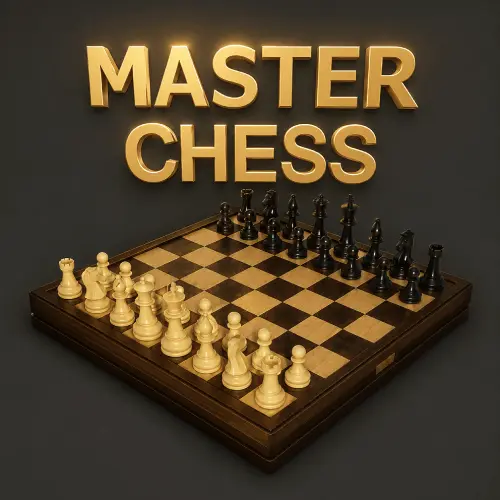
Chess Master Online
Chess Online brings the classic two-player strategy game to a browser-friendly format. Every move matters: you develop pieces, contest important squares, protect your king, and look for a…
 Works on Desktop & Mobile
Tested By BunaGames
- Test date
- June 19, 2026
- Tested on
- Chrome 150
- Device
- Desktop
- Operating system
- macOS and Windows
- Game loaded successfully
- Yes
- Fullscreen works
- Yes
- Sound works
- Yes
- Save progress
- Local browser storage
- Mobile compatibility
- Partially tested
- Keyboard controls
- Working
- Controller support
- Not detected
- Average loading time
- 4.2 seconds
- Known issues
- Minor delay after entering fullscreen
Chess Master Online not loading?
- Refresh the page.
- Disable restrictive content blockers temporarily.
- Confirm JavaScript and WebGL are enabled.
- Clear the browser cache.
- Try another modern browser.
- Close unnecessary tabs.
- Switch off VPN if the game server is blocked.
- Use the Report a Problem button if the issue continues.
Continue Playing
Daily Challenge

Play 7 minutes today in Chess Master Online.
Leaderboard
- 1Community rating4.6 ★
- 2Player likes551
- 3Total votes616
- 4Your local progress0%
Your progress is saved locally in this browser. No account required.
 Your progress is saved locally in this browser. No account required.
Game Progress & Challenges
Why Play This Game?
 Instant PlayPlay instantly in your browser.
 Mobile FriendlyOptimized for all devices.
 Free to PlayNo hidden fees.
About "Chess Master Online"
Chess Online brings the classic two-player strategy game to a browser-friendly format. Every move matters: you develop pieces, contest important squares, protect your king, and look for a route to checkmate. The familiar board contains 64 alternating squares, with each side beginning with a king, queen, rooks, bishops, knights, and pawns.
The central objective is not simply to capture the most pieces. A winning position is one where the opposing king is under attack and has no legal escape. That goal gives chess its depth. A pawn advance can open a diagonal for a bishop, a knight jump can create a fork, and a seemingly quiet move can prepare a decisive attack several turns later.
This game suits players who want a focused puzzle-like challenge as well as fans of traditional board strategy. Beginners can use each turn to learn how pieces move and why king safety matters. More experienced players can concentrate on opening development, tactical patterns, exchanges, and endgame planning. Because the board state is always visible, Chess Online rewards careful observation instead of rushed decisions.
Whether you are returning to chess after a break or studying your first checkmate pattern, the useful habit is the same: pause before moving, inspect every attack, and ask what changes after your piece lands on its destination.
Gameplay
Chess Online follows the core turn-based structure of standard chess. White makes the first move, then players alternate turns. On a turn, choose one piece and move it to a legal square. A capture occurs when a piece moves onto a square occupied by an opposing piece, except for the king, which is never captured. Instead, the game ends when checkmate is reached.
Each piece creates a different kind of pressure. Rooks move along ranks and files, bishops move diagonally, queens combine both movement styles, knights jump in an L-shape, kings move one square at a time, and pawns generally move forward while capturing diagonally. These movement rules turn the board into a network of attacks, defenses, blockers, and possible exchanges.
A legal move must also leave your own king safe. If your king is in check, your next move has to resolve that threat by moving the king, capturing the attacking piece, or blocking the attack when a block is possible. This legal-move filter is one of the most important parts of chess gameplay: an attractive attack is useless if it exposes your king.
The opening usually focuses on developing minor pieces, influencing the center, and preparing king safety. The middlegame is where tactics, combinations, and positional decisions become more frequent. In the endgame, reduced material makes pawn promotion, king activity, and precise calculation especially important. Rather than treating these phases as rigid rules, use them as a checklist for what the position needs next.
- Opening: Develop pieces and avoid unnecessary repeat moves.
- Middlegame: Search for checks, captures, threats, and weak squares.
- Endgame: Activate the king and support advancing pawns.
Platform
Chess Online is presented as a browser game on BunaGames, so it is intended to be opened and played from the game page rather than installed as separate software. A browser format is useful for a board game because the full position, move options, and turn flow remain concentrated in one screen.
Use a current web browser and allow the game area to load fully before starting. The most important practical requirement is a stable connection while the page is open, particularly when you want an uninterrupted session. If the board does not respond immediately, wait for the game interface to finish loading rather than repeatedly selecting pieces.
The supplied game information does not establish a specific app version, downloadable client, account requirement, rating system, opponent pool, or cross-device synchronization. Those features are common on some online chess services, but they should not be assumed for this particular browser page. The reliable focus here is the chessboard itself: read the position, make legal moves, and use the displayed game interface for the current session.
How to Play "Chess Master Online"
Begin by looking at the entire board before making your first move. Identify which side you control, locate both kings, and notice the central pawns and the pieces that can develop quickly. In standard chess, White moves first. Your immediate goal is to improve your position without leaving your king exposed.
- Choose a piece. Select a piece that has a useful legal move. Early choices often involve a central pawn, knight, or bishop.
- Check the destination. Confirm that the square follows that piece's movement rule and that the path is clear for sliding pieces such as rooks, bishops, and queens.
- Check king safety. Before completing the move, make sure it does not leave your king in check.
- Complete the move. Use the board interaction shown in the game interface to place the selected piece on its legal destination.
- Read the reply. After the opposing move, identify what changed. A newly opened line, attacked piece, or threatened pawn can matter more than the captured material.
When you see check, do not panic. There are only a few response categories: move the king to a safe square, capture the checking piece, or block the line of attack if a rook, bishop, or queen is checking from distance. If none is legal, it is checkmate.
Special chess rules can also affect a position. Pawns may promote after reaching the far rank, usually becoming a queen. Castling moves the king and rook together under the proper conditions and is often valuable for king safety. En passant is a special pawn capture that is available only immediately after an eligible two-square pawn move. Watch the board carefully, because legal options depend on the exact current position.
Controls
Chess Online is played through the board interface shown on the game page. The essential action is simple: select one of your pieces, then choose a legal destination square. The board should only allow or recognize moves that fit the current position and preserve king safety.
- Select: Choose the piece you want to move using the interaction provided by the board.
- Move: Choose its destination square to complete a legal move.
- Capture: Move onto an opposing piece when that capture is legal.
- Respond to check: Select a legal king move, capture, or block that removes the attack.
- Promotion: Follow the on-screen prompt if a pawn reaches the final rank.
No specific keyboard shortcuts, hotkeys, drag behavior, undo option, clock control, or board-flip command is established by the available game information. Use the visible instructions and prompts in the active game interface if they are provided. For better accuracy, take a moment to verify the selected piece and target square before finalizing a move.
Can "Chess Master Online" Unblocked?
Chess Online is available from its BunaGames browser page, making it a convenient choice when you want a classic strategy game without looking for a separate installation. Open the page in a supported browser, let the board load, and play through the interface provided there.
Browser access can be especially useful for a short practice session: review an opening idea, test your ability to spot a tactical threat, or play through a complete game at your own pace. Chess does not require fast reflexes to be rewarding. A few careful minutes can be enough to study a position and discover a stronger move.
Access can still depend on the browser, network, device settings, and local rules of the place where you are playing. If a school, workplace, library, or shared network restricts game sites, respect its acceptable-use policy rather than attempting to bypass controls. The appropriate way to play is through permitted access on a device and connection where browser games are allowed.
For more choices to enjoy during approved free time, explore the BunaGames collection of online games.
Tips for "Chess Master Online"
Strong chess decisions begin with a repeatable thinking process. Before moving, scan the board for forcing moves in this order: checks, captures, and threats. Checks deserve attention because the opponent must answer them. Captures can change the material balance. Threats may win material or create a mating attack if the opponent cannot respond effectively.
In the opening, fight for useful central influence and bring out your knights and bishops. Avoid moving the same piece repeatedly unless there is a clear tactical reason. Early queen adventures are often risky because the queen can be chased while the opponent develops several pieces. When possible, prepare king safety before the center opens and long-range pieces gain activity.
- Count attackers and defenders: Before taking a piece, compare how many pieces attack that square and how many protect it.
- Inspect loose pieces: A piece with no defender can become a tactical target.
- Look beyond the first capture: Ask what recapture, check, or discovered attack follows.
- Do not ignore pawns: Pawns control key squares, block lines, and can become queens late in the game.
- Use the king differently by phase: Keep it safe in the middlegame, but activate it when the board becomes simpler.
Learn a small group of recurring tactical motifs. A fork attacks two targets at once, often with a knight. A pin makes moving a piece costly because a more valuable piece stands behind it. A skewer attacks a valuable piece first and wins what is behind it after that piece moves. Discovered attacks occur when moving one piece opens an attack from another.
Finally, avoid playing only your own plan. After deciding on a move, ask: “What is my opponent threatening right now?” This single question prevents many beginner mistakes. If they can check your king, win your queen, or capture an undefended piece, address that danger before pursuing a slower idea.
Features "Chess Master Online"
Chess Online centers on the enduring features that make chess one of the most studied strategy games: complete information, alternating turns, legal-move calculation, and a clear checkmate objective. Both players can see the same board, so success comes from evaluating the position more accurately and anticipating the other side's reply.
- Classic chessboard structure: Play on the familiar 64-square board with the standard set of chess pieces.
- Turn-based strategy: Take time to assess attacks, defenses, exchanges, and king safety before moving.
- Legal-move decisions: Piece movement and check rules shape every available choice.
- Deep replay value: The opening position is familiar, but changing move sequences create different games.
- Tactical and positional play: Win through immediate combinations, long-term planning, or a mixture of both.
- Browser-focused access: Open the game page and focus on the board from a web browser.
A useful advantage of chess as a browser game is that it supports several play styles without changing the core rules. You can approach a game as a quick tactical puzzle, a patient strategic contest, or a learning exercise in piece coordination. The same move can be evaluated through material, space, development, pawn structure, initiative, and king safety.
Some competing online chess platforms advertise extras such as named computer opponents, player ratings, friend challenges, random matchmaking, multiple time formats, registrations, or offline modes. Those options are not confirmed for this specific game page, so they are not presented as built-in features here. This clarity helps you focus on what is certain: the traditional chess challenge of making sound legal moves and creating a position the opposing king cannot survive.
Best "Chess Master Online" Similar Games & Top Picks
- Brian Test 4: Sneaky Friends: Play Brian Test 4: Sneaky Friends online and solve cartoon riddles with careful taps, lateral thinking, and smart puzzle strategies.
- Brain Test 3: Tricky Puzzles: Play Brain Test 3: Tricky Puzzles online. Solve reverse-logic riddles, collect useful items, and follow a story through tricky quests.
- Brain Test 2: Tricky Puzzles: Play Brain Test 2: Tricky Puzzles online free. Read quirky riddles, study hand-drawn scenes, and solve clever brain teasers.
- Idle Dice: Play Idle Dice online and roll for earnings. Learn the gameplay, controls, dice-combo strategy, browser access, and save options.
- Unblock Me: Play Unblock Me online and slide the wooden blocks aside to guide the red block out of the board.
FAQ - Chess Master Online
What is the goal in Chess Online?
The goal is to checkmate the opposing king. Checkmate happens when the king is under attack and the other side has no legal move that removes the attack. Capturing pieces is useful because it can improve your position, but material alone does not win unless it helps create checkmate or an unavoidable winning endgame.
Do I need to know every chess rule before playing?
No. You can begin with the basic movement of each piece and learn through play. The most important early rules are how your pieces move, that you cannot leave your king in check, and that White moves first in standard chess. As you become more comfortable, learn castling, pawn promotion, en passant, stalemate, and common tactical patterns.
How do pieces move in chess?
Rooks move horizontally or vertically. Bishops move diagonally. Queens move like a rook or bishop. Knights jump in an L-shape and can move over pieces. Kings move one square in any direction. Pawns usually move forward and capture diagonally. A piece cannot move through another piece unless it is a knight.
What should I do when my king is in check?
You must make a legal move that ends the check. Depending on the position, you can move the king to a safe square, capture the attacking piece, or block the attack if it comes from a rook, bishop, or queen along a line. You cannot ignore check or make a move that leaves your king attacked.
Can I play Chess Online in a browser?
Yes. This BunaGames page is intended for browser play. Open the game page, allow its board interface to load, and use the displayed interaction to make moves. The supplied information does not confirm a separate download, app, account system, or synchronized profile, so those options should not be assumed.
Is Chess Online a multiplayer game?
The name and wider online chess search intent are associated with playing chess on the web, but the available information for this specific page does not confirm matchmaking, friend invitations, random opponents, computer opponents, or ranked play. Check the active game interface for the modes currently offered rather than expecting a particular opponent type.
What is the best first move for a beginner?
There is no single move that guarantees a win. A practical beginner approach is to make a move that helps control the center, then develop knights and bishops, protect the king, and avoid giving away pieces. More important than memorizing a first move is checking whether each move is safe and whether your opponent has a direct threat.
How can I improve at chess more quickly?
Use every game as a review exercise. After a mistake or lost piece, identify the moment when it became vulnerable. Practice spotting checks, captures, forks, pins, and undefended pieces. Keep a simple pre-move routine: check your king, inspect your opponent's threats, count attackers and defenders, then choose the move that improves your position without creating a larger problem.
More Games Like This
 4 Pics 1 Word
Puzzle ★ 4.5
4 Pics 1 Word
Puzzle ★ 4.5
 Jewel Quest
Puzzle ★ 4.7
Jewel Quest
Puzzle ★ 4.7
 Woodoku
Puzzle ★ 4.6
Woodoku
Puzzle ★ 4.6
 1010 Block Puzzle Game
Puzzle ★ 4.7
1010 Block Puzzle Game
Puzzle ★ 4.7
 Hexa Puzzle
Puzzle ★ 4.7
Hexa Puzzle
Puzzle ★ 4.7
 1010 Deluxe
Puzzle ★ 4.6
1010 Deluxe
Puzzle ★ 4.6
 Screw Puzzle
Puzzle ★ 4.7
Screw Puzzle
Puzzle ★ 4.7
 Color Sort
Puzzle ★ 4.6
Color Sort
Puzzle ★ 4.6
 Candy Riddles
Puzzle ★ 4.6
Candy Riddles
Puzzle ★ 4.6
 Hex Frvr
Puzzle ★ 4.5
Hex Frvr
Puzzle ★ 4.5
 Water Sort
Puzzle ★ 4.6
Water Sort
Puzzle ★ 4.6
 Brain Test Tricky Puzzles
Puzzle ★ 4.8
Brain Test Tricky Puzzles
Puzzle ★ 4.8
 Ball Sort
Puzzle ★ 4.5
Ball Sort
Puzzle ★ 4.5
 Bolts And Nuts
Puzzle ★ 4.6
Bolts And Nuts
Puzzle ★ 4.6
 Wheres My Water
Puzzle ★ 4.7
Wheres My Water
Puzzle ★ 4.7
 Hexagon
Puzzle ★ 4.6
Hexagon
Puzzle ★ 4.6
 Cut The Rope 2
Puzzle ★ 4.4
Cut The Rope 2
Puzzle ★ 4.4
 Papas Sushiria
Puzzle ★ 4.6
Papas Sushiria
Puzzle ★ 4.6
 Report a Problem
Comments About Chess Master Online