



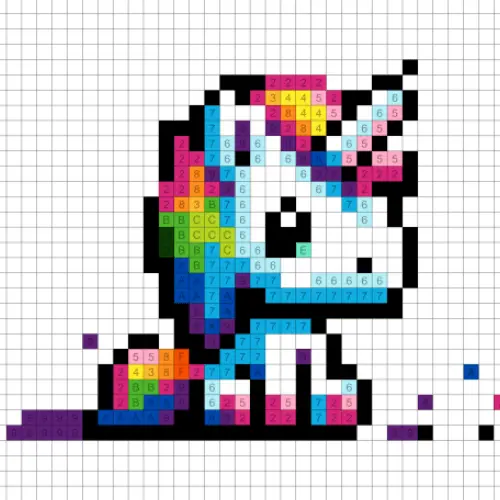
Color Pixel
Color Pixel is a relaxing color-by-number puzzle built around small colored squares. Each picture is divided into a pixel grid, and every square belongs to a numbered color…
 Works on Desktop & Mobile
Tested By BunaGames
- Test date
- July 4, 2026
- Tested on
- Chrome 150
- Device
- Desktop
- Operating system
- macOS and Windows
- Game loaded successfully
- Yes
- Fullscreen works
- Yes
- Sound works
- Yes
- Save progress
- Local browser storage
- Mobile compatibility
- Partially tested
- Keyboard controls
- Working
- Controller support
- Not detected
- Average loading time
- 4.2 seconds
- Known issues
- Minor delay after entering fullscreen
Color Pixel not loading?
- Refresh the page.
- Disable restrictive content blockers temporarily.
- Confirm JavaScript and WebGL are enabled.
- Clear the browser cache.
- Try another modern browser.
- Close unnecessary tabs.
- Switch off VPN if the game server is blocked.
- Use the Report a Problem button if the issue continues.
Continue Playing

Daily Challenge

Play 5 minutes today in Color Pixel.
Leaderboard
- 1Community rating4.7 ★
- 2Player likes855
- 3Total votes925
- 4Your local progress0%
Your progress is saved locally in this browser. No account required.
 Your progress is saved locally in this browser. No account required.
Game Progress & Challenges
Why Play This Game?
 Instant PlayPlay instantly in your browser.
 Mobile FriendlyOptimized for all devices.
 Free to PlayNo hidden fees.
About "Color Pixel"
Color Pixel is a relaxing color-by-number puzzle built around small colored squares. Each picture is divided into a pixel grid, and every square belongs to a numbered color group. Select a color, find the matching numbered cells, and gradually turn an unfinished grid into a complete pixel-art image.
The game focuses on recognition, accuracy, and satisfying visual progress rather than fast reactions. A simple image can be a quick break, while a larger design asks you to scan the grid carefully, track tiny spaces, and work through several color groups. The result is a calm puzzle experience with a clear objective: fill every required pixel and finish the picture.
Color Pixel suits players who enjoy digital coloring, number matching, pattern spotting, and low-pressure puzzle play. There is no need to draw freehand or guess which shade belongs where. The numbered layout provides the structure, while you decide the order in which to complete the artwork. It is an approachable choice for a quiet session, whether you want to finish one image methodically or simply add a few colors whenever you have spare time.
Gameplay
Every Color Pixel puzzle begins as a grid of numbered cells. Those numbers correspond to colors in the available palette. Your task is to choose one color and fill every pixel carrying its matching number. As more cells are completed, shapes, outlines, and color blocks become easier to recognize until the full image is revealed.
The central loop is straightforward: inspect the picture, select a color, locate its number, and apply that color to the correct pixels. What changes from image to image is the density of the grid and the arrangement of the color groups. Some designs have broad, easy-to-fill areas, while others use scattered single pixels or narrow details that reward close attention.
Unlike a traditional coloring page, the puzzle element comes from mapping numbers to positions. You are not mixing colors or deciding on a palette; you are reading a visual code. That makes progress easy to understand. A completed region confirms that you have resolved one part of the image, and the remaining numbered cells show exactly where work is still needed.
Color Pixel also supports different play rhythms. You can clear one color across the whole board before moving to the next, which is useful for systematic searching. Alternatively, complete visible sections of the image as you find them. Both approaches work, but the best method often depends on the picture’s size, the number of colors, and how tightly packed its details are.
- Match palette colors with identical numbers on the grid.
- Fill pixel cells to uncover a finished image piece by piece.
- Work through simple or more detailed artwork at your own pace.
- Use visual scanning and number recognition instead of reaction speed.
Platform
Color Pixel is designed for browser play, so you can start a coloring puzzle without a separate installation. It fits the kind of session that works well on either a desktop screen or a mobile device: open the game, choose a picture, and begin filling pixels.
On desktop, a mouse makes it easy to point at individual squares and move around detailed sections. On mobile or tablet, touch input provides a direct way to select colors and tap the matching pixels. A larger display can be especially helpful when an image contains narrow outlines or many small color regions, while a phone is convenient for shorter, relaxed sessions.
The game’s color-by-number format is easy to understand across devices because the objective remains visual and immediate. You do not need complex commands, a controller, or a long setup process. If you enjoy this accessible style of play, BunaGames also offers more browser games for quick sessions.
How to Play "Color Pixel"
Start by looking at the pixel picture and the color choices available to you. Each color is associated with a number. The same number appears in one or more cells on the image grid, identifying the exact places where that color belongs.
- Select a color from the palette.
- Check the number associated with that selected color.
- Scan the image for pixel cells showing the same number.
- Click or tap those matching cells to fill them.
- Continue until no numbered cells remain and the picture is complete.
A useful first move is to choose a number that appears in a large, obvious area. Filling a broad background or a strong outline gives you visual landmarks for the rest of the puzzle. Once the large regions are complete, smaller details are less likely to blend into the unfinished grid.
Take time to verify the selected color before filling a tight cluster. In a color-by-number game, accuracy matters more than speed. When the artwork includes many nearby numbers, pause after completing a small group and scan the surrounding cells again. This keeps your attention focused and makes the process feel organized rather than rushed.
You do not have to finish every image in one sitting. Because the objective is divided into individual pixels and color groups, the game naturally supports stop-and-return play. A few completed sections still create visible progress, and returning later with fresh eyes can make hard-to-spot cells easier to notice.
The most important habit is to let the numbers guide the process. Rather than trying to predict the entire picture immediately, resolve one color group at a time. The image will become clearer as the grid fills.
Controls
Color Pixel uses simple point-and-select controls that suit its precise grid-based puzzles. First choose a color, then apply it to the cells marked with the corresponding number.
| Device | Action |
|---|---|
| Desktop | Use the mouse to select and fill pixels. |
| Mobile or tablet | Tap colors and matching pixel cells. |
For the best control on detailed artwork, make deliberate selections instead of tapping rapidly across a crowded section. A mouse pointer can help with small individual squares on desktop, while touch play works naturally when you zoom your attention into one region at a time. The core interaction is the same on either device: select the numbered color, then fill the matching numbered pixels.
Can "Color Pixel" Unblocked?
Color Pixel is a convenient option when you want a calm puzzle in the browser rather than a game that requires a download or a lengthy setup. Its color-by-number format is easy to return to during a break because each click or tap contributes to a clear visual goal.
Browser access is particularly useful for players who prefer straightforward online play on a compatible desktop, laptop, tablet, or phone. Open the game page, load the puzzle, and focus on the image instead of installation steps. The simple control scheme also makes it friendly for shared devices and casual sessions.
Availability can still depend on the browser, device settings, and network rules used where you are playing. If a game page does not load in a restricted environment, use permitted access and follow the relevant local rules. The best experience comes from playing through a current browser with a stable connection and enough screen space to read the numbered pixel grid comfortably.
Tips for "Color Pixel"
Color Pixel rewards a steady, observant approach. The pictures are not timed challenges, so there is no benefit to rushing through small numbered cells. Instead, use the structure of the grid to reduce searching and make each color pass more efficient.
- Begin with large color regions. Broad areas are faster to identify and give the image a useful visual foundation.
- Use outlines as landmarks. Darker or strongly defined regions often help separate nearby shapes and make later colors easier to place.
- Finish one number systematically. Search from one side of the grid to the other instead of jumping randomly between distant cells.
- Handle scattered pixels last. Single cells and tiny clusters are easier to find after larger areas have been filled.
- Pause after a dense section. A brief reset helps you notice remaining cells that were hidden among similar-looking numbers.
- Choose the right image complexity. A smaller picture is ideal for a short break; a detailed grid is better when you want a longer, more focused coloring session.
A practical scanning pattern is to work in rows or columns. For example, after selecting one color, inspect the top portion of the grid from left to right before moving downward. This prevents repeated searching and reduces the chance of overlooking a pixel near the edge.
Another helpful strategy is to use completed areas as context. Once several colors are in place, the emerging artwork often reveals where remaining details should be. A cluster that originally looked like random numbers may become clearly recognizable as part of an object, border, or background feature. Let that visual feedback guide your next search, but always use the number labels as the final check.
Features "Color Pixel"
Color Pixel combines digital coloring with a simple number-matching puzzle structure. It is designed around recognizable actions and visible progress, making it easy for new players to start while still giving detail-oriented players plenty of small goals to complete.
- Color-by-number pixel art: Numbers tell you which color belongs in each grid cell.
- Relaxed puzzle pacing: Focus on completing artwork without the pressure of fast reactions.
- Varied image complexity: Pixel pictures can range from quick, simple designs to denser artwork with more small areas.
- Clear progress feedback: Every filled cell contributes to a more recognizable final image.
- Accessible controls: Select colors and fill pixels using mouse input or touch controls.
- Browser-friendly play: Start a puzzle online without a separate installation process.
- Pattern-recognition value: The game encourages careful visual scanning, number matching, and attention to detail.
The strongest feature is the balance between certainty and discovery. The numbered cells remove uncertainty about which color to use, yet the final picture is still revealed gradually through your work. That gives each completed color group a satisfying purpose.
The format is also flexible. Players who want a low-commitment activity can fill a handful of pixels and stop, while players seeking a more involved task can work through a detailed image methodically. Because the core goal stays consistent, Color Pixel remains easy to pick up again after a pause. It is a puzzle game built for calm concentration, visible completion, and the small satisfaction of turning a numbered grid into finished pixel art.
Best "Color Pixel" Similar Games & Top Picks
- Brian Test 4: Sneaky Friends: Play Brian Test 4: Sneaky Friends online and solve cartoon riddles with careful taps, lateral thinking, and smart puzzle strategies.
- Brain Test 3: Tricky Puzzles: Play Brain Test 3: Tricky Puzzles online. Solve reverse-logic riddles, collect useful items, and follow a story through tricky quests.
- Brain Test 2: Tricky Puzzles: Play Brain Test 2: Tricky Puzzles online free. Read quirky riddles, study hand-drawn scenes, and solve clever brain teasers.
- Idle Dice: Play Idle Dice online and roll for earnings. Learn the gameplay, controls, dice-combo strategy, browser access, and save options.
- Unblock Me: Play Unblock Me online and slide the wooden blocks aside to guide the red block out of the board.
FAQ - Color Pixel
What is Color Pixel?
Color Pixel is a color-by-number puzzle game based on pixel-art images. Each picture is made from a grid of small squares, and the squares contain numbers. Every number corresponds to a palette color. Select a color and fill the cells that show its matching number to reveal the finished artwork.
How do you play Color Pixel?
Choose a color from the available palette, then find the same number on the picture grid. Click or tap each matching pixel to color it. Repeat the process with the remaining colors until all required cells are filled and the image is complete.
Is Color Pixel a drawing game?
It is a digital coloring game with puzzle elements rather than a freehand drawing tool. You do not need to create outlines, mix shades, or decide which colors belong in the image. The numbered grid gives you the correct color placement, while your role is to locate and fill the matching pixels.
Can I play Color Pixel on mobile?
Color-by-number pixel games are suited to both desktop and mobile play. On a desktop device, use the mouse to select a color and fill cells. On a phone or tablet, use touch controls to tap the palette and the matching numbered pixels. A larger screen may make very detailed grids easier to inspect.
Do I need to download Color Pixel?
No separate installation is needed to play this browser version. You can open the game page and start working on the pixel-art puzzle in your browser. This makes it convenient for casual play when you want a quick, low-pressure activity.
What is the best way to find all the matching pixels?
Work through the grid in a consistent pattern, such as left to right across each row or top to bottom in columns. Start with large, obvious groups for quick progress, then search carefully for isolated pixels and tiny clusters. Completed areas can also make the remaining shapes easier to recognize.
Is Color Pixel difficult?
The basic rules are easy to learn because the numbers tell you exactly which color to use. Difficulty comes from image complexity. A picture with broad color areas is usually quick to complete, while a dense grid with many scattered pixels requires more patience, scanning, and attention to detail.
Why is color-by-number gameplay relaxing?
Color-by-number puzzles offer a clear, repetitive task with visible progress. You can focus on one color group at a time without needing to make complicated decisions. As the image emerges, each completed section provides satisfying feedback, making the game well suited to a calm break or a focused puzzle session.
More Games Like This
 4 Pics 1 Word
Puzzle ★ 4.5
4 Pics 1 Word
Puzzle ★ 4.5
 Jewel Quest
Puzzle ★ 4.7
Jewel Quest
Puzzle ★ 4.7
 Woodoku
Puzzle ★ 4.6
Woodoku
Puzzle ★ 4.6
 1010 Block Puzzle Game
Puzzle ★ 4.7
1010 Block Puzzle Game
Puzzle ★ 4.7
 Hexa Puzzle
Puzzle ★ 4.7
Hexa Puzzle
Puzzle ★ 4.7
 1010 Deluxe
Puzzle ★ 4.6
1010 Deluxe
Puzzle ★ 4.6
 Screw Puzzle
Puzzle ★ 4.7
Screw Puzzle
Puzzle ★ 4.7
 Color Sort
Puzzle ★ 4.6
Color Sort
Puzzle ★ 4.6
 Candy Riddles
Puzzle ★ 4.6
Candy Riddles
Puzzle ★ 4.6
 Hex Frvr
Puzzle ★ 4.5
Hex Frvr
Puzzle ★ 4.5
 Water Sort
Puzzle ★ 4.6
Water Sort
Puzzle ★ 4.6
 Brain Test Tricky Puzzles
Puzzle ★ 4.8
Brain Test Tricky Puzzles
Puzzle ★ 4.8
 Ball Sort
Puzzle ★ 4.5
Ball Sort
Puzzle ★ 4.5
 Bolts And Nuts
Puzzle ★ 4.6
Bolts And Nuts
Puzzle ★ 4.6
 Wheres My Water
Puzzle ★ 4.7
Wheres My Water
Puzzle ★ 4.7
 Hexagon
Puzzle ★ 4.6
Hexagon
Puzzle ★ 4.6
 Cut The Rope 2
Puzzle ★ 4.4
Cut The Rope 2
Puzzle ★ 4.4
 Papas Sushiria
Puzzle ★ 4.6
Papas Sushiria
Puzzle ★ 4.6
 Report a Problem
Comments About Color Pixel