



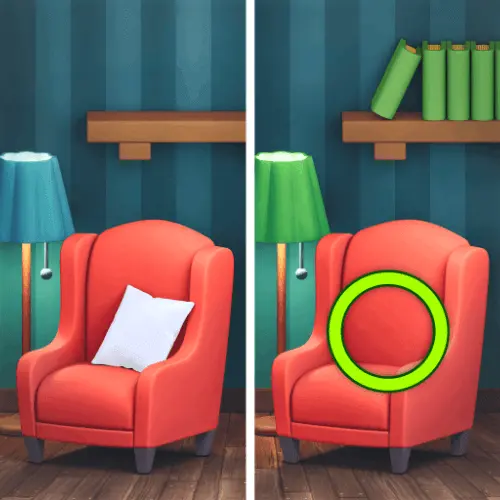
Find The Difference
Find The Difference is a visual puzzle game built around one clear challenge: compare two nearly identical pictures and locate the details that do not match. Each puzzle…
 Works on Desktop & Mobile
Tested By BunaGames
- Test date
- July 4, 2026
- Tested on
- Chrome 150
- Device
- Desktop
- Operating system
- macOS and Windows
- Game loaded successfully
- Yes
- Fullscreen works
- Yes
- Sound works
- Yes
- Save progress
- Local browser storage
- Mobile compatibility
- Partially tested
- Keyboard controls
- Working
- Controller support
- Not detected
- Average loading time
- 4.2 seconds
- Known issues
- Minor delay after entering fullscreen
Find The Difference not loading?
- Refresh the page.
- Disable restrictive content blockers temporarily.
- Confirm JavaScript and WebGL are enabled.
- Clear the browser cache.
- Try another modern browser.
- Close unnecessary tabs.
- Switch off VPN if the game server is blocked.
- Use the Report a Problem button if the issue continues.
Continue Playing
Daily Challenge

Play 7 minutes today in Find The Difference.
Leaderboard
- 1Community rating4.7 ★
- 2Player likes1.1K
- 3Total votes1.2K
- 4Your local progress0%
Your progress is saved locally in this browser. No account required.
 Your progress is saved locally in this browser. No account required.
Game Progress & Challenges
Why Play This Game?
 Instant PlayPlay instantly in your browser.
 Mobile FriendlyOptimized for all devices.
 Free to PlayNo hidden fees.
About "Find The Difference"
Find The Difference is a visual puzzle game built around one clear challenge: compare two nearly identical pictures and locate the details that do not match. Each puzzle asks you to search carefully for 10 differences, turning ordinary-looking scenes into a focused test of observation, patience, and concentration.
The central skill is not fast guessing. Success comes from noticing small inconsistencies while keeping track of the areas you have already checked. A missing detail, altered shape, changed color, or other visual mismatch can be easy to overlook when both images appear almost the same at first glance. The game encourages players to slow down, inspect the full picture, and make deliberate selections.
Find The Difference fits players looking for a calm but engaging brain-style challenge. It is easy to understand immediately because the goal is visible on screen: examine one picture against its partner, spot the hidden changes, and continue until the complete set has been found. Whether you want a short puzzle break or a way to practice visual attention, this picture-comparison game offers a direct, satisfying objective.
Gameplay
Find The Difference uses the classic spot-the-difference format. Two similar images are presented for comparison, and your task is to identify 10 places where the pictures differ. Instead of solving with words, equations, or complicated rules, you solve each puzzle through careful visual analysis.
A strong approach is to treat the two pictures as a pair of matching maps. Look at the same area in both images, compare its outlines and details, then move to the next area. This is more reliable than letting your eyes jump randomly across the screen. The left and right sides of an image may look identical from a distance, but close inspection reveals the mismatches that matter.
The challenge comes from visual similarity. Your attention has to separate meaningful changes from details that merely look busy. Scan large objects first, then inspect smaller elements, edges, patterns, and background areas. When you identify a difference, shift your focus to a new part of the image instead of repeatedly checking the same location.
Because the objective is to find a fixed set of 10 differences, every correct discovery narrows the search space. This gives the puzzle a useful sense of progress: the more changes you locate, the fewer hidden mismatches remain. Find The Difference rewards concentration and methodical searching rather than specialized gaming knowledge, making it approachable for new puzzle players while still giving observant players a meaningful challenge.
Platform
Find The Difference is designed to be played online in a web browser. That makes it a practical choice when you want a picture puzzle without downloading a separate program or learning a long list of commands. Open the game page, let the puzzle load, and begin comparing the two images on your available device.
The game format works naturally with desktop, laptop, tablet, and phone browsing because its main interaction is selecting the visual mismatch you have found. On a computer, a pointer helps you inspect precise areas of the pictures. On touch-capable devices, you can select the area directly on the screen.
For the clearest view, use a browser window and screen size that allow both images to remain easy to compare. If a puzzle contains fine details, reducing distractions around the page and looking at one region at a time can make the visual search more comfortable. The important requirement is a modern browser and an active connection that allows the game page to load.
How to Play "Find The Difference"
- Open the puzzle and study both pictures. Do not begin by clicking at random. Take a moment to understand the overall scene, including its large objects, background, and repeated details.
- Choose a starting zone. Begin at the upper-left area of the images, or pick another consistent corner. Compare the same region in both pictures before moving onward.
- Look for a mismatch. Check whether objects, lines, colors, shapes, or small details appear the same in each version. The aim is to find places where one image does not match the other.
- Select the difference you spot. Use your pointer or touch input on the location that appears different. Be precise and focus on the visual detail rather than the general area around it.
- Continue with a scanning pattern. Move horizontally across a section, then work downward. A repeatable route prevents you from losing track of the parts you have already examined.
- Keep searching until all 10 differences are found. Once obvious changes are gone, revisit the image with a slower, more detailed comparison. The final differences are often the ones missed during a quick first pass.
The key to playing well is consistency. Compare like with like: one corner against the same corner, one object against its counterpart, and one background area against the matching background. This turns a broad visual challenge into a series of smaller, manageable checks.
Controls
Find The Difference relies on simple point-and-select interaction. Your goal is to indicate the part of the picture where you see a mismatch between the two images.
| Device | Action |
|---|---|
| Desktop or laptop | Move the pointer and click |
| Phone or tablet | Tap the suspected difference |
Use careful, accurate selections rather than broad or repeated clicking. Since the puzzle depends on tiny visual distinctions, it helps to pause over the exact feature you are comparing before choosing it. If the pictures are difficult to inspect on a small screen, hold your device comfortably and focus on one region at a time.
No complex keyboard combinations are needed for the core puzzle task. The essential control is simply selecting the difference after you have verified it by comparing both versions of the image.
Can "Find The Difference" Unblocked?
Find The Difference can be played through a browser when the game page is available on your network and device. It does not require a separate app download to start the picture-comparison challenge, which makes it convenient for players who want a quick online puzzle session.
Availability can still vary by location. School, library, workplace, and managed public networks may use filtering rules that limit access to gaming pages. If the game does not open, that is usually a network or device policy issue rather than part of the puzzle itself. Follow the rules of the network you are using.
For access at home or on a permitted personal connection, open the game in a supported browser and allow the page to finish loading before you begin. A stable connection helps the game load normally, while a larger screen can make close visual comparison easier. The game remains especially well suited to short browser sessions because each challenge centers on a straightforward goal: find the 10 differences between the pictures.
Tips for "Find The Difference"
Use a grid in your mind. Divide each image into simple zones: top, middle, bottom, left, center, and right. Compare one zone in both pictures before advancing. This prevents the common mistake of checking obvious areas repeatedly while forgetting a whole corner.
Start with silhouettes and large objects. Major shapes are easier to verify quickly. Compare outlines, object positions, and large color areas first. Once those are accounted for, move to smaller details that need closer attention.
Follow edges slowly. Borders, outlines, corners, and object boundaries are useful inspection points because a subtle change can alter a line or shape without being noticeable at a glance. Trace the same edge in each picture rather than scanning both images independently.
Compare one feature at a time. When looking at an object, check its shape first, then its internal details, then the space around it. Breaking the comparison into steps reduces visual overload and makes close mismatches easier to notice.
Do not rely only on color. A difference may involve a small form or missing visual detail rather than a dramatic color change. If an area seems similar, inspect whether every component and contour is truly present in both versions.
Save the hardest areas for a second pass. After finding several clear differences, return to regions that felt uncertain. Your eyes often catch a mismatch more easily after you have stopped staring at that area for a moment.
Stay methodical near the end. When only a few differences remain, random searching becomes less effective. Restart your scan from a chosen corner and verify each section with more care. The final discoveries are usually found by disciplined comparison, not by rushing.
Features "Find The Difference"
- Picture-comparison puzzle gameplay: Examine two near-identical images and identify the visual mismatches between them.
- 10-difference objective: Each challenge centers on finding a complete set of 10 hidden changes.
- Observation-focused challenge: The game tests visual attention, concentration, and the ability to notice small details.
- Easy-to-understand goal: There are no complicated rules to memorize; compare the pictures and select the places that differ.
- Varied picture-based puzzles: Different images keep the search process centered on fresh visual details rather than repeated text questions.
- Browser-friendly play: Start the puzzle online without needing to learn an elaborate control scheme.
- Pointer and touch interaction: Use a mouse click or a screen tap to mark a suspected difference.
- Short-session friendly format: The direct objective makes it suitable when you want a focused puzzle activity without a long setup.
The most valuable feature of Find The Difference is its clarity. Every puzzle presents a visible comparison task, but the answer is hidden in close visual detail. That balance makes the game useful for players who enjoy a relaxed pace as well as players who want to challenge their scanning habits. It is less about memorizing information and more about looking with purpose.
Compared with a general image search, the paired-picture format gives you a reference point for every possible answer. You always know what to compare; the challenge is spotting exactly what changed. This creates a concentrated puzzle loop that remains understandable from the first image to the final missing difference.
Best "Find The Difference" Similar Games & Top Picks
- Brian Test 4: Sneaky Friends: Play Brian Test 4: Sneaky Friends online and solve cartoon riddles with careful taps, lateral thinking, and smart puzzle strategies.
- Brain Test 3: Tricky Puzzles: Play Brain Test 3: Tricky Puzzles online. Solve reverse-logic riddles, collect useful items, and follow a story through tricky quests.
- Brain Test 2: Tricky Puzzles: Play Brain Test 2: Tricky Puzzles online free. Read quirky riddles, study hand-drawn scenes, and solve clever brain teasers.
- Idle Dice: Play Idle Dice online and roll for earnings. Learn the gameplay, controls, dice-combo strategy, browser access, and save options.
- Unblock Me: Play Unblock Me online and slide the wooden blocks aside to guide the red block out of the board.
FAQ - Find The Difference
What is Find The Difference?
Find The Difference is a picture-comparison puzzle game. You look at two nearly identical images and search for the visual details that do not match. The goal is to locate 10 differences in the pictures.
How do I play Find The Difference?
Study the two images side by side, compare the same area in each picture, and select a place where you see a mismatch. Continue searching until you have found all 10 differences. A steady scanning pattern is usually more effective than clicking randomly.
What kinds of skills does the game test?
The game primarily tests observation, visual attention, concentration, and patience. You need to notice small differences between pictures that appear very similar at first glance. Careful comparison matters more than prior puzzle-game experience.
How many differences do I need to find?
The objective is to find 10 differences. Each one is a visual mismatch between the paired pictures. As you discover more differences, you can focus your search on the areas you have not yet checked closely.
Can I play Find The Difference on a phone or tablet?
The game is played in a browser and uses straightforward selection input. On a touch-capable device, tap the area where you believe the images differ. A larger display can make very small details easier to compare, but the core task remains the same on supported devices.
What controls does Find The Difference use?
On a desktop or laptop, move the pointer to the suspected mismatch and click. On a phone or tablet, tap the suspected difference. Precise selections help because the puzzle is based on close visual details.
Is Find The Difference free to play online?
You can open Find The Difference as an online browser game on BunaGames. Start the game page, allow it to load, and begin comparing the pictures. Network policies may affect access on managed school, library, or workplace connections.
What is the best strategy for finding the last differences?
When only a few differences remain, slow down and scan in sections. Compare the top, center, and bottom of each picture in the same order, paying particular attention to outlines, corners, small objects, and background details. Revisiting uncertain areas after a short break in attention can also reveal details missed during your first pass.
More Games Like This
 4 Pics 1 Word
Puzzle ★ 4.5
4 Pics 1 Word
Puzzle ★ 4.5
 Jewel Quest
Puzzle ★ 4.7
Jewel Quest
Puzzle ★ 4.7
 Woodoku
Puzzle ★ 4.6
Woodoku
Puzzle ★ 4.6
 1010 Block Puzzle Game
Puzzle ★ 4.7
1010 Block Puzzle Game
Puzzle ★ 4.7
 Hexa Puzzle
Puzzle ★ 4.7
Hexa Puzzle
Puzzle ★ 4.7
 1010 Deluxe
Puzzle ★ 4.6
1010 Deluxe
Puzzle ★ 4.6
 Screw Puzzle
Puzzle ★ 4.7
Screw Puzzle
Puzzle ★ 4.7
 Color Sort
Puzzle ★ 4.6
Color Sort
Puzzle ★ 4.6
 Candy Riddles
Puzzle ★ 4.6
Candy Riddles
Puzzle ★ 4.6
 Hex Frvr
Puzzle ★ 4.5
Hex Frvr
Puzzle ★ 4.5
 Water Sort
Puzzle ★ 4.6
Water Sort
Puzzle ★ 4.6
 Brain Test Tricky Puzzles
Puzzle ★ 4.8
Brain Test Tricky Puzzles
Puzzle ★ 4.8
 Ball Sort
Puzzle ★ 4.5
Ball Sort
Puzzle ★ 4.5
 Bolts And Nuts
Puzzle ★ 4.6
Bolts And Nuts
Puzzle ★ 4.6
 Wheres My Water
Puzzle ★ 4.7
Wheres My Water
Puzzle ★ 4.7
 Hexagon
Puzzle ★ 4.6
Hexagon
Puzzle ★ 4.6
 Cut The Rope 2
Puzzle ★ 4.4
Cut The Rope 2
Puzzle ★ 4.4
 Papas Sushiria
Puzzle ★ 4.6
Papas Sushiria
Puzzle ★ 4.6
 Report a Problem
Comments About Find The Difference