



Freecell
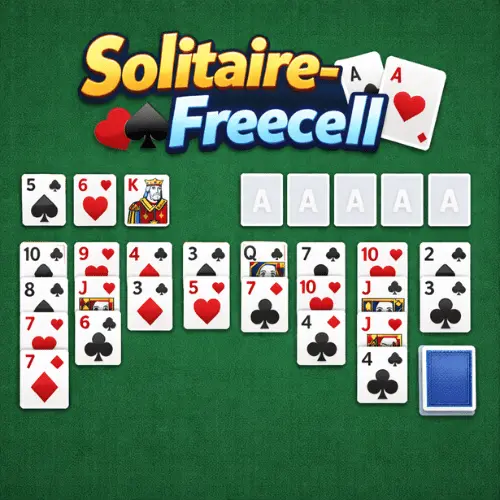
Freecell is a beloved solitaire variant that challenges players with strategic thinking and careful planning. Unlike other solitaire games, all 52 cards are dealt face-up at the start,…
 Works on Desktop & Mobile
Tested By BunaGames
- Test date
- May 22, 2026
- Tested on
- Chrome 150
- Device
- Desktop
- Operating system
- macOS and Windows
- Game loaded successfully
- Yes
- Fullscreen works
- Yes
- Sound works
- Yes
- Save progress
- Local browser storage
- Mobile compatibility
- Partially tested
- Keyboard controls
- Working
- Controller support
- Not detected
- Average loading time
- 4.2 seconds
- Known issues
- Minor delay after entering fullscreen
Freecell not loading?
- Refresh the page.
- Disable restrictive content blockers temporarily.
- Confirm JavaScript and WebGL are enabled.
- Clear the browser cache.
- Try another modern browser.
- Close unnecessary tabs.
- Switch off VPN if the game server is blocked.
- Use the Report a Problem button if the issue continues.
Continue Playing
Daily Challenge

Play 4 minutes today in Freecell.
Leaderboard
- 1Community rating4.7 ★
- 2Player likes1.1K
- 3Total votes1.2K
- 4Your local progress0%
Your progress is saved locally in this browser. No account required.
 Your progress is saved locally in this browser. No account required.
Game Progress & Challenges
Why Play This Game?
 Instant PlayPlay instantly in your browser.
 Mobile FriendlyOptimized for all devices.
 Free to PlayNo hidden fees.
About "Freecell"
Freecell is a beloved solitaire variant that challenges players with strategic thinking and careful planning. Unlike other solitaire games, all 52 cards are dealt face-up at the start, giving you complete visibility of the game state. This transparency transforms the experience from luck-based to purely skill-driven, making every move count toward victory.
The game gained massive popularity as one of the classic online games included with Windows operating systems, introducing millions to its unique blend of strategy and patience. Today, you can enjoy this timeless card game directly in your browser without any downloads or installations required.
Gameplay
The objective is to move all cards to four foundation piles, building each suit from Ace to King in ascending order. The game begins with eight tableau columns containing varying numbers of cards, all face-up for strategic planning.
Four empty spaces called free cells serve as temporary storage for individual cards, providing crucial maneuvering room during gameplay. Cards in the tableau must be arranged in descending order with alternating colors, similar to other solitaire variants but with the added strategic element of the free cells.
Success requires careful sequencing of moves, as blocked cards can only be accessed by clearing the cards above them. The challenge lies in efficiently using the limited free cell spaces while building sequences that ultimately lead to foundation completion.
Platform
This card game runs seamlessly in any modern web browser, making it accessible across desktop computers, laptops, tablets, and smartphones. The browser-based platform ensures instant access without requiring downloads, installations, or account registrations.
Compatible with Windows, Mac, iOS, and Android devices, the game adapts to different screen sizes while maintaining optimal playability. Whether you prefer playing during breaks at work or relaxing at home, the responsive design delivers a consistent gaming experience across all platforms.
How to Play "Freecell"
Begin by examining the initial card layout to identify potential moves and plan your strategy. Move cards between tableau columns by placing them in descending order with alternating colors - red cards on black cards and vice versa.
Utilize the four free cells to temporarily store cards that block access to needed cards below them. Only one card can occupy each free cell at any time, so use these spaces strategically.
Build foundation piles starting with Aces and continuing in ascending order by suit. Once a card is placed on a foundation, it typically stays there for the remainder of the game.
Focus on exposing buried cards by creating empty tableau columns, which provide additional maneuvering space for longer card sequences.
Controls
Click or tap on a card to select it, then click on the destination location to complete the move. Valid moves are highlighted automatically to guide your gameplay decisions.
Double-click or double-tap cards to automatically move them to appropriate foundation piles when possible. This feature speeds up gameplay once you become familiar with the mechanics.
Use the undo button to reverse recent moves if you realize a better strategy. Some versions offer multiple undo levels, allowing you to experiment with different approaches.
Right-click or long-press on cards for additional options like moving to free cells or foundations when multiple destinations are available.
Can "Freecell" Unblocked?
Access this classic solitaire game instantly through your web browser without encountering network restrictions or blocked content. The game loads directly from the website, bypassing common filtering systems found in schools, offices, and public networks.
No special software, plugins, or permissions are required to play free solitaire games online. The lightweight design ensures quick loading times even on slower internet connections.
Enjoy uninterrupted gameplay sessions without advertisements or pop-ups disrupting your concentration. The clean interface focuses entirely on the card game experience.
Tips for "Freecell"
Always prioritize creating empty tableau columns, as they provide maximum flexibility for moving card sequences. Empty columns can temporarily hold any card or properly sequenced group of cards.
Plan several moves ahead before committing to a strategy. Since all cards are visible, take advantage of this information to avoid dead-end situations.
Use free cells wisely by storing cards that will be needed later in the game. Avoid filling all free cells simultaneously, as this severely limits your movement options.
Focus on exposing Aces and low-numbered cards early, as these form the foundation of your winning strategy. Build foundation piles consistently rather than waiting until the end.
When multiple moves are possible, choose the option that reveals the most new cards or creates the most future opportunities.
Features "Freecell"
Experience the complete classic solitaire gameplay with all traditional rules and mechanics intact. The game maintains the authentic feel that made Freecell a worldwide phenomenon.
Enjoy unlimited gameplay with randomly shuffled deals, ensuring each game presents unique challenges and strategic opportunities. Statistics tracking helps monitor your improvement over time.
Benefit from helpful features like move validation, auto-complete options, and hint systems that guide learning without removing the strategic challenge.
The responsive design adapts perfectly to different screen sizes while maintaining clear card visibility and easy interaction. Smooth animations enhance the playing experience without slowing down gameplay.
Best "Freecell" Similar Games & Top Picks
- Blackjack: Play free Blackjack online in your browser. Learn card values, Hit and Stand decisions, controls, tips, and how to beat the dealer.
- Solitaire: Play classic Solitaire online in your browser. Build foundation piles, organize the tableau, and use smart card-game strategy.
- Klondike Solitaire: Play Klondike Solitaire free in your browser. Build foundations, sequence cards, use the stock wisely, and enjoy classic solitaire with no download.
- Daily Solitaire Challenge: Play Daily Solitaire Challenge online. Build suits from ace to king, solve a fresh card puzzle, and sharpen patience, focus, and strategy.
- PokeRogue: PokeRogue fuses Pokémon battles with roguelite mechanics. Gather stacking items, explore biomes, face gym leaders, and battle endlessly in your browser.
FAQ - Freecell
How do you win at Freecell solitaire?
To win Freecell, move all 52 cards to the four foundation piles, building each suit from Ace to King in ascending order. Use the tableau columns and free cells strategically to expose and organize cards for foundation building.
Can every Freecell game be won?
Nearly all Freecell deals are winnable with perfect play, making it primarily a game of skill rather than luck. The complete visibility of all cards from the start allows for strategic planning and optimal move sequences.
What are the free cells used for?
Free cells serve as temporary storage spaces for individual cards. You can use these four spaces to move cards out of the way, access buried cards, or reorganize sequences. Only one card can occupy each free cell at a time.
How many cards can you move at once in Freecell?
You can move properly sequenced groups of cards between tableau columns, but the number depends on available free cells and empty columns. More empty spaces allow for moving longer sequences in a single action.
Is Freecell harder than regular solitaire?
Freecell requires more strategic thinking than luck-based solitaire variants since all cards are visible from the start. While this eliminates the luck factor, it demands careful planning and foresight to achieve victory.
More Games Like This
 Reversi
Card ★ 4.5
Reversi
Card ★ 4.5
 Chinese Checkers
Card ★ 4.6
Chinese Checkers
Card ★ 4.6
 Ludo
Card ★ 4.7
Ludo
Card ★ 4.7
 Mancala
Card ★ 4.7
Mancala
Card ★ 4.7
 Papas Sushiria
Card ★ 4.6
Papas Sushiria
Card ★ 4.6
 Papas Wingeria
Card ★ 4.6
Papas Wingeria
Card ★ 4.6
 Papas Scooperia
Card ★ 4.7
Papas Scooperia
Card ★ 4.7
 Papas Pizzeria
Card ★ 4.6
Papas Pizzeria
Card ★ 4.6
 Papas Freezeria
Card ★ 4.6
Papas Freezeria
Card ★ 4.6
 Golf Solitaire
Card ★ 4.7
Golf Solitaire
Card ★ 4.7
 Pyramid Solitaire
Card ★ 4.5
Pyramid Solitaire
Card ★ 4.5
 Papas Taco Mia
Card ★ 4.6
Papas Taco Mia
Card ★ 4.6
 Papas Cupcakeria
Card ★ 4.6
Papas Cupcakeria
Card ★ 4.6
 Hello Neighbor
Card ★ 4.7
Hello Neighbor
Card ★ 4.7
 sprunki phase 8
Card ★ 4.7
sprunki phase 8
Card ★ 4.7
 Fly the Plane
Card ★ 4.8
Fly the Plane
Card ★ 4.8
 Melon Playground
Card ★ 4.7
Melon Playground
Card ★ 4.7
 Sprunkr
Card ★ 4.4
Sprunkr
Card ★ 4.4
 Report a Problem
Play Anytime, Anywhere
Add BunaGames to your home screen for quick access to your favorite games!
Comments About Freecell