



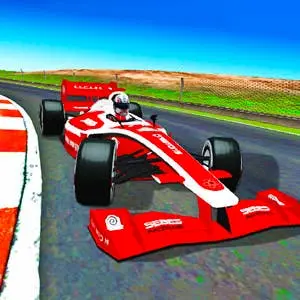
Grand Extreme Racing
Grand Extreme Racing is a high-speed browser racing game built around fast cars, demanding tracks, and competitive race events. Choose a driver and a race car, then work…
 Works on Desktop & Mobile
Tested By BunaGames
- Test date
- June 13, 2026
- Tested on
- Chrome 150
- Device
- Desktop
- Operating system
- macOS and Windows
- Game loaded successfully
- Yes
- Fullscreen works
- Yes
- Sound works
- Yes
- Save progress
- Local browser storage
- Mobile compatibility
- Partially tested
- Keyboard controls
- Working
- Controller support
- Not detected
- Average loading time
- 4.2 seconds
- Known issues
- Minor delay after entering fullscreen
Grand Extreme Racing not loading?
- Refresh the page.
- Disable restrictive content blockers temporarily.
- Confirm JavaScript and WebGL are enabled.
- Clear the browser cache.
- Try another modern browser.
- Close unnecessary tabs.
- Switch off VPN if the game server is blocked.
- Use the Report a Problem button if the issue continues.
Continue Playing
Daily Challenge

Play 5 minutes today in Grand Extreme Racing.
Leaderboard
- 1Community rating4.6 ★
- 2Player likes522
- 3Total votes588
- 4Your local progress0%
Your progress is saved locally in this browser. No account required.
 Your progress is saved locally in this browser. No account required.
Game Progress & Challenges
Why Play This Game?
 Instant PlayPlay instantly in your browser.
 Mobile FriendlyOptimized for all devices.
 Free to PlayNo hidden fees.
About "Grand Extreme Racing"
Grand Extreme Racing is a high-speed browser racing game built around fast cars, demanding tracks, and competitive race events. Choose a driver and a race car, then work through a long championship journey where every circuit asks for controlled steering, clean cornering, and steady pace. The game includes ten maps, five cars, and five drivers, giving players several combinations to try before chasing the next result.
The central goal is simple: finish ahead of the field. Reaching that goal is more involved when tracks include major turns and opponents are fighting for the same racing line. You can race against AI drivers in solo events, use practice sessions to learn a circuit, enter challenge races for a focused test, or share the action through the two-player mode.
Grand Extreme Racing suits players looking for an accessible track-racing experience rather than an open-world driving game. Its event-based structure gives each session a clear purpose, whether you have time for a quick challenge or want to continue a championship campaign. It is one of the fast-paced browser games where learning the layout of each track can make a real difference to your finishing position.
Gameplay
Grand Extreme Racing centers on circuit competition. Before a race, select from the available drivers and cars, then take to one of the game’s ten maps. The action is about carrying speed through the course while keeping the car under control around big turns. A fast start can help, but a consistent lap is more valuable than repeatedly losing momentum after a difficult corner.
Solo play places you on the grid against AI-controlled drivers. These races create the core competitive rhythm: follow the track, manage your position in traffic, and try to cross the line ahead of the other cars. The championship mode provides the longest-form objective, inviting players to pursue world championship cups across a series of races instead of treating every event as a standalone run.
Practice and challenge races add useful variety. Practice is the place to become familiar with a map before results matter, while a challenge race offers a direct racing task when you want immediate competition. This separation is valuable because track knowledge is a gameplay advantage. Once you know where a turn tightens, where the road opens, and where a mistake costs speed, you can approach the same circuit with more confidence.
Two-player mode changes the feel of the game by putting another person into the contest. Instead of only judging your performance against AI racers, you can compete side by side for track position and the better finish. Whether playing alone or with another player, the strongest approach is to combine speed with restraint: accelerate confidently on clear sections, then prepare early for the turns that decide the lap.
Platform
Grand Extreme Racing is presented as an online browser game, so it is designed to be played directly through a compatible web browser rather than as a separate racing simulator installation. Open the game page, allow it to load fully, and begin from its menu. The browser format makes it convenient for players who want a quick race session without searching for a download.
The game’s racing modes, car selection, driver selection, tracks, and event choices are accessed from the in-game interface. Because browser performance can depend on the device and connection in use, give the game a moment to finish loading before starting an important race. If the action feels less responsive than expected, closing extra browser tabs can help reduce competing activity on your device.
A keyboard is the most practical input option for a game that requires prompt steering and speed changes. Before entering a championship event or two-player race, check the game’s own control prompts and menu options. They are the most reliable guide for the version currently running in your browser.
How to Play "Grand Extreme Racing"
- Load the game and review the menu. Wait for Grand Extreme Racing to finish loading, then look through the available race options. The game offers championship racing, practice sessions, challenge races, and a two-player mode.
- Choose a driver and car. There are five drivers and five race cars to select from. Try more than one combination over time so you can decide which choice feels most comfortable for your racing style.
- Pick a mode with a purpose. Start with practice if a map is unfamiliar. Choose challenge races when you want a contained race objective, or enter the championship when you are ready to pursue world championship cups over a longer series.
- Learn the selected track. The game contains ten maps. Focus on where the major turns appear, how quickly the car needs to change direction, and which sections allow you to regain speed after a corner.
- Race against the field. In single-player events, compete with AI drivers for the best finishing place. Keep the car on a stable line, avoid wasting speed in turns, and use cleaner exits to improve your position.
- Use two-player mode for direct competition. If another player is available, choose the two-player option and race for the better result. This mode is especially useful for friendly rematches because both players can return to the same tracks and test different cars or drivers.
- Build toward better results. A difficult race is also information. Return to practice, identify the corners that cost time, and attempt the event again with a more controlled approach.
The most effective way to progress is to treat practice as preparation, not as a separate distraction from racing. A few focused laps can reveal the rhythm of a circuit and make championship or challenge attempts less unpredictable.
Controls
Grand Extreme Racing requires responsive steering and speed management, especially when approaching the larger turns on a track. The exact input prompts are shown by the game itself, so check the opening screen or in-game menu before you begin. This is particularly important before a two-player race, where each participant needs to know their assigned controls.
| Racing action | What to check |
|---|---|
| Steering | Displayed direction inputs |
| Acceleration | Displayed speed input |
| Braking or slowing | Displayed control prompt |
| Two-player setup | Each player’s inputs |
Use a light touch when correcting your line. Sudden, repeated steering changes can make it harder to hold a clean route through a corner. Learn the controls in practice first, then bring that confidence into challenge races or the championship.
Can "Grand Extreme Racing" Unblocked?
Grand Extreme Racing can be played online in a browser when the game page is available on your current network and device. It does not require a separate game installation to begin a session on this page. Load the page, wait for the game interface, and select the racing mode you want to play.
Access can still vary by location. Schools, workplaces, libraries, and managed networks may use their own web restrictions, and those policies are outside the game’s control. Use the game only where browser gaming is permitted and follow the rules of the network you are using.
If the game does not start immediately, refresh the page after checking your connection and make sure the browser has finished loading the game. Avoid repeatedly reloading during the first few moments, as game assets may still be loading. Once it is ready, you can move from the menu into practice, challenge, championship, or two-player racing.
Tips for "Grand Extreme Racing"
Learn one map at a time. Ten maps provide variety, but trying to memorize every circuit at once is unnecessary. Use practice mode on the track that is giving you trouble. Notice the sequence of turns rather than only reacting when the next corner arrives.
Prepare for corners early. Major turns are where speed can disappear. Begin setting up your direction before reaching the tightest part of a turn. A smoother route through the corner usually leaves the car in a better position to accelerate afterward.
Prioritize clean exits. Do not focus only on entering a bend at maximum speed. A stable exit onto a clearer section can be more useful because it lets you build pace without needing immediate corrections. In a race against AI opponents, this can create opportunities to gain track position over several turns.
Use practice as track reconnaissance. Practice sessions are a low-pressure way to identify the spots where you regularly lose control or momentum. Make a specific adjustment on the next lap: steer earlier, reduce unnecessary movement, or choose a more consistent line. Small changes are easier to evaluate than changing your entire approach at once.
Choose events strategically. Challenge races are useful when you want a direct test on a selected course. Championship races are better when you want to pursue the broader goal of winning cups. Switching modes can keep the game engaging while helping you return to the championship with stronger track familiarity.
Race the course, not just the opponents. AI drivers create pressure, but chasing every nearby car can lead to rushed turns. Keep attention on your own line and speed. A controlled lap can move you forward when opponents make mistakes.
Make two-player races meaningful. For repeat matches, agree to revisit the same map with different cars or drivers. That creates a more useful comparison than changing everything at once, and it gives both players a chance to improve on a familiar circuit.
Features "Grand Extreme Racing"
- Championship adventure: Race through a longer progression built around competing for world championship cups.
- Practice sessions: Spend time learning a circuit before taking on more competitive races.
- Challenge races: Choose focused racing events when you want quick, direct competition.
- Single-player competition: Race against AI drivers and work toward the best finishing position.
- Two-player mode: Compete with another player on the same racing game.
- Ten maps: Drive across a set of different tracks, each offering its own turns and racing rhythm.
- Five race cars: Select from five cars before entering an event.
- Five drivers: Pick a driver to take to the starting grid.
- Fast track-racing focus: The experience emphasizes speed, control, big turns, and consistent circuit performance.
The game’s strongest feature is how these elements support different kinds of players. A newcomer can use practice to get comfortable with steering and track layouts. A solo racer can focus on AI competition and championship progress. Players sharing a device can choose two-player mode for a more immediate contest.
There is also a useful replay loop in the combination of maps, cars, drivers, and event types. Returning to a circuit after a difficult finish is not simply repeating the same race: it is an opportunity to apply what you learned about the corners, experiment with another selection, and aim for a cleaner performance.
Grand Extreme Racing keeps its focus on organized racing rather than distractions. Select an event, get onto the track, handle the turns, and pursue the finish. That clear structure makes it easy to understand while still rewarding players who pay attention to the details of every lap.
Best "Grand Extreme Racing" Similar Games & Top Picks
- Speed Racing Pro 2: Race 12 free supercars in Speed Racing Pro 2. Choose regular or elimination events and compete on fast 3D circuit tracks.
- Cyber Cars Punk Racing 2: Play Cyber Cars Punk Racing 2 online free. Explore futuristic racing modes, neon roads, cars, challenges, and helpful beginner tips.
- Cyber Cars Punk Racing: Play Cyber Cars Punk Racing online: a 3D futuristic driving game with neon city races, career progress, many tracks, and 2-player action.
- Crash X: Play Crash X online free: drive across steep descents and climbs, test car control, and watch realistic vehicle deformation in crashes.
- Cars Arena: Play Cars Arena, a 3D physics-based drifting battle game where rivals compete for space on a breaking hex platform.
FAQ - Grand Extreme Racing
What is Grand Extreme Racing?
Grand Extreme Racing is an online car racing game focused on fast circuit events. Players choose from available drivers and race cars, compete on tracks with major turns, and try to finish ahead of opponents. Its modes include championship racing, practice, challenge races, single-player events against AI drivers, and two-player play.
Can I play Grand Extreme Racing in a browser?
Yes. The game is presented as a browser-based online game and can be started from its game page once it has loaded. You do not need to install a separate racing game to access the session on this page.
Is Grand Extreme Racing free to play?
Grand Extreme Racing is available to play online for free on this game page. Open the page, wait for the game to load, and use the in-game menu to choose a race mode. Network access rules may vary on managed connections such as school or workplace networks.
How many cars, drivers, and maps are in the game?
The game includes five race cars, five drivers, and ten maps. These choices let you change your racing setup and experience multiple track layouts while progressing through the available events.
What game modes does Grand Extreme Racing have?
You can enter a championship adventure, run practice sessions, join challenge races, race AI opponents in single-player play, or select the two-player mode. Practice is helpful for learning a course, while the championship is the main long-form route for pursuing world championship cups.
Does Grand Extreme Racing have two-player mode?
Yes. The game includes a two-player mode for racing against another player. Check the in-game control prompts before starting so both players understand the current input layout.
How do I improve at the game?
Use practice mode to learn the shape and turn sequence of each map. Prepare for corners early, avoid unnecessary steering corrections, and focus on a stable exit from each turn. Clean, repeatable laps are usually more effective than trying to force maximum speed through every corner.
What are the controls for Grand Extreme Racing?
The game displays its current control prompts in its own interface. Review them before racing, especially when setting up a two-player event. The essential skills are steering accurately, managing speed into turns, and keeping the car settled through the track’s larger corners.
More Games Like This
 Bike Hero
Car ★ 4.6
Bike Hero
Car ★ 4.6
 Crazy Stunt Cars Multiplayer
Car ★ 4.6
Crazy Stunt Cars Multiplayer
Car ★ 4.6
 Stunt Car Challenge 3
Car ★ 4.7
Stunt Car Challenge 3
Car ★ 4.7
 Drive Mad 3
Car ★ 4.6
Drive Mad 3
Car ★ 4.6
 Papas Sushiria
Car ★ 4.6
Papas Sushiria
Car ★ 4.6
 Papas Wingeria
Car ★ 4.6
Papas Wingeria
Car ★ 4.6
 Papas Scooperia
Car ★ 4.7
Papas Scooperia
Car ★ 4.7
 Car Rush
Car ★ 4.6
Car Rush
Car ★ 4.6
 Papas Pizzeria
Car ★ 4.6
Papas Pizzeria
Car ★ 4.6
 Papas Freezeria
Car ★ 4.6
Papas Freezeria
Car ★ 4.6
 Madalin Stunt Cars 3
Car ★ 4.5
Madalin Stunt Cars 3
Car ★ 4.5
 Papas Taco Mia
Car ★ 4.6
Papas Taco Mia
Car ★ 4.6
 Papas Cupcakeria
Car ★ 4.6
Papas Cupcakeria
Car ★ 4.6
 Moto X3m Spooky Land
Car ★ 4.7
Moto X3m Spooky Land
Car ★ 4.7
 Moto X3m Winter
Car ★ 4.7
Moto X3m Winter
Car ★ 4.7
 Retro Highway
Car ★ 4.4
Retro Highway
Car ★ 4.4
 Speed Master
Car ★ 4.7
Speed Master
Car ★ 4.7
 Loop Crash
Car ★ 4.6
Loop Crash
Car ★ 4.6
 Report a Problem
Comments About Grand Extreme Racing