



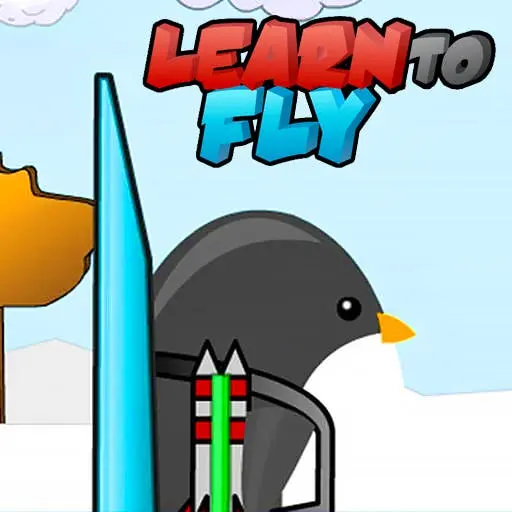
Learn to Fly
Learn to Fly is a physics-based distance game where you launch a flightless penguin into the air and upgrade equipment to achieve greater altitude and range. Inspired by…
 Works on Desktop & Mobile
Tested By BunaGames
- Test date
- May 27, 2026
- Tested on
- Chrome 150
- Device
- Desktop
- Operating system
- macOS and Windows
- Game loaded successfully
- Yes
- Fullscreen works
- Yes
- Sound works
- Yes
- Save progress
- Local browser storage
- Mobile compatibility
- Partially tested
- Keyboard controls
- Working
- Controller support
- Not detected
- Average loading time
- 4.2 seconds
- Known issues
- Minor delay after entering fullscreen
Learn to Fly not loading?
- Refresh the page.
- Disable restrictive content blockers temporarily.
- Confirm JavaScript and WebGL are enabled.
- Clear the browser cache.
- Try another modern browser.
- Close unnecessary tabs.
- Switch off VPN if the game server is blocked.
- Use the Report a Problem button if the issue continues.
Continue Playing
Daily Challenge

Play 4 minutes today in Learn to Fly.
Leaderboard
- 1Community rating4.7 ★
- 2Player likes910
- 3Total votes997
- 4Your local progress0%
Your progress is saved locally in this browser. No account required.
 Your progress is saved locally in this browser. No account required.
Game Progress & Challenges
Why Play This Game?
 Instant PlayPlay instantly in your browser.
 Mobile FriendlyOptimized for all devices.
 Free to PlayNo hidden fees.
About "Learn to Fly"
Learn to Fly is a physics-based distance game where you launch a flightless penguin into the air and upgrade equipment to achieve greater altitude and range. Inspired by momentum-driven arcade challenges, this title combines launch mechanics with an incremental progression system that rewards strategic equipment selection and timing. Unlike passive flight simulators, every run generates currency based on distance traveled, altitude reached, and bonus objectives, which you reinvest into gliders, rockets, and payload modifications. The core loop centers on experimental launches that test equipment synergy against aerodynamic drag and gravity, creating a satisfying cycle of failure, analysis, and improvement. As one of the defining entries in the online games distance genre, it balances accessible controls with depth in upgrade paths and flight angle optimization.
Gameplay
Each session begins at the launch ramp where you select your loadout: a glider for lift and control, a booster for initial velocity, and optional payload items that modify flight characteristics. You accelerate down the ramp and launch at a chosen angle, then manage mid-air booster activation to extend horizontal distance. Gravity and air resistance constantly pull the penguin downward, making booster timing and glider efficiency critical to maximizing range. The flight ends when you hit the ground or water, and the game calculates earnings based on total distance, maximum height, and bonus targets like flips or speed thresholds.
Between runs, you access the upgrade shop to purchase improved gliders with better lift coefficients, more powerful rocket boosters with longer burn times, and experimental payloads that alter weight distribution or add secondary propulsion. Each upgrade tier unlocks new strategic possibilities: lightweight gliders favor sustained glides, heavy-duty rockets enable aggressive launch angles, and balanced builds optimize consistency. The gameplay rhythm alternates between short, high-stakes flights and deliberate upgrade decisions, creating a progression arc that spans dozens of launches as you push toward distance milestones and unlock the full equipment catalog.
Platform
Learn to Fly runs directly in web browsers without installation, using Flash emulation or HTML5 depending on the hosting platform. This makes it accessible on desktop and laptop computers through Chrome, Firefox, Safari, and Edge, with no account creation or download required. The play free model means you can start launching immediately after page load, and progress typically saves via browser cookies for return sessions.
The game is optimized for mouse-based input, which suits the precision needed for launch angle adjustment and booster activation timing. Chromebook compatibility is confirmed across multiple educational game portals, making it a popular choice in school environments where browser-based entertainment is the primary option. Mobile and tablet versions exist as separate apps, but the browser edition remains the most widely played format due to its zero-friction access and consistent performance across standard desktop hardware.
How to Play "Learn to Fly"
Start by reviewing your current equipment loadout in the pre-launch screen. Select your glider type, booster configuration, and any unlocked payload items based on your current upgrade level and distance goals. Click to begin the launch sequence, which places the penguin at the top of the ramp.
As the penguin slides down, click and hold to build momentum, then release at the optimal moment to launch into the air. The launch angle is determined by your release timing—earlier releases create steeper angles for height, while later releases favor shallow trajectories for distance. Once airborne, activate your booster by clicking or holding the designated input to add forward thrust. Monitor your altitude and speed, using booster bursts strategically to counteract gravity and extend your flight path.
After landing, review your performance stats: total distance, maximum altitude, and bonus achievements. Collect your earnings and return to the upgrade shop. Purchase better gliders to improve lift and control, stronger boosters for greater thrust, or experimental items that unlock new flight mechanics. Repeat the launch cycle, applying lessons from previous flights to optimize angle, booster timing, and equipment synergy until you reach the next distance milestone or complete all upgrade tiers.
Controls
- Mouse Click: Initiate launch sequence and control release timing for launch angle
- Click/Hold: Activate rocket booster during flight to add forward thrust
- Mouse Movement: Adjust pre-launch settings and navigate upgrade menus
- Spacebar (alternate): Some versions support spacebar for booster activation
The control scheme prioritizes timing precision over complex inputs. Launch angle is the most critical input, determined by when you release during the ramp descent. Booster activation timing during flight is the secondary skill, requiring you to balance fuel consumption against distance needs. All menu navigation and upgrade purchases use standard mouse clicks, keeping the interface streamlined for rapid iteration between flights and shop visits.
Can "Learn to Fly" Unblocked?
Learn to Fly is widely available on unblocked game platforms designed for school and workplace networks where entertainment sites are typically restricted. These portals host the game on educational or math-focused domains that bypass common content filters, allowing access on Chromebooks and managed networks without triggering security blocks.
The browser-based architecture requires no downloads, plugins, or account logins, which eliminates the installation barriers that often trigger network restrictions. Because the game runs entirely client-side after initial asset loading, it generates minimal ongoing network traffic, making it less likely to be flagged by bandwidth monitoring systems. Multiple mirror sites host identical versions, so if one domain is restricted, alternative unblocked portals typically remain accessible. This distributed availability has made Learn to Fly a staple in school gaming communities where students seek quick, engaging browser games during breaks.
Tips for "Learn to Fly"
- Prioritize glider upgrades early: Improved lift coefficients extend every flight regardless of booster power, providing consistent value across all runs and enabling you to reach higher-tier equipment faster.
- Experiment with launch angles: Shallow angles (late releases) maximize horizontal distance on flat terrain, while steeper angles help clear obstacles or achieve altitude bonuses that unlock special rewards.
- Delay booster activation: Firing rockets immediately after launch wastes fuel during the high-speed phase. Wait until your velocity drops to maintain momentum efficiently and extend total flight time.
- Balance weight and power: Heavy payloads increase earnings per flight but reduce glide efficiency. Match payload weight to your current booster power to avoid premature stalls.
- Target bonus objectives: Completing flips, speed thresholds, or altitude challenges awards bonus currency that accelerates upgrade progression more than raw distance alone.
- Upgrade in tiers: Avoid over-investing in a single component. Balanced upgrades across glider, booster, and payload create synergistic performance gains that outpace specialized builds in early progression.
Features "Learn to Fly"
- Incremental upgrade system: Earn currency from every flight to purchase gliders, boosters, and payloads across multiple performance tiers, creating a persistent progression arc.
- Physics-driven flight mechanics: Realistic gravity, drag, and momentum calculations require strategic booster timing and angle optimization rather than reflexive button mashing.
- Equipment synergy depth: Glider lift, booster thrust, and payload weight interact dynamically, rewarding players who experiment with loadout combinations tailored to specific distance goals.
- Bonus objective system: Secondary challenges like altitude records, flip counts, and speed milestones provide additional currency sources and encourage varied playstyles beyond pure distance runs.
- Instant browser access: No installation, registration, or plugin requirements—launch the game and start playing within seconds on any standard desktop browser.
- Session-based gameplay: Each flight lasts 10–30 seconds, making it ideal for quick breaks while maintaining long-term progression hooks that encourage return sessions.
- Visual feedback clarity: Clear distance markers, altitude indicators, and performance stats after each flight provide immediate feedback for iterative improvement.
Best "Learn to Fly" Similar Games & Top Picks
- Dune Surfer Game: Play Dune Game in your browser on BunaGames. Learn how to start, check the controls, use practical tips, and understand the game page.
- Pokemon Emerald: Play Pokemon Emerald online and explore Hoenn, train Pokémon, battle rivals, build a team, and face Team Magma and Team Aqua.
- Boulder Dash: Play Boulder Dash online. Dig through caves, collect diamonds, avoid falling boulders, and plan every move in this classic puzzle game.
- Vib-Ribbon: Play Vib-Ribbon online and guide Vibri across beat-timed obstacle lines in this distinctive rhythm arcade game.
- Zombie Tsunami: Play Zombie Tsunami online and lead a growing zombie horde through city obstacles, pedestrians, destruction, and surprise power-ups.
FAQ - Learn to Fly
Can I play Learn to Fly for free in my browser?
Yes, Learn to Fly is completely free to play in web browsers without downloads or account creation. The game loads directly on the page and saves progress via browser cookies, allowing you to return and continue your upgrade progression across sessions.
What is the main goal in Learn to Fly?
The primary objective is to launch a penguin as far as possible by upgrading gliders, rocket boosters, and payloads. Each flight earns currency based on distance, altitude, and bonus objectives, which you reinvest to improve equipment and reach greater distances in subsequent launches.
How do I control the penguin during flight?
You control launch angle by timing your mouse click release as the penguin descends the ramp—earlier releases create steeper angles, later releases favor distance. During flight, click or hold to activate your rocket booster and add forward thrust, extending your airtime and range.
What upgrades should I buy first?
Prioritize glider upgrades early because improved lift extends every flight regardless of booster power. Once you have a mid-tier glider, balance booster and payload upgrades to match your playstyle—lightweight builds favor consistency, while heavy payloads with strong boosters maximize single-run earnings.
Does Learn to Fly work on Chromebooks and school networks?
Yes, the game is widely available on unblocked game portals optimized for Chromebooks and school networks. It requires no plugins or downloads, runs entirely in the browser, and is hosted on educational domains that typically bypass content filters.
How does the upgrade system work?
After each flight, you earn currency based on distance traveled, maximum altitude, and completed bonus objectives. You spend this currency in the shop to purchase better gliders, more powerful boosters, and experimental payloads. Each upgrade tier unlocks new performance capabilities, creating a progression loop that spans dozens of flights.
Can I play Learn to Fly on mobile devices?
The browser version is optimized for desktop and laptop computers with mouse input. Separate mobile and tablet apps exist on iOS and Android app stores, but the original browser edition remains the most accessible version for quick, no-install gameplay on standard computers.
More Games Like This
 Ball Surfer 3D
Arcade ★ 4.7
Ball Surfer 3D
Arcade ★ 4.7
 Galaga
Arcade ★ 4.7
Galaga
Arcade ★ 4.7
 Osu Game
Arcade ★ 4.7
Osu Game
Arcade ★ 4.7
 Dig Dug 2
Arcade ★ 4.4
Dig Dug 2
Arcade ★ 4.4
 Pac Xon
Arcade ★ 4.8
Pac Xon
Arcade ★ 4.8
 Colorbox Mustard
Arcade ★ 4.6
Colorbox Mustard
Arcade ★ 4.6
 Blumgi Slime
Arcade ★ 4.7
Blumgi Slime
Arcade ★ 4.7
 Rolling Ball 3D
Arcade ★ 4.7
Rolling Ball 3D
Arcade ★ 4.7
 Burrito Bison
Arcade ★ 4.6
Burrito Bison
Arcade ★ 4.6
 Dumb Ways To Die 2
Arcade ★ 4.8
Dumb Ways To Die 2
Arcade ★ 4.8
 Papas Sushiria
Arcade ★ 4.6
Papas Sushiria
Arcade ★ 4.6
 Papas Wingeria
Arcade ★ 4.6
Papas Wingeria
Arcade ★ 4.6
 Papas Scooperia
Arcade ★ 4.7
Papas Scooperia
Arcade ★ 4.7
 Papas Pizzeria
Arcade ★ 4.6
Papas Pizzeria
Arcade ★ 4.6
 Papas Freezeria
Arcade ★ 4.6
Papas Freezeria
Arcade ★ 4.6
 Crazy Roll 3D
Arcade ★ 4.6
Crazy Roll 3D
Arcade ★ 4.6
 Papas Taco Mia
Arcade ★ 4.6
Papas Taco Mia
Arcade ★ 4.6
 Fnf Garcello
Arcade ★ 4.6
Fnf Garcello
Arcade ★ 4.6
 Report a Problem
Comments About Learn to Fly