



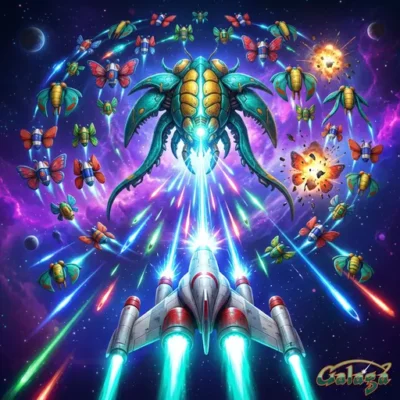
Galaga
Galaga is a classic fixed shooter arcade game released in 1981 by Namco. It places you in control of a starship facing the Galaga forces, with one clear…
 Works on Desktop & Mobile
Tested By BunaGames
- Test date
- 1981
- Tested on
- Chrome 150
- Device
- Desktop
- Operating system
- macOS and Windows
- Game loaded successfully
- Yes
- Fullscreen works
- Yes
- Sound works
- Yes
- Save progress
- Local browser storage
- Mobile compatibility
- Partially tested
- Keyboard controls
- Working
- Controller support
- Not detected
- Average loading time
- 4.2 seconds
- Known issues
- Minor delay after entering fullscreen
Galaga not loading?
- Refresh the page.
- Disable restrictive content blockers temporarily.
- Confirm JavaScript and WebGL are enabled.
- Clear the browser cache.
- Try another modern browser.
- Close unnecessary tabs.
- Switch off VPN if the game server is blocked.
- Use the Report a Problem button if the issue continues.
Continue Playing
Daily Challenge

Play 7 minutes today in Galaga.
Leaderboard
- 1Community rating4.7 ★
- 2Player likes1.2K
- 3Total votes1.3K
- 4Your local progress0%
Your progress is saved locally in this browser. No account required.
 Your progress is saved locally in this browser. No account required.
Game Progress & Challenges
Why Play This Game?
 Instant PlayPlay instantly in your browser.
 Mobile FriendlyOptimized for all devices.
 Free to PlayNo hidden fees.
About "Galaga"
Galaga is a classic fixed shooter arcade game released in 1981 by Namco. It places you in control of a starship facing the Galaga forces, with one clear objective: keep firing and destroy the attacking enemies. Its direct arcade design makes every moment easy to understand at first glance, yet tense when the screen fills with hostile movement and incoming pressure.
As a sequel to Galaxian, Galaga belongs to one of arcade gaming's best-known space-shooter lineages. The game is built around a focused format rather than a large map, story campaign, or complicated equipment system. You enter the action, guide your ship, use rapid-fire missiles, and work to clear the alien threat. That concentration is a major reason the game remains memorable: the rules are immediate, while staying composed during a difficult encounter is the real challenge.
This browser version is suited to players who want classic arcade action without a lengthy setup. It is a compact choice among browser games for quick sessions, score-focused practice, and a recognizable retro space battle. Whether you know the original arcade cabinet or are trying this landmark shooter for the first time, Galaga offers a clear, skill-centered mission from the opening start.
Gameplay
Galaga is a fixed shooter, meaning its action is concentrated on a single arcade-style combat screen rather than spread across a scrolling level. You control a starship and confront the Galaga forces as they attack. The central gameplay loop is simple and readable: enter play, fire rapid missiles, avoid losing control of the situation, and eliminate the enemies in front of you.
The game’s strength comes from that narrow focus. There is no need to learn a long list of special abilities before playing. Instead, the important decisions happen during the action: when to begin firing, how to keep your attention on the active threats, and how to maintain a deliberate rhythm instead of reacting randomly. A fixed-screen shooter rewards awareness because the whole battle is presented in one concentrated space.
Rapid-fire missiles are a key part of Galaga’s identity. They give the player a constant offensive tool, but effective shooting still depends on attention and timing. Firing is not just decoration; it is the direct way to push back against the alien forces and make progress. The best approach is to keep the action readable rather than treating every encounter as a blur of button presses.
For new players, Galaga is approachable because the goal never becomes vague. For returning arcade fans, it remains appealing because the game makes the fundamentals matter: recognize the screen, react with purpose, and keep the pressure on the enemies. The result is a classic space shooter that feels fast, concentrated, and easy to replay.
Platform
Galaga began as an arcade game in 1981, and its fixed-shooter format remains especially well suited to browser play. A browser session preserves the game’s immediate character: open the game area, use a keyboard, start the action, and focus on the starship battle without needing a large installation or a long introduction.
The available online version is designed for keyboard play. Select the game area before sending input so the browser knows where to direct your commands. The game can then be played as a quick retro arcade session on a compatible desktop or laptop browser. Because the gameplay is centered on rapid response, a physical keyboard is the most appropriate way to interact with it.
Galaga is best approached as a focused browser arcade game rather than a feature-heavy modern release. Its original appeal is the same on the web: a recognizable screen, a direct mission, rapid missiles, and hostile alien forces. If you want an accessible online game with classic arcade structure, the browser format keeps that experience close to its essentials.
How to Play "Galaga"
Begin by selecting or clicking the active game area so it can receive keyboard input. Press the Space bar to start the game. Once play begins, you take control of the starship and face the Galaga forces in a fixed-screen battle.
Your objective is to destroy the enemy forces using the ship’s rapid-fire missiles. Keep your attention on the active game screen and respond to what is happening there. Galaga does not require a complicated explanation before the first session: the player ship, enemy threat, and shooting objective form the core of the experience immediately.
- Open the game and select the play area.
- Use the keyboard to interact with the game.
- Press Space to begin.
- Control the starship according to the game’s displayed input behavior.
- Fire rapid missiles at the Galaga forces.
- Stay focused on the screen and continue clearing the enemy threat.
For a stronger first attempt, avoid rushing through the opening seconds. Take a moment to notice the play area and the game’s response to your keyboard input. Once you understand the active screen, keep your attention on both your ship and the enemies. The goal is not to memorize a complex rulebook; it is to turn a clear mission into consistent arcade execution.
If the game does not react, click the game area again before pressing Space. This common browser-play step ensures that the keyboard input is directed to Galaga rather than another part of the page. After that, return your focus to the starship, the rapid-fire attack, and the enemy forces.
Controls
Galaga is played with a keyboard. Before using any commands, click or select the game area to make sure it has focus. This is especially important in a browser, where keyboard input may otherwise affect the page instead of the arcade game.
| Input | Purpose |
|---|---|
| Click game area | Activate keyboard input |
| Space bar | Start the game |
| Keyboard controls | Operate the starship |
Press Space when you are ready to start. During play, use the keyboard input recognized by the game to operate your starship and engage the Galaga forces. Keep the game area selected throughout the session for reliable control response.
If a command appears not to work, do not assume the game has stopped. First select the play area again, then retry the input. This simple check is useful for browser-based arcade games because focus can change after clicking elsewhere on the page.
Can "Galaga" Unblocked?
Galaga can be played online in a browser, giving players a straightforward way to access classic arcade action without a separate download. Select the game area, use a keyboard, and press Space to start. The browser format is useful when you want a quick session built around a single, recognizable objective: guide a starship and destroy the Galaga forces.
“Unblocked” access can depend on the network, device rules, browser settings, and any restrictions applied by a school, workplace, library, or shared connection. If a network blocks game pages, that restriction is controlled by the network rather than by the game itself. Use the game where browser gaming is permitted and where you are allowed to access entertainment content.
For players with normal web access, the value of browser Galaga is its low-friction setup. There is no need to search through a large menu before learning the basics. Click into the game, ensure the keyboard is active, press Space, and begin the fixed-screen shooter challenge. It is a practical option for a short retro gaming break or repeated score-and-skill practice.
Tips for "Galaga"
Galaga rewards a calm, observant approach. The game may look immediately simple because the goal is direct, but fixed-shooter action becomes more manageable when you treat the screen as a readable combat space rather than trying to respond to everything at once. Watch the Galaga forces, keep track of your starship, and use rapid-fire missiles with purpose.
- Select the game area first: Reliable keyboard focus is the first step to reliable play. Click the game before starting and again if the controls seem unresponsive.
- Use Space deliberately: Press the Space bar to begin only when you are ready to focus on the active screen.
- Keep the mission clear: Your task is to destroy the Galaga forces. Let that objective guide your attention instead of getting distracted by the surrounding page.
- Read the fixed screen: Because the battle takes place in a concentrated area, awareness is valuable. Look at the whole active play field, not only one small area.
- Make firing meaningful: Rapid-fire missiles are your main answer to the alien threat. Keep your offensive attention on the enemies rather than firing without watching the result.
- Practice in short sessions: Galaga’s arcade format makes it suitable for replay. A few focused attempts can help you become more familiar with the game’s pace and screen behavior.
A useful mindset is to prioritize clarity over speed. You do not need a complicated strategy to start enjoying Galaga. First establish control of the browser game, then understand the starship’s role, then concentrate on shooting the enemy forces. As your familiarity improves, the rapid action becomes easier to follow.
The biggest practical advantage of a classic fixed shooter is that it teaches through play. Each attempt gives immediate context for the mission: the player controls a ship, hostile forces appear on the screen, and rapid missiles are used to fight back. Keep those fundamentals in mind and let consistent attention do the work.
Features "Galaga"
Galaga delivers the defining elements of classic arcade shooting in a compact format. Its identity is not based on a large collection of modes or an elaborate storyline. Instead, it centers on a starship, an alien force, rapid-fire missiles, and the enduring challenge of a fixed-screen battle. That clarity makes it easy to pick up while preserving the focused feel associated with early arcade games.
- Classic 1981 arcade game: Galaga was released by Namco in 1981 and remains a recognized name in arcade history.
- Fixed-shooter gameplay: The action is concentrated on a single combat screen, keeping the mission visible and direct.
- Starship control: You play as the pilot of a ship tasked with fighting the Galaga forces.
- Rapid-fire missiles: Shooting is central to the game’s action, giving the player a constant way to engage the enemy threat.
- Galaxian connection: Galaga is a sequel to Galaxian, placing it within an important arcade shooter series.
- Keyboard browser play: Click the game area, use the keyboard, and press Space to start.
- Quick-session design: The direct objective makes the game suitable for short attempts as well as repeated practice.
The most valuable feature is Galaga’s economy of design. It communicates its purpose without excess: the player ship is on screen, the enemy forces are the target, and the rapid-fire attack is the tool for confronting them. This structure supports players who want immediate action while still giving the game a skill-based arcade feel.
Galaga also works well for players exploring the roots of space shooters. Its historical role as a Namco arcade release and sequel to Galaxian gives it context, but the game does not depend on that history to be understandable. Open it in the browser, start with Space, and the essential objective is already clear.
Best "Galaga" Similar Games & Top Picks
- Dig Dug 2: Play Dig Dug 2 online and clear island rounds in the 1985 Namco arcade sequel with overhead action and strategic enemy encounters.
- Ball Surfer 3D: Play Ball Surfer 3D online. Roll through a futuristic 3D course, dodge boxes, collect gems, use power-ups, and chase a longer run.
- Osu Game: Play Osu Game on BunaGames. Check the game screen for current controls, gameplay instructions, and browser availability.
- Pac Xon: Play Pac Xon online and claim the board by building walls around ghosts. Learn the 80% goal, gameplay basics, controls, and smart tips.
- Colorbox Mustard: Play Colorbox Mustard online and build playful music mixes with characters, sounds, vocals, and experimental combinations.
FAQ - Galaga
What is Galaga?
Galaga is a fixed shooter arcade game released by Namco in 1981. The player controls a starship and is tasked with destroying the Galaga forces. It is known as a classic space shooter and is a sequel to Galaxian.
Can I play Galaga online in a browser?
Yes. This version is presented for browser play. Select the game area so it can receive keyboard input, then begin the arcade action from the page. Browser play keeps the experience focused on the game’s direct starship-versus-alien-forces objective.
How do I start Galaga?
Click or select the active game area first, then press the Space bar to start. Selecting the play area matters because a browser may send keyboard input somewhere else if the game is not active.
What controls does Galaga use?
Galaga requires a keyboard. The confirmed start command is the Space bar. Click the game area before playing, then use the keyboard controls recognized by the game to operate the starship during the battle.
What is the objective in Galaga?
Your objective is to control the starship and destroy the Galaga forces. Rapid-fire missiles are the player’s central offensive tool against the alien threat. The game’s fixed-shooter format keeps that objective concentrated on the active combat screen.
Who developed Galaga?
Galaga was developed by Namco. It was released as an arcade shooter in 1981 and followed Galaxian as a sequel. Its place in Namco’s arcade catalog is one reason it is widely associated with the classic era of space shooting games.
Is Galaga the sequel to Galaxian?
Yes. Galaga is identified as a sequel to Galaxian, which was released earlier in 1979. Both games are associated with arcade space-shooter action, while Galaga is the 1981 title centered on the Galaga forces and rapid-fire missiles.
Why are the controls not responding in the browser?
The most likely issue is that the game area does not have keyboard focus. Click the active game screen again, then press Space to start or retry the keyboard input. Avoid clicking elsewhere on the page while playing, since that can shift focus away from the game.
More Games Like This
 Ball Surfer 3D
Arcade ★ 4.7
Ball Surfer 3D
Arcade ★ 4.7
 Osu Game
Arcade ★ 4.7
Osu Game
Arcade ★ 4.7
 Dig Dug 2
Arcade ★ 4.4
Dig Dug 2
Arcade ★ 4.4
 Pac Xon
Arcade ★ 4.8
Pac Xon
Arcade ★ 4.8
 Colorbox Mustard
Arcade ★ 4.6
Colorbox Mustard
Arcade ★ 4.6
 Blumgi Slime
Arcade ★ 4.7
Blumgi Slime
Arcade ★ 4.7
 Rolling Ball 3D
Arcade ★ 4.7
Rolling Ball 3D
Arcade ★ 4.7
 Burrito Bison
Arcade ★ 4.6
Burrito Bison
Arcade ★ 4.6
 Dumb Ways To Die 2
Arcade ★ 4.8
Dumb Ways To Die 2
Arcade ★ 4.8
 Crazy Roll 3D
Arcade ★ 4.6
Crazy Roll 3D
Arcade ★ 4.6
 Fnf Garcello
Arcade ★ 4.6
Fnf Garcello
Arcade ★ 4.6
 Roller Coaster
Arcade ★ 4.7
Roller Coaster
Arcade ★ 4.7
 Orbit Dash
Arcade ★ 4.6
Orbit Dash
Arcade ★ 4.6
 Arrow Wave
Arcade ★ 4.6
Arrow Wave
Arcade ★ 4.6
 FNF vs Garcello
Arcade ★ 4.7
FNF vs Garcello
Arcade ★ 4.7
 Dancing Beat
Arcade ★ 4.5
Dancing Beat
Arcade ★ 4.5
 Down The Hill
Arcade ★ 4.3
Down The Hill
Arcade ★ 4.3
 Bird Up
Arcade ★ 4.6
Bird Up
Arcade ★ 4.6
 Report a Problem
Comments About Galaga