



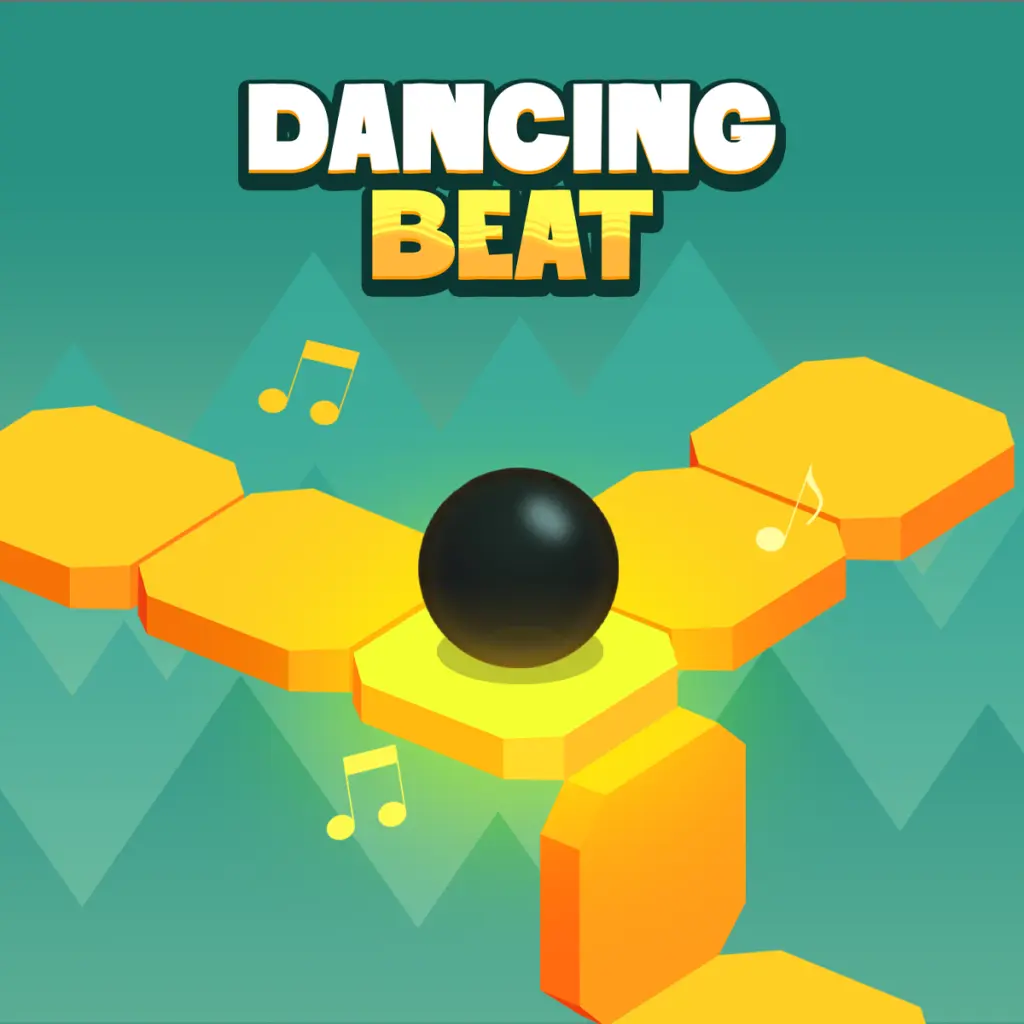
Dancing Beat
Dancing Beat is a rhythm-focused arcade game built around one urgent task: guide an automatically moving ball through changing tracks while staying in time with the music. The…
 Works on Desktop & Mobile
Tested By BunaGames
- Test date
- August 7, 2026
- Tested on
- Chrome 150
- Device
- Desktop
- Operating system
- macOS and Windows
- Game loaded successfully
- Yes
- Fullscreen works
- Yes
- Sound works
- Yes
- Save progress
- Local browser storage
- Mobile compatibility
- Partially tested
- Keyboard controls
- Working
- Controller support
- Not detected
- Average loading time
- 4.2 seconds
- Known issues
- Minor delay after entering fullscreen
Dancing Beat not loading?
- Refresh the page.
- Disable restrictive content blockers temporarily.
- Confirm JavaScript and WebGL are enabled.
- Clear the browser cache.
- Try another modern browser.
- Close unnecessary tabs.
- Switch off VPN if the game server is blocked.
- Use the Report a Problem button if the issue continues.
Related Games
Continue Playing

Daily Challenge

Play 6 minutes today in Dancing Beat.
Leaderboard
- 1Community rating4.5 ★
- 2Player likes516
- 3Total votes585
- 4Your local progress0%
Your progress is saved locally in this browser. No account required.
 Your progress is saved locally in this browser. No account required.
How to Play
Begin by watching the ball’s movement before trying to make rapid corrections. Dancing Beat uses automatic forward motion, so the most important question is always what the track will require next. Look ahead for bends, route changes, maze sections, and hazards instead of waiting until the ball reaches them.
- Start the game and observe the opening route. Notice how quickly the ball moves and how the music establishes the pace.
- Follow the ball while scanning forward. Keep your attention on the next section of track, not only the ball itself.
- Click or tap when guidance is needed. Make the input deliberately and in sync with the rhythm whenever possible.
- Handle turns before they become urgent. Anticipation is more reliable than a late reaction at the edge of a bend.
- Watch for hazards and changing layouts. Treat each unfamiliar section as a visual pattern to learn.
- Use repeat attempts constructively. If a route catches you out, remember the timing and shape of that section for the next run.
A useful approach is to divide attention between rhythm and route. The soundtrack provides a pulse, while the track provides the information needed to choose the moment of action. Neither cue should completely replace the other. Playing only by sight can lead to rushed inputs; playing only by sound can make a sudden visual hazard harder to catch.
Do not spam clicks or taps when the course becomes difficult. Because the ball is already moving, unnecessary input can break your sense of timing. Wait for a meaningful route change, act once with purpose, then immediately shift your attention forward to prepare for what follows.
On mobile: use on-screen buttons or gestures when the game supports them.
 On mobile: use on-screen buttons or gestures when the game supports them.
Controls
- ↑Jump
- ← →Move Left / Right
- ↓Crouch
- W / ↑Climb / Interact
- S / ↓Drop / Slide
Dancing Beat uses a minimal control setup that keeps the challenge focused on timing and route awareness rather than complicated commands. The ball travels automatically, and your input is used to guide it through the changing course.
| Device | Input |
|---|---|
| Desktop | Mouse click |
| Mobile | Screen tap |
Click or tap in time with the music when the route calls for an action. Since the exact moment matters, a controlled single input is usually more useful than repeated rapid clicks. Keep your pointer or tapping hand ready while you watch upcoming turns.
The game’s accessible controls do not mean the course is effortless. The difficulty comes from reading the path at speed, avoiding hazards, and matching the pace of the track. If an input feels late, focus on recognizing the next route change earlier rather than simply tapping faster.
Game Progress & Challenges
Why Play This Game?
 Instant PlayPlay instantly in your browser.
 Free to PlayNo hidden fees.
About "Dancing Beat"
Dancing Beat is a rhythm-focused arcade game built around one urgent task: guide an automatically moving ball through changing tracks while staying in time with the music. The ball does not wait for every decision, so each click or tap matters. You need to read the next bend, recognize hazards, and react when the route demands a change.
The game combines the direct feel of an arcade reflex challenge with the timing awareness of a music game. Rather than simply moving through a static course, you follow a path shaped by twists, turns, maze-like sections, and rhythmic momentum. The music is not just background atmosphere; it provides the pace that helps frame when an input should happen.
Dancing Beat suits players who enjoy short, concentrated attempts where observation improves performance. A first run is useful for learning the route and its danger points. Later runs can feel more controlled as you begin anticipating turns instead of reacting after the ball reaches them. It is an accessible choice among browser games for anyone who likes colorful visual tracks, quick input, and beat-driven arcade pressure.
Gameplay
Dancing Beat centers on a ball that moves forward automatically. Your role is not to push it ahead manually, but to guide it through the course at the moments when the path changes. This creates a distinct rhythm-game challenge: the correct action depends on both visual route reading and the pace established by the music.
As the ball travels, the track can introduce turns, shifting layouts, maze-like passages, and hazards. The key is to watch beyond the ball rather than focusing only on its current position. A turn that looks distant becomes immediate quickly when movement is continuous. Successful play means recognizing the upcoming route, preparing for the required input, and acting with clean timing.
The music-synchronized design gives the action a steady pulse. Players can use that pulse as a timing reference while still paying attention to the screen. When a route becomes visually busy, the beat can help prevent rushed, random inputs. When the track opens up, that extra moment can be used to scan for the next bend or obstacle.
- Automatic movement: the ball keeps traveling, maintaining constant pressure.
- Rhythm-based timing: clicks and taps work best when matched to the game’s musical pace.
- Dynamic route reading: turns and changing paths require forward attention.
- Hazard awareness: safe progress depends on avoiding danger along the track.
The result is a compact arcade loop with a useful learning curve. Each attempt can teach you where a turn arrives, how much time you have to respond, and whether you are following the music’s tempo closely enough.
Platform
Dancing Beat is presented as a browser-playable arcade rhythm game. It is designed around simple click and tap input, making its core interaction suitable for players using a mouse or a touch-enabled device. The central gameplay remains the same: guide the automatic ball through the route as the music sets the pace.
On a desktop or laptop, use the screen and mouse input to keep track of upcoming turns. On a phone or tablet, tapping provides the equivalent action while the compact control scheme keeps attention on the moving ball and track. A larger screen can make distant route details easier to notice, while a touch device can feel immediate for beat-based taps.
For the clearest experience, play with a stable browser session and keep the game area visible so you can read the route ahead. Audio is also useful because Dancing Beat is built around synchronized musical timing. If sound is unavailable, careful visual observation still matters, but the rhythm cue may be less apparent.
How to Play "Dancing Beat"
Begin by watching the ball’s movement before trying to make rapid corrections. Dancing Beat uses automatic forward motion, so the most important question is always what the track will require next. Look ahead for bends, route changes, maze sections, and hazards instead of waiting until the ball reaches them.
- Start the game and observe the opening route. Notice how quickly the ball moves and how the music establishes the pace.
- Follow the ball while scanning forward. Keep your attention on the next section of track, not only the ball itself.
- Click or tap when guidance is needed. Make the input deliberately and in sync with the rhythm whenever possible.
- Handle turns before they become urgent. Anticipation is more reliable than a late reaction at the edge of a bend.
- Watch for hazards and changing layouts. Treat each unfamiliar section as a visual pattern to learn.
- Use repeat attempts constructively. If a route catches you out, remember the timing and shape of that section for the next run.
A useful approach is to divide attention between rhythm and route. The soundtrack provides a pulse, while the track provides the information needed to choose the moment of action. Neither cue should completely replace the other. Playing only by sight can lead to rushed inputs; playing only by sound can make a sudden visual hazard harder to catch.
Do not spam clicks or taps when the course becomes difficult. Because the ball is already moving, unnecessary input can break your sense of timing. Wait for a meaningful route change, act once with purpose, then immediately shift your attention forward to prepare for what follows.
Controls
Dancing Beat uses a minimal control setup that keeps the challenge focused on timing and route awareness rather than complicated commands. The ball travels automatically, and your input is used to guide it through the changing course.
| Device | Input |
|---|---|
| Desktop | Mouse click |
| Mobile | Screen tap |
Click or tap in time with the music when the route calls for an action. Since the exact moment matters, a controlled single input is usually more useful than repeated rapid clicks. Keep your pointer or tapping hand ready while you watch upcoming turns.
The game’s accessible controls do not mean the course is effortless. The difficulty comes from reading the path at speed, avoiding hazards, and matching the pace of the track. If an input feels late, focus on recognizing the next route change earlier rather than simply tapping faster.
Can "Dancing Beat" Unblocked?
Dancing Beat is a browser-based game, so it is intended to be played from its game page rather than through a separate app-store download. Whether it is accessible from a particular school, workplace, library, or shared network depends on that network’s filtering rules and local device settings.
If the game page does not load where you are, avoid trying to bypass a network’s security or acceptable-use policy. Instead, use a permitted personal connection or play at a time and place where browser gaming is allowed. Access can also be affected by browser restrictions, blocked scripts, disabled audio, or an unstable connection.
For a smoother session, open Dancing Beat in a current browser, allow the game page to load fully, and make sure the game area stays in view. Because music is part of the timing experience, check that your device audio is available if you want to use the beat as a gameplay cue. The visual route remains essential even when playing quietly.
Tips for "Dancing Beat"
The strongest Dancing Beat players do not merely react to the ball’s current location. They create a short mental preview of the route ahead. Since the ball moves automatically, a turn seen early is easier to handle calmly; the same turn seen at the last second becomes a reflex test.
- Look one section ahead. Let your eyes travel beyond the ball to identify the next bend, opening, or dangerous area.
- Use the music as a pacing guide. The synchronized beat can help you avoid uneven, panicked input timing.
- Make deliberate inputs. A clean click or tap at the intended moment is more dependable than repeated guessing.
- Learn difficult route shapes. When a maze-like segment causes a mistake, remember its visual layout and timing for the next attempt.
- Stay visually centered. Avoid letting your attention drift away from the track during fast movement.
- Protect your rhythm after a close call. Do not rush the next input just because a previous turn felt difficult.
Try to notice the relationship between visual turns and the soundtrack. Some players naturally focus on the route first, while others respond strongly to the musical pulse. Dancing Beat rewards combining both. The route tells you what is coming; the beat helps shape when to commit.
It also helps to treat early attempts as practice rather than judging them only by progress. An unfamiliar course can contain turns and hazards that demand information you do not have yet. Each run reveals more of the track’s structure. Once a section is familiar, you can spend less attention discovering it and more attention refining your timing.
Finally, keep your input hand relaxed. Tension often produces extra clicks or taps, which can disrupt the steady rhythm that the game asks you to maintain. Calm observation, early recognition, and purposeful timing are more valuable than frantic speed.
Features "Dancing Beat"
Dancing Beat brings together recognizable rhythm-game and arcade-game elements in a focused browser format. Its main identity comes from the connection between automatic ball movement, music-synchronized input, and tracks that require fast visual interpretation.
- Rhythm-driven action: the musical beat supports the pace of clicks and taps.
- Automatic ball movement: forward motion continues, keeping every route decision time-sensitive.
- Changing tracks: dynamic paths prevent the experience from feeling like a simple straight run.
- Twists and turns: the course asks players to notice directional changes before they arrive.
- Maze-like course sections: route layouts require observation as well as reflexes.
- Hazard avoidance: safe movement through the path is part of the central challenge.
- Colorful presentation: bright visual environments complement the music-focused arcade style.
- Simple input concept: mouse clicks and screen taps keep the controls approachable.
The most important feature is the balance between accessibility and concentration. A player can understand the basic idea quickly because the ball moves automatically and the input is straightforward. However, effective play demands timing discipline, route memory, and the ability to look ahead while movement continues.
That balance makes Dancing Beat suitable for quick sessions as well as repeat attempts. You can start with the immediate goal of staying on the route, then gradually focus on cleaner timing and stronger anticipation. The game does not need a large control list to create pressure; its speed, hazards, changing layouts, and synchronized music create the challenge.
Best "Dancing Beat" Similar Games & Top Picks
- Dig Dug 2: Play Dig Dug 2 online and clear island rounds in the 1985 Namco arcade sequel with overhead action and strategic enemy encounters.
- Ball Surfer 3D: Play Ball Surfer 3D online. Roll through a futuristic 3D course, dodge boxes, collect gems, use power-ups, and chase a longer run.
- Galaga: Play Galaga online in your browser. Pilot a starship, fire rapid missiles, and battle the Galaga forces in this 1981 arcade shooter.
- Osu Game: Play Osu Game on BunaGames. Check the game screen for current controls, gameplay instructions, and browser availability.
- Pac Xon: Play Pac Xon online and claim the board by building walls around ghosts. Learn the 80% goal, gameplay basics, controls, and smart tips.
FAQ - Dancing Beat
What is Dancing Beat?
Dancing Beat is a rhythm-based arcade game in which you guide an automatically moving ball through colorful, changing tracks. The gameplay combines music-synchronized timing with route reading, turns, maze-like sections, and hazard avoidance.
How do you play Dancing Beat?
Watch the ball travel along the course, look ahead for route changes and hazards, then click or tap when guidance is needed. The ball moves on its own, so success depends on anticipating turns and making inputs with good timing.
Does the ball move automatically?
Yes. The ball moves forward automatically, which means you do not control its speed with a directional movement system. Your attention should stay on upcoming parts of the track so you can react before a turn or hazard becomes immediate.
What are the controls for Dancing Beat?
Use a mouse click on desktop or laptop devices, or tap the screen on a touch-enabled device. The core input is intentionally simple, but the timing of each click or tap is important because the game is synchronized with music.
Is Dancing Beat a rhythm game or an arcade game?
It is both. Dancing Beat uses the music’s beat as an important timing cue, which gives it a rhythm-game identity. At the same time, its moving ball, quick turns, hazards, and dynamic tracks give it the immediate challenge of an arcade game.
Why is timing important in Dancing Beat?
The route changes while the ball continues moving, so delayed or rushed input can make it harder to guide the ball safely. Matching actions to the musical pace can help establish a steadier rhythm, while watching the track tells you when a route change is approaching.
Can I play Dancing Beat on mobile?
The game’s click-and-tap control concept supports touch input, so tapping is the relevant way to interact on a mobile device. A phone or tablet can provide a direct way to play, although a larger display may make distant turns and changing route details easier to see.
Is Dancing Beat unblocked everywhere?
Access depends on the browser, device, and network you are using. Some schools, workplaces, libraries, and managed networks restrict gaming sites or browser content. Play only where browser games are permitted and do not attempt to bypass local network rules or security settings.
More Games Like This
 Ball Surfer 3D
Arcade ★ 4.7
Ball Surfer 3D
Arcade ★ 4.7
 Galaga
Arcade ★ 4.7
Galaga
Arcade ★ 4.7
 Osu Game
Arcade ★ 4.7
Osu Game
Arcade ★ 4.7
 Dig Dug 2
Arcade ★ 4.4
Dig Dug 2
Arcade ★ 4.4
 Pac Xon
Arcade ★ 4.8
Pac Xon
Arcade ★ 4.8
 Colorbox Mustard
Arcade ★ 4.6
Colorbox Mustard
Arcade ★ 4.6
 Blumgi Slime
Arcade ★ 4.7
Blumgi Slime
Arcade ★ 4.7
 Rolling Ball 3D
Arcade ★ 4.7
Rolling Ball 3D
Arcade ★ 4.7
 Burrito Bison
Arcade ★ 4.6
Burrito Bison
Arcade ★ 4.6
 Dumb Ways To Die 2
Arcade ★ 4.8
Dumb Ways To Die 2
Arcade ★ 4.8
 Crazy Roll 3D
Arcade ★ 4.6
Crazy Roll 3D
Arcade ★ 4.6
 Fnf Garcello
Arcade ★ 4.6
Fnf Garcello
Arcade ★ 4.6
 Roller Coaster
Arcade ★ 4.7
Roller Coaster
Arcade ★ 4.7
 Orbit Dash
Arcade ★ 4.6
Orbit Dash
Arcade ★ 4.6
 Arrow Wave
Arcade ★ 4.6
Arrow Wave
Arcade ★ 4.6
 FNF vs Garcello
Arcade ★ 4.7
FNF vs Garcello
Arcade ★ 4.7
 Down The Hill
Arcade ★ 4.3
Down The Hill
Arcade ★ 4.3
 Bird Up
Arcade ★ 4.6
Bird Up
Arcade ★ 4.6
 Report a Problem
Comments About Dancing Beat