


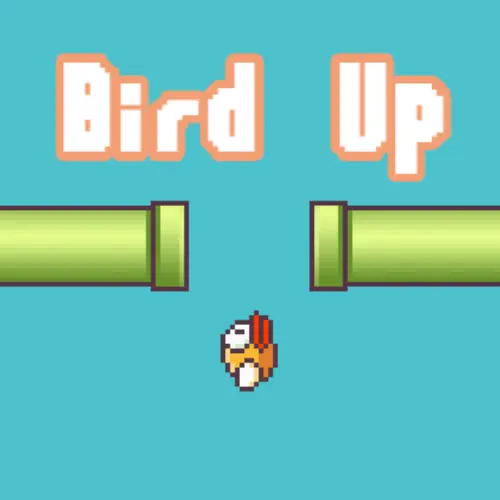
Bird Up
Bird Up is a compact vertical arcade game built around a familiar bird-flight challenge: make precise one-button inputs, keep the bird moving upward, and try to reach 150…
 Works on Desktop & Mobile
Tested By BunaGames
- Test date
- August 6, 2026
- Tested on
- Chrome 150
- Device
- Desktop
- Operating system
- macOS and Windows
- Game loaded successfully
- Yes
- Fullscreen works
- Yes
- Sound works
- Yes
- Save progress
- Local browser storage
- Mobile compatibility
- Partially tested
- Keyboard controls
- Working
- Controller support
- Not detected
- Average loading time
- 4.2 seconds
- Known issues
- Minor delay after entering fullscreen
Bird Up not loading?
- Refresh the page.
- Disable restrictive content blockers temporarily.
- Confirm JavaScript and WebGL are enabled.
- Clear the browser cache.
- Try another modern browser.
- Close unnecessary tabs.
- Switch off VPN if the game server is blocked.
- Use the Report a Problem button if the issue continues.
Related Games
Continue Playing
Daily Challenge

Play 6 minutes today in Bird Up.
Leaderboard
- 1Community rating4.6 ★
- 2Player likes1.1K
- 3Total votes1.2K
- 4Your local progress0%
Your progress is saved locally in this browser. No account required.
 Your progress is saved locally in this browser. No account required.
How to Play
Start Bird Up with one goal in mind: guide the bird successfully while building toward 150 points. The game uses a simple input scheme, but playing well requires calm timing and attention to the bird’s movement. Press the Spacebar or use the left mouse button to make the game’s primary action.
- Choose an input method. Use either the Spacebar or the left mouse button. Pick one method for a run so your timing stays consistent.
- Begin with measured presses. Do not treat every moment as a reason to press. First observe how the bird responds to your input.
- Watch position and momentum. Use what you see on screen to decide when the next input is needed. Reacting to the current movement is more reliable than following a fixed rhythm before you understand the run.
- Protect the run. When you are comfortable with the early portion, prioritize controlled actions over rushing for points.
- Track your score. Every completed attempt provides a clear result. Use it to identify whether your timing became more stable.
- Work toward 150. Treat the target as a long-term benchmark rather than expecting to reach it immediately.
A useful learning method is to give each attempt one focus. On one run, practice avoiding unnecessary inputs. On the next, concentrate on responding earlier or later based on what you observed. This turns a difficult score chase into a sequence of small, testable improvements.
Bird Up does not demand an elaborate strategy guide. Its depth comes from recognizing that a one-button game still rewards control, patience, and a repeatable input habit.
On mobile: use on-screen buttons or gestures when the game supports them.
 On mobile: use on-screen buttons or gestures when the game supports them.
Controls
- ↑Jump
- ← →Move Left / Right
- ↓Crouch
- W / ↑Climb / Interact
- S / ↓Drop / Slide
Bird Up uses two supported desktop control options for the same primary action. You can choose the one that feels most dependable for your setup.
- Spacebar: press Space to control the bird.
- Left mouse button: click the left mouse button to control the bird.
Use one input style consistently during a session. Switching between keyboard and mouse mid-run can make it harder to judge your timing, particularly when you are trying to improve a high score. Keyboard control may feel convenient if your hand is already resting near the Spacebar, while mouse control can suit players who prefer clicking.
There is no need to learn multiple actions, combos, or directional keys. The skill is in deciding when to activate the available control. If an input seems inconsistent, click directly inside the game area first or confirm that the browser window is active before beginning another attempt.
Game Progress & Challenges
Why Play This Game?
 Instant PlayPlay instantly in your browser.
 Free to PlayNo hidden fees.
About "Bird Up"
Bird Up is a compact vertical arcade game built around a familiar bird-flight challenge: make precise one-button inputs, keep the bird moving upward, and try to reach 150 points. Its central idea is simple, but the score target gives every attempt a clear purpose. Rather than needing a long tutorial, players can begin immediately and learn the timing through repeated runs.
The game is described as a vertical take on the classic flap-based arcade format. That means the focus is not on complicated menus, character builds, or lengthy stages. It is on attention, rhythm, and controlling a bird with a small set of inputs. A good run depends on responding consistently instead of pressing randomly.
Bird Up suits players looking for a quick arcade session with a measurable objective. The 150-point goal is useful whether you are playing for a few minutes, practicing your input timing, or trying to improve a previous personal best. Because the control scheme is limited to keyboard or mouse input, the challenge comes from execution rather than memorizing a large command list.
For players who enjoy fast, score-focused browser games, Bird Up offers an accessible premise with room to refine each attempt.
Gameplay
Bird Up centers on guiding a bird through a vertical arcade challenge using a single primary action. The game draws on the recognizable flap-game formula, but its vertical presentation makes upward progress and score pursuit the key ideas. Your practical objective is to keep control of the bird long enough to build points and ultimately reach the stated 150-point target.
Each run is an opportunity to read the game’s motion, establish a steady input rhythm, and improve your decision-making. The short control list does not make the game automatic. One-button arcade games ask players to convert visual feedback into well-timed actions, so consistency matters more than speed alone. A hurried sequence of presses can be less useful than a deliberate sequence that follows the bird’s current position and movement.
The scoring goal also gives Bird Up a useful structure. Beginners can treat early attempts as practice for handling the input. Returning players can use the same goal as a benchmark: improve the point total, reach a new best run, or finally push all the way to 150. This creates a replay loop without requiring extra systems to understand.
- Primary challenge: control the bird accurately in a vertical arcade setting.
- Main objective: accumulate points and aim for 150.
- Core skill: timing one-button inputs with purpose.
- Best approach: use short practice runs to learn a repeatable rhythm.
The important gameplay context is that Bird Up is score-led. Progress is not about completing a narrative campaign; it is about maintaining control, extending a run, and making each new attempt more precise than the last.
Platform
Bird Up is presented on BunaGames as an online arcade game for browser play. Its straightforward controls make it especially suitable for a desktop or laptop setup, where the Spacebar and left mouse button are readily available. You do not need a complicated controller layout to understand the basic interaction.
For the clearest experience, use a browser window where you can focus on the play area and avoid accidental clicks outside the game. If you choose keyboard input, keep one hand near the Spacebar. If you prefer mouse input, use the left button and keep the pointer positioned away from anything that might interrupt your session.
The game’s score-focused format also fits short browser sessions well. You can start an attempt, work on a single timing habit, and return later to continue pursuing the 150-point objective. Since the core action is immediately understandable, Bird Up works for both quick breaks and longer personal-best attempts.
Platform availability can depend on the version embedded on a game page, so use the controls shown with the playable game if they differ from your device setup.
How to Play "Bird Up"
Start Bird Up with one goal in mind: guide the bird successfully while building toward 150 points. The game uses a simple input scheme, but playing well requires calm timing and attention to the bird’s movement. Press the Spacebar or use the left mouse button to make the game’s primary action.
- Choose an input method. Use either the Spacebar or the left mouse button. Pick one method for a run so your timing stays consistent.
- Begin with measured presses. Do not treat every moment as a reason to press. First observe how the bird responds to your input.
- Watch position and momentum. Use what you see on screen to decide when the next input is needed. Reacting to the current movement is more reliable than following a fixed rhythm before you understand the run.
- Protect the run. When you are comfortable with the early portion, prioritize controlled actions over rushing for points.
- Track your score. Every completed attempt provides a clear result. Use it to identify whether your timing became more stable.
- Work toward 150. Treat the target as a long-term benchmark rather than expecting to reach it immediately.
A useful learning method is to give each attempt one focus. On one run, practice avoiding unnecessary inputs. On the next, concentrate on responding earlier or later based on what you observed. This turns a difficult score chase into a sequence of small, testable improvements.
Bird Up does not demand an elaborate strategy guide. Its depth comes from recognizing that a one-button game still rewards control, patience, and a repeatable input habit.
Controls
Bird Up uses two supported desktop control options for the same primary action. You can choose the one that feels most dependable for your setup.
- Spacebar: press Space to control the bird.
- Left mouse button: click the left mouse button to control the bird.
Use one input style consistently during a session. Switching between keyboard and mouse mid-run can make it harder to judge your timing, particularly when you are trying to improve a high score. Keyboard control may feel convenient if your hand is already resting near the Spacebar, while mouse control can suit players who prefer clicking.
There is no need to learn multiple actions, combos, or directional keys. The skill is in deciding when to activate the available control. If an input seems inconsistent, click directly inside the game area first or confirm that the browser window is active before beginning another attempt.
Can "Bird Up" Unblocked?
Bird Up is available as a browser-based arcade game on BunaGames, making it a convenient choice when you want a quick game without navigating a large installation process. Open the game page in a supported browser, allow the game area to load, and use Space or left click to begin interacting with the bird.
“Unblocked” can mean different things depending on where you are playing. At home or on a personal connection, browser access is usually determined by your own device and network settings. At a school, workplace, library, or managed network, access may be limited by local rules or content filters. Those policies are controlled by the network administrator, not by the game itself.
If the game does not load, try refreshing the page, checking your connection, or using an updated browser. Avoid attempting to bypass network restrictions. The best way to play is through an allowed connection and in accordance with the rules of the place where you are using the device.
Once the game is running, Bird Up’s compact one-button format is ideal for a short, focused arcade attempt.
Tips for "Bird Up"
The best Bird Up strategy is not frantic input. The game’s one-button design rewards players who make each press intentional. Since the target is 150 points, your first job is to develop reliable control before worrying about a perfect run.
- Learn the response first. Spend early attempts observing how the bird reacts after a Space press or left click. This gives you a basis for better decisions later.
- Use a steady hand. Keep your chosen control hand relaxed. Tension often leads to accidental extra presses, which can disrupt the rhythm you were building.
- Do not chase a fixed tempo blindly. A rhythm that works during one moment may not fit the bird’s current position in the next. Let the on-screen action guide your next input.
- Make one adjustment at a time. If a run ends sooner than expected, change one part of your timing on the next attempt instead of changing everything at once.
- Set intermediate goals. Rather than thinking only about 150 points, aim to surpass your most recent score by a manageable amount. Small gains make practice more useful.
- Choose your preferred control method. Some players find the Spacebar easier for repeated timing, while others prefer the tactile feedback of a mouse click. Consistency is more important than which option you choose.
- Stay focused near a strong score. When you are doing well, avoid speeding up simply because the target feels close. Continue using the same deliberate process that produced the run.
A valuable information advantage in a short arcade game is treating failure as feedback. A score is not only a result; it tells you whether your current approach is becoming more stable. Repeatedly testing, observing, and making small corrections is a stronger path to 150 than relying on luck.
Features "Bird Up"
Bird Up keeps its arcade identity clear by concentrating on a small number of meaningful elements instead of adding unnecessary complexity. The result is a direct game loop that is easy to enter and difficult to master through timing alone.
- Vertical arcade concept: Bird Up adapts a flap-style bird challenge into a vertical format.
- One-button interaction: the primary control uses either Spacebar input or the left mouse button.
- Clear score objective: players are encouraged to reach 150 points.
- Fast start: the control scheme is understandable without a long tutorial.
- Replay-focused structure: each attempt lets players refine timing and pursue a higher score.
- Accessible desktop controls: keyboard and mouse options let players use the input method that feels more natural.
- Skill-based challenge: improvement comes from observation, timing, and consistent execution.
The strongest feature is the relationship between simplicity and replay value. Bird Up does not need a large move set to create a meaningful challenge. With only one main action, every decision becomes visible: press at the right moment, assess the result, and improve the next attempt.
The 150-point target adds more direction than a purely open-ended score chase. It gives new players a concrete milestone while still allowing experienced players to treat every run as a test of control. That combination makes Bird Up suitable for players who enjoy concise arcade gameplay with a specific goal in view.
Because the game is built around immediate input and score feedback, it is also easy to return to after a break. You can quickly remember the controls, begin another run, and focus on one improvement at a time.
Best "Bird Up" Similar Games & Top Picks
- Dig Dug 2: Play Dig Dug 2 online and clear island rounds in the 1985 Namco arcade sequel with overhead action and strategic enemy encounters.
- Ball Surfer 3D: Play Ball Surfer 3D online. Roll through a futuristic 3D course, dodge boxes, collect gems, use power-ups, and chase a longer run.
- Galaga: Play Galaga online in your browser. Pilot a starship, fire rapid missiles, and battle the Galaga forces in this 1981 arcade shooter.
- Osu Game: Play Osu Game on BunaGames. Check the game screen for current controls, gameplay instructions, and browser availability.
- Pac Xon: Play Pac Xon online and claim the board by building walls around ghosts. Learn the 80% goal, gameplay basics, controls, and smart tips.
FAQ - Bird Up
What is Bird Up?
Bird Up is a vertical arcade game based on a flap-style bird challenge. Players use a simple one-button control to guide the bird, build a score, and work toward a stated goal of 150 points. The game emphasizes timing and repeat attempts rather than a large set of commands.
How do I control the bird in Bird Up?
You can use the Spacebar or the left mouse button for the game’s primary control. Both options are intended to let you guide the bird. Choose the method that feels more comfortable and try to use it consistently while practicing.
What is the goal in Bird Up?
The main objective is to score points and try to reach 150 points. This target gives each run a clear benchmark. If you are new to the game, focus first on learning the timing and then gradually improve your score toward that milestone.
Is Bird Up difficult to play?
The controls are easy to learn because the game uses one main action, but reaching a high score can take practice. The challenge comes from deciding when to press Space or click, observing how the bird responds, and keeping your input timing controlled throughout a run.
Should I use the keyboard or mouse?
Either control option can work. Use the Spacebar if you prefer keyboard input or the left mouse button if clicking feels more natural. There is no need to use both at once. Selecting one method and sticking with it can help you develop more consistent timing.
How can I get better at Bird Up?
Practice with a specific purpose. Start by observing the bird’s response to each input rather than pressing rapidly. Then make small timing adjustments between attempts. Setting personal score milestones below 150 can make improvement easier to measure and keep the final goal manageable.
Can I play Bird Up in a browser?
Yes. Bird Up is available on BunaGames as an online browser arcade game. Load the game page, make sure the game area is active, and use the Spacebar or left mouse button to play. Browser availability at a school or workplace may still depend on that network’s local rules.
Why is Bird Up replayable?
Bird Up has a concise score-based loop. A run can end, but the score gives you immediate feedback and a reason to try again. Players can return to improve their control, beat a previous personal best, or continue working toward the 150-point target.
More Games Like This
 Ball Surfer 3D
Arcade ★ 4.7
Ball Surfer 3D
Arcade ★ 4.7
 Galaga
Arcade ★ 4.7
Galaga
Arcade ★ 4.7
 Osu Game
Arcade ★ 4.7
Osu Game
Arcade ★ 4.7
 Dig Dug 2
Arcade ★ 4.4
Dig Dug 2
Arcade ★ 4.4
 Pac Xon
Arcade ★ 4.8
Pac Xon
Arcade ★ 4.8
 Colorbox Mustard
Arcade ★ 4.6
Colorbox Mustard
Arcade ★ 4.6
 Blumgi Slime
Arcade ★ 4.7
Blumgi Slime
Arcade ★ 4.7
 Rolling Ball 3D
Arcade ★ 4.7
Rolling Ball 3D
Arcade ★ 4.7
 Burrito Bison
Arcade ★ 4.6
Burrito Bison
Arcade ★ 4.6
 Dumb Ways To Die 2
Arcade ★ 4.8
Dumb Ways To Die 2
Arcade ★ 4.8
 Crazy Roll 3D
Arcade ★ 4.6
Crazy Roll 3D
Arcade ★ 4.6
 Fnf Garcello
Arcade ★ 4.6
Fnf Garcello
Arcade ★ 4.6
 Roller Coaster
Arcade ★ 4.7
Roller Coaster
Arcade ★ 4.7
 Orbit Dash
Arcade ★ 4.6
Orbit Dash
Arcade ★ 4.6
 Arrow Wave
Arcade ★ 4.6
Arrow Wave
Arcade ★ 4.6
 FNF vs Garcello
Arcade ★ 4.7
FNF vs Garcello
Arcade ★ 4.7
 Dancing Beat
Arcade ★ 4.5
Dancing Beat
Arcade ★ 4.5
 Down The Hill
Arcade ★ 4.3
Down The Hill
Arcade ★ 4.3
 Report a Problem
Comments About Bird Up