


Roller Coaster
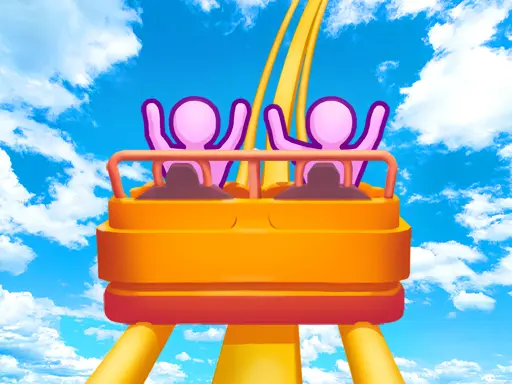
Roller Coaster is an arcade-style coaster-building game centered on one satisfying idea: create a track that looks exciting and feels like a complete ride. The strongest part of…
 Works on Desktop & Mobile
Tested By BunaGames
- Test date
- August 10, 2026
- Tested on
- Chrome 150
- Device
- Desktop
- Operating system
- macOS and Windows
- Game loaded successfully
- Yes
- Fullscreen works
- Yes
- Sound works
- Yes
- Save progress
- Local browser storage
- Mobile compatibility
- Partially tested
- Keyboard controls
- Working
- Controller support
- Not detected
- Average loading time
- 4.2 seconds
- Known issues
- Minor delay after entering fullscreen
Roller Coaster not loading?
- Refresh the page.
- Disable restrictive content blockers temporarily.
- Confirm JavaScript and WebGL are enabled.
- Clear the browser cache.
- Try another modern browser.
- Close unnecessary tabs.
- Switch off VPN if the game server is blocked.
- Use the Report a Problem button if the issue continues.
Related Games
Continue Playing
Daily Challenge

Play 7 minutes today in Roller Coaster.
Leaderboard
- 1Community rating4.7 ★
- 2Player likes846
- 3Total votes924
- 4Your local progress0%
Your progress is saved locally in this browser. No account required.
 Your progress is saved locally in this browser. No account required.
How to Play
Begin Roller Coaster by looking at the starting track area and identifying where the ride needs to travel. Your first objective is to create a route that has a clear direction. Avoid treating every piece as an isolated trick. Think of the coaster as one continuous line that needs a beginning, a middle, and an exciting finish.
- Plan the opening. Use the early section to establish height or direction. A climb can prepare the ride for a later descent.
- Create a main moment. Add a drop, dive, loop, or another prominent feature that gives the route its identity.
- Connect the movement. Use turns and shorter sections to lead naturally from one major element to the next.
- Vary the track. Combine vertical movement with horizontal changes. A ride made entirely of one type of piece is less visually interesting than a route with contrast.
- Review the whole layout. Look for awkward jumps in direction or a crowded cluster of stunts. If the interface lets you adjust the design, simplify and refine it.
A practical coaster-building approach is to work from large shapes to small details. Decide where the highest point and biggest descent belong before filling the route with twists or corkscrews. This gives the ride a readable structure and prevents later features from competing for the same space.
Do not assume that the busiest track is automatically the best one. A well-timed dip before a large loop can make that loop stand out more than several inversions placed together. Use each section to set up the next, and treat visual flow as an important part of success.
On mobile: use on-screen buttons or gestures when the game supports them.
 On mobile: use on-screen buttons or gestures when the game supports them.
Controls
- ↑Jump
- ← →Move Left / Right
- ↓Crouch
- W / ↑Climb / Interact
- S / ↓Drop / Slide
Roller Coaster uses an on-screen game interface, so the exact input method depends on the device you are using and the prompts visible in the game. Builder-style coaster games commonly rely on direct selection and placement rather than complex command combinations.
| Device | Use |
|---|---|
| Desktop or laptop | Mouse or trackpad input |
| Touch device | Tap and drag input |
On a computer, select the available track option or tool shown by the game, then place or adjust the route with the pointer. On a phone or tablet, tap the relevant on-screen control and use touch gestures where offered. Read the first visible instructions before building, since they indicate the actions supported by the current version.
For better precision, make deliberate adjustments instead of moving quickly across the play area. Coaster routes depend on their shape, so a careful placement can be more useful than adding several pieces at once. If a control does not respond, wait for loading to complete and check whether the game is asking you to select a track element first.
Game Progress & Challenges
Why Play This Game?
 Instant PlayPlay instantly in your browser.
 Free to PlayNo hidden fees.
About "Roller Coaster"
Roller Coaster is an arcade-style coaster-building game centered on one satisfying idea: create a track that looks exciting and feels like a complete ride. The strongest part of the experience is the route itself. Instead of simply watching a pre-made attraction, players focus on shaping the path through dramatic rises, drops, turns, loops, twists, and dives.
Roller coaster games are appealing because they combine quick visual creativity with simple problem solving. A short section of track can change the character of the entire ride. A steep climb can set up a fast descent, a curve can redirect momentum, and a loop or corkscrew can turn an ordinary route into a more spectacular design. The goal is not just to make the track busy; it is to make each piece feel connected.
This browser game fits players looking for a light, accessible construction challenge rather than a large park-management simulation. It is easy to begin experimenting, yet track planning creates room for replay as you try different layouts and more daring shapes. If you enjoy imaginative browser games with a clear visual result, Roller Coaster offers a focused way to build a ride one decision at a time.
Gameplay
Roller Coaster gameplay revolves around designing a route with recognizable coaster elements. The available ideas suggested by the game’s theme include climbing sections, sharp descents, bends, loops, rolling inversions, corkscrews, twists, dips, and dives. Each type of segment has a different visual job: some build anticipation, some create speed, and others add a memorable stunt to the ride.
The central gameplay loop is direct. Start with the route, extend or shape it into a more dramatic line, then assess whether the design reads as a believable, continuous coaster. Good layouts usually have a sense of sequence. They begin by gaining height, use a drop to create excitement, and place major features where they feel earned rather than random.
That sequence is the useful skill behind the arcade format. A loop immediately after a climb may feel different from a loop placed after a dive and a turn. Likewise, multiple major elements can be more effective when they are separated by calmer sections that make the next movement easier to see. The game rewards attention to the overall path, not just individual stunts.
Because coaster design is highly visual, experimentation is part of the fun. Try a compact route with quick changes of direction, then try a longer design with one large descent and a featured inversion. Comparing these layouts helps you understand how track rhythm, height changes, and feature placement influence the final ride.
Platform
Roller Coaster is presented as a game to play online in a web browser on BunaGames. This makes it a convenient choice when you want a quick arcade session without treating the game like a large downloadable coaster simulator or a full theme-park management project.
Browser play also suits the game’s visual design process. You can open the game, concentrate on the track layout, and return to it when you want to test a new idea. The exact interface can vary by device and game build, so use the controls shown in the game window as the final guide.
For the smoothest session, use a current browser, allow the game to finish loading before interacting, and keep enough screen space available to see the route clearly. A larger display can make it easier to judge the shape of turns, drops, and connected track sections. On touch-capable devices, on-screen interaction may be the most natural way to work with the builder-style interface.
How to Play "Roller Coaster"
Begin Roller Coaster by looking at the starting track area and identifying where the ride needs to travel. Your first objective is to create a route that has a clear direction. Avoid treating every piece as an isolated trick. Think of the coaster as one continuous line that needs a beginning, a middle, and an exciting finish.
- Plan the opening. Use the early section to establish height or direction. A climb can prepare the ride for a later descent.
- Create a main moment. Add a drop, dive, loop, or another prominent feature that gives the route its identity.
- Connect the movement. Use turns and shorter sections to lead naturally from one major element to the next.
- Vary the track. Combine vertical movement with horizontal changes. A ride made entirely of one type of piece is less visually interesting than a route with contrast.
- Review the whole layout. Look for awkward jumps in direction or a crowded cluster of stunts. If the interface lets you adjust the design, simplify and refine it.
A practical coaster-building approach is to work from large shapes to small details. Decide where the highest point and biggest descent belong before filling the route with twists or corkscrews. This gives the ride a readable structure and prevents later features from competing for the same space.
Do not assume that the busiest track is automatically the best one. A well-timed dip before a large loop can make that loop stand out more than several inversions placed together. Use each section to set up the next, and treat visual flow as an important part of success.
Controls
Roller Coaster uses an on-screen game interface, so the exact input method depends on the device you are using and the prompts visible in the game. Builder-style coaster games commonly rely on direct selection and placement rather than complex command combinations.
| Device | Use |
|---|---|
| Desktop or laptop | Mouse or trackpad input |
| Touch device | Tap and drag input |
On a computer, select the available track option or tool shown by the game, then place or adjust the route with the pointer. On a phone or tablet, tap the relevant on-screen control and use touch gestures where offered. Read the first visible instructions before building, since they indicate the actions supported by the current version.
For better precision, make deliberate adjustments instead of moving quickly across the play area. Coaster routes depend on their shape, so a careful placement can be more useful than adding several pieces at once. If a control does not respond, wait for loading to complete and check whether the game is asking you to select a track element first.
Can "Roller Coaster" Unblocked?
Roller Coaster is available to play online on BunaGames, giving players a straightforward browser-based option for a coaster-building arcade game. Open the game page, let the game load, and use the displayed interface to start shaping your route.
The word “unblocked” is often used by players searching for games that run directly in a browser rather than requiring a separate install. Availability can still depend on the browser, network rules, device settings, and the policies of the place where you are playing. School, work, library, and managed public networks may restrict game websites independently of the game itself.
For an uninterrupted session, use a permitted personal connection and a supported browser. Do not try to bypass a network administrator’s restrictions. When access is allowed, browser play makes Roller Coaster useful for a short break: load the page, build a new track idea, and experiment with different loops, twists, drops, and dives.
Tips for "Roller Coaster"
Build around one highlight. Choose a main feature for the ride, such as a large drop, loop, or corkscrew. Let the rest of the route lead toward it and away from it. This produces a clearer design than placing every big element in the same small area.
Use height with purpose. A climb is more than empty track. It creates anticipation and gives a following descent a stronger visual role. If the route begins with a rise, consider what that height will pay off later in the design.
Alternate intensity. A sequence of twist, dip, turn, and loop can look more intentional than repeated identical pieces. Contrast makes individual features easier to notice. Add a calmer connecting section when two major stunts would otherwise feel crowded.
Watch the direction of travel. Each new piece should continue the route naturally. Before placing a tight turn or inversion, look at where the previous section points. This simple check helps prevent a track that appears to change direction without a convincing transition.
Keep the route readable. An effective coaster can be understood at a glance. Players should be able to spot the climb, the descent, and the signature stunt. If the design becomes difficult to follow visually, reduce the number of competing features and emphasize the strongest shape.
Experiment in versions. Make one layout focused on a tall climb and fast dive. Then make another focused on compact twists and a corkscrew. Comparing distinct concepts teaches more than changing every part of the same route at once.
Use the game’s feedback. If the current build offers completion cues, route checks, previews, or other on-screen responses, use them to guide revisions. The best improvement is usually specific: adjust a transition, give a loop more space, or move a major feature so the track has a better rhythm.
Features "Roller Coaster"
Roller Coaster focuses on the visual language of a thrilling amusement ride. Its key attraction is the opportunity to shape a coaster route rather than only watch one. This gives every play session a creative angle: you decide how the ride climbs, turns, drops, twists, and dives.
- Coaster-building focus: Create a route from connected track ideas and shape the ride’s overall path.
- Classic ride elements: Design around loops, rolls, twists, corkscrews, dips, dives, climbs, and descents.
- Arcade-friendly format: Concentrate on a single ride concept without the broader demands of managing an entire amusement park.
- Visual experimentation: Compare tall, flowing layouts with compact, stunt-heavy arrangements.
- Accessible browser play: Start an online session from the game page when you want a quick creative challenge.
- Replay value through layout choices: A different order of features can produce a completely different-looking coaster.
The important distinction is between adding track and designing a ride. A successful layout has pacing. It uses climbs to prepare for drops, turns to guide the eye, and inversions to create a standout moment. That makes Roller Coaster suitable for players who enjoy casual construction mechanics but still want a reason to think about placement.
The game’s strongest information gain comes from this design perspective: coaster features are not merely decorations. They are transitions in a route. When you plan them as connected movements, even a simple layout can feel more deliberate, exciting, and satisfying to complete.
Best "Roller Coaster" Similar Games & Top Picks
- Dig Dug 2: Play Dig Dug 2 online and clear island rounds in the 1985 Namco arcade sequel with overhead action and strategic enemy encounters.
- Ball Surfer 3D: Play Ball Surfer 3D online. Roll through a futuristic 3D course, dodge boxes, collect gems, use power-ups, and chase a longer run.
- Galaga: Play Galaga online in your browser. Pilot a starship, fire rapid missiles, and battle the Galaga forces in this 1981 arcade shooter.
- Osu Game: Play Osu Game on BunaGames. Check the game screen for current controls, gameplay instructions, and browser availability.
- Pac Xon: Play Pac Xon online and claim the board by building walls around ghosts. Learn the 80% goal, gameplay basics, controls, and smart tips.
FAQ - Roller Coaster
What is Roller Coaster?
Roller Coaster is an online arcade-style game built around designing an exciting roller coaster route. Its core theme is creating track shapes with familiar ride elements such as climbs, drops, turns, loops, twists, corkscrews, dips, and dives.
Is Roller Coaster a full theme-park management game?
No broad park-management system is established by the available game information. The game is best understood as a focused coaster-building experience, where the main activity is shaping the ride itself rather than operating an entire park with staff, shops, and other attractions.
Can I play Roller Coaster online for free?
Roller Coaster is offered as an online game on BunaGames. Load the game page in your browser and follow the on-screen interface to begin. Access may still depend on your device, browser, connection, and local network permissions.
What can I build in Roller Coaster?
The coaster theme supports dramatic route features including loops, rolls, twists, corkscrews, dips, dives, climbs, turns, and descents. The exact options available should be confirmed in the game interface, but the main aim is to combine these ideas into a continuous, visually exciting track.
How do I make a better coaster layout?
Start with a clear structure. Use an early climb to set up a meaningful drop, select one major stunt as the ride’s highlight, and connect the remaining sections with readable turns or shorter transitions. Avoid putting every loop and twist together; contrast helps the route feel more deliberate.
Does Roller Coaster need keyboard controls?
The specific controls depend on the version shown in the browser. Builder-style games generally use direct on-screen interaction, such as a mouse or trackpad on desktop and taps or drags on touch devices. Check the visible instructions in the game before playing because they are the authoritative guide for the current control layout.
Can I play Roller Coaster on a phone or tablet?
The game is designed for browser access, and touch-capable devices can use on-screen interaction where supported. For the clearest view of detailed track shapes, a larger screen may be helpful, especially when you want to judge the spacing and direction of loops, drops, and turns.
Why are loops and corkscrews useful in a coaster game?
They give the route a recognizable signature and add variation to the ride’s visual rhythm. A loop can serve as a central stunt after a descent, while a corkscrew or twist can add direction changes between larger track sections. Their best use is as part of a connected route, not as isolated decorations.
More Games Like This
 Ball Surfer 3D
Arcade ★ 4.7
Ball Surfer 3D
Arcade ★ 4.7
 Galaga
Arcade ★ 4.7
Galaga
Arcade ★ 4.7
 Osu Game
Arcade ★ 4.7
Osu Game
Arcade ★ 4.7
 Dig Dug 2
Arcade ★ 4.4
Dig Dug 2
Arcade ★ 4.4
 Pac Xon
Arcade ★ 4.8
Pac Xon
Arcade ★ 4.8
 Colorbox Mustard
Arcade ★ 4.6
Colorbox Mustard
Arcade ★ 4.6
 Blumgi Slime
Arcade ★ 4.7
Blumgi Slime
Arcade ★ 4.7
 Rolling Ball 3D
Arcade ★ 4.7
Rolling Ball 3D
Arcade ★ 4.7
 Burrito Bison
Arcade ★ 4.6
Burrito Bison
Arcade ★ 4.6
 Dumb Ways To Die 2
Arcade ★ 4.8
Dumb Ways To Die 2
Arcade ★ 4.8
 Crazy Roll 3D
Arcade ★ 4.6
Crazy Roll 3D
Arcade ★ 4.6
 Fnf Garcello
Arcade ★ 4.6
Fnf Garcello
Arcade ★ 4.6
 Orbit Dash
Arcade ★ 4.6
Orbit Dash
Arcade ★ 4.6
 Arrow Wave
Arcade ★ 4.6
Arrow Wave
Arcade ★ 4.6
 FNF vs Garcello
Arcade ★ 4.7
FNF vs Garcello
Arcade ★ 4.7
 Dancing Beat
Arcade ★ 4.5
Dancing Beat
Arcade ★ 4.5
 Down The Hill
Arcade ★ 4.3
Down The Hill
Arcade ★ 4.3
 Bird Up
Arcade ★ 4.6
Bird Up
Arcade ★ 4.6
 Report a Problem
Comments About Roller Coaster