



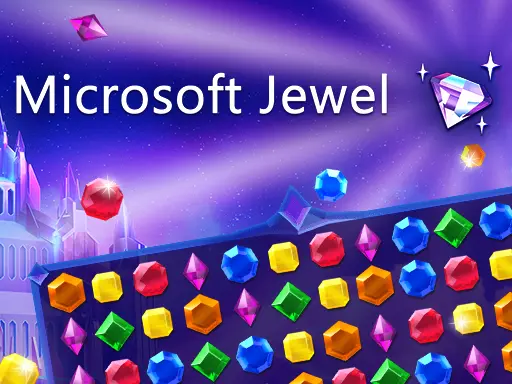
Microsoft Jewel 2
Microsoft Jewel 2 is a colorful match-3 puzzle game built around a simple goal: place at least three matching basic jewels together to clear them from the board.…
 Works on Desktop & Mobile
Tested By BunaGames
- Test date
- July 6, 2026
- Tested on
- Chrome 150
- Device
- Desktop
- Operating system
- macOS and Windows
- Game loaded successfully
- Yes
- Fullscreen works
- Yes
- Sound works
- Yes
- Save progress
- Local browser storage
- Mobile compatibility
- Partially tested
- Keyboard controls
- Working
- Controller support
- Not detected
- Average loading time
- 4.2 seconds
- Known issues
- Minor delay after entering fullscreen
Microsoft Jewel 2 not loading?
- Refresh the page.
- Disable restrictive content blockers temporarily.
- Confirm JavaScript and WebGL are enabled.
- Clear the browser cache.
- Try another modern browser.
- Close unnecessary tabs.
- Switch off VPN if the game server is blocked.
- Use the Report a Problem button if the issue continues.
Continue Playing

Daily Challenge

Play 7 minutes today in Microsoft Jewel 2.
Leaderboard
- 1Community rating4.7 ★
- 2Player likes914
- 3Total votes1.0K
- 4Your local progress0%
Your progress is saved locally in this browser. No account required.
 Your progress is saved locally in this browser. No account required.
Game Progress & Challenges
Why Play This Game?
 Instant PlayPlay instantly in your browser.
 Mobile FriendlyOptimized for all devices.
 Free to PlayNo hidden fees.
About "Microsoft Jewel 2"
Microsoft Jewel 2 is a colorful match-3 puzzle game built around a simple goal: place at least three matching basic jewels together to clear them from the board. Each successful move can open space, create new matching possibilities, and help you progress through a sequence of jewel-filled levels.
The game expands the familiar gem-matching format with seven different jewel kinds, special gems, Power-Up Jewels, and bonus levels. That combination gives each board more to consider than a quick three-piece match. A move may clear a small group immediately, set up a stronger follow-up match, or contribute to a power-up that can affect a larger part of the puzzle.
Microsoft Jewel 2 suits players looking for an approachable puzzle game with clear visual feedback and short, focused rounds. The rules are easy to understand, but choosing the best swap becomes more important as the board develops. Instead of moving randomly, look for jewel groups that improve the board after they disappear.
Whether you are returning to classic match-3 games or want a straightforward browser puzzle session, this game emphasizes recognizable jewel-matching skills while adding sparkling surprises and new bonus-level opportunities.
Gameplay
Microsoft Jewel 2 uses the core match-3 loop: inspect the board, swap neighboring jewels, and make lines or groups containing at least three of the same basic jewel. A valid match clears those jewels and changes the board, allowing remaining pieces to settle into the empty spaces. Those changes can reveal fresh matches that were not available before your move.
The important gameplay decision is not merely finding a match. It is deciding which match has the best result. A small match near the top may be legal but have limited impact. A match lower on the board can make more jewels fall, reshape several columns, and create extra chances for follow-up clears. When multiple swaps are possible, compare the space each one opens.
Progress comes through levels, with bonus levels adding another reason to keep advancing. The game also includes special gems and Power-Up Jewels. These pieces are valuable because they add a tactical layer to basic jewel matching: creating or activating one can make a larger board change than an ordinary three-jewel clear.
There are seven jewel types to recognize, so visual scanning matters. Before making a move, check rows, columns, and nearby clusters for repeated colors or jewel shapes. A patient look often reveals a stronger setup than the first obvious swap. This creates a satisfying rhythm of quick observation, one deliberate move, board movement, and a new puzzle state.
- Match three or more identical basic jewels.
- Use clearing moves to change the board layout.
- Look for opportunities to create Power-Up Jewels.
- Advance through levels and discover bonus-level content.
Platform
Microsoft Jewel 2 is presented here as a browser puzzle game, so you can focus on the jewel board without needing to learn a complicated control scheme. The central interaction is visual: choose a jewel, swap it with a neighboring jewel, and watch for a valid match.
A larger screen can make it easier to scan the full board and compare several possible moves before committing. Smaller-screen play can still suit short puzzle sessions, especially when you take a moment to identify the jewels involved in a planned swap. The key requirement is a responsive pointing or touch input method for selecting adjacent pieces.
Because match-3 boards change after every clear, a stable viewing area is more useful than speed alone. Give yourself enough space to see lower rows, edge positions, and possible three-jewel alignments. If you prefer browsing game collections between rounds, BunaGames also offers browser games for different quick-play sessions.
Availability can vary according to the device, browser, connection, and any local network rules in place. If the game does not load as expected, refreshing the page or trying a current browser can help distinguish a temporary loading issue from a network restriction.
How to Play "Microsoft Jewel 2"
Start by examining the whole jewel board rather than tapping the first matching color you notice. Your objective is to swap neighboring jewels so that at least three identical basic jewels line up. A successful match clears the group and causes the board to change, creating a new arrangement for your next decision.
- Find a possible line. Look for two matching jewels with a third matching jewel one swap away. Check both horizontal and vertical directions.
- Confirm that the jewels are adjacent. The move must exchange neighboring positions, so make sure the intended swap can actually form the match.
- Make the swap. Select one jewel and then its neighboring target, or use the equivalent drag motion if supported by your device.
- Watch the board resolve. Cleared jewels disappear, remaining pieces shift, and new arrangements can appear.
- Reassess before the next move. Do not assume the old plan still applies after the board changes. Look again for improved matches and Power-Up Jewel opportunities.
When you see a chance to create a Power-Up Jewel, it is often worth considering before taking an ordinary clear. Power-ups and special gems are part of what separates a routine match from a move that can reshape the puzzle. However, do not force a setup if a clean match will leave the board in a more favorable condition.
As you progress through levels, keep the basic rule in mind: every move should either make a valid match now or improve the board in a useful way. This mindset helps you play deliberately without making the puzzle feel slow or overly technical.
Controls
The controls are designed around selecting and exchanging neighboring jewels. On a computer, use a mouse or trackpad to choose the jewel you want to move and the adjacent jewel you want to swap with. On a touch-enabled device, tap neighboring jewels or use the touch interaction supported by the game screen.
| Input | Action |
|---|---|
| Click or tap | Select a jewel |
| Second click or tap | Choose an adjacent swap |
| Drag, if supported | Swap toward a neighbor |
Only swaps that produce a valid match of at least three identical basic jewels are useful for clearing the board. If a move does not create a match, choose another neighboring pair and look for a clearer line.
For better control accuracy, pause briefly before selecting pieces near the edge of the board. On touchscreens, a deliberate tap helps avoid choosing the wrong jewel when several colors are close together. On desktop, a mouse click can be especially helpful for planning exact adjacent swaps.
Can "Microsoft Jewel 2" Unblocked?
If you are looking for an unblocked way to play Microsoft Jewel 2, access depends on where you are playing and what rules apply to that network or device. This page is designed for browser play, but schools, workplaces, shared networks, parental settings, browser extensions, or regional connection issues can sometimes prevent a game page from loading normally.
The most reliable approach is to use a permitted personal connection and a modern browser. If the game area does not appear, first try a page refresh. You can also check whether privacy tools, strict content filters, or blocked scripts are interfering with the game. These steps address ordinary browser-loading problems without trying to bypass network policies.
Do not attempt to work around restrictions established by a school, workplace, library, or network administrator. Those controls may be in place for safety, bandwidth, or usage-policy reasons. Instead, play when you have authorized access.
Once the game loads, no complicated setup is needed to understand the puzzle: match three or more identical basic jewels, create Power-Up Jewels where possible, and continue through the available levels. That makes it a practical choice for a short, permitted browser-game break.
Tips for "Microsoft Jewel 2"
Good Microsoft Jewel 2 play comes from reading the board before swapping. Matching three jewels is the minimum requirement, but the strongest move is often the one that creates useful board movement, builds toward a Power-Up Jewel, or leaves several potential matches for later.
- Scan from the bottom first. A clear in a lower row can shift more jewels than a clear near the top. More falling pieces means more chances for new patterns to emerge.
- Look for near-complete lines. Find pairs of matching jewels and ask whether one neighboring piece can be moved into position to make three.
- Check both directions. A color may look unhelpful horizontally but form a vertical match after one swap. Alternate your eye between rows and columns.
- Do not rush the first visible match. Several legal moves may exist. Compare them, especially when one move affects a denser area of the board.
- Value Power-Up Jewel setups. Since Power-Up Jewels are created through matching, a move that develops one can be more useful than a simple clear.
- Use special gems thoughtfully. When a special gem appears, consider what part of the board would benefit most from a larger change rather than activating it without a plan.
- Re-read the board after every clear. Falling jewels can produce a completely different set of opportunities. A strong player adapts instead of following an outdated sequence.
There is also a useful balance between immediate progress and future position. An ordinary three-jewel match may be best when it opens the center, breaks up an awkward cluster, or brings matching colors closer together. On the other hand, holding your attention on a potential power-up can pay off if the needed jewels are already close.
Bonus levels reward the same habits: observe, identify a legal swap, and choose moves with the most meaningful effect. You do not need frantic input. Clear visual planning is often more valuable than making moves as quickly as possible.
Features "Microsoft Jewel 2"
Microsoft Jewel 2 combines classic match-3 puzzle structure with additional jewel-based variety. Its central mechanic is easy to recognize, yet the combination of levels, seven jewel types, Power-Up Jewels, special gems, and bonus-level content gives players several elements to watch as the board changes.
- Classic match-3 rules: Match at least three of the same basic jewels to clear them and continue through the puzzle.
- Seven jewel kinds: Multiple jewel types make visual recognition and board scanning an important part of each move.
- Power-Up Jewels: Create enhanced jewel effects through successful matching rather than relying only on standard clears.
- Special gems: Discover jewel variations that add sparkling surprises to the familiar matching formula.
- Level progression: Continue through a series of puzzle levels instead of playing only a single static board.
- Bonus levels: Reach additional challenges as you advance.
- Accessible interaction: The game is centered on selecting and swapping adjacent jewels, making the core action understandable for new players.
The main appeal is the way familiar mechanics support repeatable decision-making. Every board asks a small but meaningful question: which adjacent swap is most useful now? The answer may be a direct three-jewel clear, a move that changes the lower board, or a setup for a Power-Up Jewel. Because the layout changes after matches resolve, the same basic rule continues to produce fresh situations.
This structure works well for players who enjoy visual puzzles without needing a long tutorial. You can understand the objective quickly, then improve naturally by spotting better alignments, reading jewel positions more efficiently, and using special opportunities with more care.
Best "Microsoft Jewel 2" Similar Games & Top Picks
- Brian Test 4: Sneaky Friends: Play Brian Test 4: Sneaky Friends online and solve cartoon riddles with careful taps, lateral thinking, and smart puzzle strategies.
- Brain Test 3: Tricky Puzzles: Play Brain Test 3: Tricky Puzzles online. Solve reverse-logic riddles, collect useful items, and follow a story through tricky quests.
- Brain Test 2: Tricky Puzzles: Play Brain Test 2: Tricky Puzzles online free. Read quirky riddles, study hand-drawn scenes, and solve clever brain teasers.
- Idle Dice: Play Idle Dice online and roll for earnings. Learn the gameplay, controls, dice-combo strategy, browser access, and save options.
- Unblock Me: Play Unblock Me online and slide the wooden blocks aside to guide the red block out of the board.
FAQ - Microsoft Jewel 2
What is Microsoft Jewel 2?
Microsoft Jewel 2 is a match-3 puzzle game based on swapping neighboring jewels to make groups of at least three identical basic jewels. Matches clear pieces from the board and help you progress through levels. The game includes seven jewel types, Power-Up Jewels, special gems, and bonus-level content.
How do I make a match in Microsoft Jewel 2?
Choose two neighboring jewels and swap them so that three or more of the same basic jewel form a horizontal or vertical line. A valid match clears the jewels. Before moving, look for pairs that can become a three-jewel line with one adjacent exchange.
What are Power-Up Jewels?
Power-Up Jewels are enhanced jewels created through matching. They are important because they add a stronger tactical option than an ordinary basic-jewel clear. When you notice an opportunity to create one, compare it with available standard matches and consider which move will improve the board most.
How many kinds of jewels are in the game?
Microsoft Jewel 2 has seven different kinds of jewels. Learning to recognize them quickly helps when you scan for possible lines, near-complete groups, and swaps that can create a Power-Up Jewel.
Are there bonus levels in Microsoft Jewel 2?
Yes. The game includes bonus levels as part of its progression. Advancing through standard puzzle levels can lead to more bonus-level opportunities and additional jewel-matching challenges.
What controls does Microsoft Jewel 2 use?
Use a mouse, trackpad, or touch input to select a jewel and swap it with a neighboring jewel. Depending on the device, this may be done with two clicks or taps, or with a drag gesture. The essential action is always an adjacent swap that forms a valid match.
Can I play Microsoft Jewel 2 in a browser?
This BunaGames page is intended for browser play. Actual access can depend on your browser, device, internet connection, and local network settings. If the game does not load, try refreshing the page or using a current browser on a permitted connection.
Is Microsoft Jewel 2 difficult for beginners?
The basic rule is beginner-friendly because you only need to match three or more identical basic jewels. The challenge grows from choosing stronger moves, noticing vertical as well as horizontal opportunities, setting up Power-Up Jewels, and adapting after the board changes. Start with clear three-jewel matches, then gradually look for moves that affect more of the board.
More Games Like This
 4 Pics 1 Word
Puzzle ★ 4.5
4 Pics 1 Word
Puzzle ★ 4.5
 Jewel Quest
Puzzle ★ 4.7
Jewel Quest
Puzzle ★ 4.7
 Woodoku
Puzzle ★ 4.6
Woodoku
Puzzle ★ 4.6
 1010 Block Puzzle Game
Puzzle ★ 4.7
1010 Block Puzzle Game
Puzzle ★ 4.7
 Hexa Puzzle
Puzzle ★ 4.7
Hexa Puzzle
Puzzle ★ 4.7
 1010 Deluxe
Puzzle ★ 4.6
1010 Deluxe
Puzzle ★ 4.6
 Screw Puzzle
Puzzle ★ 4.7
Screw Puzzle
Puzzle ★ 4.7
 Color Sort
Puzzle ★ 4.6
Color Sort
Puzzle ★ 4.6
 Candy Riddles
Puzzle ★ 4.6
Candy Riddles
Puzzle ★ 4.6
 Hex Frvr
Puzzle ★ 4.5
Hex Frvr
Puzzle ★ 4.5
 Water Sort
Puzzle ★ 4.6
Water Sort
Puzzle ★ 4.6
 Brain Test Tricky Puzzles
Puzzle ★ 4.8
Brain Test Tricky Puzzles
Puzzle ★ 4.8
 Ball Sort
Puzzle ★ 4.5
Ball Sort
Puzzle ★ 4.5
 Bolts And Nuts
Puzzle ★ 4.6
Bolts And Nuts
Puzzle ★ 4.6
 Wheres My Water
Puzzle ★ 4.7
Wheres My Water
Puzzle ★ 4.7
 Hexagon
Puzzle ★ 4.6
Hexagon
Puzzle ★ 4.6
 Cut The Rope 2
Puzzle ★ 4.4
Cut The Rope 2
Puzzle ★ 4.4
 Papas Sushiria
Puzzle ★ 4.6
Papas Sushiria
Puzzle ★ 4.6
 Report a Problem
Comments About Microsoft Jewel 2