



Mine Shooter
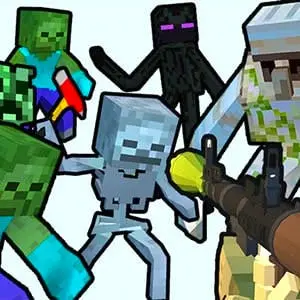
Mine Shooter is a first-person shooting game set in a bright, block-built world under attack. The central objective is direct and action-focused: fight an invading force of undead-style…
 Works on Desktop & Mobile
Tested By BunaGames
- Test date
- June 10, 2026
- Tested on
- Chrome 150
- Device
- Desktop
- Operating system
- macOS and Windows
- Game loaded successfully
- Yes
- Fullscreen works
- Yes
- Sound works
- Yes
- Save progress
- Local browser storage
- Mobile compatibility
- Partially tested
- Keyboard controls
- Working
- Controller support
- Not detected
- Average loading time
- 4.2 seconds
- Known issues
- Minor delay after entering fullscreen
Mine Shooter not loading?
- Refresh the page.
- Disable restrictive content blockers temporarily.
- Confirm JavaScript and WebGL are enabled.
- Clear the browser cache.
- Try another modern browser.
- Close unnecessary tabs.
- Switch off VPN if the game server is blocked.
- Use the Report a Problem button if the issue continues.
Continue Playing

Daily Challenge

Play 7 minutes today in Mine Shooter.
Leaderboard
- 1Community rating4.8 ★
- 2Player likes1.0K
- 3Total votes1.1K
- 4Your local progress0%
Your progress is saved locally in this browser. No account required.
 Your progress is saved locally in this browser. No account required.
Game Progress & Challenges
Why Play This Game?
 Instant PlayPlay instantly in your browser.
 Mobile FriendlyOptimized for all devices.
 Free to PlayNo hidden fees.
About "Mine Shooter"
Mine Shooter is a first-person shooting game set in a bright, block-built world under attack. The central objective is direct and action-focused: fight an invading force of undead-style enemies, monsters, and other hostile attackers before they overwhelm the world. It combines the instantly recognizable look of a sandbox-inspired cubic environment with the fast reactions expected from an FPS.
Rather than asking players to build, mine, or manage a long list of resources, Mine Shooter puts the emphasis on combat. You face hostile targets, select from the available firearms, and keep the pressure off the area as enemies close in. Game descriptions for Mine Shooter highlight weapons such as pistols and machine guns, while versions of the game are also associated with rifles and shotguns.
The appeal is in that contrast: a colorful, approachable block-style setting becomes the backdrop for an enemy-defense shooter. Players looking for quick browser action can focus on aiming, target priority, weapon choice, and survival against a persistent invasion without needing to learn an elaborate adventure system first.
Gameplay
Mine Shooter centers on first-person combat against an invading army in a cubic, sandbox-style world. The action is built around identifying threats, putting enemies in your sights, and using your available weapons to stop the attack. Zombies are a recurring enemy theme in descriptions of the game, although the opposition is also broadly described as monsters and hostile invaders.
The main gameplay loop is easy to understand but can demand fast decisions. Enemies are not simply background scenery; they are the reason to keep moving your attention around the battlefield. A player who only watches one direction can lose track of attackers approaching from elsewhere. The useful habit is to scan, choose an immediate target, fire deliberately, then reassess the scene.
Weapons provide the game’s core combat variety. A pistol can be associated with straightforward, controlled shooting, while machine guns suggest sustained fire when the situation becomes crowded. Other Mine Shooter descriptions mention rifles and shotguns, reinforcing the game’s focus on using different gun types against undead opponents. The exact selection can vary by game version or build, so the weapons shown in the current session should always be treated as the active loadout.
Mine Shooter is best approached as an accessible FPS rather than a slow exploration game. The important skills are visual awareness, aim placement, timing, and staying composed when several enemies demand attention at once. Its blocky presentation makes targets easy to read, while its invasion premise gives every encounter a clear purpose: protect the world by eliminating the attackers.
Platform
Mine Shooter is presented as a web-based shooting game, making it suited to players who want to start an FPS session in a browser rather than install a large standalone game. On BunaGames, the focus is on opening the game page and playing through the browser experience.
A stable internet connection helps maintain a smoother session, especially in a game where quick aiming and immediate reactions matter. For the clearest view of enemy movement and the game interface, use a browser window that gives the play area enough space and avoid unnecessary tabs or overlays while playing.
Because browser games can be updated, embedded differently, or presented in more than one version, visible menus, weapon availability, and input prompts should be checked directly in the running game. This is particularly useful with a title such as Mine Shooter, which has descriptions across the web that reference more than one weapon set and enemy label.
If you enjoy immediate web play, BunaGames also has a broad selection of browser games for different play styles and sessions.
How to Play "Mine Shooter"
Start Mine Shooter with one clear goal in mind: prevent the hostile invasion from taking over the cubic world. Once the game begins, look for the nearest visible threat and use the on-screen combat setup to engage it. The game’s premise is about repelling enemies, so active observation is more useful than waiting for the battlefield to become crowded.
- Enter the game and review the visible interface, including any weapon display, objective prompt, or control reminder.
- Locate incoming zombies, monsters, or other hostile attackers.
- Center your attention on a target before firing instead of spraying shots without checking where enemies are moving.
- Prioritize the threat that is closest, most exposed, or most likely to disrupt your next move.
- Use the firearm currently available to keep the attack under control.
- After removing a target, scan again rather than assuming the area is clear.
The most important lesson is that Mine Shooter rewards awareness as much as firing speed. A first-person viewpoint limits what you can see at one time, so regularly checking the wider play area is part of the challenge. When an enemy group appears, avoid mentally treating it as one target. Notice individual attackers, deal with immediate danger first, and then work through the rest.
Players should also pay attention to any instructions shown by the game itself. The active browser version is the best guide for exact objectives, weapon switching, restart behavior, and any controls that are available in that session. This prevents confusion between Mine Shooter descriptions that may refer to different builds of the same named shooter.
Controls
Mine Shooter uses first-person shooter-style interaction, but the precise control mapping should be confirmed from the prompts displayed in the playable version. Browser builds can present controls differently depending on their current interface and the device being used.
Before entering a difficult encounter, take a moment to identify the visible commands for looking around, moving through the area, aiming, firing, and changing weapons if that option is provided. This small check is worthwhile because combat is built around fast responses to nearby enemies.
- Look for: on-screen instructions before or at the start of play.
- Prioritize: aiming and firing inputs first, since enemy defense is the main objective.
- Check again: if a weapon display or control prompt changes during play.
- Use the active build: as the authority for exact keys, buttons, and touch inputs.
Knowing the current inputs before enemies arrive helps you focus on target selection rather than searching for a command in the middle of the action.
Can "Mine Shooter" Unblocked?
Mine Shooter is intended for browser play on BunaGames, so you can open the game page and begin without treating it like a separate downloadable FPS. Whether a game page is accessible from a particular school, workplace, library, or shared network depends on that network’s local rules and filtering settings.
No browser game can reliably bypass a network administrator’s restrictions. If the page does not load in a managed environment, do not attempt to work around the policy. Instead, play on an approved personal connection, during suitable free time, or on a network where browser gaming is permitted.
For the best experience, open the game directly in a modern browser, allow the play area to load fully, and keep the page active while you play. Since Mine Shooter relies on quick first-person combat, a clear and responsive game window is more useful than trying to play through a heavily restricted or unstable connection.
Tips for "Mine Shooter"
Mine Shooter’s enemy-invasion setup makes smart target handling more valuable than random firing. The goal is not merely to shoot at whatever appears first; it is to keep the immediate situation manageable. Build a habit of looking for the enemy that poses the clearest short-term problem, then return your attention to the rest of the battlefield.
- Scan after every elimination. A defeated enemy can create a false sense of safety. Move your view across the area and search for the next attacker.
- Handle nearby danger first. A close zombie or monster deserves more attention than a distant target that is not yet affecting your position.
- Keep your aim intentional. Centering on a target before firing is usually more useful than reacting with uncontrolled shots.
- Learn the weapon currently shown. Mine Shooter is associated with several firearm types. Notice what is available in your session and adapt your firing rhythm to that weapon.
- Do not rely on the scenery. The colorful block-style environment may look familiar and calm, but it is still an active combat space with enemies moving through it.
- Read the game’s own prompts. They are the reliable source for the active objective and available actions in the version you are playing.
An especially useful improvement over basic run-and-shoot play is threat cycling. Pick the most urgent target, deal with it, immediately check for another immediate threat, and repeat. This keeps attention from getting stuck on a single part of the screen while enemies gather elsewhere.
Finally, treat early attempts as practice for recognition. Learn how easily enemies stand out against the cubic environment, how quickly the scene changes, and which situations make you lose track of attackers. Better awareness turns the game’s simple premise into more consistent defense.
Features "Mine Shooter"
Mine Shooter brings together a recognizable cubic-world visual style and direct first-person shooting. Its feature set is defined by the conflict at the center of the game: hostile forces are invading, and the player responds with firearms rather than construction or long-form exploration.
- First-person shooting action: play from an FPS viewpoint with combat as the main activity.
- Cubic sandbox-inspired setting: battle in a colorful block-built world associated with Minecraft-style visuals.
- Enemy invasion premise: defend against zombies, monsters, and other hostile attackers.
- Gun-focused combat: game descriptions reference pistols, machine guns, rifles, and shotguns.
- Clear player purpose: stop the attacking force and protect the world from being overrun.
- Browser-friendly format: open the game online for a quick shooting session.
The strongest feature is the game’s immediate readability. Players can recognize the genre quickly: enemies appear, weapons are used, and the objective is to fight back. That makes Mine Shooter approachable for players who want the visual charm of block-based worlds but prefer combat over collecting or crafting.
It is also useful to separate the core identity of Mine Shooter from assumptions about similarly named games. The supported premise is a browser FPS with an invasion of undead-style enemies and a selection of guns. Specific progression systems, character upgrades, map counts, multiplayer modes, and other advanced features should only be expected if the active game interface explicitly presents them.
This focus on verified basics gives Mine Shooter a straightforward appeal: enter a threatened cubic world, spot the attackers, and use your weapons to push back the invasion.
Best "Mine Shooter" Similar Games & Top Picks
- Zombie Rush: Play Zombie Rush online, a pixel-art top-down shooter with zombie hordes, weapon upgrades, critical hits, and tactical movement.
- Mr Bullet: Play Mr Bullet free in your browser. Aim carefully, use ricochet shots, and solve physics-based shooting puzzles.
- SkillWarZ: Play SkillWars, a fast-paced 3D first-person shooter with multiplayer modes, movement-focused combat, aiming challenges, and score battles.
- Space Wars: Battleground: Play Space Wars: Battleground online. Enter fast galactic team battles with unique characters, robots, arcade shooting, and survival pressure.
- Cool Archer: Play Cool Archer online and test your timing in a 3D archery challenge with moving targets, wind, arrows, bullseyes, and score-focused shots.
FAQ - Mine Shooter
What is Mine Shooter?
Mine Shooter is a first-person shooting game set in a block-built, sandbox-inspired world. Its main premise is that hostile enemies are attacking the world, and the player must use firearms to fight back. Descriptions of the game commonly identify zombies, monsters, and an invading army as the opposition.
Is Mine Shooter a first-person shooter?
Yes. Mine Shooter is described as an FPS, meaning its action is presented from a first-person perspective. The core activity is aiming at hostile targets and using weapons to stop them. Players should focus on awareness, target selection, and reacting to attackers in the environment.
What enemies are in Mine Shooter?
Zombie-like undead enemies are a major part of Mine Shooter’s theme. The attackers are also described more broadly as monsters and an army of enemies invading the world. The exact enemy appearance in a session should be taken from the version currently running in the browser.
What weapons can I use in Mine Shooter?
Mine Shooter descriptions reference several firearm types, including pistols and machine guns. Other descriptions also mention rifles and shotguns. Because web versions can differ, the weapons visible in the game’s current interface are the most accurate guide to the loadout available for your play session.
Is Mine Shooter related to Minecraft?
Mine Shooter uses a cubic, block-style world that is associated with the visual language of sandbox building games. Its gameplay focus is different from a building or mining game: Mine Shooter is centered on first-person combat against invading enemies. It is best understood as a shooter with a familiar block-world theme.
Can I play Mine Shooter in a browser?
Yes. Mine Shooter is presented as a web game and can be played through the game page in a browser. You do not need to treat it as a large standalone installation. For smooth play, use a stable connection and give the game window enough space to display the action clearly.
Is Mine Shooter free to play?
Mine Shooter is offered on BunaGames as an online browser game. Open the game page to play the available version. If you are using a school, office, or other managed connection, access may still depend on the local network’s rules and content filters.
What is the best way to improve at Mine Shooter?
Start by learning to scan the battlefield after each target is removed. Prioritize nearby threats, aim with purpose, and check the game’s own prompts for the active controls and objective. The biggest improvement usually comes from staying aware of multiple attackers instead of focusing on one enemy for too long.
More Games Like This
 Raft Wars
Shooting ★ 4.7
Raft Wars
Shooting ★ 4.7
 Papas Sushiria
Shooting ★ 4.6
Papas Sushiria
Shooting ★ 4.6
 Papas Wingeria
Shooting ★ 4.6
Papas Wingeria
Shooting ★ 4.6
 Papas Scooperia
Shooting ★ 4.7
Papas Scooperia
Shooting ★ 4.7
 Papas Pizzeria
Shooting ★ 4.6
Papas Pizzeria
Shooting ★ 4.6
 Papas Freezeria
Shooting ★ 4.6
Papas Freezeria
Shooting ★ 4.6
 Masked Special Forces
Shooting ★ 4.7
Masked Special Forces
Shooting ★ 4.7
 Papas Taco Mia
Shooting ★ 4.6
Papas Taco Mia
Shooting ★ 4.6
 Papas Cupcakeria
Shooting ★ 4.6
Papas Cupcakeria
Shooting ★ 4.6
 Deer Hunter
Shooting ★ 4.7
Deer Hunter
Shooting ★ 4.7
 Shooter Sky
Shooting ★ 4.7
Shooter Sky
Shooting ★ 4.7
 Ultrakill
Shooting ★ 4.6
Ultrakill
Shooting ★ 4.6
 Hello Neighbor
Shooting ★ 4.7
Hello Neighbor
Shooting ★ 4.7
 sprunki phase 8
Shooting ★ 4.7
sprunki phase 8
Shooting ★ 4.7
 Fly the Plane
Shooting ★ 4.8
Fly the Plane
Shooting ★ 4.8
 Melon Playground
Shooting ★ 4.7
Melon Playground
Shooting ★ 4.7
 Sprunkr
Shooting ★ 4.4
Sprunkr
Shooting ★ 4.4
 Dune Surfer Game
Shooting ★ 4.6
Dune Surfer Game
Shooting ★ 4.6
 Report a Problem
Comments About Mine Shooter