



Moto Road Rash 3D
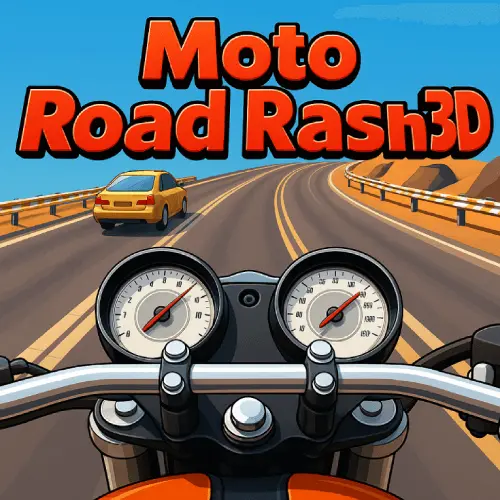
Moto Road Rash 3D is a first-person motorcycle racing game that emphasizes high-speed urban navigation and traffic evasion. Unlike traditional third-person racing titles, this HTML5 game positions players…
 Works on Desktop & Mobile
Tested By BunaGames
- Test date
- May 27, 2026
- Tested on
- Chrome 150
- Device
- Desktop
- Operating system
- macOS and Windows
- Game loaded successfully
- Yes
- Fullscreen works
- Yes
- Sound works
- Yes
- Save progress
- Local browser storage
- Mobile compatibility
- Partially tested
- Keyboard controls
- Working
- Controller support
- Not detected
- Average loading time
- 4.2 seconds
- Known issues
- Minor delay after entering fullscreen
Moto Road Rash 3D not loading?
- Refresh the page.
- Disable restrictive content blockers temporarily.
- Confirm JavaScript and WebGL are enabled.
- Clear the browser cache.
- Try another modern browser.
- Close unnecessary tabs.
- Switch off VPN if the game server is blocked.
- Use the Report a Problem button if the issue continues.
Continue Playing
Daily Challenge

Play 5 minutes today in Moto Road Rash 3D.
Leaderboard
- 1Community rating4.4 ★
- 2Player likes309
- 3Total votes360
- 4Your local progress0%
Your progress is saved locally in this browser. No account required.
 Your progress is saved locally in this browser. No account required.
Game Progress & Challenges
Why Play This Game?
 Instant PlayPlay instantly in your browser.
 Mobile FriendlyOptimized for all devices.
 Free to PlayNo hidden fees.
About "Moto Road Rash 3D"
Moto Road Rash 3D is a first-person motorcycle racing game that emphasizes high-speed urban navigation and traffic evasion. Unlike traditional third-person racing titles, this HTML5 game positions players directly in the rider's perspective, amplifying the intensity of weaving through congested city streets. The game combines arcade-style velocity with tactical lane management, requiring split-second decisions as vehicles, barriers, and environmental hazards emerge in your path. Available as one of many online games accessible through modern browsers, it delivers immediate racing action without installation requirements or platform restrictions.
Gameplay
The core gameplay loop centers on maintaining maximum speed while navigating dense traffic patterns across urban roadways. Players accelerate their motorcycle through multiple lanes, executing precise overtakes and near-miss maneuvers to avoid collisions with cars, trucks, and roadside obstacles. The first-person camera angle creates a narrow field of vision that demands heightened spatial awareness and rapid reaction timing.
Four distinct game modes provide varied challenge structures. Each mode adjusts traffic density, speed thresholds, and objective parameters, ranging from time-based sprints to endurance runs that test sustained concentration. The ferocity of the riding experience escalates as speeds increase, compressing reaction windows and punishing navigation errors with immediate crashes. Success depends on reading traffic flow patterns, anticipating lane openings, and exploiting brief gaps between vehicles moving at different velocities.
Platform
Moto Road Rash 3D runs as an HTML5 game, eliminating download and installation barriers common to native applications. The browser-based architecture ensures cross-platform compatibility with desktop computers, laptops, and Chromebooks through standard web browsers. No plugins, emulators, or additional software layers are required—players access the full racing experience directly through the browser window.
This HTML5 foundation delivers seamless performance optimization for web environments, with responsive controls and stable frame rates that maintain gameplay fluidity. The game loads quickly and operates within the security sandbox of modern browsers, making it suitable for environments with restricted software permissions. As a result, players can play free from virtually any device with internet connectivity and a compatible browser.
How to Play "Moto Road Rash 3D"
Begin by selecting one of the four available game modes based on your preferred challenge type. Once the race starts, your motorcycle automatically accelerates forward—your primary responsibility is steering and lane positioning rather than manual speed control.
Focus your attention on the road ahead, scanning for traffic patterns and identifying safe lanes. Steer left or right to change lanes, timing your movements to slip between vehicles without contact. The first-person perspective limits peripheral vision, so anticipate obstacles early rather than reacting at the last moment.
Maintain high speeds by staying in open lanes whenever possible. Each collision reduces momentum and may end your run depending on the game mode. As you progress, traffic density increases and vehicle speeds vary more dramatically, requiring tighter maneuvering and faster decision cycles. Prioritize survival over risky overtakes when traffic compresses, then exploit clear stretches to maximize distance or time bonuses.
Controls
The control scheme is streamlined for browser accessibility and rapid input response:
- Arrow Keys / A and D: Steer the motorcycle left and right to change lanes
- Spacebar: Apply brakes to reduce speed when necessary (use sparingly to maintain competitive pace)
- Mouse: Navigate menus and select game modes
The game emphasizes steering precision over complex input combinations. Since forward acceleration is automatic, players concentrate entirely on lateral positioning and timing. Smooth, measured steering inputs yield better results than abrupt jerks, especially when threading narrow gaps between vehicles at high velocity.
Can "Moto Road Rash 3D" Unblocked?
As an HTML5 browser game, Moto Road Rash 3D functions without executable downloads or system-level installations, which helps it operate in network environments where traditional game clients may be restricted. The game runs entirely within the browser sandbox, accessing only standard web technologies available to any website.
This architecture makes it accessible on school and workplace networks that block downloadable gaming applications but permit general web browsing. The lightweight codebase loads quickly even on bandwidth-limited connections, and the game requires no account creation, registration, or personal data submission to begin playing. These characteristics align with the typical profile of unblocked browser games that prioritize immediate access and minimal technical barriers.
Tips for "Moto Road Rash 3D"
- Master lane discipline: Stay centered in your chosen lane until you commit to a lane change—drifting between lanes increases collision risk and reduces reaction time for sudden obstacles.
- Read traffic rhythm: Vehicles often move in clusters with gaps between groups. Time your overtakes to exploit these natural openings rather than forcing risky passes through dense packs.
- Use peripheral cues: Watch for vehicle shadows, road markings, and edge indicators that signal upcoming hazards before they fill your central vision cone.
- Brake strategically: Reserve braking for unavoidable congestion rather than routine navigation. Maintaining speed is critical for score and progression, so prioritize steering solutions over speed reduction.
- Anticipate speed differentials: Slower vehicles appear to approach rapidly due to your high speed. Begin lane changes earlier than instinct suggests to account for closure rates.
- Practice mode selection: Start with the mode offering the most forgiving traffic patterns to internalize steering sensitivity and distance judgment before attempting higher-difficulty variants.
Features "Moto Road Rash 3D"
- First-person perspective: Immersive camera angle that intensifies speed perception and demands precise spatial judgment
- Four game modes: Multiple challenge structures providing varied objectives, traffic configurations, and difficulty curves
- Urban traffic simulation: Dynamic vehicle patterns with mixed speeds and lane behaviors that create emergent navigation puzzles
- HTML5 browser compatibility: Instant access without downloads, supporting cross-platform play on desktops, laptops, and Chromebooks
- Arcade racing mechanics: Streamlined controls and automatic acceleration that prioritize action over simulation complexity
- Progressive difficulty scaling: Increasing traffic density and speed as gameplay advances, maintaining challenge throughout sessions
- Optimized web performance: Smooth frame rates and responsive input handling engineered specifically for browser environments
Best "Moto Road Rash 3D" Similar Games & Top Picks
- Speed Racing Pro 2: Race 12 free supercars in Speed Racing Pro 2. Choose regular or elimination events and compete on fast 3D circuit tracks.
- Cyber Cars Punk Racing 2: Play Cyber Cars Punk Racing 2 online free. Explore futuristic racing modes, neon roads, cars, challenges, and helpful beginner tips.
- Cyber Cars Punk Racing: Play Cyber Cars Punk Racing online: a 3D futuristic driving game with neon city races, career progress, many tracks, and 2-player action.
- Crash X: Play Crash X online free: drive across steep descents and climbs, test car control, and watch realistic vehicle deformation in crashes.
- Cars Arena: Play Cars Arena, a 3D physics-based drifting battle game where rivals compete for space on a breaking hex platform.
FAQ - Moto Road Rash 3D
Is Moto Road Rash 3D free to play?
Yes, Moto Road Rash 3D is completely free to play in your browser. No payment, subscription, or account creation is required to access the full game and all four game modes.
Do I need to download Moto Road Rash 3D?
No download is necessary. The game runs as an HTML5 application directly in your web browser, allowing you to start playing immediately without installation or additional software.
What are the four game modes in Moto Road Rash 3D?
The game offers four distinct modes that vary traffic patterns, speed requirements, and objectives. Each mode presents different challenge structures, from time-based races to endurance runs, though specific mode names are selected in-game.
Can I play Moto Road Rash 3D on a Chromebook?
Yes, the HTML5 architecture ensures full compatibility with Chromebooks and other devices running Chrome OS. The game operates through the browser with optimized performance for these platforms.
What makes the first-person perspective different in this game?
The first-person camera places you directly in the rider's viewpoint, creating a narrower field of vision compared to third-person racing games. This perspective intensifies the sensation of speed and requires earlier anticipation of traffic obstacles since you cannot see as far to the sides.
How do I avoid crashing in heavy traffic?
Focus on reading traffic patterns ahead rather than reacting to immediate threats. Look for natural gaps between vehicle clusters, stay centered in lanes until you commit to a change, and begin steering maneuvers earlier than your instinct suggests to account for high closure speeds.
More Games Like This
 Bike Hero
Car ★ 4.6
Bike Hero
Car ★ 4.6
 Crazy Stunt Cars Multiplayer
Car ★ 4.6
Crazy Stunt Cars Multiplayer
Car ★ 4.6
 Stunt Car Challenge 3
Car ★ 4.7
Stunt Car Challenge 3
Car ★ 4.7
 Drive Mad 3
Car ★ 4.6
Drive Mad 3
Car ★ 4.6
 Papas Sushiria
Car ★ 4.6
Papas Sushiria
Car ★ 4.6
 Papas Wingeria
Car ★ 4.6
Papas Wingeria
Car ★ 4.6
 Papas Scooperia
Car ★ 4.7
Papas Scooperia
Car ★ 4.7
 Car Rush
Car ★ 4.6
Car Rush
Car ★ 4.6
 Papas Pizzeria
Car ★ 4.6
Papas Pizzeria
Car ★ 4.6
 Papas Freezeria
Car ★ 4.6
Papas Freezeria
Car ★ 4.6
 Madalin Stunt Cars 3
Car ★ 4.5
Madalin Stunt Cars 3
Car ★ 4.5
 Papas Taco Mia
Car ★ 4.6
Papas Taco Mia
Car ★ 4.6
 Papas Cupcakeria
Car ★ 4.6
Papas Cupcakeria
Car ★ 4.6
 Moto X3m Spooky Land
Car ★ 4.7
Moto X3m Spooky Land
Car ★ 4.7
 Moto X3m Winter
Car ★ 4.7
Moto X3m Winter
Car ★ 4.7
 Retro Highway
Car ★ 4.4
Retro Highway
Car ★ 4.4
 Speed Master
Car ★ 4.7
Speed Master
Car ★ 4.7
 Loop Crash
Car ★ 4.6
Loop Crash
Car ★ 4.6
 Report a Problem
Comments About Moto Road Rash 3D