



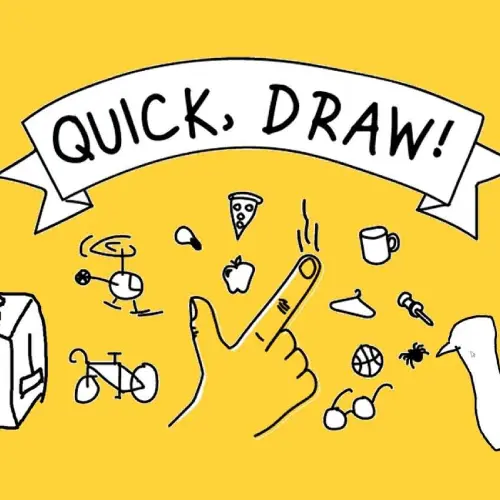
Quick Draw
Quick Draw is an exciting arcade drawing game that challenges players to create recognizable sketches within strict time limits. This fast-paced online game combines artistic creativity with quick…
 Works on Desktop & Mobile
Tested By BunaGames
- Test date
- May 25, 2026
- Tested on
- Chrome 150
- Device
- Desktop
- Operating system
- macOS and Windows
- Game loaded successfully
- Yes
- Fullscreen works
- Yes
- Sound works
- Yes
- Save progress
- Local browser storage
- Mobile compatibility
- Partially tested
- Keyboard controls
- Working
- Controller support
- Not detected
- Average loading time
- 4.2 seconds
- Known issues
- Minor delay after entering fullscreen
Quick Draw not loading?
- Refresh the page.
- Disable restrictive content blockers temporarily.
- Confirm JavaScript and WebGL are enabled.
- Clear the browser cache.
- Try another modern browser.
- Close unnecessary tabs.
- Switch off VPN if the game server is blocked.
- Use the Report a Problem button if the issue continues.
Continue Playing
Daily Challenge

Play 4 minutes today in Quick Draw.
Leaderboard
- 1Community rating4.7 ★
- 2Player likes1.2K
- 3Total votes1.4K
- 4Your local progress0%
Your progress is saved locally in this browser. No account required.
 Your progress is saved locally in this browser. No account required.
Game Progress & Challenges
Why Play This Game?
 Instant PlayPlay instantly in your browser.
 Mobile FriendlyOptimized for all devices.
 Free to PlayNo hidden fees.
About "Quick Draw"
Quick Draw is an exciting arcade drawing game that challenges players to create recognizable sketches within strict time limits. This fast-paced online game combines artistic creativity with quick thinking, making it perfect for players who enjoy testing their drawing abilities under pressure. The game features simple mechanics that are easy to learn but challenging to master, providing endless entertainment for artists and casual gamers alike.
Gameplay
The core gameplay revolves around speed drawing challenges where players must sketch various objects, animals, or concepts before time runs out. Each round presents a new prompt, and success depends on creating drawings that are clear and recognizable within the given timeframe. The game emphasizes quick decision-making and efficient line work, rewarding players who can capture essential details without getting caught up in unnecessary complexity. Progressive difficulty levels introduce more challenging subjects and shorter time limits to keep the experience engaging.
Platform
Quick Draw runs seamlessly in web browsers without requiring downloads or installations. The game is optimized for both desktop and mobile devices, allowing players to draw using mouse controls on computers or touch gestures on tablets and smartphones. This cross-platform compatibility ensures that players can enjoy the drawing challenges anywhere with an internet connection. The responsive design adapts to different screen sizes while maintaining smooth drawing performance across all supported devices.
How to Play "Quick Draw"
Begin each round by reading the drawing prompt that appears on screen. Use your mouse or finger to draw the requested object within the allocated time limit. Focus on capturing the most recognizable features of the subject rather than creating detailed artwork. Submit your drawing before time expires to progress to the next challenge. The game evaluates drawings based on recognizability and key visual elements, so clear, simple sketches often perform better than complex detailed drawings.
Controls
Drawing controls are intuitive and responsive across all platforms. On desktop computers, use your mouse to click and drag for creating lines and shapes. Mobile users can draw directly on the screen using touch gestures with their finger or stylus. The drawing interface includes basic tools for line thickness adjustment and an eraser function for corrections. Clear and undo buttons allow players to restart their drawings if needed during the time limit.
Can "Quick Draw" Unblocked?
Quick Draw is accessible as an unblocked game through BunaGames, making it available in schools, offices, and other restricted network environments. The game loads directly in web browsers without triggering content filters or security restrictions. This accessibility ensures that players can enjoy drawing challenges during breaks or free time regardless of network limitations. The lightweight design minimizes bandwidth usage while maintaining full functionality.
Tips for "Quick Draw"
Start with basic shapes and outlines to establish your drawing's foundation quickly. Focus on the most distinctive features that make objects recognizable rather than attempting detailed artwork. Practice common subjects like animals, vehicles, and household items to improve your speed and accuracy. Use bold, clear strokes instead of sketchy lines to create more definitive shapes. Keep drawings simple and avoid unnecessary details that consume valuable time without improving recognition.
Features "Quick Draw"
- Time-based drawing challenges that test speed and creativity
- Intuitive drawing interface optimized for all devices
- Progressive difficulty levels with varied prompts and time limits
- Cross-platform compatibility for desktop and mobile play
- Simple controls suitable for players of all skill levels
- Quick gameplay sessions perfect for short breaks
- No registration required for immediate play free access
Best "Quick Draw" Similar Games & Top Picks
- Dune Surfer Game: Play Dune Game in your browser on BunaGames. Learn how to start, check the controls, use practical tips, and understand the game page.
- Pokemon Emerald: Play Pokemon Emerald online and explore Hoenn, train Pokémon, battle rivals, build a team, and face Team Magma and Team Aqua.
- Boulder Dash: Play Boulder Dash online. Dig through caves, collect diamonds, avoid falling boulders, and plan every move in this classic puzzle game.
- Vib-Ribbon: Play Vib-Ribbon online and guide Vibri across beat-timed obstacle lines in this distinctive rhythm arcade game.
- Zombie Tsunami: Play Zombie Tsunami online and lead a growing zombie horde through city obstacles, pedestrians, destruction, and surprise power-ups.
FAQ - Quick Draw
How long do I have to complete each drawing?
Time limits vary depending on the difficulty level and complexity of the drawing prompt. Most challenges range from 20 seconds to 2 minutes, with more complex subjects typically allowing additional time.
Can I play Quick Draw on mobile devices?
Yes, the game is fully compatible with smartphones and tablets. You can draw using touch gestures directly on your device's screen for a natural drawing experience.
Do I need artistic skills to play this game?
No artistic experience is required. The game focuses on creating recognizable sketches rather than detailed artwork, making it accessible to players of all skill levels.
Can I erase or undo my drawings?
Yes, the game includes eraser and undo functions that allow you to make corrections during the drawing process, as long as time remains on the clock.
Is Quick Draw free to play?
Yes, Quick Draw is completely free to play through your web browser. No downloads, purchases, or subscriptions are required to enjoy the full game experience.
More Games Like This
 Ball Surfer 3D
Arcade ★ 4.7
Ball Surfer 3D
Arcade ★ 4.7
 Galaga
Arcade ★ 4.7
Galaga
Arcade ★ 4.7
 Osu Game
Arcade ★ 4.7
Osu Game
Arcade ★ 4.7
 Dig Dug 2
Arcade ★ 4.4
Dig Dug 2
Arcade ★ 4.4
 Pac Xon
Arcade ★ 4.8
Pac Xon
Arcade ★ 4.8
 Colorbox Mustard
Arcade ★ 4.6
Colorbox Mustard
Arcade ★ 4.6
 Blumgi Slime
Arcade ★ 4.7
Blumgi Slime
Arcade ★ 4.7
 Rolling Ball 3D
Arcade ★ 4.7
Rolling Ball 3D
Arcade ★ 4.7
 Burrito Bison
Arcade ★ 4.6
Burrito Bison
Arcade ★ 4.6
 Dumb Ways To Die 2
Arcade ★ 4.8
Dumb Ways To Die 2
Arcade ★ 4.8
 Papas Sushiria
Arcade ★ 4.6
Papas Sushiria
Arcade ★ 4.6
 Papas Wingeria
Arcade ★ 4.6
Papas Wingeria
Arcade ★ 4.6
 Papas Scooperia
Arcade ★ 4.7
Papas Scooperia
Arcade ★ 4.7
 Papas Pizzeria
Arcade ★ 4.6
Papas Pizzeria
Arcade ★ 4.6
 Papas Freezeria
Arcade ★ 4.6
Papas Freezeria
Arcade ★ 4.6
 Crazy Roll 3D
Arcade ★ 4.6
Crazy Roll 3D
Arcade ★ 4.6
 Papas Taco Mia
Arcade ★ 4.6
Papas Taco Mia
Arcade ★ 4.6
 Fnf Garcello
Arcade ★ 4.6
Fnf Garcello
Arcade ★ 4.6
 Report a Problem
Comments About Quick Draw