



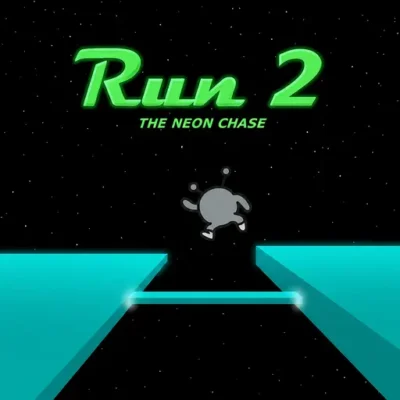
Run 2
Run 2 is a focused 3D running platform game about guiding a gray alien through a series of suspended courses. The character keeps moving through narrow paths, gaps,…
 Works on Desktop & Mobile
Tested By BunaGames
- Test date
- August 15, 2026
- Tested on
- Chrome 150
- Device
- Desktop
- Operating system
- macOS and Windows
- Game loaded successfully
- Yes
- Fullscreen works
- Yes
- Sound works
- Yes
- Save progress
- Local browser storage
- Mobile compatibility
- Partially tested
- Keyboard controls
- Working
- Controller support
- Not detected
- Average loading time
- 4.2 seconds
- Known issues
- Minor delay after entering fullscreen
Run 2 not loading?
- Refresh the page.
- Disable restrictive content blockers temporarily.
- Confirm JavaScript and WebGL are enabled.
- Clear the browser cache.
- Try another modern browser.
- Close unnecessary tabs.
- Switch off VPN if the game server is blocked.
- Use the Report a Problem button if the issue continues.
Continue Playing
Daily Challenge

Play 4 minutes today in Run 2.
Leaderboard
- 1Community rating4.5 ★
- 2Player likes641
- 3Total votes730
- 4Your local progress0%
Your progress is saved locally in this browser. No account required.
 Your progress is saved locally in this browser. No account required.
Game Progress & Challenges
Why Play This Game?
 Instant PlayPlay instantly in your browser.
 Mobile FriendlyOptimized for all devices.
 Free to PlayNo hidden fees.
About "Run 2"
Run 2 is a focused 3D running platform game about guiding a gray alien through a series of suspended courses. The character keeps moving through narrow paths, gaps, ledges, and obstacles, while the shape of each level turns simple movement into a spatial puzzle. Your job is not merely to react quickly; it is to read the route ahead, choose a safe line, and make each jump land cleanly.
The game stands out because its courses use walls and changing surfaces as part of the path. A route that appears impossible from one angle may become manageable when you move onto another face of the tunnel-like level. This perspective-driven design gives Run 2 more planning value than a standard straight-line runner.
Some courses are approached by running, while others involve skating, creating a different feel as you move through the three-dimensional environment. Every level asks for concentration, timing, and memorization. A missed platform usually teaches you something useful about the next attempt: where to jump, which surface to use, or how much room you have before the next gap.
It is an approachable arcade challenge with a clear goal: keep the alien moving, avoid falling, and solve each compact course one precise run at a time.
Gameplay
Run 2 combines automatic forward momentum with platforming decisions. As the gray alien travels through each course, you steer toward safer ground and jump over breaks in the floor. The levels are built in three dimensions, so the route can extend across the floor, walls, and other surfaces rather than staying on one flat lane.
The central gameplay skill is route recognition. Looking only at the platform directly ahead can lead to a late jump or an awkward landing. Instead, scan for the next two or three pieces of ground. Notice where a gap begins, how the platform is angled, and whether moving sideways will place the character on a more useful surface. This makes each course feel like a short movement puzzle as well as a reflex test.
Momentum matters because the character is continuously progressing through the stage. A jump needs enough forward travel to clear a gap, but it also needs a controlled landing position. Landing near an edge may leave too little room to line up for the next obstacle. On curved or twisting sections, staying calm is often more effective than making large corrections.
The running and skating context adds variety to the basic goal of reaching the end. Regardless of the movement style, success comes from learning the level layout and connecting a sequence of clean actions. Run 2 rewards repeat attempts because difficult sections become more readable once you know what appears around the next corner.
- Run across suspended platforms and avoid open gaps.
- Jump with timing that matches the distance ahead.
- Use the course's changing surfaces to find viable routes.
- Memorize difficult sequences and improve each retry.
Platform
Run 2 is presented as an online browser game, making it suited to players who want a quick arcade platform challenge without treating it like a long installation-based game. Open the game page, allow the game area to load, and use a keyboard for the most direct control experience.
A desktop or laptop keyboard is especially useful because the game relies on arrow-key input and fast directional adjustments. The 3D courses can demand accurate steering near gaps and platform edges, so a physical keyboard gives clearer control than a touch-first setup.
For the smoothest session, keep the game window active and avoid switching away while navigating a difficult sequence. If the play area is not responding, click inside it before using the arrow keys. Players looking for more quick-play titles can also explore browser games on BunaGames.
Because browser access can be affected by a device, school, workplace, network, or local content policy, availability may vary by location. When the game page is available, its compact level structure works well for short breaks as well as longer practice sessions.
How to Play "Run 2"
Start a Run 2 course and guide the gray alien forward through the three-dimensional route. The immediate objective is simple: stay on the platforms, clear the gaps, avoid obstacles, and reach the end of the level. The deeper objective is to understand how the course is connected before speed forces a decision.
- Watch the opening path. Use the first moments of a level to identify the platform direction, nearby gaps, and the next safe landing area.
- Steer early. Move toward the side or surface you need before reaching the edge. Late corrections make jumps harder to control.
- Jump with a destination in mind. Do not jump only to escape a gap. Aim for a stable part of the next platform that leaves room for the following move.
- Read the level in 3D. When the floor seems to end, look for a route that continues along another face of the course. Walls and changing surfaces can be part of the solution.
- Learn from falls. A failed attempt reveals the timing and positioning the next attempt requires. Treat each restart as route practice rather than lost progress.
On sequences with several gaps, think in connected actions. The best landing on the first platform is the one that makes the second jump easier. This is particularly important when a route turns or asks you to shift across the course while moving forward.
Do not rush an unfamiliar stage purely because the character is moving. Focus on the geometry ahead, make measured directional inputs, and use repeat runs to turn uncertain sections into a known pattern. Once a level is familiar, the same movements that first felt demanding become a satisfying, repeatable route.
Controls
Run 2 uses keyboard-based arrow controls. Keep the game area selected, then use the arrows to direct the alien through the course and handle jumps. Since the character is always advancing through the stage, small inputs are often enough to change a landing line or prepare for a gap.
| Key | Action |
|---|---|
| Left Arrow | Move left |
| Right Arrow | Move right |
| Arrow keys | Run, steer, and jump |
Use directional input deliberately near edges. Holding a direction for too long can carry the character away from the safest landing area, while a brief correction can keep a route aligned. For jumps, prepare your position before reaching the gap rather than trying to correct everything at the last instant.
If the controls do not react, click once inside the game window and try again. Keyboard focus is important in browser games, particularly after opening another tab, using a menu, or clicking outside the play area.
Can "Run 2" Unblocked?
Run 2 is designed for online browser play, but whether it is available on a particular connection depends on that network's rules and filtering settings. Schools, libraries, offices, and managed devices may restrict game pages or browser content. Those restrictions are controlled by the network or device administrator, not by the game itself.
When the page is accessible, you can play directly in a browser with keyboard controls. There is no need to claim that every network will allow access, because availability can differ between locations and devices. If a game page does not load, first check your connection, browser settings, and whether the game area has finished loading.
For a better browser session, use a current browser, keep the tab active, and make sure the game window has keyboard focus. Avoid relying on unofficial copies, suspicious download prompts, or attempts to bypass local network policies. The safest option is simply to use the game where it is permitted and available.
Run 2's short level format is useful when you have a few minutes to practice a route, replay a difficult jump sequence, or work toward a cleaner completion.
Tips for "Run 2"
The most useful Run 2 skill is not raw speed. It is learning to see a level as a chain of landing zones. Each platform affects the jump after it, so choose positions that preserve options instead of drifting toward an edge without a plan.
- Look beyond the first gap. Before jumping, identify where you will land and where you must move next. This prevents a successful first jump from creating an impossible follow-up.
- Move into position early. If the next platform is offset, begin steering before the edge. Early alignment produces cleaner, less panicked jumps.
- Favor stable landings. Landing in the middle of a platform usually gives more time to react than landing on its outer edge.
- Use small corrections. Oversteering can be as dangerous as not steering. Short directional adjustments help maintain a controlled route through narrow sections.
- Study the 3D layout. A wall or alternate surface may be a continuation of the route. When the obvious floor ends, search the surrounding geometry before assuming the level has no path.
- Memorize problem areas. Repeated failures usually point to one issue: late positioning, a mistimed jump, or an unread route transition. Isolate that moment and adjust one action at a time.
For long sequences, establish a rhythm rather than reacting to every platform as a separate emergency. Consistent steering and deliberate jump timing make the course easier to read. If a skating section feels different from a running section, give yourself an attempt or two to learn its movement feel before trying to force a fast completion.
Most importantly, do not treat a fall as random. Run 2 is structured around concentration and memorization. Once you understand the placement of a gap, a turn, or a surface transition, the level becomes less about surprise and more about execution.
Features "Run 2"
Run 2 delivers a compact arcade-platform experience built around movement, route planning, and three-dimensional course design. Its strongest feature is the way simple arrow-key control supports levels that require much more than simple left-and-right movement.
- 3D course navigation: Platforms, walls, turns, and changing surfaces make players think about direction and space.
- Gray alien protagonist: Guide a recognizable character through a sequence of suspended obstacle courses.
- Running and skating play: The game includes the idea of moving through courses by running or skating, adding variety to its platform action.
- Platforming challenge: Clear gaps, avoid obstacles, and maintain safe positioning while moving forward.
- Memorization-based progress: Repeated attempts help reveal the safest route and the right timing for difficult sections.
- Concentration-focused levels: Each stage rewards attention to the path ahead rather than careless speed.
- Browser-friendly format: Play online when the page is available, making it easy to return for another attempt.
The game also has a useful balance of accessibility and depth. The basic goal is instantly understandable: do not fall, and reach the end. However, the 3D arrangement of the courses creates decisions about where to steer, when to jump, and which surface offers the next route. That difference keeps the action engaging after the first few levels.
For players who enjoy precise movement challenges, Run 2 provides a clear feedback loop. Every missed jump exposes a route detail, every retry improves familiarity, and every completed sequence feels earned through better observation and control.
Best "Run 2" Similar Games & Top Picks
- Slope Tunnel: Play Slope Tunnel online and guide a speeding ball through twisting 3D paths, holes, curves, obstacles, and orb-filled routes.
- Running Fred: Play Running Fred online and guide Fred through dangerous dungeons, traps, coins, acrobatic moves, and fast survival runs.
- Dino Run: Play Dino Run online free in your browser. Jump cacti, avoid flying dinosaurs, improve your score, and survive the endless desert run.
- Slope Run: Play Slope Run online and guide a fast-moving ball through 3D space tracks filled with slopes, turns, gaps, and obstacles.
- Dino Dash 3D: Play Dino Dash 3D online. Guide a T-Rex through a 3D desert, jump cacti, dodge aerial threats, and chase a longer survival score.
FAQ - Run 2
What is Run 2?
Run 2 is an online 3D running and platform game. You guide a gray alien through a series of courses made from platforms, gaps, obstacles, turns, and changing surfaces. The goal is to stay on the route and reach the end of each level.
How do you play Run 2?
Guide the alien through each course with the arrow keys. Steer toward safe platforms, jump across openings, and watch for routes that continue on another surface. The character moves through the level continuously, so planning your next landing is as important as reacting to the gap immediately ahead.
What are the controls for Run 2?
Run 2 uses the arrow keys for movement. The left and right arrows direct the character across the course, while the arrow controls are used to handle running, steering, and jumping. Click inside the game window first if your keyboard input does not respond.
Is Run 2 an endless runner?
No. Run 2 is structured around separate courses and levels rather than one endlessly generated path. Each course has a designed layout with specific gaps, platforms, obstacles, and three-dimensional route changes. This makes memorization and repeat practice important parts of the experience.
Why are the levels difficult?
The challenge comes from combining forward movement with 3D platform layouts. You need to judge jump timing, steer toward safe landing zones, and recognize when a wall or different surface continues the route. Difficult sections become easier once you remember their layout and prepare your position earlier.
Can you run on walls in Run 2?
The courses use changing surfaces as part of their three-dimensional design, so the route is not limited to one flat floor. When a path appears to end, look around the course geometry for another usable surface. Reading these transitions is one of the main skills needed to progress.
Is Run 2 free to play in a browser?
Run 2 is presented as an online browser game. When the page is available on your device and network, you can play it in the browser using keyboard controls. Access can vary if a school, workplace, library, or managed network restricts game content.
What is the best tip for beating Run 2 levels?
Plan two moves ahead. Instead of jumping only to clear the next gap, choose a landing spot that prepares you for the platform after it. Steer early, make small corrections near edges, and use failed attempts to memorize the exact position and timing needed for the next run.
More Games Like This
 Zombs IO
Running Games ★ 4.5
Zombs IO
Running Games ★ 4.5
 Meat Boy
Running Games ★ 4.4
Meat Boy
Running Games ★ 4.4
 4 Pics 1 Word
Running Games ★ 4.5
4 Pics 1 Word
Running Games ★ 4.5
 Super Smash Flash
Running Games ★ 4.5
Super Smash Flash
Running Games ★ 4.5
 Street Fighter 2
Running Games ★ 4.7
Street Fighter 2
Running Games ★ 4.7
 Ball Surfer 3D
Running Games ★ 4.7
Ball Surfer 3D
Running Games ★ 4.7
 Alien Hominid
Running Games ★ 4.6
Alien Hominid
Running Games ★ 4.6
 Reversi
Running Games ★ 4.5
Reversi
Running Games ★ 4.5
 Jewel Quest
Running Games ★ 4.7
Jewel Quest
Running Games ★ 4.7
 King Of Fighters
Running Games ★ 4.8
King Of Fighters
Running Games ★ 4.8
 Bike Hero
Running Games ★ 4.6
Bike Hero
Running Games ★ 4.6
 Big Tower Tiny Square
Running Games ★ 4.5
Big Tower Tiny Square
Running Games ★ 4.5
 Woodoku
Running Games ★ 4.6
Woodoku
Running Games ★ 4.6
 Raft Wars
Running Games ★ 4.7
Raft Wars
Running Games ★ 4.7
 Chinese Checkers
Running Games ★ 4.6
Chinese Checkers
Running Games ★ 4.6
 Ludo
Running Games ★ 4.7
Ludo
Running Games ★ 4.7
 Galaga
Running Games ★ 4.7
Galaga
Running Games ★ 4.7
 Bloons Td 6
Running Games ★ 4.6
Bloons Td 6
Running Games ★ 4.6
 Report a Problem
Comments About Run 2