



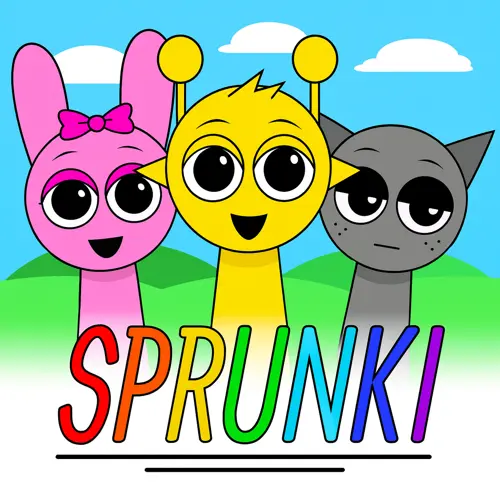
Sprunki Phase 1
Sprunki Phase 1 is a music creation game built around rhythm, experimentation, and the recognizable Sprunki Incredibox-style sound-mixing format. Rather than asking players to memorize a long sequence…
 Works on Desktop & Mobile
Tested By BunaGames
- Test date
- July 14, 2026
- Tested on
- Chrome 150
- Device
- Desktop
- Operating system
- macOS and Windows
- Game loaded successfully
- Yes
- Fullscreen works
- Yes
- Sound works
- Yes
- Save progress
- Local browser storage
- Mobile compatibility
- Partially tested
- Keyboard controls
- Working
- Controller support
- Not detected
- Average loading time
- 4.2 seconds
- Known issues
- Minor delay after entering fullscreen
Sprunki Phase 1 not loading?
- Refresh the page.
- Disable restrictive content blockers temporarily.
- Confirm JavaScript and WebGL are enabled.
- Clear the browser cache.
- Try another modern browser.
- Close unnecessary tabs.
- Switch off VPN if the game server is blocked.
- Use the Report a Problem button if the issue continues.
Continue Playing

Daily Challenge

Play 7 minutes today in Sprunki Phase 1.
Leaderboard
- 1Community rating4.7 ★
- 2Player likes913
- 3Total votes982
- 4Your local progress0%
Your progress is saved locally in this browser. No account required.
 Your progress is saved locally in this browser. No account required.
Game Progress & Challenges
Why Play This Game?
 Instant PlayPlay instantly in your browser.
 Mobile FriendlyOptimized for all devices.
 Free to PlayNo hidden fees.
About "Sprunki Phase 1"
Sprunki Phase 1 is a music creation game built around rhythm, experimentation, and the recognizable Sprunki Incredibox-style sound-mixing format. Rather than asking players to memorize a long sequence of buttons, it focuses on assembling an arrangement from audiovisual elements and hearing how the parts work together. The result is a compact creative game where a short session can produce a simple beat, an unusual layered track, or a more carefully balanced musical loop.
Phase 1 is presented as an early entry in the wider Sprunki series. Its central appeal is not a score chase or a traditional level-by-level campaign; it is the freedom to test combinations, listen for changes in rhythm, and shape a mix that feels right to you. That makes it approachable for players who want a quick browser music game as well as for listeners who enjoy refining a repeating soundscape.
The best way to approach the game is as an interactive sound board. Each choice can affect the overall texture, so the important question is not whether there is one perfect answer, but whether the beat, melody, voices, and effects feel balanced together. Try a few combinations, keep the sounds that support the groove, and rebuild whenever a mix becomes too crowded.
Gameplay
Sprunki Phase 1 centers on making a looping musical arrangement from character-based sound elements. The gameplay is driven by listening: players introduce parts, compare the resulting layers, and adjust the lineup until the track has a satisfying rhythm and mood. A single sound may establish the pulse, while later choices can add percussion, melody, vocal color, or a more unusual effect.
This makes timing and restraint more useful than speed. Adding every available element at once may create a dense mix, but it can also make individual parts difficult to hear. A stronger approach is to start with a dependable rhythmic foundation, then add one layer at a time. After each change, let the loop play long enough to notice whether the new part supports the existing pattern or competes with it.
Some search listings describe Sprunki Phase 1 with adventure or puzzle language, while music-focused listings identify it as a Sprunki Incredibox-inspired music creation game. For players arriving with different expectations, the important context is that the main activity is creative audio mixing. The satisfaction comes from discovering combinations and building a coherent loop, not from navigating a platforming route.
The game also rewards replaying a session with a different goal. One mix can prioritize a steady, simple rhythm. Another can focus on layered vocal sounds, contrast between quiet and busy moments, or an intentionally strange experimental texture. Because the arrangement can be reconsidered at any time, there is room to learn through trial, listening, removal, and revision.
Platform
Sprunki Phase 1 is suited to browser play, so the focus stays on the game screen rather than on installing a large application. Open the game page in a modern web browser, allow the page to finish loading, and use the on-screen interface to begin creating a mix. A stable connection can help the game load smoothly, especially when opening it for the first time.
The visual, selection-based format is most natural with a mouse or trackpad on desktop and laptop computers. On compatible touch devices, tapping and dragging can provide a similarly direct way to interact with the on-screen sound elements. Since browser layouts can vary by device and screen size, landscape orientation may offer more comfortable room for the game interface on a phone or tablet.
For the clearest musical feedback, use headphones or speakers instead of playing silently. Audio is the main source of information in a music creation game: it helps you identify the beat, distinguish overlapping layers, and decide which sound should be changed next. If a sound does not begin immediately, check your browser volume and interact with the page once, as some browsers require user input before playing audio.
How to Play "Sprunki Phase 1"
- Begin with the game interface. Wait for Sprunki Phase 1 to load fully, then look over the available sound elements and the characters or positions used to build the mix.
- Choose one foundation sound. Start with a beat or other steady rhythmic part if one is available. A simple foundation makes it easier to judge every sound added afterward.
- Place or activate a sound element. Use the on-screen interaction to assign a sound to the arrangement. Listen through more than one repeat before deciding whether to keep it.
- Build in small steps. Add a second part that complements the first, then introduce melody, vocal, or effect-like layers gradually. This preserves a clear sense of what each new choice changes.
- Listen for balance. Notice whether the rhythm remains easy to follow, whether a melodic part has space, and whether the overall loop feels intentional rather than overloaded.
- Remove and replace weaker layers. If a sound distracts from the mix, take it out or swap it for another option. Revision is a normal part of the game, not a mistake.
- Experiment with new combinations. Once you have a mix you enjoy, rebuild it with a different starting sound or a different mood. Comparing two versions teaches you more than adding sounds at random.
A useful beginner target is a three-part arrangement: one rhythmic base, one supporting musical or vocal layer, and one accent. This is enough to make the loop feel active without making it difficult to hear. From there, add only the elements that give the track a clear improvement.
There is no need to rush through the available choices. Sprunki Phase 1 works best when you treat each interaction as a listening decision. The visible characters provide a playful presentation, but the finished result depends on how the sounds combine over time.
Controls
Sprunki Phase 1 uses direct on-screen interaction rather than a complex keyboard command set. The exact presentation can differ slightly between browser versions and devices, but the core task is selecting sound elements and applying them to the active arrangement.
- Mouse or trackpad: Click an available element, then use the game’s on-screen placement interaction to add it to the mix.
- Touchscreen: Tap, hold, or drag the visible sound elements where the interface allows touch input.
- Remove or change a part: Select the active sound or character again when the interface provides a removal or replacement action.
- Audio: Use your device volume controls to hear subtle rhythmic and melodic layers clearly.
Watch the interface for visual feedback after each selection. If an action does not register on a touch device, try a deliberate tap or switch to landscape orientation for more space. On desktop, a mouse generally offers the most precise control when moving between multiple sound choices.
Can "Sprunki Phase 1" Unblocked?
Sprunki Phase 1 is designed for online browser play, which makes it convenient when you want a short music-making session without a separate download. Load the game through BunaGames, wait for the page and audio to initialize, and begin interacting with the available sound elements in your browser.
“Unblocked” can mean different things depending on where you are playing. At home or on a personal network, browser access usually depends on your device, connection, and browser settings. On school, work, library, or managed public networks, access may be limited by local rules or content filters. Those restrictions are set by the network administrator, so use the game only where recreational browser gaming is permitted.
If the game does not load as expected, refresh the page, confirm that your connection is active, and try a current browser. Disabling overly aggressive page-blocking extensions for the page may also help where appropriate. For music games, also check that browser sound is enabled and that the device is not muted. Once loaded, the game is ideal for quick creative breaks because the main activity is making and adjusting a loop rather than completing a lengthy campaign.
Tips for "Sprunki Phase 1"
Build from the rhythm outward. Start with the most stable beat-like element you can find. Once the pulse feels dependable, add a second layer that reinforces it rather than changing the track’s direction too sharply. This gives the arrangement a structure before you introduce more expressive sounds.
Make one change at a time. A common mistake in sound-mixing games is adding several parts before listening. Instead, add a layer, hear it across a full repeat, and decide what it contributes. Does it make the groove clearer? Does it add contrast? Does it cover an existing sound? This method turns experimentation into a deliberate process.
Use empty space as part of the mix. A sparse arrangement is not incomplete. Leaving room around a melody, vocal phrase, or distinctive effect can make that element more noticeable. If a track starts to sound messy, remove the least useful layer before adding anything new.
Create contrast between versions. Try making one arrangement with a calm, steady mood and another with more active layers. Starting from different sounds can reveal combinations you might miss when repeatedly building the same type of loop. You can also compare a minimal three-part mix with a fuller mix to hear exactly when density helps or hurts.
Listen with headphones when possible. Small details are easier to identify when background noise is reduced. Headphones can help you hear whether a sound sits in the rhythm, carries a melody, or functions mainly as an accent.
Do not chase a single “correct” mix. The creative value of Sprunki Phase 1 is its combination testing. A successful arrangement can be smooth, energetic, strange, sparse, or layered, provided its parts feel intentional together. Save your attention for the sounds you enjoy and rebuild freely when the direction is no longer working.
Features "Sprunki Phase 1"
Sprunki Phase 1 combines a simple, approachable interface with a creative music-making goal. Its strengths come from interaction and replayability rather than from long instructions: select sounds, hear their relationship, revise the lineup, and shape a loop in your own style.
- Music creation focus: The main activity is building a rhythmic sound mix through combinations of on-screen elements.
- Sprunki Incredibox-style inspiration: Music-focused descriptions connect the game to the popular Sprunki Incredibox-inspired sound-mixing format.
- Character-based presentation: Sound choices are represented visually, helping players connect an audible layer with an on-screen part of the arrangement.
- Experiment-driven play: Different combinations can change the rhythm, texture, and mood of a loop, encouraging repeat sessions.
- Low learning barrier: Direct visual interaction makes it easier to begin than a traditional music production tool with many technical settings.
- Browser convenience: The game is suited to an online play session, with no long campaign required before you can start creating.
- Flexible pacing: Players can spend a few minutes testing a beat or take longer to refine a denser composition.
The biggest player benefit is immediate feedback. You do not need formal music theory to notice when a beat is steady, a layer clashes, or a mix becomes more interesting. At the same time, players who enjoy musical structure can use rhythm, repetition, contrast, and selective layering to make more polished results.
Sprunki Phase 1 also fills a useful middle ground between a passive music video and a full digital audio workstation. It gives you creative control over the arrangement while keeping the interaction playful, visual, and easy to revisit in a browser.
Best "Sprunki Phase 1" Similar Games & Top Picks
- sprunki phase 8: Play Sprunki Phase 8, a glitchy horror music game where character sounds, visuals, and layered loops shape your eerie remix.
- Sprunkr: Play Sprunkr online and build original musical combinations with colorful loops, distinctive sounds, and creative remix-style experimentation.
- sprunki 5: Play Sprunki 5 online and build eerie music mixes with expressive characters, layered sounds, and visual storytelling.
- Sprunki Phase 11: Play Sprunki Phase 11 online and build layered vocal mixes. Learn its music-making gameplay, controls, tips, features, and browser access.
- Sprunki Phase 2: Play Sprunki Phase 2 free in your browser. Explore eerie sounds, character-based music creation, controls, tips, and gameplay details.
FAQ - Sprunki Phase 1
What is Sprunki Phase 1?
Sprunki Phase 1 is a browser-focused music creation game in the wider Sprunki series. It is associated with the Sprunki Incredibox-style format, where players experiment with sound elements to build a repeating rhythmic arrangement. The main goal is creative mixing: combine layers, listen to the result, and adjust the track to suit your preferred mood.
Is Sprunki Phase 1 a music game or an adventure game?
Music-focused descriptions identify Sprunki Phase 1 as a music creation game, while some search results use broader adventure and puzzle wording. The core experience covered here is sound mixing and rhythm-based experimentation. Players should expect to create and revise an arrangement rather than rely on a conventional platforming or exploration structure.
How do you play Sprunki Phase 1?
Start by choosing an on-screen sound element and adding it to the arrangement through the game interface. Listen to the loop, then add another compatible layer or remove a part that does not fit. Building slowly is usually more effective than activating many sounds at once. Begin with a steady rhythm, add support around it, and use accents carefully.
What controls does Sprunki Phase 1 use?
The game is based on direct visual interaction. On a computer, use a mouse or trackpad to select and place available sound elements. On a touch-compatible device, tap or drag where the interface supports touch input. Device volume controls are also important because hearing the musical layers clearly is essential to playing well.
Can I play Sprunki Phase 1 in a browser?
Yes. Sprunki Phase 1 is suited to online browser play. Open the game page, allow it to load, and make sure browser audio is available. A current browser, stable connection, and working speakers or headphones will provide the best experience.
Is Sprunki Phase 1 free to play?
You can access Sprunki Phase 1 on BunaGames as an online game. The game is designed for quick browser sessions, so you can focus on creating a mix without needing to complete a long introduction first. Availability can still depend on your device, browser settings, and any rules applied by the network you are using.
Why is there no sound in the game?
First, check your device volume and make sure the browser tab is not muted. Some browsers do not allow audio to begin until you click or tap the page, so interact with the game once after it loads. If sound is still missing, refresh the page and check whether a browser extension or device setting is blocking audio.
What is the best strategy for making a good mix?
There is no single best combination, but a clear structure helps. Begin with one dependable rhythmic layer, add one supporting sound, then introduce an accent or melodic element. Listen after every change and remove sounds that make the loop harder to follow. A balanced, intentional three- or four-part mix often sounds stronger than a crowded arrangement with every available element active.
More Games Like This
 Papas Sushiria
mobile ★ 4.6
Papas Sushiria
mobile ★ 4.6
 Papas Wingeria
mobile ★ 4.6
Papas Wingeria
mobile ★ 4.6
 Papas Scooperia
mobile ★ 4.7
Papas Scooperia
mobile ★ 4.7
 Papas Pizzeria
mobile ★ 4.6
Papas Pizzeria
mobile ★ 4.6
 Papas Freezeria
mobile ★ 4.6
Papas Freezeria
mobile ★ 4.6
 Papas Taco Mia
mobile ★ 4.6
Papas Taco Mia
mobile ★ 4.6
 Papas Cupcakeria
mobile ★ 4.6
Papas Cupcakeria
mobile ★ 4.6
 Hello Neighbor
mobile ★ 4.7
Hello Neighbor
mobile ★ 4.7
 sprunki phase 8
mobile ★ 4.7
sprunki phase 8
mobile ★ 4.7
 Fly the Plane
mobile ★ 4.8
Fly the Plane
mobile ★ 4.8
 Melon Playground
mobile ★ 4.7
Melon Playground
mobile ★ 4.7
 Sprunkr
mobile ★ 4.4
Sprunkr
mobile ★ 4.4
 Dune Surfer Game
mobile ★ 4.6
Dune Surfer Game
mobile ★ 4.6
 Call of Duty
mobile ★ 4.4
Call of Duty
mobile ★ 4.4
 Cupcake Clicker
mobile ★ 4.6
Cupcake Clicker
mobile ★ 4.6
 Poop Clicker 2
mobile ★ 4.8
Poop Clicker 2
mobile ★ 4.8
 Little Farm Clicker Game
mobile ★ 4.8
Little Farm Clicker Game
mobile ★ 4.8
 Minecraft Clicker
mobile ★ 4.7
Minecraft Clicker
mobile ★ 4.7
 Report a Problem
Comments About Sprunki Phase 1