



TABS
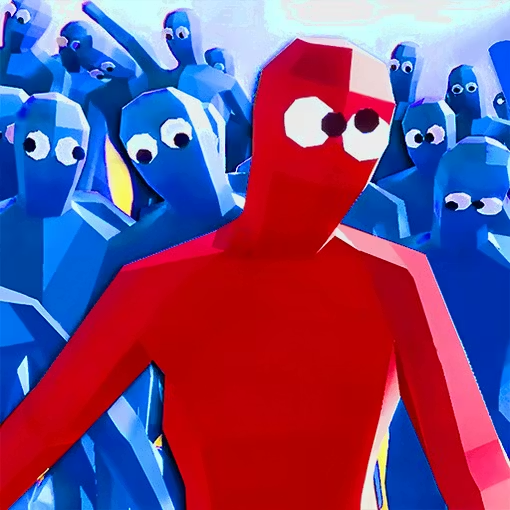
TABS, short for Totally Accurate Battle Simulator, is a physics-based strategy game built around planning strange battles and watching them unfold. You lead colorful red and blue wobblers,…
 Works on Desktop & Mobile
Tested By BunaGames
- Test date
- June 12, 2026
- Tested on
- Chrome 150
- Device
- Desktop
- Operating system
- macOS and Windows
- Game loaded successfully
- Yes
- Fullscreen works
- Yes
- Sound works
- Yes
- Save progress
- Local browser storage
- Mobile compatibility
- Partially tested
- Keyboard controls
- Working
- Controller support
- Not detected
- Average loading time
- 4.2 seconds
- Known issues
- Minor delay after entering fullscreen
TABS not loading?
- Refresh the page.
- Disable restrictive content blockers temporarily.
- Confirm JavaScript and WebGL are enabled.
- Clear the browser cache.
- Try another modern browser.
- Close unnecessary tabs.
- Switch off VPN if the game server is blocked.
- Use the Report a Problem button if the issue continues.
Continue Playing
Daily Challenge

Play 7 minutes today in TABS.
Leaderboard
- 1Community rating4.6 ★
- 2Player likes449
- 3Total votes502
- 4Your local progress0%
Your progress is saved locally in this browser. No account required.
 Your progress is saved locally in this browser. No account required.
Game Progress & Challenges
Why Play This Game?
 Instant PlayPlay instantly in your browser.
 Mobile FriendlyOptimized for all devices.
 Free to PlayNo hidden fees.
About "TABS"
TABS, short for Totally Accurate Battle Simulator, is a physics-based strategy game built around planning strange battles and watching them unfold. You lead colorful red and blue wobblers, choose a side, arrange units on a battlefield, and let the simulation decide how the clash develops. Its central appeal is not strict military realism; it is the unpredictable movement, collapsing formations, swinging weapons, and unlikely victories created by deliberately wobbly physics.
The battle settings span broad fantasy-style themes, including ancient lands, spooky places, and imaginative worlds. That variety gives each encounter a playful visual identity while keeping the focus on tactical choices. A sensible unit arrangement can be undone by terrain, timing, momentum, or one fighter tumbling into the right position.
TABS works especially well for players who enjoy testing ideas instead of executing long action-game combos. Set up an army, observe the result, identify why it succeeded or failed, and revise the plan. Every simulation can become a compact experiment in spacing, unit matchups, and battlefield chaos.
Whether you want a quick spectacle or a more thoughtful tactical puzzle, the game turns simple army placement into an entertaining chain of unexpected physical outcomes.
Gameplay
TABS gameplay follows a clear tactical loop: inspect the available battlefield and opposing force, select units, place them for your team, then start the battle simulation. Once the fight begins, the wobblers act out the encounter through physics-driven movement. They charge, collide, lose balance, swing at nearby enemies, and react to the crowded conditions around them.
The planning phase carries the real strategic weight. Before a battle starts, consider the number of units you can field, the shape of the opposing formation, and the amount of room each group needs. A tightly packed line may look strong but can become a traffic jam. A spread-out force can cover more ground, yet isolated units may be overwhelmed before support arrives.
Rather than relying on exact, repeatable animation patterns, TABS makes each match feel like a live simulation. The same general setup may produce a familiar result, but wobbling bodies, collisions, and changing positions can create different details every time. That uncertainty is part of the challenge: a plan should be resilient enough to work even when the opening charge becomes messy.
Players can approach battles in two useful ways:
- Problem solving: study an enemy group and build a counter formation.
- Experimentation: test unusual lineups to see how physics changes the outcome.
- Observation: watch key moments closely to learn where a formation broke down.
- Iteration: adjust one variable at a time rather than replacing the whole army after every loss.
This blend of tactics and slapstick simulation gives TABS a different rhythm from a traditional real-time strategy game. You make the important decisions before combat, then learn from the consequences.
Platform
TABS is known as a 3D battle simulation experience, so visual performance matters more than it would in a simple 2D arcade game. Large groups of wobblers, moving weapons, collisions, and battle effects all need to be rendered while the simulation is active. If a battle seems less responsive on a device, reducing unnecessary background activity and allowing the game page time to load can help create a smoother session.
On BunaGames, the focus is on opening the game from a web browser and getting into the battle-planning loop without needing to search through a separate game catalog. Browser play is most comfortable on a device with a stable connection and enough available memory for a 3D scene.
Because device capability varies, players should use the controls and display options presented by the game page itself. A newer device may handle more active units and busy simulations more comfortably than an older or heavily used device.
If you are looking for more quick-to-open experiences, BunaGames also offers online games across multiple styles.
How to Play "TABS"
Start by treating each battle as a small tactical puzzle. Look at the opposing side before committing to a formation. Notice whether the enemy is gathered into one compact group, stretched across the field, or arranged in separate clusters. Your goal is to create a force that can survive the first contact and continue fighting after the formation becomes disordered.
- Review the battlefield. Take a moment to understand the available space and where the two sides will meet.
- Assess the enemy lineup. Identify dense groups, exposed edges, and any units that appear likely to decide the fight.
- Choose your side and units. Build a lineup that has a purpose instead of selecting units only because they look powerful.
- Place units with room to act. Give front-line fighters a direct route forward and avoid making every unit collide with allies at the opening charge.
- Start the simulation. Watch the full battle rather than judging the plan only from its first few seconds.
- Read the result. Did the center collapse? Did one flank get surrounded? Did units fail to reach the enemy effectively?
- Revise the setup. Change placement, spacing, or the unit mix, then test again.
A useful habit is to change only one major part of a losing plan at a time. If you alter the entire army after every attempt, it becomes difficult to know what actually caused the improvement. Controlled experiments make TABS more rewarding because each rematch teaches you something practical about formation behavior.
Do not expect a perfectly orderly battle. The wobblers are meant to stumble and react in exaggerated ways. Build plans that can handle a little disorder instead of depending on one exact movement sequence.
Controls
TABS centers on selecting units, placing them for a team, and launching a battle simulation. The exact input prompts can vary with the version, browser, device, and available interface, so use the control guidance shown on the game page when you begin.
| Action | Purpose |
|---|---|
| Select | Choose a unit or option |
| Place | Set a unit on your side |
| Start | Run the battle simulation |
| Observe | Study the battle result |
For better tactical control, place a few units, pause to inspect their spacing, and then continue building the formation. Avoid rushing through setup just because combat begins automatically after launch. In this game, the placement phase is where your decisions matter most.
If an input does not respond as expected, confirm that the game area is active and follow any on-screen instructions supplied by the current build. Those prompts are the most reliable guide for the version you are playing.
Can "TABS" Unblocked?
This TABS page is designed for players who want to access a browser game directly from BunaGames. Availability can still depend on your browser, device settings, connection, and the rules of the network you are using. School, workplace, library, and public Wi-Fi networks may restrict gaming pages or certain web content.
Use the game through an approved connection and follow the policies of the network owner. There is no need to attempt to bypass filters, security settings, or access restrictions. If the page does not load correctly, try a supported browser, refresh after checking your connection, or return later when the network is less busy.
Since TABS uses a visually active 3D simulation, it is also worth closing resource-heavy tabs before playing. That can leave more device resources available for the battlefield, especially when many wobblers are moving at once.
The best browser-game experience is simple: open the page on a permitted network, let the game finish loading, and use the on-screen guidance for the current version.
Tips for "TABS"
The strongest TABS plans are usually built around formation logic rather than raw quantity. Before each attempt, decide what job every part of your army should perform. A front line should absorb the opening contact, a supporting group should remain able to reach the fight, and any units placed wide should have a reason for being there.
- Protect the center. Many battles are decided where the two main groups first collide. If the center disappears immediately, the remaining units can be surrounded.
- Use spacing deliberately. Units need enough room to move and engage. Overcrowding can make friendly wobblers obstruct one another before they reach the opponent.
- Watch the first collision. The opening impact often reveals whether your formation has enough stability and whether units are reaching useful targets.
- Test flanks carefully. A wide placement can create pressure from the side, but an unsupported flank can also be eliminated alone.
- Do not overreact to one odd result. Physics can produce funny surprises. Repeat a useful idea before deciding it is unreliable.
- Change one factor at a time. Move a group, alter its spacing, or adjust the lineup, then compare the new outcome with the previous attempt.
Observation is a genuine skill in TABS. After a defeat, avoid restarting immediately. Look for the moment the plan stopped functioning. Perhaps the front group was knocked out of position, perhaps the enemy reached an exposed section, or perhaps too many allies became trapped in the same crowded area. The replay-like nature of simulated battles turns failure into information.
Finally, leave room for creativity. Some of the most memorable victories come from testing a strange layout that would not look sensible in a conventional tactics game. TABS rewards both thoughtful counterplay and curiosity about what the wobbling physics engine might do next.
Features "TABS"
TABS combines approachable setup with deep replay value. You do not need to manage a long list of real-time commands during combat; instead, you make tactical choices before the battle and watch their consequences play out. That structure makes the game easy to understand while leaving plenty to explore through new formations and rematches.
- Physics-driven battles: Wobblers move, collide, fall, and fight with exaggerated physical behavior that makes every clash visually distinct.
- Red versus blue conflict: The opposing teams provide an immediate, readable battle setup.
- Strategic unit placement: Positioning, spacing, and formation shape influence how efficiently a force can engage.
- Varied themed worlds: Battles draw on ancient lands, spooky locations, and fantasy-inspired settings.
- Simulation-focused learning: Watch a plan succeed or fail, then refine it using what happened on the field.
- Unexpected outcomes: The wobbly physics can turn a close battle into an entertaining surprise.
A major strength of TABS is that it gives players a reason to look closely at the action. In many strategy games, a victory screen is enough. Here, the path to victory matters. A successful formation may hold its ground, create a better approach angle, or simply avoid getting tangled up at the wrong moment. The visual comedy does not replace strategy; it makes the strategic feedback easier and more enjoyable to watch.
The game also suits different session lengths. You can run a quick experiment with a single battle or spend more time refining a difficult matchup. That flexibility makes it a good fit for players who enjoy accessible tactics, sandbox-style testing, and chaotic 3D battle scenes.
Best "TABS" Similar Games & Top Picks
- Dune Surfer Game: Play Dune Game in your browser on BunaGames. Learn how to start, check the controls, use practical tips, and understand the game page.
- Pokemon Emerald: Play Pokemon Emerald online and explore Hoenn, train Pokémon, battle rivals, build a team, and face Team Magma and Team Aqua.
- Boulder Dash: Play Boulder Dash online. Dig through caves, collect diamonds, avoid falling boulders, and plan every move in this classic puzzle game.
- Vib-Ribbon: Play Vib-Ribbon online and guide Vibri across beat-timed obstacle lines in this distinctive rhythm arcade game.
- Zombie Tsunami: Play Zombie Tsunami online and lead a growing zombie horde through city obstacles, pedestrians, destruction, and surprise power-ups.
FAQ - TABS
What does TABS stand for?
TABS stands for Totally Accurate Battle Simulator. It is a physics-based battle game where players lead red and blue wobblers, set up opposing armies, and watch simulated fights unfold.
What kind of game is TABS?
TABS is a tactical battle simulator with a deliberately humorous physics style. The main activity is planning unit placement before combat rather than controlling every attack during the fight. Once the battle starts, the wobblers react to collisions, movement, weapons, and the changing position of nearby units.
How do you win battles in TABS?
Winning depends on making a formation that handles the enemy lineup effectively. Study where the opposing force is concentrated, give your own units enough room to move, and pay attention to whether your center and flanks can survive the first clash. After a loss, adjust the placement or composition and test again.
Is TABS a realistic war game?
No. Although it uses tactical ideas such as formations and opposing forces, TABS is designed around exaggerated, wobbly physics rather than realistic warfare. Units can stumble, collide in surprising ways, and produce outcomes that are intentionally playful and unpredictable.
Why do battles in TABS sometimes turn out differently?
The game uses a physics-driven simulation, so movement, impacts, balance, and crowding can change how a battle develops. A formation may have a consistent overall strength while still producing different individual moments. That unpredictability is why it helps to test a strategy more than once before judging it.
What should beginners focus on first?
Beginners should focus on clear placement. Start with a simple front line, avoid crowding every unit into one small area, and watch what happens when the two teams meet. Instead of changing everything after losing, make one deliberate adjustment and compare the next result. This quickly teaches the value of spacing and formation shape.
Can I play TABS in a browser?
This BunaGames page is intended for browser access. The quality of the experience can depend on your device, browser, connection, and the current game build. Because TABS features active 3D battles, allowing the page to load fully and closing unnecessary tabs may help on devices with limited resources.
Why might TABS run slowly on some devices?
TABS can place many moving 3D wobblers on screen at once, with physics interactions occurring throughout the battle. That can be demanding on older devices or when many other apps and browser tabs are open. A stable connection, available device memory, and a capable browser can help support smoother play.
More Games Like This
 Ball Surfer 3D
Arcade ★ 4.7
Ball Surfer 3D
Arcade ★ 4.7
 Galaga
Arcade ★ 4.7
Galaga
Arcade ★ 4.7
 Osu Game
Arcade ★ 4.7
Osu Game
Arcade ★ 4.7
 Dig Dug 2
Arcade ★ 4.4
Dig Dug 2
Arcade ★ 4.4
 Pac Xon
Arcade ★ 4.8
Pac Xon
Arcade ★ 4.8
 Colorbox Mustard
Arcade ★ 4.6
Colorbox Mustard
Arcade ★ 4.6
 Blumgi Slime
Arcade ★ 4.7
Blumgi Slime
Arcade ★ 4.7
 Rolling Ball 3D
Arcade ★ 4.7
Rolling Ball 3D
Arcade ★ 4.7
 Burrito Bison
Arcade ★ 4.6
Burrito Bison
Arcade ★ 4.6
 Dumb Ways To Die 2
Arcade ★ 4.8
Dumb Ways To Die 2
Arcade ★ 4.8
 Papas Sushiria
Arcade ★ 4.6
Papas Sushiria
Arcade ★ 4.6
 Papas Wingeria
Arcade ★ 4.6
Papas Wingeria
Arcade ★ 4.6
 Papas Scooperia
Arcade ★ 4.7
Papas Scooperia
Arcade ★ 4.7
 Papas Pizzeria
Arcade ★ 4.6
Papas Pizzeria
Arcade ★ 4.6
 Papas Freezeria
Arcade ★ 4.6
Papas Freezeria
Arcade ★ 4.6
 Crazy Roll 3D
Arcade ★ 4.6
Crazy Roll 3D
Arcade ★ 4.6
 Papas Taco Mia
Arcade ★ 4.6
Papas Taco Mia
Arcade ★ 4.6
 Fnf Garcello
Arcade ★ 4.6
Fnf Garcello
Arcade ★ 4.6
 Report a Problem
Comments About TABS