



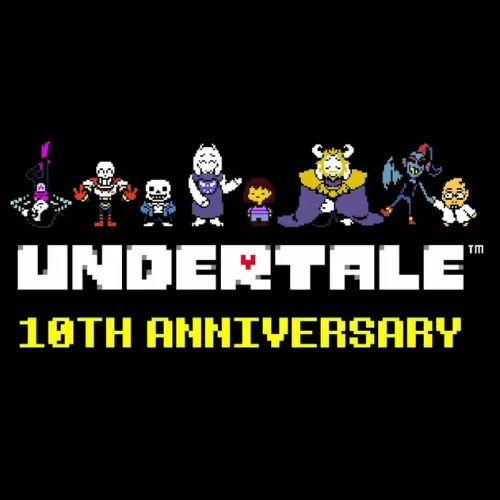
Undertale 10th Anniversary
Undertale 10th Anniversary is an Undertale-themed browser experience connected to the game's tenth-anniversary celebration. It is designed to run in a modern web browser rather than requiring a…
 Works on Desktop & Mobile
Tested By BunaGames
- Test date
- June 18, 2026
- Tested on
- Chrome 150
- Device
- Desktop
- Operating system
- macOS and Windows
- Game loaded successfully
- Yes
- Fullscreen works
- Yes
- Sound works
- Yes
- Save progress
- Local browser storage
- Mobile compatibility
- Partially tested
- Keyboard controls
- Working
- Controller support
- Not detected
- Average loading time
- 4.2 seconds
- Known issues
- Minor delay after entering fullscreen
Undertale 10th Anniversary not loading?
- Refresh the page.
- Disable restrictive content blockers temporarily.
- Confirm JavaScript and WebGL are enabled.
- Clear the browser cache.
- Try another modern browser.
- Close unnecessary tabs.
- Switch off VPN if the game server is blocked.
- Use the Report a Problem button if the issue continues.
Continue Playing

Daily Challenge

Play 5 minutes today in Undertale 10th Anniversary.
Leaderboard
- 1Community rating4.6 ★
- 2Player likes514
- 3Total votes565
- 4Your local progress0%
Your progress is saved locally in this browser. No account required.
 Your progress is saved locally in this browser. No account required.
Game Progress & Challenges
Why Play This Game?
 Instant PlayPlay instantly in your browser.
 Mobile FriendlyOptimized for all devices.
 Free to PlayNo hidden fees.
About "Undertale 10th Anniversary"
Undertale 10th Anniversary is an Undertale-themed browser experience connected to the game's tenth-anniversary celebration. It is designed to run in a modern web browser rather than requiring a traditional installation, making it a convenient option for players who want to open the experience directly from a game page.
The most important technical detail is that the page requires JavaScript and WebAssembly. Those browser technologies allow interactive web software to load and run locally in the browser window. If the game screen does not appear, browser permissions, content blockers, an outdated browser, or a restricted network are more likely to be the issue than the game itself.
The anniversary name can refer to more than one Undertale-related activity, including a two-day anniversary livestream event. This playable browser page should therefore be treated as its own interactive experience rather than as a recording of the stream or a replacement for the original Undertale release.
For players arriving through searches for Undertale anniversary content, the practical goal is simple: open the page, let its assets finish loading, and follow the instructions shown by the experience itself. That approach is especially useful because the available research confirms the browser requirement but does not document a fixed public control list, campaign structure, or complete feature set.
Gameplay
Undertale 10th Anniversary is best approached as an interactive browser experience with an Undertale anniversary focus. The supplied game-page information confirms that it runs through JavaScript and WebAssembly, but it does not provide a reliable breakdown of levels, combat systems, menus, endings, characters, or scoring. Rather than assuming it plays exactly like the original Undertale, wait for the page to present its own interface and instructions after loading.
That distinction matters for players searching for a familiar Undertale battle, dialogue, exploration, or choice-based format. Undertale is strongly associated with those ideas, but an anniversary web experience may use a narrower activity, a special presentation, or an event-specific interaction. The browser page itself is the authority for what is currently playable.
A useful first session has three stages:
- Load completely: Keep the tab open until the interactive screen, title display, or prompt appears.
- Read the first prompt: Look for on-screen guidance before pressing keys repeatedly. Browser experiences often reveal their input method only after initialization.
- Test one action at a time: If a menu, cursor, or start prompt is visible, use the listed input and confirm that the page reacts before trying another command.
This careful start is more effective than treating the page as a video. A WebAssembly game may need a short moment to initialize, and the browser can require one click inside the game area before keyboard input is captured. Once focus is active, use the displayed instructions as the definitive guide to the current build.
The main player benefit is direct access: there is no need to interpret a stream schedule or search through anniversary discussion before trying the interactive page. Open it, confirm that the browser is ready, and let the game interface establish the activity, objective, and available actions.
Platform
Undertale 10th Anniversary is presented as a browser-based experience. The available page information specifically states that JavaScript and WebAssembly must be enabled. A current desktop browser is the most dependable choice because it provides a larger play area, clear keyboard access, and fewer interruptions from mobile browser controls.
Before starting, make sure JavaScript is not disabled for the site. WebAssembly is generally available in current mainstream browsers, but older browser versions, privacy extensions, script blockers, school-managed devices, and locked-down work computers can prevent the page from starting correctly.
- Use an up-to-date browser.
- Allow JavaScript for the game page.
- Keep WebAssembly available in browser settings.
- Wait for the page to finish loading before refreshing.
- Click the game area once if keys do not respond.
Mobile access may depend on the device browser and the design of the current experience. Because the research does not confirm touch controls, keyboard support, controller support, operating-system compatibility, or a downloadable version, it is safest to rely on the instructions that appear on the active game screen.
How to Play "Undertale 10th Anniversary"
Start by opening the Undertale 10th Anniversary page in a browser where JavaScript and WebAssembly are enabled. Do not close the tab during the initial load. Interactive WebAssembly pages can take longer than ordinary text pages because they may need to prepare game code, audio, visual assets, and interface elements before accepting input.
- Open the game page. Let the browser finish loading the page and any visible loading screen.
- Check for a browser warning. If the page says JavaScript or WebAssembly is unavailable, enable the required feature, update the browser, or try a different modern browser.
- Select the play area. Click or tap once inside the interactive area so the browser knows where to send input.
- Read the on-screen prompt. Look for a start message, menu instruction, control reminder, or confirmation request.
- Use only listed inputs first. Follow the current screen instead of relying on controls from another Undertale game, fan project, or video.
- Pause troubleshooting if needed. If the page is unresponsive, refresh after confirming that scripts are allowed and that no extension is blocking the game.
Players familiar with Undertale may be tempted to expect a specific route, battle command, or dialogue choice. The available research does not verify those details for this anniversary page, so the smartest way to play is to treat the first visible instructions as the rules for this version.
If audio, animation, or inputs seem delayed, avoid opening several copies of the page at once. Close heavy tabs, give the experience a moment to initialize, then reload once. Repeated rapid refreshes can make it harder to tell whether the issue is loading time, browser focus, or a network restriction.
The aim is not to guess a hidden control scheme. It is to establish a clean browser session, identify the page's visible prompt, and proceed from the instructions that the active experience provides.
Controls
No fixed keyboard, mouse, touch, or controller layout is confirmed by the supplied research. For accuracy, use the instructions shown inside Undertale 10th Anniversary after it loads rather than assuming that controls from the original Undertale or another anniversary project will apply.
| Situation | What to do |
|---|---|
| No key response | Click the game area |
| Page will not start | Enable JavaScript |
| Compatibility notice | Check WebAssembly |
| Unclear input | Read on-screen prompts |
Browser focus is often the missing step. Clicking outside the game frame can direct keyboard presses to the address bar, page search, or another tab instead of the interactive content. Click back inside the game area, then try the input named by the page.
If touch controls appear on your device, follow those visible buttons or gestures. If they do not appear, that does not confirm an error; the available information does not establish mobile control support.
Can "Undertale 10th Anniversary" Unblocked?
“Unblocked” usually means a game can be opened in a normal browser without a separate download. Undertale 10th Anniversary is browser-based, but successful access still depends on whether your browser and network allow the technologies it needs: JavaScript and WebAssembly.
On a personal device and ordinary home connection, start by opening the page in a current browser. If it does not load, check whether a script blocker, strict privacy extension, antivirus web filter, or browser setting is preventing interactive content from running. Temporarily allowing the page's required browser features may resolve the issue.
School, library, workplace, and managed-device networks can apply rules that individual players cannot change. If a network blocks game sites, scripts, or WebAssembly, do not attempt to bypass its policy. Instead, use an approved connection or a personal device where permitted.
For more quick-play options, BunaGames also has online games that can be opened from the browser. Access conditions can still vary by device, browser version, and local network rules.
Tips for "Undertale 10th Anniversary"
The best Undertale 10th Anniversary tip is to separate confirmed information from expectation. The browser page is verified to require JavaScript and WebAssembly; its detailed gameplay structure and universal controls are not confirmed in the supplied research. Use that knowledge to troubleshoot efficiently instead of losing time trying unverified key combinations.
- Give the first load time: WebAssembly experiences may need longer to initialize than simple web pages. A blank or quiet screen for a short period does not automatically mean failure.
- Use one clean tab: Multiple open copies can consume memory and make it difficult to identify which tab has keyboard focus.
- Click before using keys: Select the interactive frame, then follow any prompt that appears. This is especially helpful after switching tabs.
- Read before reacting: Start screens often explain the next action. Following that guidance is more reliable than importing controls from a different Undertale title.
- Refresh methodically: If the experience fails to load, check browser permissions first, then refresh once. Repeated reloads without changing the cause rarely help.
- Reduce browser conflicts: Disable only the extension or setting that is clearly preventing JavaScript or WebAssembly from operating, if you are comfortable doing so.
It is also useful to understand the anniversary context. Anniversary coverage may include livestreams, charity activity, announcements, recordings, and separate interactive pages. A search result mentioning a stream does not automatically describe the browser experience on this page. Focus on what the active screen shows instead of expecting a streamed program or an entire original game campaign.
If something looks different from a previous visit, do not assume a bug. Browser-hosted experiences can present their own opening state, loading sequence, or instructions. Confirm the visible prompt, verify browser compatibility, and continue only with controls the page identifies.
Finally, protect the session: keep the tab active during startup, avoid accidental back-button presses, and save any browser changes only if you understand their effect. These small habits produce a smoother first attempt and make technical issues much easier to diagnose.
Features "Undertale 10th Anniversary"
Undertale 10th Anniversary has several confirmed and practical browser-focused qualities:
- Undertale anniversary identity: The page is explicitly presented under the Undertale 10th Anniversary name.
- Browser delivery: It is accessed as a web experience rather than through a confirmed standalone installation process.
- JavaScript requirement: The browser must permit JavaScript for the interactive content to function.
- WebAssembly requirement: WebAssembly support is required, indicating that the page depends on modern browser game technology.
- Direct interactive access: Players can open the page and follow its live instructions without needing to rely on an anniversary stream recording.
The strongest feature is convenience paired with technical transparency. The page tells players what browser capabilities are necessary, which gives a clear starting point when troubleshooting. Instead of guessing whether a missing plugin or download is needed, check the two stated requirements first.
It is equally important to avoid overstating unverified features. The supplied research does not establish a complete story mode, combat format, save system, achievements, multiplayer mode, controller mapping, mobile layout, downloadable client, or specific character roster. Those details should be taken only from the version currently visible in the browser.
This makes the page a good fit for players who want a focused Undertale anniversary destination and prefer browser access. Its technical model also offers a useful benefit: when the browser is compatible, the experience can run within the page rather than asking the player to install a separate application.
For the smoothest result, combine the confirmed features with sensible browser habits: keep JavaScript active, use a WebAssembly-capable browser, click the game frame to capture input, and read the experience's own prompts before playing.
Best "Undertale 10th Anniversary" Similar Games & Top Picks
- Stickman Parkour: Play Stickman Parkour online and master 30 side-scrolling levels filled with spikes, water, ropeways, keys, chests, and platforms.
- Undertale Yellow: Play Undertale Yellow online. Learn about Clover’s Underground prequel journey, browser access, controls, and helpful beginner tips.
- Hotline Miami: Learn about Hotline Miami’s 1989 Miami setting, brutal gunplay, close combat, browser access notes, controls guidance, and practical tips.
- Hidden Object: Clues and Mysteries: Play Hidden Object: Clues and Mysteries online. Search illustrated scenes, solve riddles, and uncover secrets in this cozy puzzle adventure.
- Sprunki Adventure 3: Explore colorful block worlds in Sprunki Adventure 3, find 15 hidden keys, meet NPCs, complete fetch quests, and unlock the treasure chest.
FAQ - Undertale 10th Anniversary
What is Undertale 10th Anniversary?
Undertale 10th Anniversary is an Undertale-themed browser experience presented for the game's tenth-anniversary celebration. The available page information confirms that it requires JavaScript and WebAssembly to run in a browser.
The anniversary name may also appear alongside information about anniversary livestream programming and related events. Those are not necessarily the same thing as the interactive browser page, so use the game screen itself to understand what is playable here.
Can I play Undertale 10th Anniversary in a browser?
Yes. The available research identifies it as a browser-accessible experience and states that JavaScript and WebAssembly must be enabled. Open the page in a current browser and allow it time to finish loading.
Because the page depends on browser technology, access can vary if you are using an outdated browser, a restricted device, or extensions that block scripts.
Why is Undertale 10th Anniversary not loading?
First, check whether JavaScript is enabled. Then confirm that your browser supports and permits WebAssembly. Current mainstream browsers normally support WebAssembly, but a disabled setting, old version, content blocker, strict privacy tool, or managed network can interfere with it.
If the page remains unresponsive, refresh once after checking those settings. Closing heavy tabs and returning focus to the game area can also help.
What are the controls for Undertale 10th Anniversary?
A fixed control layout is not confirmed by the supplied research. Follow the control instructions, buttons, or prompts shown on the active game screen after it loads.
If keyboard inputs do nothing, click inside the game area first. This gives the browser page focus and prevents keystrokes from being sent elsewhere.
Is Undertale 10th Anniversary the same as the original Undertale?
No confirmed source here says that this browser experience is a complete replacement for the original Undertale. It should be treated as a separate Undertale anniversary page with its own currently displayed content and instructions.
Do not assume that original-game progression, routes, mechanics, menus, or control habits will automatically be present. Let the browser experience define its own format.
Does Undertale 10th Anniversary need a download?
The supplied information describes a browser page that uses JavaScript and WebAssembly. It does not state that a separate download is required. Open the page in a compatible browser and follow its loading instructions.
If a browser asks for a normal permission such as allowing scripts, review the request carefully. The confirmed technical requirement is browser support for JavaScript and WebAssembly.
Can I play it at school or work?
That depends on local device and network policy. A managed network may block game pages, JavaScript, WebAssembly, or other interactive browser content. Do not try to bypass network restrictions.
If access is allowed, use an up-to-date browser and ensure that the page can run its required web technologies. If access is not allowed, wait until you can use an approved device or connection.
Is Undertale 10th Anniversary free to open?
This BunaGames page is intended for browser access, but the supplied research does not provide a separate pricing statement or document optional purchases. The practical way to check the current availability is to open the page and review what it presents.
For a successful start, focus on compatibility first: enable JavaScript, use a browser with WebAssembly support, wait for loading to finish, and follow the on-screen instructions.
More Games Like This
 Short Ride
Adventure ★ 4.6
Short Ride
Adventure ★ 4.6
 Papas Sushiria
Adventure ★ 4.6
Papas Sushiria
Adventure ★ 4.6
 Papas Wingeria
Adventure ★ 4.6
Papas Wingeria
Adventure ★ 4.6
 Papas Scooperia
Adventure ★ 4.7
Papas Scooperia
Adventure ★ 4.7
 Papas Pizzeria
Adventure ★ 4.6
Papas Pizzeria
Adventure ★ 4.6
 Papas Freezeria
Adventure ★ 4.6
Papas Freezeria
Adventure ★ 4.6
 Papas Taco Mia
Adventure ★ 4.6
Papas Taco Mia
Adventure ★ 4.6
 Papas Cupcakeria
Adventure ★ 4.6
Papas Cupcakeria
Adventure ★ 4.6
 Duck Life 3
Adventure ★ 4.6
Duck Life 3
Adventure ★ 4.6
 Jacksmith
Adventure ★ 4.5
Jacksmith
Adventure ★ 4.5
 Duck Life 4
Adventure ★ 4.6
Duck Life 4
Adventure ★ 4.6
 Under The Red Sky
Adventure ★ 4.5
Under The Red Sky
Adventure ★ 4.5
 Pokémon Infinite Fusion
Adventure ★ 4.4
Pokémon Infinite Fusion
Adventure ★ 4.4
 Sailor Piece
Adventure ★ 4.7
Sailor Piece
Adventure ★ 4.7
 Hello Neighbor
Adventure ★ 4.7
Hello Neighbor
Adventure ★ 4.7
 sprunki phase 8
Adventure ★ 4.7
sprunki phase 8
Adventure ★ 4.7
 Fly the Plane
Adventure ★ 4.8
Fly the Plane
Adventure ★ 4.8
 Melon Playground
Adventure ★ 4.7
Melon Playground
Adventure ★ 4.7
 Report a Problem
Comments About Undertale 10th Anniversary