



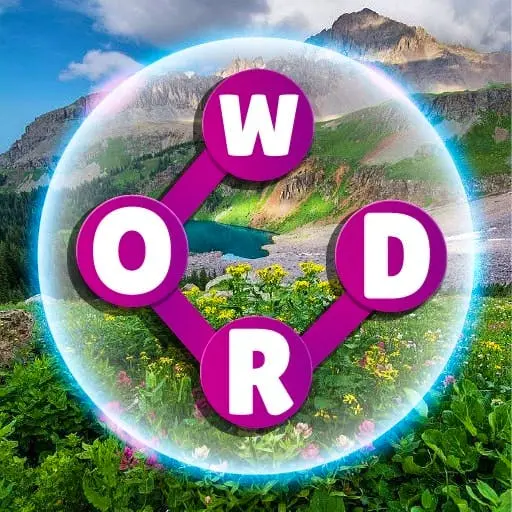
Wordscapes
Wordscapes merges anagram mechanics with crossword puzzle structure to create a hybrid word challenge that tests vocabulary recall and pattern recognition. Developed by PeopleFun, this word puzzle game…
 Works on Desktop & Mobile
Tested By BunaGames
- Test date
- May 28, 2026
- Tested on
- Chrome 150
- Device
- Desktop
- Operating system
- macOS and Windows
- Game loaded successfully
- Yes
- Fullscreen works
- Yes
- Sound works
- Yes
- Save progress
- Local browser storage
- Mobile compatibility
- Partially tested
- Keyboard controls
- Working
- Controller support
- Not detected
- Average loading time
- 4.2 seconds
- Known issues
- Minor delay after entering fullscreen
Wordscapes not loading?
- Refresh the page.
- Disable restrictive content blockers temporarily.
- Confirm JavaScript and WebGL are enabled.
- Clear the browser cache.
- Try another modern browser.
- Close unnecessary tabs.
- Switch off VPN if the game server is blocked.
- Use the Report a Problem button if the issue continues.
Continue Playing

Daily Challenge

Play 4 minutes today in Wordscapes.
Leaderboard
- 1Community rating4.7 ★
- 2Player likes1.1K
- 3Total votes1.2K
- 4Your local progress0%
Your progress is saved locally in this browser. No account required.
 Your progress is saved locally in this browser. No account required.
Game Progress & Challenges
Why Play This Game?
 Instant PlayPlay instantly in your browser.
 Mobile FriendlyOptimized for all devices.
 Free to PlayNo hidden fees.
About "Wordscapes"
Wordscapes merges anagram mechanics with crossword puzzle structure to create a hybrid word challenge that tests vocabulary recall and pattern recognition. Developed by PeopleFun, this word puzzle game presents players with a circular arrangement of letters that must be connected in sequence to form valid English words fitting into a crossword-style grid. Each level increases in difficulty as the letter pool expands and the grid complexity grows, requiring both systematic exploration of letter combinations and strategic thinking about word placement. The game layers scenic nature backgrounds behind the puzzle interface to create a visually calming environment that contrasts with the cognitive engagement of the word-solving task.
As one of the most recognized titles in the word puzzle genre, Wordscapes appeals to players seeking online games that exercise linguistic skills without time pressure or competitive stress. The browser version maintains the core mechanics that made the mobile release popular while adapting the interface for mouse and keyboard input, making it accessible for quick mental workouts during breaks or extended puzzle-solving sessions.
Gameplay
Wordscapes gameplay revolves around a two-part interface: a circular letter wheel at the bottom and a crossword grid above. Players drag across letters in the wheel to form words, which then populate matching slots in the crossword grid when valid. The challenge lies in discovering all possible word combinations from the limited letter set, including bonus words not required for grid completion that contribute to score and progression.
Each puzzle begins with a small set of letters—typically three to seven—and a partially empty crossword grid with slots of varying lengths. The game does not provide traditional crossword clues; instead, players must deduce which words fit based on letter count and the available character pool. This anagram-solving approach requires testing multiple permutations and recognizing common prefixes, suffixes, and root words. As levels advance, grids become more interconnected, and letter sets include more vowels and consonants, expanding the solution space exponentially.
The progression system organizes puzzles into thematic level packs, each containing dozens of individual challenges. Completing grids unlocks subsequent levels and occasionally reveals new background scenery. The game tracks bonus words separately, rewarding players who exhaust all valid combinations beyond the minimum required to finish the crossword. This dual objective—grid completion versus comprehensive word discovery—adds replayability and encourages thorough exploration of each letter set.
Platform
Wordscapes is available as a browser game that runs directly in modern web browsers without requiring downloads or installations. The browser version uses HTML5 technology to deliver the same core puzzle mechanics found in the mobile app versions, adapted for desktop and laptop interfaces. Players can access the game on Windows, Mac, and Linux systems through Chrome, Firefox, Safari, and Edge browsers, with responsive design that adjusts to different screen sizes.
The browser implementation supports both mouse-driven interaction and touchscreen input on convertible devices, making it versatile across hardware configurations. Game progress typically saves locally through browser storage, though some versions may offer account-based cloud saving for cross-device continuity. The platform's lightweight design ensures fast loading times and smooth performance even on older computers, making it an accessible option for casual puzzle sessions without the commitment of app installation.
How to Play "Wordscapes"
Begin each Wordscapes puzzle by examining the letters arranged in the circular wheel at the bottom of the screen and noting the empty slots in the crossword grid above. The number and length of slots indicate how many words you need to find and their character counts. Start by identifying the longest possible words from your letter set, as these often anchor the grid and reveal intersecting letters that help solve shorter words.
Form words by clicking and dragging across letters in the wheel in the correct sequence. The game accepts the word if it matches a slot in the grid and is a valid English term. If you create a legitimate word not required for the grid, it registers as a bonus word and contributes to your score. Systematically test two-letter, three-letter, and longer combinations, paying attention to common word patterns like -ING, -ED, or -LY endings when those letters appear.
When stuck, focus on the intersecting letters already placed in the grid—these constrain the possibilities for remaining words and provide crucial hints. Work through the alphabet mentally, substituting different starting letters with your available set to trigger recognition of words you might have overlooked. Complete the puzzle by filling all grid slots, then proceed to the next level in the sequence. The game does not penalize incorrect attempts, so experiment freely with letter combinations.
Controls
Wordscapes uses intuitive drag-based controls optimized for both mouse and touch input. To form a word, click or tap on the first letter in the circular wheel, then drag across subsequent letters in order without releasing. The selected letters highlight as you move, and releasing the mouse button or lifting your finger submits the word for validation. If the word is valid and matches a grid slot, it populates automatically; if it's a bonus word, the game acknowledges it with a notification.
The interface requires no keyboard input for core gameplay—all word formation happens through the letter wheel interaction. Players can click the shuffle button to rearrange the letter positions in the wheel without changing the available characters, which often helps visualize new word possibilities. A hint system is typically accessible through a dedicated button, revealing one letter of an unsolved word when activated. Navigation between completed and upcoming levels occurs through menu buttons positioned around the main play area.
Can "Wordscapes" Unblocked?
Wordscapes functions as an unblocked game in most environments because it operates entirely within the browser without requiring external executables, plugins, or restricted network protocols. Schools, offices, and public networks that filter gaming content may still permit access since the game uses standard HTTPS web traffic and does not involve multiplayer servers, real-time communication, or large data transfers that trigger common firewall rules.
The game's educational value as a vocabulary-building tool further reduces the likelihood of administrative blocking compared to action or entertainment-focused titles. Players on restricted networks should verify that their institution allows access to the hosting domain. If direct access is blocked, the game's availability across multiple browser game platforms means alternative URLs may remain accessible. The single-player, offline-capable nature of the browser version ensures that once loaded, gameplay continues without constant server communication, minimizing network footprint and detection.
Tips for "Wordscapes"
- Exhaust short words first: Systematically form all two-letter and three-letter combinations before attempting longer words. This establishes a foundation of intersecting letters that constrain and clarify remaining possibilities.
- Recognize common patterns: Train yourself to spot frequent word structures like -ER, -EST, -ING, and -LY. When these letter groups appear in your wheel, prioritize testing them as suffixes.
- Use the shuffle strategically: Rearranging letter positions in the wheel can trigger visual recognition of words your brain missed in the original configuration. Shuffle multiple times when stuck.
- Work backward from grid structure: Analyze the crossword layout to identify which slots share letters. Solving one word often reveals critical letters for intersecting words, narrowing your search space.
- Build vocabulary awareness: Wordscapes accepts many obscure but valid English words. When you discover an unfamiliar term that works, note it mentally—the game reuses letter combinations across levels.
- Prioritize grid completion over bonus words: While bonus words boost scores, focus first on filling all required slots. Return to hunt for extras after solving the primary puzzle to avoid frustration.
- Consider plural forms and verb tenses: If a base word fits the letter count, test its plural (adding S) or past tense (adding ED) when those letters are available.
Features "Wordscapes"
- Hybrid puzzle mechanics: Combines anagram solving with crossword grid completion, requiring both free-form word discovery and spatial reasoning about letter placement.
- Progressive difficulty curve: Starts with simple three-letter puzzles and gradually introduces larger letter sets, longer words, and more complex grid interconnections across thousands of levels.
- Bonus word system: Rewards comprehensive exploration by tracking valid words beyond the minimum required to complete each crossword, encouraging vocabulary depth.
- Scenic background themes: Features nature-inspired visuals that change as players advance through level packs, providing aesthetic variety without distracting from puzzle focus.
- No time pressure: Allows unlimited time per puzzle, supporting relaxed problem-solving and making the game accessible to players of all ages and skill levels.
- Hint system: Offers optional letter reveals for players who become stuck, balancing challenge with accessibility without forcing their use.
- Shuffle function: Rearranges letter wheel positions to help players visualize new word combinations from the same character set.
- Browser-native play: Runs directly in web browsers as a play free experience without downloads, installations, or account requirements for basic gameplay.
Best "Wordscapes" Similar Games & Top Picks
- Brian Test 4: Sneaky Friends: Play Brian Test 4: Sneaky Friends online and solve cartoon riddles with careful taps, lateral thinking, and smart puzzle strategies.
- Brain Test 3: Tricky Puzzles: Play Brain Test 3: Tricky Puzzles online. Solve reverse-logic riddles, collect useful items, and follow a story through tricky quests.
- Brain Test 2: Tricky Puzzles: Play Brain Test 2: Tricky Puzzles online free. Read quirky riddles, study hand-drawn scenes, and solve clever brain teasers.
- Idle Dice: Play Idle Dice online and roll for earnings. Learn the gameplay, controls, dice-combo strategy, browser access, and save options.
- Unblock Me: Play Unblock Me online and slide the wooden blocks aside to guide the red block out of the board.
FAQ - Wordscapes
Can I play Wordscapes for free in my browser?
Yes, Wordscapes is available as a free browser game that runs directly in modern web browsers without requiring downloads or payment. The browser version provides the core puzzle mechanics and level progression found in the mobile app versions.
How many levels does Wordscapes have?
Wordscapes contains thousands of individual puzzles organized into thematic level packs. The browser version typically includes several hundred levels, with difficulty increasing as you progress through the sequence.
What happens if I find a word not in the crossword grid?
Valid English words that are not required for grid completion register as bonus words. These contribute to your overall score and progression but are not necessary to finish the puzzle and advance to the next level.
Does Wordscapes accept all English words?
Wordscapes uses a curated dictionary of valid English words, including some less common terms. Proper nouns, abbreviations, and highly specialized jargon are typically not accepted. The game focuses on standard vocabulary found in most English dictionaries.
Can I play Wordscapes on a Chromebook or tablet browser?
Yes, the browser version of Wordscapes works on Chromebooks, tablets, and other devices with modern web browsers. The interface adapts to touchscreen input, allowing you to drag across letters with your finger on compatible devices.
Is there a time limit for solving each puzzle?
No, Wordscapes does not impose time limits on puzzle completion. You can take as long as needed to find all required words and explore bonus word possibilities at your own pace.
How do I get hints if I'm stuck on a puzzle?
Most versions of Wordscapes include a hint button that reveals one letter of an unsolved word when activated. The availability and cost of hints may vary depending on the specific browser implementation you're playing.
Does my progress save in the browser version?
Browser-based Wordscapes typically saves progress locally using browser storage technology. Your completed levels and current position should persist between sessions on the same device and browser, though clearing browser data may reset progress.
More Games Like This
 4 Pics 1 Word
Puzzle ★ 4.5
4 Pics 1 Word
Puzzle ★ 4.5
 Jewel Quest
Puzzle ★ 4.7
Jewel Quest
Puzzle ★ 4.7
 Woodoku
Puzzle ★ 4.6
Woodoku
Puzzle ★ 4.6
 1010 Block Puzzle Game
Puzzle ★ 4.7
1010 Block Puzzle Game
Puzzle ★ 4.7
 Hexa Puzzle
Puzzle ★ 4.7
Hexa Puzzle
Puzzle ★ 4.7
 1010 Deluxe
Puzzle ★ 4.6
1010 Deluxe
Puzzle ★ 4.6
 Screw Puzzle
Puzzle ★ 4.7
Screw Puzzle
Puzzle ★ 4.7
 Color Sort
Puzzle ★ 4.6
Color Sort
Puzzle ★ 4.6
 Candy Riddles
Puzzle ★ 4.6
Candy Riddles
Puzzle ★ 4.6
 Hex Frvr
Puzzle ★ 4.5
Hex Frvr
Puzzle ★ 4.5
 Water Sort
Puzzle ★ 4.6
Water Sort
Puzzle ★ 4.6
 Brain Test Tricky Puzzles
Puzzle ★ 4.8
Brain Test Tricky Puzzles
Puzzle ★ 4.8
 Ball Sort
Puzzle ★ 4.5
Ball Sort
Puzzle ★ 4.5
 Bolts And Nuts
Puzzle ★ 4.6
Bolts And Nuts
Puzzle ★ 4.6
 Wheres My Water
Puzzle ★ 4.7
Wheres My Water
Puzzle ★ 4.7
 Hexagon
Puzzle ★ 4.6
Hexagon
Puzzle ★ 4.6
 Cut The Rope 2
Puzzle ★ 4.4
Cut The Rope 2
Puzzle ★ 4.4
 Papas Sushiria
Puzzle ★ 4.6
Papas Sushiria
Puzzle ★ 4.6
 Report a Problem
Play Anytime, Anywhere
Add BunaGames to your home screen for quick access to your favorite games!
Comments About Wordscapes