



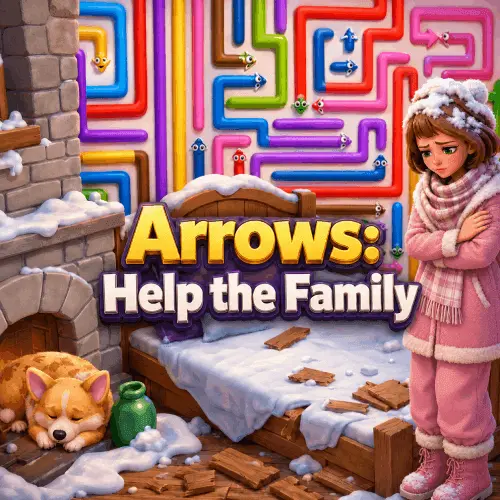
Game Arrows: Help this Family
Arrows: Help the Family is a casual logic puzzle game built around compact mazes filled with directional arrows. The central objective is simple to understand but increasingly demanding…
 Works on Desktop & Mobile
Tested By BunaGames
- Test date
- June 23, 2026
- Tested on
- Chrome 150
- Device
- Desktop
- Operating system
- macOS and Windows
- Game loaded successfully
- Yes
- Fullscreen works
- Yes
- Sound works
- Yes
- Save progress
- Local browser storage
- Mobile compatibility
- Partially tested
- Keyboard controls
- Working
- Controller support
- Not detected
- Average loading time
- 4.2 seconds
- Known issues
- Minor delay after entering fullscreen
Game Arrows: Help this Family not loading?
- Refresh the page.
- Disable restrictive content blockers temporarily.
- Confirm JavaScript and WebGL are enabled.
- Clear the browser cache.
- Try another modern browser.
- Close unnecessary tabs.
- Switch off VPN if the game server is blocked.
- Use the Report a Problem button if the issue continues.
Continue Playing

Daily Challenge

Play 7 minutes today in Game Arrows: Help this Family.
Leaderboard
- 1Community rating4.6 ★
- 2Player likes719
- 3Total votes800
- 4Your local progress0%
Your progress is saved locally in this browser. No account required.
 Your progress is saved locally in this browser. No account required.
Game Progress & Challenges
Why Play This Game?
 Instant PlayPlay instantly in your browser.
 Mobile FriendlyOptimized for all devices.
 Free to PlayNo hidden fees.
About "Game Arrows: Help this Family"
Arrows: Help the Family is a casual logic puzzle game built around compact mazes filled with directional arrows. The central objective is simple to understand but increasingly demanding to execute: remove every arrow from the board. Each puzzle asks you to inspect the arrangement, identify an arrow that is free to move, and make a click that opens the way for the next decision.
The game turns a familiar arrow puzzle idea into a sequence of short planning challenges. An arrow that looks like an obvious choice may be holding the maze together, while a less noticeable move can create a useful opening. That makes observation more valuable than rushing. Instead of relying on fast reactions, players read the layout, consider the available routes, and gradually clear the colorful arrow formation.
Arrows: Help the Family suits players looking for an approachable browser puzzle with clear goals and focused rounds. Every level presents another arrow maze to untangle, so the satisfying part is not merely clicking pieces away; it is recognizing the order that lets the entire board disappear. Start with the arrows that have room to move, keep checking the new space created by each choice, and work toward a completely cleared maze.
Gameplay
The gameplay in Arrows: Help the Family centers on move selection. A level begins with a maze-like arrangement of arrows pointing in different directions. Your job is to clear them all, but you can only choose arrows that are currently free to move. The puzzle comes from determining which available move will improve the board rather than limit your next options.
Each successful click removes an arrow and changes the shape of the remaining maze. That change is the key gameplay loop: observe the board, choose a free arrow, reassess the newly opened layout, and continue until no arrows remain. A move can reveal another clear route, separate a crowded cluster, or make an important arrow easier to evaluate. Because the board changes after every removal, a level rewards active re-reading instead of following a fixed visual pattern without thought.
The challenge rises naturally from blocked paths and connected groups. In a simple arrangement, the usable arrows are easy to spot. In a denser maze, several arrows can compete for attention, and clearing one may affect what becomes available next. Players benefit from distinguishing between an arrow that is free now and an arrow that will become free after surrounding pieces have been removed.
This is a logic-first puzzle experience with direct actions and visible consequences. There are no complicated command sequences to learn: the meaningful skill is route awareness. Finishing a level means fully clearing its arrow maze, giving each round a definite conclusion and a clean, easy-to-read success condition.
Platform
Arrows: Help the Family is presented as a free online browser game on BunaGames. You can open the game page in a web browser and play the puzzle directly from the page, making it a practical choice for a short logic break without needing to learn a large game system first.
The interaction is based on selecting arrows, so a mouse or trackpad is a natural fit when playing on a desktop or laptop browser. On touch-capable devices, the same basic idea is to tap the arrow you want to select. The important requirement is clear visibility of the maze: you need to be able to inspect arrow directions and notice which pieces have room to move.
Browser availability can still depend on the device, browser settings, connection, and local network rules. If the game does not load as expected, refresh the page, check that your browser can run web games, or try a different supported browser environment. The puzzle itself remains focused on click-or-tap decisions rather than requiring a controller or keyboard-heavy setup.
How to Play "Game Arrows: Help this Family"
Begin by looking over the entire arrow maze before making your first selection. The goal is to remove every arrow, but not every arrow can be moved immediately. Search for arrows that are free to move and use those openings to begin reducing the board.
- Read the directions. Notice where each arrow points and how the surrounding arrows form the maze.
- Find a free arrow. Choose an arrow that has a clear opportunity to move rather than one constrained by the current layout.
- Click or tap it. A successful selection clears that arrow from the puzzle.
- Inspect the new gap. Removing one arrow changes the board, so pause to see which arrows are now easier to clear.
- Continue in a useful order. Prefer moves that create more accessible space or reveal additional free arrows.
- Clear the full maze. The level is complete only when every arrow has been removed.
A helpful way to approach a crowded board is to treat empty space as information. Once an arrow is cleared, the new opening may expose another move that was difficult to notice before. Do not focus only on the arrow nearest your cursor. Compare the available options and ask which removal is most likely to make the next decision simpler.
If a puzzle seems confusing, slow down and scan it from edge to edge. The game is about reasoning through the current layout, not about making fast clicks. A deliberate first move can prevent you from overlooking a cleaner sequence, while repeated reassessment helps you adapt as the arrow maze becomes smaller.
Controls
The controls are intentionally minimal because the puzzle challenge comes from planning, not from complex inputs. Select arrows directly on the game board whenever they are free to move.
| Input | Action |
|---|---|
| Mouse click | Select an arrow |
| Trackpad click | Select an arrow |
| Screen tap | Select an arrow |
Before selecting an arrow, take a moment to check its direction and the space around it. Clicking is the action, but accurate reading is the real control skill. A clear view of the board makes it easier to spot free arrows and follow how each removal changes the maze.
There is no need to memorize multi-button combinations for the core puzzle. Keep your pointer or finger on the board, choose an available arrow, and then evaluate the new arrangement after it clears.
Can "Game Arrows: Help this Family" Unblocked?
Arrows: Help the Family is available to play free through its BunaGames browser page, so players can access the puzzle online when their device and network allow browser games to load. Its straightforward click-or-tap format makes it well suited to quick sessions in a standard web browser.
“Unblocked” access can mean different things depending on where you play. A school, workplace, library, or managed Wi-Fi network may use its own content rules, browser restrictions, or game-site filters. Those local policies are outside the game itself, and they can affect whether any online game page opens correctly.
The appropriate approach is to use the game where browser gaming is permitted. If the page is allowed but does not start, check your connection, reload the page, and make sure the browser is up to date and able to run web content. Avoid trying to bypass a network’s restrictions. When access is available, the game can be played directly in the browser without needing complicated controls.
Tips for "Game Arrows: Help this Family"
The strongest strategy in Arrows: Help the Family is to think one or two moves ahead. A free arrow is not automatically the best arrow. Before clicking, consider what space its removal will create and whether that gap is likely to expose another useful move.
- Scan the full board first. Do not commit to the first free arrow you notice. A quick overview can reveal a move that opens a larger part of the maze.
- Use the edges as starting points. Outer arrows are often easier to evaluate because there is less surrounding visual clutter. Clearing an edge can make the puzzle’s structure easier to read.
- Watch for chains. One cleared arrow may make another arrow free. When you find such a sequence, follow it while still checking whether a better opening has appeared elsewhere.
- Protect your options. In a dense arrangement, favor moves that create room and leave several possible follow-ups instead of narrowing your attention to one small area.
- Reassess after every removal. The board is different after each move. An arrow that was blocked a moment ago may now be the clearest choice.
- Separate observation from action. If the layout feels busy, pause and identify the available arrows before clicking. This reduces accidental, unplanned choices.
It also helps to recognize that the maze is a changing spatial problem, not a test of random tapping. The arrows provide directional information, while the empty spaces show where the puzzle has begun to open. Use both. When several moves appear possible, choose the one that makes the remaining structure more legible.
For a relaxing pace, solve the board in small phases: clear an obvious opening, inspect the new shape, then choose the next opening. This method keeps the puzzle manageable and makes the final cleanup easier when only a few arrows remain.
Features "Game Arrows: Help this Family"
Arrows: Help the Family focuses on a clean puzzle premise that is easy to enter and capable of producing thoughtful decisions. Its main features support players who enjoy short, visual logic challenges:
- Arrow-maze puzzles: Every level is built around a maze-like arrangement of directional arrows.
- Clear objective: Remove all arrows from the board to complete the level.
- Free-move decision making: Progress depends on identifying arrows that are currently able to move.
- Direct click-or-tap interaction: Select arrows on the board without complicated command systems.
- Changing puzzle states: Each cleared arrow changes the layout and can reveal new possibilities.
- Logic-based progression: Success comes from observation, sequencing, and spatial awareness rather than rapid reflexes.
- Colorful visual pieces: The arrow maze uses colorful elements that help distinguish the puzzle board at a glance.
- Short-session format: Individual levels provide contained goals for players who want a focused browser puzzle.
The most appealing feature is the balance between simplicity and planning. The action is always understandable—choose an arrow that is free—but the best order is not always obvious. That gives the game a useful replayable puzzle quality: players repeatedly read a new layout, identify openings, and enjoy the satisfaction of clearing the final remaining arrow.
It is also an accessible fit for casual puzzle fans because the game communicates its goal visually. Rather than asking players to manage large inventories, complex maps, or lengthy instructions, it keeps attention on the board, the arrows, and the sequence needed to clear them.
Best "Game Arrows: Help this Family" Similar Games & Top Picks
- Papas Taco Mia: Play Papa's Taco Mia online. Take taco orders, cook seasoned meats, add toppings, earn coins, and improve your busy taqueria.
- Papas Cupcakeria: Play Papas Cupcakeria online. Take orders, bake cupcakes, add frosting and toppings, then serve each customer with care.
- Melon Playground: Play Melon Playground online, a creative ragdoll physics sandbox for building experiments with characters, tools, weapons, and vehicles.
- Incredibox: Play Incredibox online and build a layered beatbox mix with animated performers, beats, melodies, effects, voices, and bonuses.
- Blob Opera: Play Blob Opera online and conduct four AI-powered opera voices. Drag the singing blobs to create playful harmonies in your browser.
FAQ - Game Arrows: Help this Family
What is Arrows: Help the Family?
Arrows: Help the Family is a casual logic puzzle game in which you work through maze-like boards made of directional arrows. The goal in each level is to clear every arrow from the puzzle. It is built around observation and move order: you need to find arrows that are free to move, select them, and use the resulting space to continue clearing the maze.
How do I complete a level?
Complete a level by removing all arrows from its board. Start by identifying an arrow that is currently free to move, then click or tap it. After an arrow clears, inspect the new layout because another arrow may now be available. Keep making valid selections until the maze is empty.
What does a free arrow mean in the game?
A free arrow is an arrow that can be selected and moved under the current puzzle layout. Not every arrow is available at once. The core challenge is recognizing which arrows have room to move and deciding which available choice will best open the board for later moves.
Is Arrows: Help the Family a reflex game?
No. The game is primarily a logic and spatial-planning puzzle. Clicking an arrow is simple, but the meaningful part is reading the maze, noticing open routes, and choosing a productive order for clearing the arrows. Taking time to scan the board can be more useful than clicking quickly.
Can I play Arrows: Help the Family for free?
Yes. The game is available as a free online browser game on BunaGames. Open the game page in a compatible browser and play by selecting arrows on the puzzle board. Access may still depend on your device, connection, browser settings, and any rules applied by the network you are using.
What controls does the game use?
Use a mouse click, trackpad click, or screen tap to select an arrow. The game does not require complicated control combinations for its basic puzzle actions. The important skill is checking the arrow arrangement before selecting a piece.
What is the best strategy for difficult arrow mazes?
Look at the whole board before making a move, then favor arrows that create useful empty space. Reassess after every removal because the available moves can change immediately. Edge areas can be easier to read, and a successful move may start a chain in which several arrows become free one after another.
Can I play it on a restricted school or work network?
That depends on the local network policy. Some schools, workplaces, and public networks restrict game sites or browser content. Use the game only where online gaming is permitted, and do not attempt to bypass network restrictions. If access is allowed but the page does not load, try refreshing the browser or checking your connection.
More Games Like This
 Sprunki Retake 2
Casual ★ 4.8
Sprunki Retake 2
Casual ★ 4.8
 Sprunki Phase 3 Remastered
Casual ★ 4.7
Sprunki Phase 3 Remastered
Casual ★ 4.7
 Helix Jump
Casual ★ 4.6
Helix Jump
Casual ★ 4.6
 Sprunki Incredibox
Casual ★ 4.5
Sprunki Incredibox
Casual ★ 4.5
 Good Pizza Great Pizza
Casual ★ 4.7
Good Pizza Great Pizza
Casual ★ 4.7
 Eagle Craft
Casual ★ 4.7
Eagle Craft
Casual ★ 4.7
 Storm The House
Casual ★ 4.7
Storm The House
Casual ★ 4.7
 Papas Sushiria
Casual ★ 4.6
Papas Sushiria
Casual ★ 4.6
 Papas Wingeria
Casual ★ 4.6
Papas Wingeria
Casual ★ 4.6
 Papas Scooperia
Casual ★ 4.7
Papas Scooperia
Casual ★ 4.7
 Papas Pizzeria
Casual ★ 4.6
Papas Pizzeria
Casual ★ 4.6
 Papas Freezeria
Casual ★ 4.6
Papas Freezeria
Casual ★ 4.6
 Sled Rider 3D
Casual ★ 4.7
Sled Rider 3D
Casual ★ 4.7
 Fnaf
Casual ★ 4.5
Fnaf
Casual ★ 4.5
 Tropical Merge
Casual ★ 4.6
Tropical Merge
Casual ★ 4.6
 Flip Bottle
Casual ★ 4.6
Flip Bottle
Casual ★ 4.6
 Papas Taco Mia
Casual ★ 4.6
Papas Taco Mia
Casual ★ 4.6
 Farm Merge Valley
Casual ★ 4.7
Farm Merge Valley
Casual ★ 4.7
 Report a Problem
Comments About Game Arrows: Help this Family