



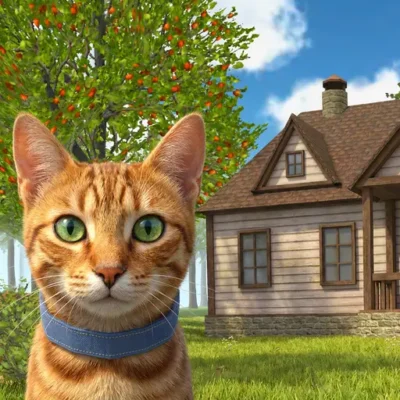
Cat Simulator Game
Cat Simulator Game puts you in the paws of a playful feline with room to explore, objects to investigate, and plenty of opportunities for harmless chaos. Instead of…
 Works on Desktop & Mobile
Tested By BunaGames
- Test date
- July 5, 2026
- Tested on
- Chrome 150
- Device
- Desktop
- Operating system
- macOS and Windows
- Game loaded successfully
- Yes
- Fullscreen works
- Yes
- Sound works
- Yes
- Save progress
- Local browser storage
- Mobile compatibility
- Partially tested
- Keyboard controls
- Working
- Controller support
- Not detected
- Average loading time
- 4.2 seconds
- Known issues
- Minor delay after entering fullscreen
Cat Simulator Game not loading?
- Refresh the page.
- Disable restrictive content blockers temporarily.
- Confirm JavaScript and WebGL are enabled.
- Clear the browser cache.
- Try another modern browser.
- Close unnecessary tabs.
- Switch off VPN if the game server is blocked.
- Use the Report a Problem button if the issue continues.
Continue Playing
Daily Challenge

Play 5 minutes today in Cat Simulator Game.
Leaderboard
- 1Community rating4.7 ★
- 2Player likes718
- 3Total votes770
- 4Your local progress0%
Your progress is saved locally in this browser. No account required.
 Your progress is saved locally in this browser. No account required.
Game Progress & Challenges
Why Play This Game?
 Instant PlayPlay instantly in your browser.
 Mobile FriendlyOptimized for all devices.
 Free to PlayNo hidden fees.
About "Cat Simulator Game"
Cat Simulator Game puts you in the paws of a playful feline with room to explore, objects to investigate, and plenty of opportunities for harmless chaos. Instead of controlling a human hero, you experience the environment from a cat-sized perspective: moving through larger areas, looking for interesting objects, and deciding what to do next.
The central appeal is the familiar fantasy of being a mischievous house cat. A quiet space can become a playground when you roam around, bump into props, and knock things over. That simple loop makes the game easy to understand even before you know every corner of the map. Explore at your own pace, test how the environment responds, and see how much trouble a curious cat can create.
Cat Simulator Game fits players looking for a light simulation experience rather than a rigid, level-by-level challenge. It emphasizes free movement, playful experimentation, and the comedy of feline behavior. Whether you want a quick browser break or time to explore the map more carefully, the game gives you a clear role and a simple goal: think like a curious cat and make the most of the space around you.
Gameplay
Gameplay in Cat Simulator Game centers on exploration and interaction. You control a cat across broad areas, search for objects that stand out, and experiment with the environment. The most recognizable activity is creating chaos by knocking things over. A small object, a stack of items, or an inviting piece of scenery can become part of the fun when you approach it from the right angle.
Rather than pushing players through a single narrow route, the game’s cat-simulator premise encourages curiosity. Look around each area before rushing onward. Notice the layout, check where objects are placed, and move toward spots that seem likely to react to your presence. This makes ordinary navigation more meaningful: traveling is not only about reaching a destination, but also about discovering what can be disturbed, explored, or used for playful behavior.
The cat viewpoint is important to the experience. Large maps feel different when you are playing as a small animal, because furniture, open paths, corners, and scattered objects can all become points of interest. The best moments often come from testing the obvious and the unexpected. If something looks movable or vulnerable to a passing cat, it is worth investigating.
This is a simulation-style game with an accessible rhythm. You can spend time roaming freely, focus on making a mess, or simply enjoy seeing the world from a feline perspective. There is no need to treat every moment like a speedrun. Observation, movement, and playful interaction are the core of the experience.
Platform
Cat Simulator Game is presented for browser play, so you can start from the game page without treating it like a traditional boxed or console release. Open the page in a modern web browser, allow the game to load fully, and use the instructions shown by the embedded game build.
Browser access is useful for players who want a quick simulation game without a long setup process. Keep the game tab active while playing, especially during the first load, and close other demanding tabs if performance feels slow. A stable internet connection can also help the game load more smoothly.
The exact experience may vary with the browser, device, screen size, and the version currently hosted on the page. For the clearest view of the map and nearby objects, use a screen where you can comfortably see the play area and any control prompts. If the game displays a loading screen or introductory message, wait for it to finish before trying to move.
Because this is a browser game, the on-page version is the best place to confirm current controls and availability.
How to Play "Cat Simulator Game"
- Load the game completely. Wait until the playable scene and any in-game instructions are visible. Starting before loading is complete can make the first few moments confusing.
- Read the opening prompts. The game build may show its current movement or camera instructions when it begins. These prompts are the most reliable guide for the version on this page.
- Start exploring as the cat. Move through the available area and get familiar with the scale of the environment. Look for clear paths, corners, objects, and places where several items are grouped together.
- Approach interactive-looking objects. Cat Simulator Game is built around playful feline behavior, including knocking items over. Try moving close to objects and observing how the environment responds.
- Use the map as a playground. Do not focus only on one spot. Roam across the larger area, revisit interesting places, and see whether different objects create different results.
- Experiment carefully. A direct approach is not always the most entertaining one. Change your angle, take another route, or return after exploring elsewhere. Curiosity is part of the intended play style.
- Follow any goals the game presents. If the current build provides a task, prompt, or objective, complete it using the same exploration skills: observe the scene, locate useful objects, and move deliberately.
The basic idea is simple: inhabit the cat role, explore the environment, and turn everyday objects into opportunities for mischief. There is no need to memorize a complicated strategy before beginning. Learn by moving, looking, and trying things.
Controls
The available research does not verify one universal keyboard, mouse, touchscreen, or controller layout for Cat Simulator Game. Browser game builds can use different input schemes, so it is better not to rely on an assumed control list.
Use the instructions displayed when the game loads as your primary control reference. Look for an opening tutorial, a pause menu, an on-screen help prompt, or icons near the game window. These usually explain how the currently hosted version handles movement, camera view, interaction, and menu navigation.
For smoother play, make sure the game window is active before pressing keys or using the pointer. If input does not respond, click or tap inside the game area first, then check whether a loading screen, menu, or instruction overlay is still open.
- Best reference: the in-game control prompt
- Before moving: activate the game window
- If stuck: check the pause or help menu
- For mobile devices: follow the on-screen input guidance, if provided
Can "Cat Simulator Game" Unblocked?
“Unblocked” usually means a player wants a game that can be opened and played through a browser without installing separate software. Cat Simulator Game is available from its BunaGames game page, where you can load the game directly in your browser.
Access can still depend on the device, browser settings, internet connection, and any restrictions applied by a school, workplace, library, or network administrator. No browser game page can guarantee access on every restricted network. If a page does not load, the issue may be caused by blocked game content, disabled browser features, an unstable connection, or a network rule rather than the game itself.
For normal personal use, open the page in an updated browser and let the game finish loading. Avoid using unofficial copies or download sites when a browser version is already available. Playing on the official BunaGames page keeps the process straightforward: visit the game, wait for the playable area, and follow the prompts shown on screen.
If access is permitted on your network, you can enjoy this feline simulation as part of the site’s collection of online games.
Tips for "Cat Simulator Game"
Explore before causing chaos. It is tempting to knock over the first object you see, but taking a quick look around helps you understand the space. Larger maps can contain multiple routes, clusters of objects, and overlooked corners that are more interesting than the starting area.
Watch the placement of objects. Items near edges, narrow paths, furniture, or other props may create a more noticeable result when disturbed. The joy of a cat simulator comes from testing the environment, so pay attention to what looks loosely arranged or deliberately placed.
Use a curious-cat mindset. Do not play as though there is only one correct route. Move into side areas, inspect unusual objects, and return to places that caught your attention earlier. A cat’s behavior is naturally exploratory, and the game works best when you embrace that approach.
Keep your movement controlled. Fast movement can be useful for crossing open space, but slower positioning is often better when you want to approach a specific object. Take a moment to line up your cat before trying to interact with something near a wall, corner, or group of props.
Learn from the environment. When an object reacts, remember what happened. That response tells you more about the game’s interactive spaces and can guide your next experiment. If nothing happens, try another angle or move on rather than forcing the same attempt repeatedly.
Follow in-game prompts when present. If the current version gives you an instruction or goal, treat it as a guide to the game’s intended interactions. Objectives can direct your attention toward areas or actions you might otherwise miss.
Play for discovery, not perfection. Cat Simulator Game is most rewarding when you allow room for silly outcomes. A missed bump, an unexpected route, or a new object to investigate can be more memorable than a perfectly planned run.
Features "Cat Simulator Game"
Play as a cat. The game’s main identity is its feline perspective. Instead of viewing the world as a person, you move through it as a curious, mischievous cat.
Free-roaming exploration. Large map areas support wandering and observation. You can look beyond the immediate starting point, travel through the available space, and search for places that invite interaction.
Playful object chaos. Knocking objects over is a defining part of the experience. This simple mechanic supports the fantasy of a cat turning an ordinary environment into a personal playground.
Simulation-style role-play. The game is built around living out a playful feline role rather than controlling a conventional warrior, racer, or puzzle character. Your actions are framed by curiosity, movement, and environmental mischief.
Accessible browser format. Cat Simulator Game is designed to be opened from a game page in a browser. That makes it convenient for players who want to start a session without a complicated installation process.
Environment-led fun. The map itself drives much of the entertainment. Paths, props, corners, and object placement give players reasons to look around and test what can happen.
Flexible pace. You can approach the game as a quick casual session or spend more time exploring. The core loop does not require a long explanation: roam, inspect, interact, and enjoy the consequences.
Easy-to-understand premise. The role is immediately recognizable. Anyone who has watched a cat investigate a room, push at an object, or make a little mess will understand the playful tone behind the game.
Best "Cat Simulator Game" Similar Games & Top Picks
- Stickman Boost 2: Play Stickman Boost 2 online. Dodge deadly traps, jump obstacles, slide through hazards, and reach each finish platform.
- Stickman Boost: Play Stickman Boost online and guide a stick hero through traps with quick movement, jumps, double jumps, slides, and rolls.
- Xevious: Play Xevious, Namco's classic vertical scrolling shooter. Pilot the Solvalou, dodge enemy forces, and master arcade-style action.
- Mophead Dash: Play Mophead Dash online: dash through colorful platform levels, collect sushi, avoid traps, and use sharp timing to reach new areas.
- Stickman Parkour: Play Stickman Parkour online and master 30 side-scrolling levels filled with spikes, water, ropeways, keys, chests, and platforms.
FAQ - Cat Simulator Game
What is Cat Simulator Game?
Cat Simulator Game is a browser-based simulation game built around experiencing the environment as a playful cat. Players roam across larger areas, explore the surroundings, and create feline-style chaos by knocking objects over.
What do you do in Cat Simulator Game?
The main activities are moving around the map, investigating objects, and experimenting with the environment. The game encourages curiosity rather than a single strict route, so exploring and seeing what reacts to your cat is a major part of play.
Can I play Cat Simulator Game online?
Yes. The game is presented on BunaGames as a browser game. Open the game page, wait for the playable content to load, and use the instructions displayed by the current game build.
Is Cat Simulator Game free to play?
You can access and play the game from its BunaGames browser page. There is no need to use a separate app store listing to begin a session on the site.
What are the controls for Cat Simulator Game?
The research available for this page does not confirm a single fixed control scheme. Check the opening tutorial, in-game help, pause menu, or on-screen prompts after loading the game. Those instructions are the best source for the controls used by the version currently available here.
Can I play Cat Simulator Game on a phone or tablet?
Device compatibility can depend on the browser and the particular game build. Open the game page on your device and check whether it loads correctly and presents usable on-screen controls. If it does, follow the input prompts shown in the game.
Is Cat Simulator Game an unblocked game?
The game can be opened from a browser when your network allows access to game content. However, school, work, library, and managed networks may block gaming pages or browser features. Availability on those networks depends on their local rules and settings.
What is the best way to get better at the game?
Explore patiently and pay attention to the environment. Search for object clusters, check side routes, approach items from different angles, and use any in-game objective prompts as guidance. The most useful skill is observation: notice what the cat can reach and what the environment allows you to disturb.
More Games Like This
 Meat Boy
Platform ★ 4.4
Meat Boy
Platform ★ 4.4
 Big Tower Tiny Square
Platform ★ 4.5
Big Tower Tiny Square
Platform ★ 4.5
 Dig Dug 2
Platform ★ 4.4
Dig Dug 2
Platform ★ 4.4
 Papas Sushiria
Platform ★ 4.6
Papas Sushiria
Platform ★ 4.6
 Papas Wingeria
Platform ★ 4.6
Papas Wingeria
Platform ★ 4.6
 Papas Scooperia
Platform ★ 4.7
Papas Scooperia
Platform ★ 4.7
 Papas Pizzeria
Platform ★ 4.6
Papas Pizzeria
Platform ★ 4.6
 Papas Freezeria
Platform ★ 4.6
Papas Freezeria
Platform ★ 4.6
 Geometry Dash Scratch
Platform ★ 4.7
Geometry Dash Scratch
Platform ★ 4.7
 Papa Louie 2
Platform ★ 4.7
Papa Louie 2
Platform ★ 4.7
 Geometry Dash Subzero
Platform ★ 4.5
Geometry Dash Subzero
Platform ★ 4.5
 Papas Taco Mia
Platform ★ 4.6
Papas Taco Mia
Platform ★ 4.6
 Vex 7
Platform ★ 4.6
Vex 7
Platform ★ 4.6
 Papas Cupcakeria
Platform ★ 4.6
Papas Cupcakeria
Platform ★ 4.6
 Fire And Water
Platform ★ 4.6
Fire And Water
Platform ★ 4.6
 I Am Cat
Platform ★ 4.7
I Am Cat
Platform ★ 4.7
 Pixel Slime
Platform ★ 4.7
Pixel Slime
Platform ★ 4.7
 Stickman Climb 2
Platform ★ 4.6
Stickman Climb 2
Platform ★ 4.6
 Report a Problem
Comments About Cat Simulator Game