



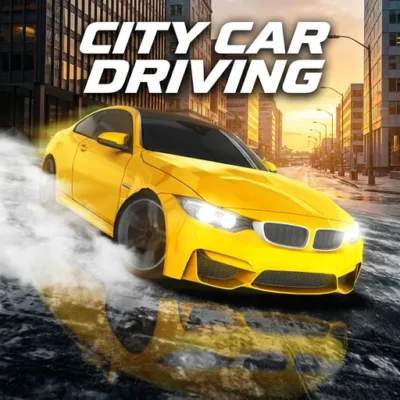
City Car Driving
City Car Driving is a browser driving game built around the appeal of guiding a car through an urban environment with care, control, and awareness. Rather than treating…
 Works on Desktop & Mobile
Tested By BunaGames
- Test date
- July 11, 2026
- Tested on
- Chrome 150
- Device
- Desktop
- Operating system
- macOS and Windows
- Game loaded successfully
- Yes
- Fullscreen works
- Yes
- Sound works
- Yes
- Save progress
- Local browser storage
- Mobile compatibility
- Partially tested
- Keyboard controls
- Working
- Controller support
- Not detected
- Average loading time
- 4.2 seconds
- Known issues
- Minor delay after entering fullscreen
City Car Driving not loading?
- Refresh the page.
- Disable restrictive content blockers temporarily.
- Confirm JavaScript and WebGL are enabled.
- Clear the browser cache.
- Try another modern browser.
- Close unnecessary tabs.
- Switch off VPN if the game server is blocked.
- Use the Report a Problem button if the issue continues.
Continue Playing

Daily Challenge

Play 6 minutes today in City Car Driving.
Leaderboard
- 1Community rating4.6 ★
- 2Player likes503
- 3Total votes565
- 4Your local progress0%
Your progress is saved locally in this browser. No account required.
 Your progress is saved locally in this browser. No account required.
Game Progress & Challenges
Why Play This Game?
 Instant PlayPlay instantly in your browser.
 Mobile FriendlyOptimized for all devices.
 Free to PlayNo hidden fees.
About "City Car Driving"
City Car Driving is a browser driving game built around the appeal of guiding a car through an urban environment with care, control, and awareness. Rather than treating every drive as a race, the game suits players who enjoy a more measured simulator-style approach: learning how the vehicle responds, making deliberate adjustments, and improving through repeated runs.
The City Car Driving name is also used by several driving simulator listings on PC and mobile, so it is useful to approach this BunaGames version as its own browser play experience. The shared idea across those listings is city-based driving practice and developing basic vehicle-control skills in changing conditions. That makes this game a good fit for players looking for a calmer alternative to stunt-heavy racing games.
Your goal is not simply to move forward. Productive play means keeping the car settled, choosing a comfortable pace, making clean direction changes, and noticing how small steering or speed adjustments affect the drive. Take time to learn the available play screen before pushing for faster, more difficult runs.
Whether you want a short driving break or a focused handling challenge, City Car Driving offers a straightforward reason to return: each attempt can help you become smoother, more patient, and more confident behind the virtual wheel.
Gameplay
City Car Driving centers on the basic relationship between the player, the vehicle, and the city setting. You guide a car, observe its movement, and adapt your inputs until driving feels controlled instead of rushed. That simple loop gives the game its simulator flavor: progress comes from attention and consistency, not from pressing controls as quickly as possible.
Start each session by identifying the driving space and the information shown on screen. A brief observation period helps you understand where the car is positioned, which direction it faces, and how much room is available for a turn or correction. Once you begin moving, use gradual changes whenever possible. Abrupt steering can make it harder to judge the car's line, while a steady pace gives you more time to react.
City driving is especially useful as a practice context because it encourages spatial awareness. Keep track of the car's front, sides, and turning path. Before changing direction, think about the full route the vehicle will take rather than only the first moment of steering. This habit makes your movement look cleaner and helps reduce unnecessary corrections.
The most satisfying runs usually follow a simple rhythm:
- Assess the road space before committing to a direction.
- Build speed only when you can still steer accurately.
- Make one purposeful adjustment instead of several panicked ones.
- Recover calmly if your line is imperfect.
- Repeat the route or activity to compare your control from one attempt to the next.
Players who treat each drive as feedback will get more value from City Car Driving than players who only chase immediate speed.
Platform
City Car Driving is presented on BunaGames as a browser game, so you can open the game page and begin from a compatible web browser. This is useful when you want a driving game without treating it like a separate installed simulator. The browser format also makes it easy to return for a quick practice session when you have a few minutes free.
For the clearest experience, use a device with enough screen space to see the driving area and any prompts shown by the game. A desktop or laptop can be convenient when the game uses keyboard input, while a larger mobile screen may make visual details easier to follow when touch controls are available. The exact control layout can vary by device and game version, so always check the visible instructions after loading.
If the game does not respond immediately, wait for the page and game window to finish loading, then select the game area if needed. Closing unnecessary browser tabs can also help you focus on the driving view. City Car Driving is best enjoyed when you can clearly see the vehicle's position and make unhurried control decisions.
How to Play "City Car Driving"
Begin City Car Driving by loading the game on this page and taking a moment to inspect the opening screen. Look for any start option, mode selection, control prompt, or on-screen guidance provided by the game. Because similarly named City Car Driving releases exist on different platforms, the instructions displayed in the browser version should be your authority for the current session.
Once the car is active, do not rush into large inputs. First, test how the vehicle responds when you begin moving and when you change direction. A short, controlled trial gives you a better sense of steering sensitivity than a full-speed start. Keep your attention on the car's orientation: knowing where the front of the vehicle is pointing is the foundation of every clean turn.
Use this practical routine while playing:
- Start the game and read the visible controls or prompts.
- Choose a clear direction and begin with a gentle movement.
- Watch the car's position as it travels through the city environment.
- Make small steering corrections early rather than waiting until the car is far off line.
- Reduce speed or pause your input when you need time to judge space.
- Practice the same kind of movement several times until it becomes predictable.
A good driving attempt is one where you remain in control from beginning to end. If a turn goes wrong, avoid treating it as a failure. Notice whether you entered too quickly, turned too late, or overcorrected. Then use that observation on the next attempt. This repeat-and-refine approach turns a simple browser session into meaningful driving practice.
Controls
The exact City Car Driving controls should be confirmed from the prompts visible in the game window. Browser driving games may use keyboard commands, touch buttons, or an interface designed for the device you are using, and the current play screen provides the most reliable mapping.
Before attempting a difficult maneuver, identify the inputs used to begin moving, change direction, slow down, and access any available reset or menu option. Spend a few moments testing each action in a safe open area of the driving space. This prevents confusion when you need to react quickly later.
For better control, avoid holding a direction longer than necessary. Short, intentional inputs are easier to evaluate, especially while learning the car's handling. If the game offers touch controls, make sure your fingers do not block the part of the screen where you need to judge the vehicle's path.
Can "City Car Driving" Unblocked?
City Car Driving is available to play through its BunaGames browser page, giving players a direct way to access the game online. Open the page in a compatible browser, allow the game to load, and use the on-screen instructions to begin. You do not need to search through separate platform listings to find the browser version featured here.
The word “unblocked” is often used by players looking for a game that can be opened quickly during a break. Access can still depend on the browser, network rules, device settings, and the policies of the place where you are playing. If a game page cannot load on a school, workplace, library, or managed network, do not try to bypass that network's restrictions. Use an approved connection or play later from a permitted device.
For a smoother session, load the game from the official BunaGames page, wait for the game area to finish initializing, and check that your browser is up to date. If you are looking for more quick-play options afterward, explore the site's online games collection.
Tips for "City Car Driving"
The strongest City Car Driving strategy is controlled repetition. Since the game emphasizes the feel of driving in a city environment, a smooth run is usually more useful than a fast but unstable one. Build a foundation first, then increase the challenge only after your movements become predictable.
- Learn the response before accelerating. Test steering and movement in a simple area before attempting tighter routes or faster driving.
- Look ahead of the car. Focus on the space where you want the vehicle to go, not only on its current position. This makes turns easier to plan.
- Steer early and lightly. Small corrections made before a problem develops are more effective than large corrections made at the last second.
- Keep a steady pace. Extra speed reduces your time to judge direction and space. Slow, confident movement is valuable practice.
- Finish one action before starting another. Let the car settle after a turn or adjustment instead of immediately adding another strong input.
- Use mistakes as data. If you lose your line, identify one cause: excessive speed, late steering, or overcorrection. Change only that one habit on the next run.
A useful personal challenge is to repeat a simple route while trying to use fewer corrections each time. Do not judge success only by how quickly you complete it. Judge it by whether the car stayed composed and whether your choices felt deliberate. This transforms ordinary driving into a skill exercise.
Players who enjoy the simulator side of City Car Driving can also vary their practice. Spend one attempt concentrating on smooth starts, another on direction changes, and another on maintaining awareness of the vehicle's position. Narrow goals create faster improvement than trying to fix every part of your driving at once.
Features "City Car Driving"
City Car Driving is designed around an accessible driving-simulator premise: place a car in a city-oriented environment and give the player room to practice vehicle control. Its appeal comes from the focused driving loop rather than from needing a long setup. Load the game, learn the current controls, and work on more deliberate movement.
- City driving focus: The urban setting gives each drive a clear sense of place and encourages attention to direction, spacing, and handling.
- Simulator-style mindset: The game rewards patience, observation, and improving basic driving habits through practice.
- Browser access: Play from the BunaGames game page without needing to treat the experience like a separate desktop simulator.
- Short-session friendly: It works well for players who want to practice a few movements or enjoy a brief driving break.
- Repeatable skill loop: Each new attempt lets you test a cleaner turn, steadier pace, or better recovery from an error.
- Device-aware play: The game can be approached through the control prompts and interface available on your current browser device.
An important benefit is the low-pressure way City Car Driving frames improvement. You can slow down, observe the vehicle, and retry a maneuver without needing to compete against another player. That makes it suitable for players who prefer controlled driving practice over constant race pressure.
The game also benefits from its clear intent. You are not required to memorize a complicated world before enjoying it. The core activity is understandable from the first session: operate the car with care and improve the quality of your driving choices. For browser players, that directness is often the feature that matters most.
Best "City Car Driving" Similar Games & Top Picks
- Escape Drive: Play Escape Drive online and outrun the police in a fast-paced city car chase filled with sharp turns, obstacles, and crashes.
- The Farmer: Play The Farmer online and manage a growing farm by planting crops, caring for chickens, and building a successful farm.
- Street Life: Play Street Life online, a clicker merge game about tapping, merging, and jamming with a musical monkey on the road to stardom.
- Grand Prix Hero: Race across continents in Grand Prix Hero. Dodge traffic, collect coins, use boosts, and upgrade your car for the next race.
- Drift Frenzy: Play Drift Frenzy online and steer through endless sharp turns, avoid crashes, unlock cars, and chase a higher score.
FAQ - City Car Driving
What is City Car Driving?
City Car Driving is a browser driving game on BunaGames centered on controlling a car in a city-based driving environment. It is best approached as a simulator-style experience where careful movement, steering awareness, and repeated practice matter more than rushing.
Can I play City Car Driving online?
Yes. City Car Driving is available through its BunaGames game page in a web browser. Open the page, allow the game to load, and follow the instructions shown in the game window.
Is City Car Driving a racing game?
The game is primarily framed around driving and vehicle-control practice rather than pure racing. Players may still enjoy building speed and improving their movement, but the useful focus is smooth handling, controlled turns, and awareness of the driving space.
What are the controls for City Car Driving?
Check the visible instructions inside the current game session for the exact controls. Control layouts can depend on the browser version and device, so the in-game prompt is more reliable than assuming a fixed keyboard or touch mapping. Test the movement and steering inputs before attempting difficult maneuvers.
Can I play City Car Driving on mobile?
You can open the BunaGames page in a mobile browser, but the best experience depends on your device, screen size, browser, and the control interface provided by the game. A larger screen can make it easier to see the car and judge its path. Always review the on-screen controls after loading.
Is City Car Driving free to access on BunaGames?
The game is presented as an online browser play experience on BunaGames. Open the game page to start a session and check the current play screen for any instructions or available options.
Why are there different games called City Car Driving?
City Car Driving is a title used by multiple driving simulator listings across different platforms. Some versions may have different modes, visuals, features, or control schemes. For this page, rely on the browser game's own interface and prompts rather than assuming that details from a mobile or PC listing apply here.
How can I get better at City Car Driving?
Improve by starting slowly, making smaller steering changes, looking ahead of the car, and repeating simple driving movements until they feel predictable. When a maneuver goes wrong, identify one cause—such as turning late or moving too quickly—and adjust that single habit on your next attempt.
More Games Like This
 Bike Hero
Driving ★ 4.6
Bike Hero
Driving ★ 4.6
 Crazy Stunt Cars Multiplayer
Driving ★ 4.6
Crazy Stunt Cars Multiplayer
Driving ★ 4.6
 Stunt Car Challenge 3
Driving ★ 4.7
Stunt Car Challenge 3
Driving ★ 4.7
 Drive Mad 3
Driving ★ 4.6
Drive Mad 3
Driving ★ 4.6
 Papas Sushiria
Driving ★ 4.6
Papas Sushiria
Driving ★ 4.6
 Papas Wingeria
Driving ★ 4.6
Papas Wingeria
Driving ★ 4.6
 Papas Scooperia
Driving ★ 4.7
Papas Scooperia
Driving ★ 4.7
 Car Rush
Driving ★ 4.6
Car Rush
Driving ★ 4.6
 Papas Pizzeria
Driving ★ 4.6
Papas Pizzeria
Driving ★ 4.6
 Papas Freezeria
Driving ★ 4.6
Papas Freezeria
Driving ★ 4.6
 Madalin Stunt Cars 3
Driving ★ 4.5
Madalin Stunt Cars 3
Driving ★ 4.5
 Papas Taco Mia
Driving ★ 4.6
Papas Taco Mia
Driving ★ 4.6
 Papas Cupcakeria
Driving ★ 4.6
Papas Cupcakeria
Driving ★ 4.6
 Moto X3m Spooky Land
Driving ★ 4.7
Moto X3m Spooky Land
Driving ★ 4.7
 Moto X3m Winter
Driving ★ 4.7
Moto X3m Winter
Driving ★ 4.7
 Retro Highway
Driving ★ 4.4
Retro Highway
Driving ★ 4.4
 Speed Master
Driving ★ 4.7
Speed Master
Driving ★ 4.7
 Loop Crash
Driving ★ 4.6
Loop Crash
Driving ★ 4.6
 Report a Problem
Comments About City Car Driving