



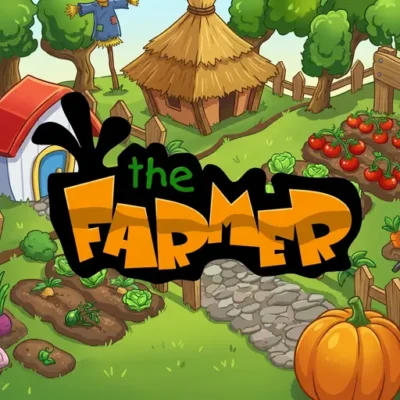
The Farmer
The Farmer is a browser-based farm management game about building and looking after a productive farm. Its central activities are planting different fruits and vegetables, caring for chickens,…
 Works on Desktop & Mobile
Tested By BunaGames
- Test date
- July 6, 2026
- Tested on
- Chrome 150
- Device
- Desktop
- Operating system
- macOS and Windows
- Game loaded successfully
- Yes
- Fullscreen works
- Yes
- Sound works
- Yes
- Save progress
- Local browser storage
- Mobile compatibility
- Partially tested
- Keyboard controls
- Working
- Controller support
- Not detected
- Average loading time
- 4.2 seconds
- Known issues
- Minor delay after entering fullscreen
The Farmer not loading?
- Refresh the page.
- Disable restrictive content blockers temporarily.
- Confirm JavaScript and WebGL are enabled.
- Clear the browser cache.
- Try another modern browser.
- Close unnecessary tabs.
- Switch off VPN if the game server is blocked.
- Use the Report a Problem button if the issue continues.
Continue Playing
Daily Challenge

Play 4 minutes today in The Farmer.
Leaderboard
- 1Community rating4.8 ★
- 2Player likes1.1K
- 3Total votes1.1K
- 4Your local progress0%
Your progress is saved locally in this browser. No account required.
 Your progress is saved locally in this browser. No account required.
Game Progress & Challenges
Why Play This Game?
 Instant PlayPlay instantly in your browser.
 Mobile FriendlyOptimized for all devices.
 Free to PlayNo hidden fees.
About "The Farmer"
The Farmer is a browser-based farm management game about building and looking after a productive farm. Its central activities are planting different fruits and vegetables, caring for chickens, and working toward a bigger, more successful farm. Rather than presenting farming as a single action, the game frames the farm as a connected set of responsibilities: crops need attention, animals are part of the operation, and each decision contributes to the farm's overall development.
The game is a good fit for players who enjoy calm management objectives with a clear theme. You are not simply observing a farm; you are responsible for shaping it through planting and animal care. That makes every part of the farm meaningful, whether you are deciding what to plant or checking on the chickens.
Although this page is listed with driving games, the gameplay focus described for The Farmer is farm management. Players looking for farming-focused browser games can use it as a straightforward way to explore the routine of growing crops and maintaining animals online.
The strongest appeal is the practical farm-building loop. Start with the available farm space, take care of its living parts, and aim to turn a modest operation into a larger working farm.
Gameplay
The Farmer centers on the responsibilities that define a small farm. Players plant fruits and vegetables, look after chickens, and build the farm into a more successful operation. These activities create the game's main management loop: decide what needs attention, complete the relevant farm task, then return to the wider goal of developing the property.
Crop planting gives the game its agricultural foundation. Fruits and vegetables are not just background scenery; they are explicitly part of the work you perform on the farm. Chicken care adds a second responsibility, so the experience is not limited to placing or tending plants. The combination gives the farm a more complete identity, with both cultivated and animal-focused work to consider.
Success is best understood as building a farm that feels organized and actively maintained. The game describes the goal as creating a big farm and becoming a successful farmer, so players should approach it as an ongoing management experience instead of a one-move challenge. Check the farm's available actions, prioritize the most immediate task, and keep progress moving across both crops and chickens.
A useful distinction is that The Farmer is about direct farm stewardship, not coding automation or a board-game economy simulation. The player-facing focus is the farm itself: planting, animal care, and expansion. That clarity helps set expectations for anyone searching for an online farming game with simple, recognizable management activities.
Platform
The Farmer is presented as an online game that can be played through a web browser. That browser format is useful for players who want to begin from a game page rather than install a separate desktop application. Open the game page in a current browser, allow it to finish loading, and follow the visible game interface.
Because browser performance can vary by device, a stable internet connection and an updated browser are sensible starting points. If the game area does not appear immediately, wait for page loading to complete before refreshing. On a smaller screen, keep the browser window unobstructed so that farm controls and on-screen prompts remain easy to see.
The research available for this game identifies it as an online farm management title but does not document separate versions for consoles, downloadable PC software, or mobile apps. For that reason, the most reliable access expectation is browser play through this page.
Use the in-game interface as the final authority for available actions and device-specific input prompts.
How to Play "The Farmer"
Begin by looking at the farm and identifying the actions the game currently makes available. The Farmer's confirmed activities are planting fruits and vegetables, caring for chickens, and developing a larger farm, so these should guide your first decisions. Do not treat the farm as a collection of unrelated objects; think of it as one operation with crops and animals that both require your attention.
- Open the game and wait until the farm interface is ready.
- Review the visible plots, chickens, action icons, or prompts before selecting anything.
- Choose a planting action when you want to add fruits or vegetables to the farm.
- Return to the chicken-related area or prompt whenever the game indicates animal care is needed.
- Continue alternating between crop work and chicken care as the farm develops.
- Use the available farm-building or expansion options when they are shown in the game.
The key is to stay purposeful. Planting supports the crop side of the farm, while chicken care supports the animal side. Keeping both areas in mind helps you play like a farm manager instead of focusing on only one task.
If you are new to farm management games, begin slowly and learn the meaning of each visible button before making rapid selections. The available research does not provide a complete action-by-action walkthrough, so the exact interface should always take priority over assumptions. Follow labels, tooltips, and tutorial prompts in the version loaded on this page.
Your broad objective is simple: keep participating in the farm's core work and use that progress to build a larger, successful farm.
Controls
The available research confirms browser play but does not provide an official complete control list for The Farmer. Exact inputs can therefore vary with the version and device used. The most dependable approach is to follow the buttons, icons, and interaction prompts displayed inside the game.
- Mouse or trackpad: Use the on-screen interface to select farm actions where supported.
- Touch screen: Tap visible controls if the loaded browser version accepts touch input.
- Keyboard: Use only keys that the game itself displays or requests.
- Game interface: Treat in-game prompts as the authoritative control guide.
If an action does not respond, first confirm that the game has fully loaded and that the browser window is active. Avoid guessing at shortcuts when no key prompt is shown. Farm management games often rely on context-sensitive interface choices, so selecting the relevant crop, chicken, or farm option on screen is more useful than trying random keys.
Can "The Farmer" Unblocked?
The Farmer is intended for online browser play on BunaGames, so there is no need to search for a separate application before starting. Visit the game page, let the browser load the game area, and use the available on-screen controls to begin managing the farm.
“Unblocked” can mean different things depending on where you are playing. A game page may work normally on a personal connection but be unavailable on a school, workplace, library, or managed network because that network has its own browsing rules. Those restrictions are controlled by the network administrator, not by the game itself.
If the game does not load, check your connection, refresh the page after it has finished loading, and make sure your browser is current. Do not try to bypass network controls or security policies. The practical option is to play from a permitted connection and device.
For players who want a quick online farming experience, the browser format keeps the focus on opening the page and getting into the crop-and-chicken management loop.
Tips for "The Farmer"
Play The Farmer with a manager's mindset. The game is built around planting fruits and vegetables, taking care of chickens, and building a bigger farm, so a balanced approach is more useful than concentrating on one activity without checking the rest of the farm.
- Read the interface first: Before choosing an action, inspect its label, icon, or prompt. This avoids spending time on the wrong part of the farm.
- Keep crops and chickens in view: The confirmed gameplay includes both. After working with plants, check whether the chicken area or animal-care prompt needs attention.
- Build a repeatable routine: Review crop actions, review chicken care, then look for the next farm-development opportunity. A simple sequence makes management easier to follow.
- Do not rush unexplained options: If an icon or action is unclear, wait for an in-game tooltip, tutorial message, or label instead of assuming what it does.
- Use visible feedback: The game interface is the best source for knowing which actions are currently available and what the farm needs next.
- Think beyond one task: Planting is important, but the goal is a successful, growing farm. Keep the full operation in mind.
A useful way to improve is to notice how the game presents crop work and chicken care as complementary responsibilities. That is the clearest strategic context supplied by the game description. Players who methodically check both areas will understand the farm's rhythm more quickly than players who click through actions without a plan.
The main information advantage is expectation-setting: this is a farm management game with recognizable activities, not a programming simulator or a fast driving challenge. Let the farm interface establish the detailed rules, then use steady attention and organized choices to make progress.
Features "The Farmer"
The Farmer focuses on accessible farm management with a clear set of agricultural activities. Its strongest features come from the way it combines crop planting, chicken care, and farm-building goals into one themed online experience.
- Farm management focus: Take responsibility for the day-to-day development of a farm.
- Fruit and vegetable planting: Work with different crops as part of the farm's core activities.
- Chicken care: Look after chickens alongside the crop side of the operation.
- Farm-building objective: Aim to create a bigger farm and become a successful farmer.
- Online browser format: Access the game from a browser page rather than relying on a separately documented download.
- Clear agricultural theme: The game keeps its attention on practical farm tasks instead of unrelated systems.
The important feature is the connection between these elements. Planting fruits and vegetables gives the farm a cultivation role, while caring for chickens introduces animal stewardship. Together, they support the larger objective of building up the farm. That combination gives players more context than a game focused on only one crop or only one animal.
The Farmer is also approachable for players who want an easily understood premise. You do not need prior knowledge of a complex fictional world to understand the basic direction: plant, care for animals, and work toward a better farm. Exact options and progression details should be checked in the live game interface, but the central farming purpose remains clear from the start.
Best "The Farmer" Similar Games & Top Picks
- City Car Driving: Play City Car Driving online and focus on smooth city driving, vehicle control, careful practice, and better handling in your browser.
- Escape Drive: Play Escape Drive online and outrun the police in a fast-paced city car chase filled with sharp turns, obstacles, and crashes.
- Street Life: Play Street Life online, a clicker merge game about tapping, merging, and jamming with a musical monkey on the road to stardom.
- Grand Prix Hero: Race across continents in Grand Prix Hero. Dodge traffic, collect coins, use boosts, and upgrade your car for the next race.
- Drift Frenzy: Play Drift Frenzy online and steer through endless sharp turns, avoid crashes, unlock cars, and chase a higher score.
FAQ - The Farmer
What is The Farmer?
The Farmer is an online farm management game. Players take care of a farm by planting different fruits and vegetables, caring for chickens, and working toward a bigger and more successful farm.
What do you do in The Farmer?
The main confirmed activities are planting crops and taking care of chickens. The game also presents farm growth as a key objective, so players work toward building a larger farm while managing those responsibilities.
Is The Farmer a driving game?
This page is categorized under driving games, but the gameplay information for The Farmer describes a farm management experience. Its stated focus is planting fruits and vegetables, caring for chickens, and developing a farm rather than vehicle driving.
Can I play The Farmer in a browser?
Yes. The Farmer is presented as an online browser game. Open the game page, wait for the game area to load, and follow the controls and prompts shown by the version available on the page.
Do I need to download The Farmer?
The available game information identifies The Farmer as an online browser game and does not document a required separate download for playing it here. Use the browser game page and the visible in-game interface to start.
How do I control The Farmer?
A complete official control scheme is not provided in the available research. Use the on-screen interface, buttons, icons, and any tutorial prompts shown in the loaded game. On supported devices, these interactions may be handled through a mouse, trackpad, or touch screen.
What animals are in The Farmer?
Chickens are specifically mentioned as animals that players can take care of. The available information does not confirm other animal types, so it is best to rely on the game interface for the full list of farm content.
What is the goal of The Farmer?
The broad goal is to build a big farm and become a successful farmer. Progress comes from participating in the farm's main activities, especially crop planting and chicken care, while following the development options shown in the game.
More Games Like This
 Bike Hero
Driving ★ 4.6
Bike Hero
Driving ★ 4.6
 Crazy Stunt Cars Multiplayer
Driving ★ 4.6
Crazy Stunt Cars Multiplayer
Driving ★ 4.6
 Stunt Car Challenge 3
Driving ★ 4.7
Stunt Car Challenge 3
Driving ★ 4.7
 Drive Mad 3
Driving ★ 4.6
Drive Mad 3
Driving ★ 4.6
 Papas Sushiria
Driving ★ 4.6
Papas Sushiria
Driving ★ 4.6
 Papas Wingeria
Driving ★ 4.6
Papas Wingeria
Driving ★ 4.6
 Papas Scooperia
Driving ★ 4.7
Papas Scooperia
Driving ★ 4.7
 Car Rush
Driving ★ 4.6
Car Rush
Driving ★ 4.6
 Papas Pizzeria
Driving ★ 4.6
Papas Pizzeria
Driving ★ 4.6
 Papas Freezeria
Driving ★ 4.6
Papas Freezeria
Driving ★ 4.6
 Madalin Stunt Cars 3
Driving ★ 4.5
Madalin Stunt Cars 3
Driving ★ 4.5
 Papas Taco Mia
Driving ★ 4.6
Papas Taco Mia
Driving ★ 4.6
 Papas Cupcakeria
Driving ★ 4.6
Papas Cupcakeria
Driving ★ 4.6
 Moto X3m Spooky Land
Driving ★ 4.7
Moto X3m Spooky Land
Driving ★ 4.7
 Moto X3m Winter
Driving ★ 4.7
Moto X3m Winter
Driving ★ 4.7
 Retro Highway
Driving ★ 4.4
Retro Highway
Driving ★ 4.4
 Speed Master
Driving ★ 4.7
Speed Master
Driving ★ 4.7
 Loop Crash
Driving ★ 4.6
Loop Crash
Driving ★ 4.6
 Report a Problem
Comments About The Farmer