



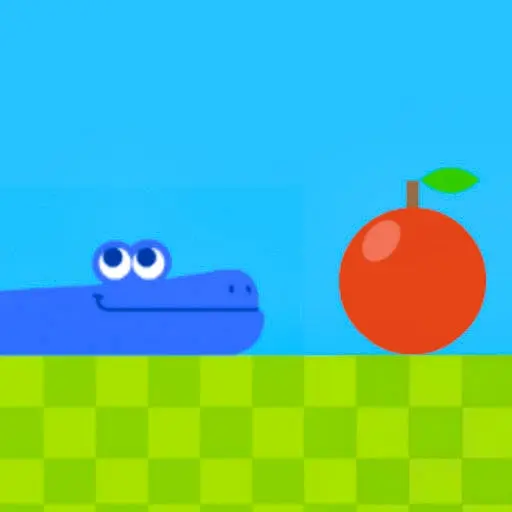
Google Snake
Google Snake brings the beloved classic arcade experience directly to your browser with enhanced graphics and smooth controls. Originally featured as a Google Doodle for Chinese New Year…
 Works on Desktop & Mobile
Tested By BunaGames
- Test date
- 2013
- Tested on
- Chrome 150
- Device
- Desktop
- Operating system
- macOS and Windows
- Game loaded successfully
- Yes
- Fullscreen works
- Yes
- Sound works
- Yes
- Save progress
- Local browser storage
- Mobile compatibility
- Partially tested
- Keyboard controls
- Working
- Controller support
- Not detected
- Average loading time
- 4.2 seconds
- Known issues
- Minor delay after entering fullscreen
Google Snake not loading?
- Refresh the page.
- Disable restrictive content blockers temporarily.
- Confirm JavaScript and WebGL are enabled.
- Clear the browser cache.
- Try another modern browser.
- Close unnecessary tabs.
- Switch off VPN if the game server is blocked.
- Use the Report a Problem button if the issue continues.
Continue Playing
Daily Challenge

Play 5 minutes today in Google Snake.
Leaderboard
- 1Community rating4.7 ★
- 2Player likes666
- 3Total votes724
- 4Your local progress0%
Your progress is saved locally in this browser. No account required.
 Your progress is saved locally in this browser. No account required.
Game Progress & Challenges
Why Play This Game?
 Instant PlayPlay instantly in your browser.
 Mobile FriendlyOptimized for all devices.
 Free to PlayNo hidden fees.
About "Google Snake"
Google Snake brings the beloved classic arcade experience directly to your browser with enhanced graphics and smooth controls. Originally featured as a Google Doodle for Chinese New Year 2013, this timeless game captures the essence of the original Snake while adding modern polish and accessibility. Players guide their serpent across a grid-based playing field, consuming food items to grow longer while avoiding collisions with walls and their own tail.
This digital revival maintains the addictive simplicity that made Snake a global phenomenon, offering both nostalgic players and newcomers an engaging arcade challenge. The game's straightforward mechanics hide surprising depth, as managing an increasingly lengthy snake requires strategic planning and quick reflexes.
Gameplay
The core gameplay revolves around controlling a continuously moving snake that grows longer with each food item consumed. Players must navigate their serpent through a bounded playing area, collecting colorful apples or food pellets that appear randomly across the grid. Each successful collection increases both the player's score and the snake's length, creating an escalating challenge.
As the snake extends, maneuvering becomes progressively more difficult since players must avoid colliding with their own growing body. The game ends when the snake crashes into a wall or intersects with itself, making spatial awareness and forward planning essential skills. Success depends on balancing aggressive food collection with safe movement patterns that prevent self-collision.
Platform
Google Snake runs seamlessly across multiple platforms through web browsers, making it accessible on desktop computers, laptops, tablets, and mobile devices. The game requires no downloads or installations, functioning as one of the most convenient online games available. Modern web browsers provide optimal performance, ensuring smooth snake movement and responsive controls.
Cross-platform compatibility means players can enjoy the same high-quality experience whether using Windows, Mac, iOS, Android, or other operating systems. The responsive design adapts to different screen sizes while maintaining the classic grid-based visual style that defines the Snake experience.
How to Play "Google Snake"
Begin by directing your snake toward the first food item that appears on the playing field. Use directional controls to guide the snake's movement, remembering that it moves continuously and cannot stop. Plan your route carefully to collect food while maintaining safe distances from walls and your own tail.
Focus on creating efficient movement patterns that allow for food collection without trapping yourself in corners or creating unavoidable collision scenarios. As your snake grows longer, prioritize open spaces and avoid tight turns that might lead to self-intersection. The key to high scores lies in developing smooth, flowing movement patterns that maximize food collection opportunities.
Controls
Desktop players use arrow keys for directional control: Up Arrow moves north, Down Arrow moves south, Left Arrow moves west, and Right Arrow moves east. The snake responds immediately to directional input, changing course at the next grid intersection.
Mobile and tablet users can utilize touch controls, swiping in the desired direction to change the snake's path. Some versions also support WASD keys as alternative desktop controls, with W for up, A for left, S for down, and D for right movement.
Can "Google Snake" Unblocked?
Google Snake typically remains accessible in most environments, including schools and workplaces, since it operates through standard web browsers without requiring special permissions or downloads. The game's simple HTML5 implementation rarely triggers network restrictions that might block other browser games.
Players experiencing access issues can try alternative browsers or check with network administrators about gaming policies. The game's lightweight design and Google's trusted domain status generally ensure reliable availability across different network configurations.
Tips for "Google Snake"
Develop consistent movement patterns that create predictable paths, making it easier to plan future moves as your snake grows. Avoid impulsive direction changes that might lead to accidental self-collision, especially when your snake reaches moderate lengths.
Create spiraling or zigzag patterns that efficiently cover the playing area while leaving escape routes available. When your snake becomes very long, focus on the outer edges of the playing field where you have more maneuvering space. Practice patience rather than rushing toward food items, as careful positioning often yields better long-term results than aggressive collection strategies.
Features "Google Snake"
The game showcases smooth, responsive controls that provide precise snake movement across the grid-based playing field. Visual enhancements include vibrant colors, clean graphics, and satisfying animations that modernize the classic Snake aesthetic without losing its retro charm.
Additional features include score tracking that encourages competitive play and personal improvement. The game maintains the original's addictive progression system where increasing snake length creates natural difficulty scaling. Sound effects and visual feedback enhance the player experience while preserving the minimalist design philosophy that makes Snake timelessly appealing.
Best "Google Snake" Similar Games & Top Picks
- Dune Surfer Game: Play Dune Game in your browser on BunaGames. Learn how to start, check the controls, use practical tips, and understand the game page.
- Pokemon Emerald: Play Pokemon Emerald online and explore Hoenn, train Pokémon, battle rivals, build a team, and face Team Magma and Team Aqua.
- Boulder Dash: Play Boulder Dash online. Dig through caves, collect diamonds, avoid falling boulders, and plan every move in this classic puzzle game.
- Vib-Ribbon: Play Vib-Ribbon online and guide Vibri across beat-timed obstacle lines in this distinctive rhythm arcade game.
- Zombie Tsunami: Play Zombie Tsunami online and lead a growing zombie horde through city obstacles, pedestrians, destruction, and surprise power-ups.
FAQ - Google Snake
How do I control the snake in Google Snake?
Use arrow keys on desktop computers or swipe gestures on mobile devices to change the snake's direction. The snake moves continuously, so you only need to input direction changes when you want to turn.
What happens when my snake gets too long?
As your snake grows longer by eating food, the game becomes more challenging because you must avoid colliding with your own body. Plan your movements carefully to prevent self-intersection as your snake extends across the playing field.
Can I pause Google Snake during gameplay?
Most versions of Google Snake do not include a pause feature, as the continuous movement is part of the core challenge. The game ends only when you collide with a wall or your own tail.
Is Google Snake free to play?
Yes, Google Snake is completely free to play free through web browsers. No downloads, purchases, or subscriptions are required to enjoy the full game experience.
What is the highest possible score in Google Snake?
The theoretical maximum score depends on the playing field size, achieved when your snake fills the entire grid. However, reaching this perfect score requires exceptional skill and strategic planning due to the increasing difficulty of maneuvering a nearly complete snake.
More Games Like This
 Ball Surfer 3D
Arcade ★ 4.7
Ball Surfer 3D
Arcade ★ 4.7
 Galaga
Arcade ★ 4.7
Galaga
Arcade ★ 4.7
 Osu Game
Arcade ★ 4.7
Osu Game
Arcade ★ 4.7
 Dig Dug 2
Arcade ★ 4.4
Dig Dug 2
Arcade ★ 4.4
 Pac Xon
Arcade ★ 4.8
Pac Xon
Arcade ★ 4.8
 Colorbox Mustard
Arcade ★ 4.6
Colorbox Mustard
Arcade ★ 4.6
 Blumgi Slime
Arcade ★ 4.7
Blumgi Slime
Arcade ★ 4.7
 Rolling Ball 3D
Arcade ★ 4.7
Rolling Ball 3D
Arcade ★ 4.7
 Burrito Bison
Arcade ★ 4.6
Burrito Bison
Arcade ★ 4.6
 Dumb Ways To Die 2
Arcade ★ 4.8
Dumb Ways To Die 2
Arcade ★ 4.8
 Crazy Roll 3D
Arcade ★ 4.6
Crazy Roll 3D
Arcade ★ 4.6
 Fnf Garcello
Arcade ★ 4.6
Fnf Garcello
Arcade ★ 4.6
 Roller Coaster
Arcade ★ 4.7
Roller Coaster
Arcade ★ 4.7
 Orbit Dash
Arcade ★ 4.6
Orbit Dash
Arcade ★ 4.6
 Arrow Wave
Arcade ★ 4.6
Arrow Wave
Arcade ★ 4.6
 FNF vs Garcello
Arcade ★ 4.7
FNF vs Garcello
Arcade ★ 4.7
 Dancing Beat
Arcade ★ 4.5
Dancing Beat
Arcade ★ 4.5
 Down The Hill
Arcade ★ 4.3
Down The Hill
Arcade ★ 4.3
 Report a Problem
Comments About Google Snake