



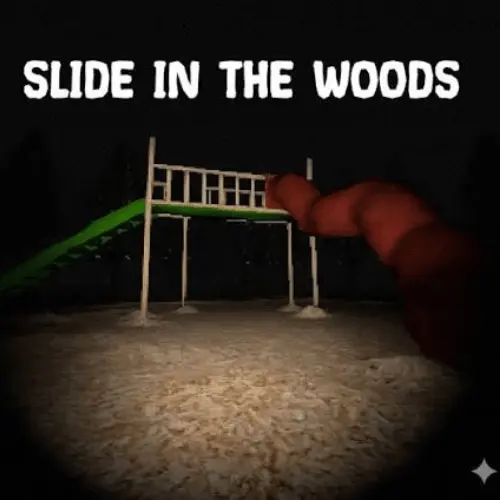
Slide in the Woods
Slide in the Woods is a short horror game that transforms a familiar childhood object into the center of an unsettling experience. The premise is deceptively simple: a…
 Works on Desktop & Mobile
Tested By BunaGames
- Test date
- August 11, 2026
- Tested on
- Chrome 150
- Device
- Desktop
- Operating system
- macOS and Windows
- Game loaded successfully
- Yes
- Fullscreen works
- Yes
- Sound works
- Yes
- Save progress
- Local browser storage
- Mobile compatibility
- Partially tested
- Keyboard controls
- Working
- Controller support
- Not detected
- Average loading time
- 4.2 seconds
- Known issues
- Minor delay after entering fullscreen
Slide in the Woods not loading?
- Refresh the page.
- Disable restrictive content blockers temporarily.
- Confirm JavaScript and WebGL are enabled.
- Clear the browser cache.
- Try another modern browser.
- Close unnecessary tabs.
- Switch off VPN if the game server is blocked.
- Use the Report a Problem button if the issue continues.
Continue Playing
Daily Challenge

Play 4 minutes today in Slide in the Woods.
Leaderboard
- 1Community rating4.3 ★
- 2Player likes404
- 3Total votes491
- 4Your local progress0%
Your progress is saved locally in this browser. No account required.
 Your progress is saved locally in this browser. No account required.
Game Progress & Challenges
Why Play This Game?
 Instant PlayPlay instantly in your browser.
 Mobile FriendlyOptimized for all devices.
 Free to PlayNo hidden fees.
About "Slide in the Woods"
Slide in the Woods is a short horror game that transforms a familiar childhood object into the center of an unsettling experience. The premise is deceptively simple: a playground slide stands in the woods, a setting that should feel ordinary or nostalgic but instead becomes increasingly strange. Its horror comes from the tension between that innocent memory and the uncomfortable feeling that something is not right.
Rather than promising a huge open world or a long campaign, this game is built as a compact horror adventure. That focused format suits players who want a complete, memorable scare without a major time commitment. The woods, the isolated playground setting, and the slide itself form the core of its identity, creating a mood that is eerie before anything openly frightening happens.
The game is often associated with atmospheric indie horror: minimal setup, a clear central image, and a strong urge to keep going until the mystery reaches its conclusion. It is a good choice when you want horror driven by curiosity and discomfort rather than a complicated ruleset. Pay attention to the changing tone of the scene, because the contrast between childhood familiarity and unknown danger is the experience's most important idea.
Gameplay
Slide in the Woods is designed around a short-form horror journey. Its primary gameplay appeal is not competitive scoring, deep character building, or lengthy survival management. Instead, the game asks you to stay with an unnerving situation long enough to discover why a simple slide in the forest feels wrong. The result is a compact adventure with a clear beginning-to-ending pull.
The setting does much of the work. A slide normally suggests play, safety, and childhood memories. Placing it alone in the woods changes that meaning immediately. The player is invited to observe this familiar object in an unfamiliar context, then continue as the atmosphere grows more disturbing. That contrast gives the game its recognizable horror hook.
Expect the pace to reward attention rather than rushing. Short indie horror games frequently create tension through anticipation: quiet moments, repeated focus on a location, and the uncertainty of what may change next. In this case, the goal is to experience the progression and reach the ending, not to master an elaborate system. If you enjoy horror games that can make one ordinary place feel threatening, the focused structure is a benefit.
- Core mood: childhood nostalgia turned unsettling.
- Central setting: an isolated slide in the woods.
- Play style: short horror adventure with an ending to reach.
- Best approach: play patiently and let the atmosphere build.
Because it is brief, Slide in the Woods works especially well as a single-session browser horror game. It gives players a direct premise, a concentrated dose of suspense, and a memorable final objective without asking them to learn a large number of mechanics first.
Platform
Slide in the Woods originated as a downloadable Windows game, while this BunaGames page is presented for players looking for a browser-play experience. That distinction matters: a browser-hosted version is convenient for quick access, but players should avoid assuming that every version found on every platform has identical presentation, settings, or input prompts.
For this page, the practical benefit is simple: open the game in a modern web browser and use the instructions shown by the game player. Browser play is well suited to this title's short format, since you can start a horror session without planning around a lengthy install or an extended campaign.
For the most reliable experience, use an up-to-date desktop or laptop browser, allow the page to finish loading, and keep audio available if you want the intended atmosphere. A stable connection also helps prevent interruptions during a short narrative-focused game. If the embedded game provides its own loading, fullscreen, sound, or control prompts, those on-screen directions take priority over general browser advice.
- Original format: downloadable Windows release.
- Page use: browser-based play on BunaGames.
- Session length: suited to a quick horror break.
How to Play "Slide in the Woods"
Begin Slide in the Woods by loading the game fully and giving the opening scene a moment to establish its mood. This is a short horror experience, so the most useful goal is not to rush past every moment but to follow the situation through to its conclusion. The slide and the surrounding woods are the central visual anchors; keep them in mind as the experience develops.
- Open the game and wait until the browser player is ready.
- Read any instructions displayed inside the game before making assumptions about its inputs.
- Use the available controls to proceed through the experience and remain attentive to changes in the setting or tone.
- Follow the game's progression rather than treating it as a score challenge or open-ended sandbox.
- Continue until you reach the ending, which is the natural objective of this short horror adventure.
The strongest way to play is with curiosity. The premise works because the slide is a recognizable childhood object, yet its placement in the woods makes it feel isolated and suspicious. Let that contradiction guide your attention. Notice when a familiar image feels different, when the atmosphere becomes heavier, and when the game encourages you to move forward.
Headphones can help players focus on a horror game's soundscape, but they are optional. If you prefer a less intense session, lower the volume while keeping enough sound to follow any audio cues the browser version uses. Likewise, playing in a brighter room can make the game more comfortable without removing its core concept.
Do not expect a long list of objectives. The challenge is emotional and observational: commit to the short journey, resist the urge to dismiss the strange setting too quickly, and see where the game takes the seemingly innocent slide.
Controls
Use the control instructions shown in the active browser game as the authoritative guide. Slide in the Woods is available in more than one context, including an original downloadable Windows release and browser-hosted play, so it is better not to assume a specific keyboard, mouse, touch, or controller layout before the game loads.
| Need | What to do |
|---|---|
| Start play | Select the game player |
| Inputs | Follow on-screen prompts |
| Audio | Adjust browser volume |
| Focus | Click the game if needed |
On a desktop browser, click inside the game area if your keyboard inputs do not register at first. If the page offers fullscreen, use it only if it makes the scene easier to see and you are comfortable with a more immersive horror presentation. Avoid repeatedly refreshing during loading, as that can restart the session or delay access.
If a prompt appears with movement, interaction, continue, pause, or menu instructions, follow that prompt rather than a generic control guide. The game itself is the best source for its current playable build.
Can "Slide in the Woods" Unblocked?
On BunaGames, Slide in the Woods is intended as an accessible browser horror game for players who want to start a short session online. “Unblocked” in this context means convenient web access without needing to rely on the original downloadable Windows format. Availability can still depend on your device, browser settings, connection, and any restrictions imposed by the network you are using.
If the game does not start, first refresh the page once, wait for loading to complete, and make sure the browser is not blocking required page content. Clicking directly in the game frame can also restore keyboard focus. Try an updated browser if an older one has trouble with browser-game features.
School, workplace, library, and managed public networks may apply their own content rules. Those restrictions are controlled by the network administrator, not by the game page. Use the game only where you have permission to access online entertainment content.
The advantage of browser access is that the title's short, self-contained horror format can fit a quick break. You can open the page, play through the eerie slide-in-the-woods premise, and finish a focused session without treating it like a large installation project.
Tips for "Slide in the Woods"
The best tip for Slide in the Woods is to play it as an atmosphere-first horror game. The central image is intentionally simple: a slide in the woods. Its power comes from the fact that it resembles a harmless childhood memory while existing in a place that feels lonely and unsafe. Give the game enough attention for that tension to work.
- Do not rush the opening. Short horror games often establish their strongest unease before the obvious scares arrive.
- Watch the setting closely. The slide and forest are not just background decoration; they are the foundation of the game's mood.
- Use sound thoughtfully. Moderate volume or headphones can make atmospheric details easier to notice, but choose a comfortable level.
- Play in one sitting. A compact horror adventure is usually most effective when its tension is not broken by long pauses.
- Follow in-game prompts. They are more dependable than assumed controls, particularly in a browser version.
- Expect discomfort, not complexity. The game is about curiosity, suspense, and reaching the ending rather than difficult systems.
Players sometimes reduce short horror games to a search for a jump scare, but that approach can miss the point here. The memorable part is the gradual corruption of a familiar idea. A playground slide is normally associated with daylight, friends, and safety. When it appears alone among trees, that expectation is inverted. Let yourself consider why the location feels wrong before demanding an immediate explanation.
For a smoother session, close distracting tabs, let the game load before interacting, and keep the browser window large enough to see the scene clearly. If the horror becomes too intense, pause if the version permits it or lower the audio. Being comfortable enough to continue is more valuable than forcing an overly immersive setup.
Features "Slide in the Woods"
Slide in the Woods stands out through a focused horror concept rather than a crowded feature list. The game takes one recognizable childhood object and uses it as the basis for an unsettling adventure. That clear thematic identity makes it easy to understand why players search for it: they want a short horror game centered on a strange slide in an isolated forest.
- Short horror format: built for a concise, complete experience.
- Childhood-horror contrast: a familiar playground image becomes disturbing.
- Atmospheric woodland setting: isolation and uncertainty support the tension.
- Clear central mystery: the unusual slide encourages players to keep going.
- Indie horror identity: compact presentation with a memorable premise.
- Browser convenience: a practical option for players seeking a quick online session.
A key strength is restraint. Instead of needing a large cast, elaborate lore encyclopedia, or hundreds of collectibles to create interest, the game relies on a single strong visual and emotional question. Why is this slide here, and what does its presence mean? That type of design can be especially effective in short horror because it gives every moment a shared focal point.
The game also fits players who enjoy horror adventures with an ending to discover. Its compact nature makes it approachable for newcomers to the genre, while the unsettling use of childhood imagery gives experienced horror fans a familiar but effective theme. It is not presented as a broad action game or a long survival simulation; its feature value is concentration.
Another useful distinction is its platform history. The title is known as a downloadable Windows game, while browser access emphasizes immediacy. This lets players experience the premise online while recognizing that the original release context and a hosted browser build may not be identical in every technical detail.
Best "Slide in the Woods" Similar Games & Top Picks
- Slenderman: Play Slenderman online on BunaGames. Learn the survival horror premise, gameplay approach, access details, controls guidance, and tips.
- Bendy And The Ink Machine: Play Bendy And The Ink Machine, a first-person cartoon horror adventure with puzzles, exploration, ink-soaked danger, and a dark studio mystery.
- Fnaf 3: Play Fnaf 3 online and face a single deadly animatronic, phantom illusions, and tense point-and-click survival horror.
- Fnaf 4: Play Fnaf 4 online and face nightmare animatronics in a tense survival horror challenge built around awareness, timing, and nerves.
- FNF Silly Billy: Play FNF Silly Billy online and face Yourself in a tense Friday Night Funkin' rhythm battle with keyboard note controls.
FAQ - Slide in the Woods
What is Slide in the Woods?
Slide in the Woods is a short horror game centered on an unsettling playground slide located in the woods. It uses the contrast between childhood familiarity and isolated forest horror to create tension. The game is structured as a compact adventure with an ending to reach.
Is Slide in the Woods a long game?
No. It is described as a short horror experience rather than a lengthy campaign. That makes it suitable for players who want a complete horror session without committing to a large open-world game or a multi-hour progression system.
What kind of horror is Slide in the Woods?
Its main identity is atmospheric indie horror. The premise begins with an ordinary childhood object, a slide, and makes it unnerving by placing it in an isolated woodland setting. The mood is driven by mystery, anticipation, and the feeling that a familiar place or object has become wrong.
Can I play Slide in the Woods in a browser?
This BunaGames page is intended for browser play. The game is also known from an original downloadable Windows release, so browser presentation or input prompts can vary by version. Follow the instructions displayed in the active game player for the most accurate guidance.
What are the controls for Slide in the Woods?
Use the control prompts shown inside the browser game. Because the title can appear in different release contexts, it is not reliable to assume a fixed control scheme from outside the game. If keyboard input does not work immediately, click inside the game frame to give it focus.
Is Slide in the Woods free to play?
You can access the game from this BunaGames browser page as an online play option. The original release is associated with a downloadable Windows version, and availability or pricing can differ between platforms. For browser play here, load the game player and follow the page's current access options.
Who developed Slide in the Woods?
Slide in the Woods is associated with Jonny's Games. It is recognized as a short indie horror title with a deliberately simple but memorable setting.
What is the goal of Slide in the Woods?
The practical goal is to proceed through the short horror experience and reach its conclusion. Rather than focusing on score chasing or complex combat systems, the game asks players to follow the mystery surrounding the slide and the woods while the atmosphere becomes increasingly unsettling.
More Games Like This
 Slenderman
Horror ★ 4.7
Slenderman
Horror ★ 4.7
 Bendy And The Ink Machine
Horror ★ 4.6
Bendy And The Ink Machine
Horror ★ 4.6
 Fnaf 3
Horror ★ 4.7
Fnaf 3
Horror ★ 4.7
 Fnaf 4
Horror ★ 4.7
Fnaf 4
Horror ★ 4.7
 Scary Shawarma Kiosk: The Anomaly
Horror ★ 4.7
Scary Shawarma Kiosk: The Anomaly
Horror ★ 4.7
 FNAF Free Roam
Horror ★ 4.6
FNAF Free Roam
Horror ★ 4.6
 Who’s at the Door?
Horror ★ 4.6
Who’s at the Door?
Horror ★ 4.6
 FNF Silly Billy
Horror ★ 4.6
FNF Silly Billy
Horror ★ 4.6
 The Man from the Window
Horror ★ 4.6
The Man from the Window
Horror ★ 4.6
 Baldi
Horror ★ 4.7
Baldi
Horror ★ 4.7
 Hello Neighbor
Horror ★ 4.7
Hello Neighbor
Horror ★ 4.7
 Eyes: The Horror Game
Horror ★ 4.5
Eyes: The Horror Game
Horror ★ 4.5
 Plants vs Zombies 2 “PVZ 2”
Horror ★ 4.7
Plants vs Zombies 2 “PVZ 2”
Horror ★ 4.7
 Jolly 2
Horror ★ 4.6
Jolly 2
Horror ★ 4.6
 Ultimate Custom Night UCN
Horror ★ 4.5
Ultimate Custom Night UCN
Horror ★ 4.5
 How to Get a NEIGHBOR
Horror ★ 4.4
How to Get a NEIGHBOR
Horror ★ 4.4
 Piggy
Horror ★ 4.7
Piggy
Horror ★ 4.7
 Idols of Ash
Horror ★ 4.4
Idols of Ash
Horror ★ 4.4
 Report a Problem
Comments About Slide in the Woods