



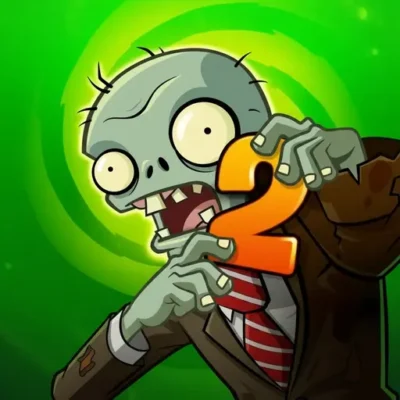
Plants vs Zombies 2 “PVZ 2”
Plants vs Zombies 2 PVZ 2 brings the familiar plant-versus-zombie battle into a strategic lane-defense challenge. Your job is to build a living defense before the zombies reach…
 Works on Desktop & Mobile
Tested By BunaGames
- Test date
- July 9, 2026
- Tested on
- Chrome 150
- Device
- Desktop
- Operating system
- macOS and Windows
- Game loaded successfully
- Yes
- Fullscreen works
- Yes
- Sound works
- Yes
- Save progress
- Local browser storage
- Mobile compatibility
- Partially tested
- Keyboard controls
- Working
- Controller support
- Not detected
- Average loading time
- 4.2 seconds
- Known issues
- Minor delay after entering fullscreen
Plants vs Zombies 2 “PVZ 2” not loading?
- Refresh the page.
- Disable restrictive content blockers temporarily.
- Confirm JavaScript and WebGL are enabled.
- Clear the browser cache.
- Try another modern browser.
- Close unnecessary tabs.
- Switch off VPN if the game server is blocked.
- Use the Report a Problem button if the issue continues.
Continue Playing

Daily Challenge

Play 4 minutes today in Plants vs Zombies 2 “PVZ 2”.
Leaderboard
- 1Community rating4.7 ★
- 2Player likes1.2K
- 3Total votes1.3K
- 4Your local progress0%
Your progress is saved locally in this browser. No account required.
 Your progress is saved locally in this browser. No account required.
Game Progress & Challenges
Why Play This Game?
 Instant PlayPlay instantly in your browser.
 Mobile FriendlyOptimized for all devices.
 Free to PlayNo hidden fees.
About "Plants vs Zombies 2 “PVZ 2”"
Plants vs Zombies 2 PVZ 2 brings the familiar plant-versus-zombie battle into a strategic lane-defense challenge. Your job is to build a living defense before the zombies reach the far end of the lawn. Each choice matters: a plant that creates resources helps fund the next part of your setup, while an attacking or blocking plant can protect a vulnerable lane at the exact moment a zombie wave arrives.
The appeal is not simply placing plants quickly. PVZ 2 rewards players who read the board, notice which lanes are under pressure, and spend resources with a purpose. A defense can look strong at first and still collapse when a tougher zombie reaches an unprotected row. Good play means balancing immediate safety with the long-term economy needed to keep planting.
Although it uses a colorful cartoon presentation, the advancing undead, sudden pressure, and last-line defense tension give this game a light horror-game flavor. It is approachable for new players, but its strongest moments come from planning ahead, adapting to changing waves, and turning a nearly lost lawn into a controlled defense.
This page is built for players looking for clear, practical information before starting a browser session: what the game asks you to do, how the basic controls work, and how to make smarter decisions when zombies begin to stack up in one lane.
Gameplay
Plants vs Zombies 2 PVZ 2 is built around a simple tactical loop: collect resources, plant defenses, and prevent zombies from crossing the lawn. The playfield is divided into horizontal lanes. Zombies advance through those lanes, so every row needs attention. A plant placed in one lane may be excellent there while doing nothing for a threat moving through another row.
Most successful defenses combine several roles instead of relying on one plant type. Resource-producing plants support your economy. Offensive plants damage zombies over time or in bursts. Defensive plants delay enemies and buy time for damage dealers to work. Special plants can provide a response when an ordinary setup is no longer enough. The best arrangement depends on what is approaching, how much space is available, and how many resources you can safely spend.
Wave timing creates the real challenge. Early in a level, it is often useful to establish resource production rather than filling every square with attacks. Later, when more zombies arrive together, the priority shifts toward lane coverage and emergency protection. If several zombies appear in a single row, adding more damage to that row may be better than spreading weak defenses everywhere.
Pay close attention to gaps. A lane with no attacker, no blocker, or no way to recover can become the route that ends the run. Strong gameplay comes from treating the lawn as one connected defensive system: build an economy, cover the lanes, identify the greatest threat, and make each plant placement answer a specific problem.
Platform
This BunaGames page is intended for players who want to access Plants vs Zombies 2 PVZ 2 through a web browser. Browser play is useful when you want to start from a desktop or laptop without treating the game like a long installation project. Open the game page, allow it time to load, and use the play area once it is ready.
For the clearest experience, use a current browser and keep enough room on screen for the full game field. A larger display makes it easier to inspect lane pressure, compare plant choices, and react before a zombie reaches a weak point. Closing heavy background tabs can also help if the browser is slow.
Controls and performance can vary with the version delivered in the game frame and the device being used. A mouse or trackpad is generally the most natural way to select items and place them precisely on the grid. If the game window is not responding as expected, refresh the page and wait for the game area to finish loading before trying again.
Looking for more quick-start experiences after your session? BunaGames also collects a wide range of browser games for players who prefer easy web access.
How to Play "Plants vs Zombies 2 “PVZ 2”"
Start by looking at the lawn as a set of separate lanes with shared resources. Zombies move toward your side of the board, and your plants are the defensive line that must stop them. Select a plant when it is available, then place it in a useful square. The placement should solve a current need, whether that means producing more resources, attacking an enemy, slowing an advance, or protecting an important plant.
- Read the opening lanes. Notice where the first zombies appear. Do not assume every lane needs the same response at the same time.
- Build resources early. A steady supply lets you react later instead of waiting helplessly while a lane becomes crowded.
- Place attacks with lane coverage in mind. Make sure active zombie routes have a way to take damage before they reach your side.
- Add protection where pressure rises. A blocker can give attacking plants extra seconds to remove a dangerous target.
- Save room for adaptation. Avoid filling the grid without a plan. Open spaces can be valuable when an unexpected wave needs a quick answer.
- Watch for the most urgent lane. The lawn is lost through a breakthrough, not because every row is equally busy.
A useful beginner habit is to pause mentally before every expensive placement. Ask what the plant will accomplish and whether another lane needs help first. That small decision process turns random planting into strategy. As you become more comfortable, you can develop defensive patterns, but remain ready to change them whenever the zombie lineup or wave timing demands it.
Controls
Plants vs Zombies 2 PVZ 2 is primarily played through point-and-click actions in the browser game area. Select a plant, choose a valid square on the lawn, and place it where it can contribute to the defense. The key is accuracy: placing a plant in the wrong row can leave the actual danger unanswered.
| Action | Typical input |
|---|---|
| Select a plant | Mouse click or tap |
| Place a plant | Click or tap a lawn square |
| Choose menu options | Click or tap |
| Restart or continue | Use on-screen controls |
Use the on-screen interface as the final authority for available actions. Depending on the browser version and device, the game may use slightly different menus, prompts, or touch behavior. On a computer, a mouse makes it easier to select plants and place them quickly during busy waves. On touch-enabled devices, tap deliberately so that a fast reaction does not become a misplaced plant.
Before a major wave, keep the cursor or touch focus ready near the plant selection area. Fast input is useful, but a calm placement in the correct lane is usually better than a rushed choice that spends resources without stopping the immediate threat.
Can "Plants vs Zombies 2 “PVZ 2”" Unblocked?
Plants vs Zombies 2 PVZ 2 can be played from this BunaGames game page when the page and game frame are available on your current browser and network. Browser access is convenient because it can reduce the need for separate downloads, but availability may still depend on device settings, network rules, browser support, or local restrictions.
If the game does not open, first try ordinary troubleshooting: reload the page, check your internet connection, disable only browser extensions that interfere with game loading, and try a current browser. Give the game frame a moment to initialize before clicking repeatedly. Repeated reloads during loading can interrupt the session rather than fix it.
Do not attempt to bypass school, workplace, library, or network restrictions. Those rules are set by the network owner and should be followed. If a shared device does not permit game access, play later on a device and connection where browser gaming is allowed.
Once the page loads normally, focus on the game board and on-screen controls. The most reliable way to enjoy a browser game is a stable connection, an updated browser, and enough free device resources to keep the play area responsive during larger zombie waves.
Tips for "Plants vs Zombies 2 “PVZ 2”"
The best Plants vs Zombies 2 PVZ 2 strategy is based on efficient decisions, not on placing every plant as soon as possible. Think of resources as both opportunity and protection. Spending everything on early attacks may leave you unable to respond when a stronger lane suddenly needs a blocker or extra damage.
- Create a dependable economy. Resource production gives you options. Build enough of it that one unexpected zombie does not force you to wait with an empty defense.
- Protect your investment. Plants that provide resources or sustained damage are more valuable when a defensive layer gives them time to work.
- Cover active lanes first. A row with an approaching zombie and no answer is more urgent than a quiet lane with an ideal-looking setup.
- Do not overcommit to one row. Extra firepower can be useful, but another lane may be one zombie away from becoming the real problem.
- Use space deliberately. Empty squares are not always mistakes. They can be reserved for a quick response when the board changes.
- Learn from a breakthrough. If a lane fails, identify why: low damage, no delay, poor resource timing, or a late reaction. Use that answer on the next attempt.
When a wave is approaching, scan from lane to lane instead of staring at a single fight. Look for the zombie closest to the defensive end, then check whether that lane has enough damage and time to stop it. This priority system prevents a common mistake: spending resources on the busiest-looking row while a less crowded row is actually closer to breaking through.
Finally, keep your setup flexible. A neat formation is useful only while it handles the current threat. Strategic players are willing to reinforce, redirect resources, or change their planting order when the lawn demands a different answer.
Features "Plants vs Zombies 2 “PVZ 2”"
Plants vs Zombies 2 PVZ 2 centers on readable lane-defense strategy with a strong plant-versus-zombie identity. Its core strength is that the board is easy to understand at a glance, while the decisions behind each plant placement can become increasingly important as pressure builds.
- Lane-based defense: Zombies advance through horizontal rows, creating clear positional decisions and immediate priorities.
- Plant selection and placement: Each placement is a tactical commitment that can support resource production, damage, delay, or protection.
- Resource management: Players must decide whether to invest now, save for a response, or strengthen an exposed lane.
- Wave pressure: Groups of zombies test whether your defense has enough coverage and enough recovery options.
- Board awareness: Success depends on monitoring multiple lanes rather than reacting to only one enemy.
- Cartoon horror atmosphere: The undead theme adds tension without changing the game’s colorful, accessible presentation.
- Browser-focused access: The BunaGames page supports players who want a web-based game session with straightforward on-screen interaction.
The game is especially satisfying for players who enjoy a visible cause-and-effect loop. Place a plant in the right lane, protect it long enough to do its job, and the defense stabilizes. Make a poor trade or ignore a gap, and the board quickly communicates the consequence. That clarity makes PVZ 2 approachable for casual sessions while leaving room for more deliberate planning.
Its most valuable gameplay lesson is prioritization. You cannot always solve every potential problem at once, so you learn to identify the threat that matters now while preparing for the one likely to matter next. That combination of immediate action and forward planning is the foundation of the experience.
Best "Plants vs Zombies 2 “PVZ 2”" Similar Games & Top Picks
- Hello Neighbor: Play Hello Neighbor, a stealth horror game about entering a suspicious house, avoiding a smart Neighbor, and uncovering a basement secret.
- Eyes: The Horror Game: Play Eyes: The Horror Game online and face ghosts, traps, jump scares, and tense survival horror locations.
- Jolly 2: Play Jolly 2 online, a tense point-and-click survival horror game with nightshift challenges, exploration, and frightening surprises.
- Ultimate Custom Night UCN: Play Ultimate Custom Night UCN online and build a custom FNAF survival challenge with 50 selectable characters and adjustable difficulty.
- How to Get a NEIGHBOR: Play How to Get a NEIGHBOR online free. Move into a new house, investigate a suspicious neighbor, and uncover a mystery.
FAQ - Plants vs Zombies 2 “PVZ 2”
What is Plants vs Zombies 2 PVZ 2?
Plants vs Zombies 2 PVZ 2 is a plant-versus-zombie strategy game built around defending lanes from advancing zombie waves. Players place plants on a lawn-like grid, use available resources to expand their defense, and try to stop zombies before they reach the end of a lane.
How do you play Plants vs Zombies 2 PVZ 2?
You select plants through the game interface and place them on the board. Different plant roles support different parts of the defense, such as producing resources, damaging enemies, delaying pressure, or protecting important positions. Watch the lanes carefully and reinforce the row with the most urgent threat.
What is the main goal of the game?
The goal is to keep zombies from breaking through your defensive lines. A successful setup has enough resources to keep planting, enough damage to remove approaching enemies, and enough protection to prevent one crowded lane from ending the run.
What controls are used in the browser version?
Browser play generally uses mouse clicks or taps. Click or tap a plant to select it, then click or tap a suitable lawn square to place it. Menus, restart prompts, and other actions are handled through the on-screen interface. Exact behavior can vary by device and game version.
Why do I lose even when I have many plants?
Having many plants is not always the same as having an effective defense. You may have spent too many resources too early, left one lane without enough damage, failed to protect a key plant, or reacted too late to a fast-building wave. Check the lane that broke through and adjust your priorities on the next attempt.
Should I focus on resources or attacking plants first?
You need both. Early resource production helps you afford stronger responses later, but ignoring active lanes can create an immediate loss. Build your economy while ensuring that each lane with zombies has a practical answer. The right balance changes as the board becomes more dangerous.
Can I play Plants vs Zombies 2 PVZ 2 on a school or work network?
That depends on the rules and technical settings of the network. This page may be available in a browser when the network allows it, but you should not try to bypass restrictions set by a school, workplace, library, or other network owner.
What is the best beginner tip for PVZ 2?
Scan every lane before spending resources. Find the zombie that is closest to reaching your side, confirm that the lane has a way to stop it, and then make your next placement. This simple habit helps prevent avoidable breakthroughs and encourages more deliberate defense planning.
More Games Like This
 Slenderman
Horror ★ 4.7
Slenderman
Horror ★ 4.7
 Bendy And The Ink Machine
Horror ★ 4.6
Bendy And The Ink Machine
Horror ★ 4.6
 Papas Sushiria
Horror ★ 4.6
Papas Sushiria
Horror ★ 4.6
 Papas Wingeria
Horror ★ 4.6
Papas Wingeria
Horror ★ 4.6
 Papas Scooperia
Horror ★ 4.7
Papas Scooperia
Horror ★ 4.7
 Papas Pizzeria
Horror ★ 4.6
Papas Pizzeria
Horror ★ 4.6
 Papas Freezeria
Horror ★ 4.6
Papas Freezeria
Horror ★ 4.6
 Fnaf 3
Horror ★ 4.7
Fnaf 3
Horror ★ 4.7
 Fnaf 4
Horror ★ 4.7
Fnaf 4
Horror ★ 4.7
 Papas Taco Mia
Horror ★ 4.6
Papas Taco Mia
Horror ★ 4.6
 Papas Cupcakeria
Horror ★ 4.6
Papas Cupcakeria
Horror ★ 4.6
 Slide in the Woods
Horror ★ 4.3
Slide in the Woods
Horror ★ 4.3
 Scary Shawarma Kiosk: The Anomaly
Horror ★ 4.7
Scary Shawarma Kiosk: The Anomaly
Horror ★ 4.7
 FNAF Free Roam
Horror ★ 4.6
FNAF Free Roam
Horror ★ 4.6
 Who’s at the Door?
Horror ★ 4.6
Who’s at the Door?
Horror ★ 4.6
 FNF Silly Billy
Horror ★ 4.6
FNF Silly Billy
Horror ★ 4.6
 The Man from the Window
Horror ★ 4.6
The Man from the Window
Horror ★ 4.6
 Baldi
Horror ★ 4.7
Baldi
Horror ★ 4.7
 Report a Problem
Comments About Plants vs Zombies 2 “PVZ 2”