



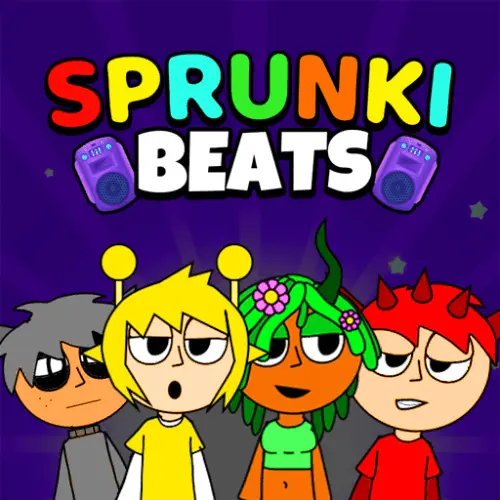
Sprunki Beats
Sprunki Beats is a creative browser music game built around rhythm, sound selection, and layered beat-making. Instead of following a long campaign or competing for a high score,…
 Works on Desktop & Mobile
Tested By BunaGames
- Test date
- August 2025
- Tested on
- Chrome 150
- Device
- Desktop
- Operating system
- macOS and Windows
- Game loaded successfully
- Yes
- Fullscreen works
- Yes
- Sound works
- Yes
- Save progress
- Local browser storage
- Mobile compatibility
- Partially tested
- Keyboard controls
- Working
- Controller support
- Not detected
- Average loading time
- 4.2 seconds
- Known issues
- Minor delay after entering fullscreen
Sprunki Beats not loading?
- Refresh the page.
- Disable restrictive content blockers temporarily.
- Confirm JavaScript and WebGL are enabled.
- Clear the browser cache.
- Try another modern browser.
- Close unnecessary tabs.
- Switch off VPN if the game server is blocked.
- Use the Report a Problem button if the issue continues.
Continue Playing
Daily Challenge

Play 6 minutes today in Sprunki Beats.
Leaderboard
- 1Community rating4.7 ★
- 2Player likes1.1K
- 3Total votes1.2K
- 4Your local progress0%
Your progress is saved locally in this browser. No account required.
 Your progress is saved locally in this browser. No account required.
Game Progress & Challenges
Why Play This Game?
 Instant PlayPlay instantly in your browser.
 Mobile FriendlyOptimized for all devices.
 Free to PlayNo hidden fees.
About "Sprunki Beats"
Sprunki Beats is a creative browser music game built around rhythm, sound selection, and layered beat-making. Instead of following a long campaign or competing for a high score, players experiment with character-based audio parts to assemble a track that feels personal. Each choice can add a beat, melody, vocal element, or another musical texture, turning a simple arrangement into a fuller soundscape.
The central appeal is accessible music mixing. You do not need to read notation, own instruments, or understand production software before starting. The game presents its sounds through quirky visual characters, so the creative process is based on listening, testing combinations, and deciding what works together. Add a steady rhythmic foundation, place a melodic part over it, then try vocals or contrasting loops to change the mood.
Sprunki Beats suits players who enjoy playful audio experimentation as much as traditional games. A short session can be a quick attempt to find a satisfying groove, while a longer session can become a process of refining balance, texture, and timing. It is an easy fit for fans of browser games who want a creative activity that rewards curiosity rather than fast reactions.
Gameplay
Gameplay in Sprunki Beats centers on building a musical arrangement one sound layer at a time. Characters act as visual anchors for different audio roles, making it easier to recognize what you are adding to the mix. A rhythm part may establish the pulse, while melody, vocal, and effect-like sounds can make the result brighter, darker, busier, or more spacious.
The most useful way to approach a new mix is to listen for the role each sound performs rather than judging it alone. A loop that seems plain by itself may become effective once it supports a stronger melody. Likewise, several interesting sounds can become cluttered when they all demand attention at once. Good play involves choosing a foundation, testing additions, and removing parts that do not improve the overall track.
Because the audio loops are designed for creative combination, the game shifts attention from technical music theory to arrangement decisions. Players can explore questions such as:
- Which beat gives the track a clear pulse?
- Does the melody complement the rhythm or compete with it?
- Do vocals add personality without overwhelming the mix?
- Would the track sound stronger with fewer active layers?
This is a relaxed form of interactive music creation. There is no need to rush through a level, memorize a sequence, or hit notes with exact arcade timing. The challenge is auditory: notice how parts interact, identify a mood you want, and shape the soundscape through deliberate combinations.
Platform
Sprunki Beats is presented as an online browser game, so the main play experience is designed around opening the game page and interacting with the music mixer in a web browser. This makes it suitable for quick creative sessions without requiring a separate music-production program.
A desktop or laptop can be especially comfortable because it provides more screen space for seeing the available characters and managing several active sound parts. The interaction described for this style of music game is based on selecting, dragging, dropping, and rearranging sound elements, so a mouse or trackpad is a natural way to play.
For the best listening experience, use headphones or speakers when possible. The game is fundamentally about comparing loops, beats, melodies, and voices; quiet audio can make it harder to hear the difference between a useful supporting layer and a distracting one. If you are playing in a shared space, lower the volume before experimenting with multiple parts.
Browser availability also supports short sessions. Open Sprunki Beats when you want to try a few combinations, then continue adjusting a mix as long as the creative idea is interesting. No platform-specific progress, mobile feature, download, or account requirement is assumed here.
How to Play "Sprunki Beats"
Start Sprunki Beats by taking a moment to identify the selectable sound characters and listening to the first sound you activate. Treat the opening choice as the foundation of the arrangement rather than trying to fill every available space immediately. A clear beat or simple repeating loop gives the rest of the mix something to work around.
- Choose a starting sound. Begin with a beat or another loop that establishes a pace you enjoy.
- Add one complementary part. Try a melody, vocal, or alternate rhythmic sound and listen to how it changes the first layer.
- Build gradually. Add sounds one at a time. Pause after each change so you can hear whether it improves the arrangement.
- Create contrast. Combine low and high sounds, simple and detailed loops, or rhythmic and vocal elements to avoid a flat result.
- Edit the mix. If a layer feels too busy, repetitive, or out of place, remove it and test another option.
- Refine by listening. Let the full combination play for a few cycles before deciding whether it works.
The important skill is not speed. It is active listening. When you make a change, ask what role it serves: does it strengthen the rhythm, carry the tune, add character, or merely make the track louder? This practical question helps turn random experimenting into purposeful composition.
There is also value in restarting your idea with a different first layer. Starting from a new beat can lead to an entirely different musical direction even when you use some of the same characters later. Use the game as a small sound laboratory: test, compare, simplify, and rebuild until the combination feels cohesive.
Controls
Sprunki Beats uses straightforward point-and-click style interaction for its creative music mixing. The exact available actions can depend on the game screen, but the core task is selecting sound characters and placing or activating them to build a layered track.
| Control | Purpose |
|---|---|
| Mouse click | Select a sound |
| Drag and drop | Place a sound part |
| Trackpad tap | Select on laptops |
Use a mouse or trackpad to work carefully through the available parts. Dragging and dropping is useful because it encourages a deliberate sequence: choose a sound, place it, then listen to its contribution before adding another. Avoid making many changes at once when you are learning the mix, since it becomes difficult to tell which new layer changed the feel of the track.
If you are using a touch-capable device, tap-and-drag behavior may be the natural equivalent of mouse interaction, but playability can vary by browser and device. For the clearest control over small on-screen elements, a larger display and pointer input can be helpful.
Can "Sprunki Beats" Unblocked?
Sprunki Beats is intended to be played online in a browser, making it convenient for players looking for a quick music game without a separate installation. Open the game page, allow the page audio to play, and begin experimenting with the available sound characters.
“Unblocked” is often used to mean that a game is accessible from the browser on the network and device currently in use. Access can still depend on local rules, browser settings, content filters, school or workplace policies, and whether audio playback is permitted. Those controls are managed by the network or device owner, not by the game itself.
If the game page opens but you cannot hear the mix, check your browser tab, device volume, speaker connection, and any autoplay restriction. Many browsers require a click or tap on the page before sound begins. Headphones can make the experience more enjoyable because they reveal small differences between rhythm, melody, and vocal layers.
Play responsibly and follow the rules for the device, classroom, library, or workplace you are using. When access is available, Sprunki Beats works well as a short creative break because a satisfying track can begin with only a few sound choices.
Tips for "Sprunki Beats"
The strongest Sprunki Beats mixes usually begin with restraint. It is tempting to activate every character quickly, but a crowded arrangement can hide the sounds that made the track appealing in the first place. Build from a simple base and make every new layer earn its place.
- Find the pulse first. Start with a beat or repeating rhythm that gives the mix a stable center. Listen for a loop you would be happy to hear repeatedly.
- Add one role at a time. After choosing the foundation, introduce either a melody or vocal layer before adding more percussion. This makes the effect of each decision easier to hear.
- Use contrast with intention. A deep rhythmic sound can pair well with a higher melody, while a distinctive vocal can become the focal point of a simpler arrangement.
- Leave space. Silence, or the absence of an extra layer, is part of a good mix. Fewer sounds can make the active parts clearer and more memorable.
- Listen through full cycles. Do not judge a combination in the first second. Let the loops repeat so you can notice whether they remain enjoyable together.
- Remove before replacing. When a track feels messy, take out one part first. This often reveals whether the problem was overload rather than a bad sound choice.
- Try alternate foundations. Rebuild the same melody or vocal idea over another beat. The new rhythmic context may create a better mood.
A useful creative method is to make two versions of the same idea: one minimal mix with only a few parts and one fuller mix with additional textures. Compare them honestly. The fuller version is not automatically better; the goal is a balanced soundscape where rhythm, melody, and character can all be heard.
Finally, trust your ears over rules. The game supports playful experimentation, so unusual combinations are worth testing. If a sound surprises you in a good way, keep it. If it distracts from the track’s main idea, edit it out and continue shaping the mix.
Features "Sprunki Beats"
Sprunki Beats focuses on approachable, character-led music creation. Its main feature is the connection between visual sound characters and musical layers, which gives players a direct way to experiment with a mix without needing a conventional instrument interface.
- Creative sound mixing: Combine different audio parts to form an original arrangement rather than following a fixed song.
- Layered soundscapes: Build tracks from complementary beats, melodies, vocals, and other musical textures.
- Character-based interaction: Use recognizable visual elements to select and organize the sounds in your composition.
- Rhythm-focused play: Explore how repeating loops interact and how a foundation affects the feeling of every added layer.
- Low barrier to entry: Begin creating through listening and experimentation; formal music knowledge is not required.
- Flexible session length: Make a quick combination for a few minutes or stay longer to refine a fuller track.
- Browser convenience: Enjoy a music-game experience directly online when the page is available on your device.
What separates this style of game from a note-matching rhythm challenge is its emphasis on authorship. You are not simply reacting to a prewritten sequence. You are choosing which sounds belong together and deciding when the arrangement feels complete. That makes replay value come from combinations, moods, and personal taste rather than from completing a single route.
The most valuable feature is immediate feedback. Add a sound and the mix changes; remove it and you can hear the difference. This fast loop between action and listening helps players understand basic arrangement ideas naturally. A rhythm can anchor the track, a melody can define its mood, and a vocal part can supply personality. By experimenting with those roles, players create music that is simple to start yet open to many different results.
Best "Sprunki Beats" Similar Games & Top Picks
- Papas Taco Mia: Play Papa's Taco Mia online. Take taco orders, cook seasoned meats, add toppings, earn coins, and improve your busy taqueria.
- Papas Cupcakeria: Play Papas Cupcakeria online. Take orders, bake cupcakes, add frosting and toppings, then serve each customer with care.
- Melon Playground: Play Melon Playground online, a creative ragdoll physics sandbox for building experiments with characters, tools, weapons, and vehicles.
- Incredibox: Play Incredibox online and build a layered beatbox mix with animated performers, beats, melodies, effects, voices, and bonuses.
- Blob Opera: Play Blob Opera online and conduct four AI-powered opera voices. Drag the singing blobs to create playful harmonies in your browser.
FAQ - Sprunki Beats
What is Sprunki Beats?
Sprunki Beats is an online creative music game where players combine character-based sound parts to make a layered track. The experience is centered on mixing rhythm, beats, melodies, vocals, and other audio textures into a soundscape that matches your own taste.
Is Sprunki Beats a rhythm game?
It is rhythm-focused, but it is better described as a music-mixing game than a strict note-timing challenge. The main activity is selecting and combining loops rather than reacting to a fixed sequence of prompts. Listening, arranging, and experimenting are more important than fast button presses.
How do I make music in Sprunki Beats?
Choose a sound character, add it to the active mix, and listen to the loop it contributes. Begin with a simple rhythmic foundation, then introduce a melody, vocal, or another complementary part. Continue testing layers and remove sounds that make the result feel crowded or unbalanced.
Do I need music experience to play?
No. The game is accessible because the sounds are presented as ready-to-combine parts. You can make progress by listening carefully and trying different combinations. Players with music experience may enjoy thinking about rhythm and arrangement, but no formal knowledge of notation, chords, or software is required.
What are the best sounds to start with?
Start with a beat or a repeating rhythmic loop because it gives the track a consistent pulse. Once that base feels right, add only one new layer at a time. A melody can shape the mood, while a vocal sound can add a memorable focal point. The best choice depends on what you hear, not on one fixed combination.
Why does my mix sound too busy?
A busy mix usually has too many layers competing for attention. Remove one sound and listen again before adding a replacement. Try keeping one clear rhythmic base, one melodic or vocal focus, and only a small number of supporting textures. Space helps each active part remain recognizable.
Can I play Sprunki Beats in a browser?
Yes. Sprunki Beats is presented as an online browser game. A mouse or trackpad is useful for selecting and placing sound elements, while headphones or speakers help you hear how the layers fit together. Browser availability and audio behavior can vary according to your device settings and local network access.
Is Sprunki Beats free to play?
The game is available to play on this BunaGames page as an online browser experience. You can begin exploring the music mixer without needing to use a separate production program. Follow the rules of the device and network you are using, especially in shared, school, or workplace environments.
More Games Like This
 Sprunki Retake 2
Casual ★ 4.8
Sprunki Retake 2
Casual ★ 4.8
 Sprunki Phase 3 Remastered
Casual ★ 4.7
Sprunki Phase 3 Remastered
Casual ★ 4.7
 Helix Jump
Casual ★ 4.6
Helix Jump
Casual ★ 4.6
 Sprunki Incredibox
Casual ★ 4.5
Sprunki Incredibox
Casual ★ 4.5
 Good Pizza Great Pizza
Casual ★ 4.7
Good Pizza Great Pizza
Casual ★ 4.7
 Eagle Craft
Casual ★ 4.7
Eagle Craft
Casual ★ 4.7
 Storm The House
Casual ★ 4.7
Storm The House
Casual ★ 4.7
 Papas Sushiria
Casual ★ 4.6
Papas Sushiria
Casual ★ 4.6
 Papas Wingeria
Casual ★ 4.6
Papas Wingeria
Casual ★ 4.6
 Papas Scooperia
Casual ★ 4.7
Papas Scooperia
Casual ★ 4.7
 Papas Pizzeria
Casual ★ 4.6
Papas Pizzeria
Casual ★ 4.6
 Papas Freezeria
Casual ★ 4.6
Papas Freezeria
Casual ★ 4.6
 Sled Rider 3D
Casual ★ 4.7
Sled Rider 3D
Casual ★ 4.7
 Fnaf
Casual ★ 4.5
Fnaf
Casual ★ 4.5
 Tropical Merge
Casual ★ 4.6
Tropical Merge
Casual ★ 4.6
 Flip Bottle
Casual ★ 4.6
Flip Bottle
Casual ★ 4.6
 Papas Taco Mia
Casual ★ 4.6
Papas Taco Mia
Casual ★ 4.6
 Farm Merge Valley
Casual ★ 4.7
Farm Merge Valley
Casual ★ 4.7
 Report a Problem
Comments About Sprunki Beats