



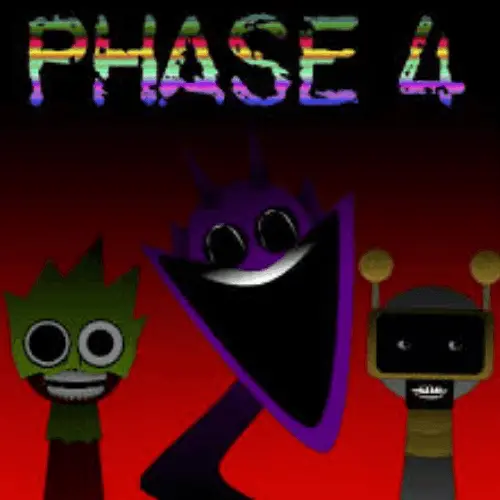
Sprunki Phase 4
Sprunki Phase 4 is a fan-made rhythm and music creation game connected to the Incredibox Sprunki mod scene. Instead of racing through obstacles, the play is built around…
 Works on Desktop & Mobile
Tested By BunaGames
- Test date
- May 30, 2026
- Tested on
- Chrome 150
- Device
- Desktop
- Operating system
- macOS and Windows
- Game loaded successfully
- Yes
- Fullscreen works
- Yes
- Sound works
- Yes
- Save progress
- Local browser storage
- Mobile compatibility
- Partially tested
- Keyboard controls
- Working
- Controller support
- Not detected
- Average loading time
- 4.2 seconds
- Known issues
- Minor delay after entering fullscreen
Sprunki Phase 4 not loading?
- Refresh the page.
- Disable restrictive content blockers temporarily.
- Confirm JavaScript and WebGL are enabled.
- Clear the browser cache.
- Try another modern browser.
- Close unnecessary tabs.
- Switch off VPN if the game server is blocked.
- Use the Report a Problem button if the issue continues.
Continue Playing
Daily Challenge

Play 5 minutes today in Sprunki Phase 4.
Leaderboard
- 1Community rating4.6 ★
- 2Player likes870
- 3Total votes970
- 4Your local progress0%
Your progress is saved locally in this browser. No account required.
 Your progress is saved locally in this browser. No account required.
Game Progress & Challenges
Why Play This Game?
 Instant PlayPlay instantly in your browser.
 Mobile FriendlyOptimized for all devices.
 Free to PlayNo hidden fees.
About "Sprunki Phase 4"
Sprunki Phase 4 is a fan-made rhythm and music creation game connected to the Incredibox Sprunki mod scene. Instead of racing through obstacles, the play is built around arranging characters, sound loops, beats, melodies, voices, and eerie effects into a layered track. Players who arrive from the Run Games category should expect a fast, experimental browser game, but the core challenge is musical timing, mix balance, and creative sequencing rather than running or jumping.
This phase is commonly described by competitors as a darker, Halloween-inspired chapter of Sprunki. Its appeal comes from the contrast between simple drag-and-drop interaction and a creepy sound palette. You do not need formal music knowledge to enjoy it. The game gives you a set of character icons, each tied to a sound layer, and lets you test how those layers work together on the stage.
The strongest reason to play is the freedom to experiment. You can make a calm loop, push the mix toward a spooky rhythm, or rebuild the whole arrangement until the characters feel synchronized. Because Sprunki phases are fan-published and vary by version, treat Phase 4 as a creative browser remix experience rather than a single fixed studio release.
Gameplay
Sprunki Phase 4 gameplay follows the familiar Incredibox-style loop: choose a sound icon, place it on a character, listen to the new layer, then keep adjusting the lineup until the mix feels complete. Each character can represent a beat, effect, melody, vocal sound, or atmospheric accent. The fun is not only hearing one sound at a time, but discovering how several loops combine into a darker Halloween-style arrangement.
The game rewards quick testing. A sound that feels strange alone may become useful when paired with a steady beat or a higher melody. A creepy effect can add tension, while a vocal loop can make the track feel more animated. This makes Phase 4 closer to a music sandbox than a traditional level-based arcade game. There is no need to chase a finish line; the goal is to build a satisfying rhythm and refine it through trial and error.
Competitor pages often repeat that it is a captivating, immersive, fan-made Sprunki phase, but the important gameplay detail is how much control the player has over texture. Phase 4 is about sound layering: starting with a foundation, adding contrast, removing noise, and reshaping the mood. The phase format also matters. Fan-made Sprunki phases are usually published independently, so each phase can change the tone, visual theme, or sound bank without following a single official sequence.
For players, that means Phase 4 is best approached like a live mixing board. Put characters on the stage, listen carefully for clashes, and rebuild the lineup until the beat, melody, and horror atmosphere support each other.
Platform
Sprunki Phase 4 is presented as an online browser game, so the main platform is the web. You can open it from the game page and play without needing a console or a large installation. This makes it easy to test a mix during a short break, replay the game on another computer, or share the experience with someone who enjoys fan-made music games.
Desktop and laptop browsers are usually the most reliable way to play because drag-and-drop music games benefit from a larger screen and precise pointer control. Some versions of Sprunki-style games may respond to touch input, but mobile compatibility can vary depending on the browser, device, and embedded build. If a phone or tablet does not handle dragging smoothly, switch to a computer for a cleaner experience.
Because Sprunki Phase 4 belongs to a fan-made phase ecosystem, the exact build can differ across sites. On BunaGames, the goal is quick browser access with simple interaction and minimal setup so players can focus on creating music.
How to Play "Sprunki Phase 4"
Start by loading the game and waiting for the character lineup and sound icons to appear. The screen usually works like a small music studio: characters stand ready on the stage, and icons represent different audio parts. Your job is to assign sounds, listen to the result, and keep improving the mix.
- Choose a sound icon. Look at the available icons and pick one to test first. It may represent percussion, melody, voice, or an eerie effect.
- Place it on a character. Drag the icon onto a character slot, or tap and assign it if the version supports touch controls.
- Listen to the loop. Once assigned, the character performs that sound repeatedly, adding a new layer to the track.
- Add more layers. Build a fuller mix by combining beats, melodies, vocals, and atmospheric sounds.
- Remove weak parts. If a loop feels too busy or clashes with the rhythm, take it out and try a different sound.
- Search for combinations. Some Sprunki-style mixes feel best when characters are arranged in a specific balance, with rhythm first and decoration second.
A good beginner method is to start with one beat, add one melodic part, then add a horror effect or vocal detail. This keeps the mix readable. If you place every sound at once, the track may become crowded before you understand which character is carrying the rhythm. Build slowly, listen after each change, and use silence as part of the arrangement. The best Phase 4 mixes usually feel intentional rather than overloaded.
Controls
The controls are designed to be simple because the main focus is music creation. Most browser versions use mouse or touch interaction rather than complex keyboard commands. The exact interface can vary by build, but the common Sprunki Phase 4 control pattern is easy to understand.
| Action | Control |
|---|---|
| Select sound | Click or tap |
| Add sound | Drag and drop |
| Change mix | Swap icons |
| Remove layer | Drag away or reset |
On desktop, use the mouse to drag icons onto characters and adjust the lineup. On touch screens, try tapping or dragging with your finger if the game responds correctly. If an icon does not attach, release it directly over the character area and wait a moment for the audio layer to start. If the game feels unresponsive, refresh the page or try a desktop browser for more precise control.
Can "Sprunki Phase 4" Unblocked?
Sprunki Phase 4 works well as a quick browser game because it is built around immediate interaction rather than long downloads or complicated setup. When a game page is accessible on your network, you can start experimenting with the character soundboard almost instantly. This makes it suitable for short casual sessions, especially for players who want a creative music game they can open and replay without saving progress.
Access can still depend on local network rules. Schools, workplaces, public Wi-Fi, and managed devices may block gaming pages or embedded browser content. BunaGames cannot override those restrictions, and players should follow the rules of the network they are using. If the game loads slowly, check your connection, close extra tabs, and allow the browser enough time to load the audio assets.
For the smoothest unblocked-style experience, use a modern browser, keep audio enabled, and play on a device where drag-and-drop controls are not restricted.
Tips for "Sprunki Phase 4"
Sprunki Phase 4 is simple to start, but better mixes come from careful listening. Treat the stage like a layered arrangement, not a place to dump every sound at once. The Halloween tone works best when there is space for the eerie parts to breathe.
- Build the rhythm first. Start with a beat or pulse before adding melodies. A stable foundation makes every later sound easier to judge.
- Add contrast gradually. Use one creepy effect, then one melodic layer, then a vocal or accent. Too many similar sounds can blur together.
- Listen after every change. Do not rush through the icons. Add one character, wait for the loop to settle, then decide if it improves the track.
- Remove sounds that fight the groove. A loop can be interesting but still wrong for the mix. If it distracts from the beat, replace it.
- Use the darker theme intentionally. Phase 4’s Halloween mood is strongest when suspenseful effects support the rhythm instead of covering it.
- Test different character orders. Even when the same sounds are available, a different lineup can make you notice new combinations.
- Restart when the mix gets crowded. Clearing the board is often faster than trying to repair an overloaded track.
A useful advanced habit is to think in roles: one sound for timekeeping, one for movement, one for melody, one for texture, and one for surprise. If every active character has a job, the mix feels cleaner and more deliberate. This approach also helps new players understand why some combinations sound catchy while others feel messy.
Features "Sprunki Phase 4"
Sprunki Phase 4 stands out because it combines accessible music-game controls with the darker personality of a fan-made Halloween phase. It is easy enough for a first-time player to understand, but flexible enough for repeat experimentation. The experience is not about winning a race; it is about discovering how characters, loops, and atmosphere interact.
- Fan-made Sprunki phase: Phase 4 belongs to the community-driven Sprunki/Incredibox mod space, where phases are often created and shared independently.
- Halloween-inspired mood: The sound design and presentation lean into creepy, mysterious, and suspenseful energy.
- Music creation loop: Players arrange character sounds to build a custom rhythm mix instead of following a fixed song chart.
- Drag-and-drop interaction: The core action is simple, making the game approachable even for players who do not usually play rhythm games.
- Layered audio design: Beats, effects, melodies, and voices can combine into different tracks depending on player choice.
- Short-session friendly: You can create a quick mix in a few minutes or spend longer refining combinations.
- Browser-based access: The game is designed for online play, with no console required.
- Creative replay value: The same sound set can produce many different moods when arranged in new ways.
The feature competitors often understate is the value of restraint. Phase 4 is most enjoyable when the player uses the horror theme as a production tool. A sparse beat with one unsettling accent can feel more powerful than a full board of constant noise. That gives the game a small but meaningful creative skill curve.
Best "Sprunki Phase 4" Similar Games & Top Picks
- sprunki phase 8: Play Sprunki Phase 8, a glitchy horror music game where character sounds, visuals, and layered loops shape your eerie remix.
- Sprunkr: Play Sprunkr online and build original musical combinations with colorful loops, distinctive sounds, and creative remix-style experimentation.
- sprunki 5: Play Sprunki 5 online and build eerie music mixes with expressive characters, layered sounds, and visual storytelling.
- Sprunki Phase 11: Play Sprunki Phase 11 online and build layered vocal mixes. Learn its music-making gameplay, controls, tips, features, and browser access.
- Sprunki Phase 1: Play Sprunki Phase 1 online and create rhythmic sound mixes. Learn the gameplay, controls, tips, features, and browser access.
FAQ - Sprunki Phase 4
What is Sprunki Phase 4?
Sprunki Phase 4 is a fan-made rhythm and music creation game associated with the Incredibox Sprunki mod scene. Players use character-based sound loops to build a custom mix with a darker, Halloween-style atmosphere. The main activity is arranging beats, effects, melodies, and voices until the track sounds balanced.
Is Sprunki Phase 4 an official Incredibox game?
The available competitor research describes Sprunki Phase 4 as a fan-made phase or expansion inspired by Incredibox Sprunki. It should be treated as a community-made browser music game rather than an official Incredibox release. Fan phases can also vary by site or build, so small differences in presentation are possible.
How do you play Sprunki Phase 4?
Choose a sound icon, drag it onto a character, and listen as that character adds a loop to the music. Continue placing icons to layer more sounds. If the mix becomes too busy, remove or swap sounds until the rhythm, melody, and eerie effects work together. The goal is creative mixing, not reaching a traditional finish line.
What are the controls for Sprunki Phase 4?
The usual controls are click, tap, and drag-and-drop. On a computer, use the mouse to select sound icons and place them on characters. On some touch devices, dragging with a finger may work, but desktop browsers are generally more reliable for precise placement.
Can I play Sprunki Phase 4 for free online?
Yes, the game is intended as a free online browser experience on BunaGames. You can open the page and start building music without a console or large installation. Network restrictions, browser settings, or device compatibility may still affect whether the game loads correctly.
Why is Sprunki Phase 4 connected to Halloween?
Competitor descriptions repeatedly frame Phase 4 as a creepy or Halloween-inspired Sprunki music game. That theme appears through the darker mood, suspenseful audio style, and horror-leaning character presentation. The Halloween angle helps separate Phase 4 from brighter or more neutral music-mixing games.
Is Sprunki Phase 4 good for beginners?
Yes. The basic action is easy: place sounds on characters and listen to the result. Beginners should start with one beat, add one melody, then add a spooky effect. This slower method makes it easier to hear which sounds improve the mix and which ones make it too crowded.
Does Sprunki Phase 4 have levels or a final boss?
Sprunki Phase 4 is better understood as a creative music sandbox than a level-based action game. The replay value comes from testing combinations, building different moods, and refining the sound arrangement. Some players may look for hidden combinations or special-feeling lineups, but the main experience is open-ended music creation.
More Games Like This
 Papas Sushiria
mobile ★ 4.6
Papas Sushiria
mobile ★ 4.6
 Papas Wingeria
mobile ★ 4.6
Papas Wingeria
mobile ★ 4.6
 Papas Scooperia
mobile ★ 4.7
Papas Scooperia
mobile ★ 4.7
 Papas Pizzeria
mobile ★ 4.6
Papas Pizzeria
mobile ★ 4.6
 Papas Freezeria
mobile ★ 4.6
Papas Freezeria
mobile ★ 4.6
 Papas Taco Mia
mobile ★ 4.6
Papas Taco Mia
mobile ★ 4.6
 Papas Cupcakeria
mobile ★ 4.6
Papas Cupcakeria
mobile ★ 4.6
 Hello Neighbor
mobile ★ 4.7
Hello Neighbor
mobile ★ 4.7
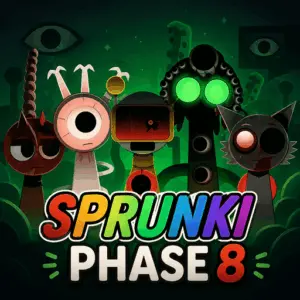 sprunki phase 8
mobile ★ 4.7
sprunki phase 8
mobile ★ 4.7
 Fly the Plane
mobile ★ 4.8
Fly the Plane
mobile ★ 4.8
 Melon Playground
mobile ★ 4.7
Melon Playground
mobile ★ 4.7
 Sprunkr
mobile ★ 4.4
Sprunkr
mobile ★ 4.4
 Dune Surfer Game
mobile ★ 4.6
Dune Surfer Game
mobile ★ 4.6
 Call of Duty
mobile ★ 4.4
Call of Duty
mobile ★ 4.4
 Cupcake Clicker
mobile ★ 4.6
Cupcake Clicker
mobile ★ 4.6
 Poop Clicker 2
mobile ★ 4.8
Poop Clicker 2
mobile ★ 4.8
 Little Farm Clicker Game
mobile ★ 4.8
Little Farm Clicker Game
mobile ★ 4.8
 Minecraft Clicker
mobile ★ 4.7
Minecraft Clicker
mobile ★ 4.7
 Report a Problem
Comments About Sprunki Phase 4