



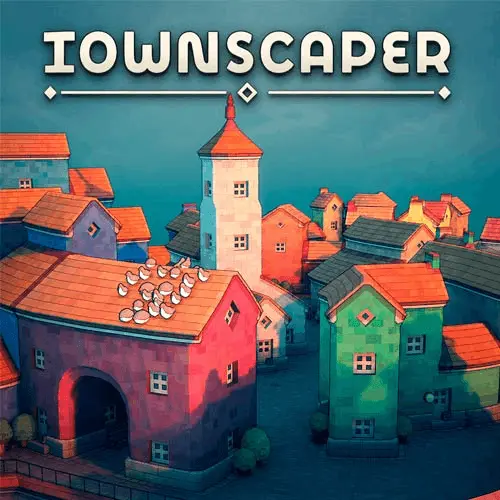
Townscaper
Townscaper is a calm, creative town-building toy centered on one simple idea: place colorful blocks on an irregular ocean grid and watch a settlement take shape. Instead of…
 Works on Desktop & Mobile
Tested By BunaGames
- Test date
- June 17, 2026
- Tested on
- Chrome 150
- Device
- Desktop
- Operating system
- macOS and Windows
- Game loaded successfully
- Yes
- Fullscreen works
- Yes
- Sound works
- Yes
- Save progress
- Local browser storage
- Mobile compatibility
- Partially tested
- Keyboard controls
- Working
- Controller support
- Not detected
- Average loading time
- 4.2 seconds
- Known issues
- Minor delay after entering fullscreen
Townscaper not loading?
- Refresh the page.
- Disable restrictive content blockers temporarily.
- Confirm JavaScript and WebGL are enabled.
- Clear the browser cache.
- Try another modern browser.
- Close unnecessary tabs.
- Switch off VPN if the game server is blocked.
- Use the Report a Problem button if the issue continues.
Continue Playing
Daily Challenge

Play 4 minutes today in Townscaper.
Leaderboard
- 1Community rating4.5 ★
- 2Player likes768
- 3Total votes866
- 4Your local progress0%
Your progress is saved locally in this browser. No account required.
 Your progress is saved locally in this browser. No account required.
Game Progress & Challenges
Why Play This Game?
 Instant PlayPlay instantly in your browser.
 Mobile FriendlyOptimized for all devices.
 Free to PlayNo hidden fees.
About "Townscaper"
Townscaper is a calm, creative town-building toy centered on one simple idea: place colorful blocks on an irregular ocean grid and watch a settlement take shape. Instead of managing money, balancing resources, completing missions, or defending a city, you are free to build at your own pace. A few placed blocks can become small waterfront homes, while a larger design may grow into curving streets, canals, tall cathedrals, or imaginative structures raised above the water on stilts.
The appeal comes from experimentation. The building system interprets where each block sits and turns that choice into charming architectural details. Because the grid is uneven rather than square, even simple layouts can produce winding shorelines and organic-looking neighborhoods. Choose a color, place a piece, and gradually discover what kind of town emerges.
This is a strong choice for players who want a low-pressure break from competitive browser games. There is no required finish line and no “correct” city plan. You can create a tiny harbor village, fill an island with dense homes, or use the space as a visual sketchbook for a fantasy setting.
Gameplay
Townscaper gameplay is based on placement rather than traditional city-management systems. You begin with open water and an irregular building surface. Select a color from the palette, then place blocks one at a time. The game responds to their position and neighboring pieces by shaping them into parts of a coherent seaside town.
That means the important decision is not which upgrade to buy or which objective to chase. It is where to place the next block. A line of pieces can suggest a street along the waterfront. A cluster can become a compact hamlet. Building around open water can leave room for a canal, while building upward or outward can create striking silhouettes above the sea. The same color can feel completely different when it is used as a dense row of homes, a small accent, or part of a taller landmark.
The experience is often described as more of a toy than a conventional game because it has no fixed goal. There are no mandatory levels to clear, no score to maximize, and no campaign direction supplied by the core concept. That absence of pressure is the mechanic: every placement is an invitation to observe, revise your idea, and continue.
For a satisfying session, start with a loose visual intention rather than a complicated plan. You might aim for a fishing village, a canal district, a cathedral-like centerpiece, or a sky city on stilts. Then let the irregular grid guide the result. The best builds usually combine a simple idea with enough open water and variation to make the town’s outline readable.
Platform
Townscaper is known for a WebGL browser version as well as versions associated with other platforms. On BunaGames, the intended experience is to play it from the game page in a compatible desktop web browser. The browser format makes it easy to begin a relaxed building session without treating the game like a lengthy strategy campaign.
Desktop access is particularly important for the WebGL version. The available source information specifically notes that Townscaper WebGL builds are not supported on mobile devices. If the game does not load or respond as expected on a phone or tablet, try opening the page on a desktop or laptop browser instead.
Because the game is visually driven, a larger screen can also make it easier to inspect the shoreline, see the spacing between blocks, and plan a town’s shape before adding more pieces. Use a current browser and allow the game page time to load before assuming there is a problem.
- Best fit: desktop or laptop browser play.
- Core format: WebGL-based creative building experience.
- Mobile note: WebGL builds are not supported on mobile devices.
- Session style: short creative breaks or longer freeform projects.
How to Play "Townscaper"
Playing Townscaper is deliberately straightforward, but building with purpose gives the experience more depth. Start by looking at the empty water and deciding where the first part of your settlement should sit. Pick a color from the visible palette, then place a block. Continue placing pieces nearby to establish a small district before expanding too far across the map.
- Choose a color. Treat the palette as a way to define districts, landmarks, or visual accents rather than merely decoration.
- Place a first cluster. A compact beginning helps you see how neighboring blocks relate to each other.
- Follow the irregular layout. Let curves and gaps influence your plan instead of forcing a rigid square city.
- Reserve water intentionally. Empty spaces can become canals, harbors, or breathing room around the town.
- Build in stages. Make a small hamlet first, then add a taller focal point, a waterfront edge, or another neighborhood.
- Experiment freely. Since there is no goal, a surprising result is not a mistake; it may become the defining feature of the build.
A useful approach is to build from silhouette outward. First establish the broad outline of your island town: a long shore, a circular group of homes, or a narrow chain over the water. Next, add density in selected places. Finally, use contrasting colors and open channels to make the shape easier to read.
Do not expect resource bars, zoning menus, population targets, or a final victory screen. Townscaper rewards visual curiosity. The practical objective is whatever you decide it should be: a peaceful port, a maze of canals, a compact medieval-looking settlement, or an abstract cityscape above the sea.
Controls
Townscaper uses simple pointer-based interaction. The central actions are choosing a color from the palette and placing blocks on the available building surface. This minimal control scheme keeps attention on composition and experimentation instead of complex shortcuts.
| Action | What it does |
|---|---|
| Select a palette color | Sets the next block color |
| Click or tap a build space | Places a block |
| Place nearby blocks | Expands the settlement |
For browser play, a mouse or trackpad is the most practical way to make careful placements. Take a moment between clicks when working near a canal edge or a planned open area; the position of each new piece affects the visual flow of the whole town. Since the WebGL version is not supported on mobile devices, desktop pointer controls are the recommended option.
The best control habit is patience. Place a few blocks, look at the resulting shape, and then decide whether the next addition should extend the shoreline, fill a neighborhood, or remain separate as a new island feature.
Can "Townscaper" Unblocked?
Townscaper is designed around calm, direct browser play rather than accounts, rankings, or competitive matchmaking. If the game is available through the BunaGames page on your network and device, you can open it and begin building without needing to learn a long progression system first.
“Unblocked” can mean different things in different places. School, workplace, library, or public Wi-Fi networks may apply their own rules or content filters, and those restrictions are outside the game itself. Do not attempt to bypass a network’s security, filtering, or usage policies. Instead, use the game where it is permitted, such as on a personal connection or during approved free time.
For the most reliable browser session, use a desktop or laptop with a compatible modern browser. The available WebGL information indicates that mobile devices are not supported for this version. If access is allowed but the game appears slow or does not open, refreshing the page after the browser has fully loaded can help distinguish a temporary loading issue from a device limitation.
Townscaper is especially suitable when you want a quiet creative activity: open the page, place a few colorful blocks, and leave whenever your small town feels complete.
Tips for "Townscaper"
The strongest Townscaper creations usually come from deliberate spacing, not from filling every available area. Since there is no score or required objective, use each session to test one visual idea and allow the town to develop naturally.
- Begin small. A compact hamlet makes it easier to understand the shape created by neighboring blocks. Expand only after the first cluster has a clear identity.
- Protect open water. Leaving gaps is useful. Water can frame a neighborhood, suggest a harbor, or become part of a canal network instead of unused space.
- Use color with intention. Choose one dominant color for a district and introduce a different color for a landmark or a new area. This creates visual hierarchy without needing menus or labels.
- Build a focal point. Give the town one memorable section, such as a taller structure, a tightly packed waterfront, or a narrow bridge-like chain across the water.
- Work with curves. The irregular grid is part of the game’s character. Curved edges and uneven shorelines often look more natural than trying to make every area symmetrical.
- Create districts. Separate a quiet outer island from a dense central settlement, or place a canal between two groups to make the layout easier to read.
- Pause and inspect. After several placements, stop adding blocks. Look for places where the outline is becoming too flat, too crowded, or disconnected from your original idea.
A useful creative challenge is to set a soft limit before you start: build only one island, use only two colors, or leave a central water channel untouched. Limits create a design problem without turning the game into a stressful task. Another good approach is storytelling. Imagine which area is the market, which cluster is a harbor settlement, and where a grand cathedral-like building belongs. The game does not assign those roles, but your layout can suggest them.
Features "Townscaper"
Townscaper stands apart from ordinary city builders by focusing on expressive construction rather than management. Its features support a relaxed creative loop: choose a color, place a block, observe the architecture that emerges, and continue in any direction that interests you.
- Goal-free building: There is no mandatory objective, campaign route, score chase, or prescribed ending.
- Color palette: Select colors to give neighborhoods, waterfronts, and landmarks their own visual character.
- Irregular building grid: The non-square layout encourages curvy streets, uneven coastlines, and organic town shapes.
- Seaside settings: Build on water and use empty spaces to shape island edges, harbors, and canal networks.
- Architectural variety through placement: Block position and nearby pieces can produce the feeling of small homes, taller structures, and more elaborate town forms.
- Creative scale: Make a tiny hamlet in minutes or keep expanding toward a dense waterfront city.
- Imaginative structures: The building concept supports everything from soaring cathedral-like forms to sky cities on stilts.
- Low-pressure sessions: Stop after a few placements or spend longer refining a visual idea; neither approach interrupts progress toward a required goal.
The major information advantage for new players is understanding that the game is not asking for optimization. It is a procedural city-building toy with an oceanic, medieval-inspired feel, where the pleasure lies in seeing simple inputs become a detailed-looking settlement. Players familiar with economic city simulators may initially search for budgets, residents, or objectives, but Townscaper intentionally removes those systems.
This makes it useful for visual brainstorming too. A player can sketch a coastal fantasy town, imagine a setting for a story or tabletop campaign, or simply arrange colors and waterways for a peaceful screen-sized composition. The result is personal because the town develops from your placement choices rather than from a fixed map challenge.
Best "Townscaper" Similar Games & Top Picks
- Papas Taco Mia: Play Papa's Taco Mia online. Take taco orders, cook seasoned meats, add toppings, earn coins, and improve your busy taqueria.
- Papas Cupcakeria: Play Papas Cupcakeria online. Take orders, bake cupcakes, add frosting and toppings, then serve each customer with care.
- Melon Playground: Play Melon Playground online, a creative ragdoll physics sandbox for building experiments with characters, tools, weapons, and vehicles.
- Incredibox: Play Incredibox online and build a layered beatbox mix with animated performers, beats, melodies, effects, voices, and bonuses.
- Blob Opera: Play Blob Opera online and conduct four AI-powered opera voices. Drag the singing blobs to create playful harmonies in your browser.
FAQ - Townscaper
What is Townscaper?
Townscaper is a creative town-building toy in which you place colorful blocks on an irregular surface surrounded by water. Those placements form charming island settlements with curving streets, waterfront districts, canals, and taller architectural shapes. It is designed for freeform creation rather than traditional city-management challenges.
Does Townscaper have a goal or ending?
No fixed goal is part of the experience. There are no required missions, campaign stages, resource targets, or final victory condition described by the game’s core concept. You decide when a town is finished, whether that means a small hamlet, a canal network, or a much larger cityscape.
How do you build a town in Townscaper?
Choose a color from the palette and place blocks on the building area. Add nearby blocks to grow a neighborhood, leave gaps for water, and use the irregular layout to create curves and distinctive shorelines. The game turns simple block placement into the appearance of a detailed town.
Can I make canals and buildings on stilts?
Yes. Townscaper’s creative building concept supports canal networks and sky-city-like structures on stilts, along with small settlements and soaring cathedral-like forms. Leave water where you want a channel or harbor feeling, then build around it to define the surrounding town.
Is Townscaper a city-management simulator?
Not in the usual sense. It is more of a building toy than a management simulation. The emphasis is on color, placement, shape, and atmosphere rather than budgets, traffic, population statistics, production chains, or competitive objectives.
Can I play Townscaper on mobile?
The available information for the WebGL version states that it is not supported on mobile devices. For the browser version, use a desktop or laptop computer with a compatible browser for the best chance of a smooth experience.
What are the controls for Townscaper?
The basic interaction is pointer-based: select a color from the palette and place blocks where you want to build. A mouse or trackpad is well suited to careful placement on desktop, especially when you are shaping narrow waterways or keeping separate districts apart.
What is the best way to start playing?
Start with a small cluster of blocks rather than trying to cover the whole area. Choose one color, create a compact waterfront group, and pause to study its silhouette. From there, expand with a second district, reserve water for a canal, or build toward a taller focal point. Because there is no required objective, experimenting is the best strategy.
More Games Like This
 Sprunki Retake 2
Casual ★ 4.8
Sprunki Retake 2
Casual ★ 4.8
 Sprunki Phase 3 Remastered
Casual ★ 4.7
Sprunki Phase 3 Remastered
Casual ★ 4.7
 Helix Jump
Casual ★ 4.6
Helix Jump
Casual ★ 4.6
 Sprunki Incredibox
Casual ★ 4.5
Sprunki Incredibox
Casual ★ 4.5
 Good Pizza Great Pizza
Casual ★ 4.7
Good Pizza Great Pizza
Casual ★ 4.7
 Eagle Craft
Casual ★ 4.7
Eagle Craft
Casual ★ 4.7
 Storm The House
Casual ★ 4.7
Storm The House
Casual ★ 4.7
 Papas Sushiria
Casual ★ 4.6
Papas Sushiria
Casual ★ 4.6
 Papas Wingeria
Casual ★ 4.6
Papas Wingeria
Casual ★ 4.6
 Papas Scooperia
Casual ★ 4.7
Papas Scooperia
Casual ★ 4.7
 Papas Pizzeria
Casual ★ 4.6
Papas Pizzeria
Casual ★ 4.6
 Papas Freezeria
Casual ★ 4.6
Papas Freezeria
Casual ★ 4.6
 Sled Rider 3D
Casual ★ 4.7
Sled Rider 3D
Casual ★ 4.7
 Fnaf
Casual ★ 4.5
Fnaf
Casual ★ 4.5
 Tropical Merge
Casual ★ 4.6
Tropical Merge
Casual ★ 4.6
 Flip Bottle
Casual ★ 4.6
Flip Bottle
Casual ★ 4.6
 Papas Taco Mia
Casual ★ 4.6
Papas Taco Mia
Casual ★ 4.6
 Farm Merge Valley
Casual ★ 4.7
Farm Merge Valley
Casual ★ 4.7
 Report a Problem
Comments About Townscaper