


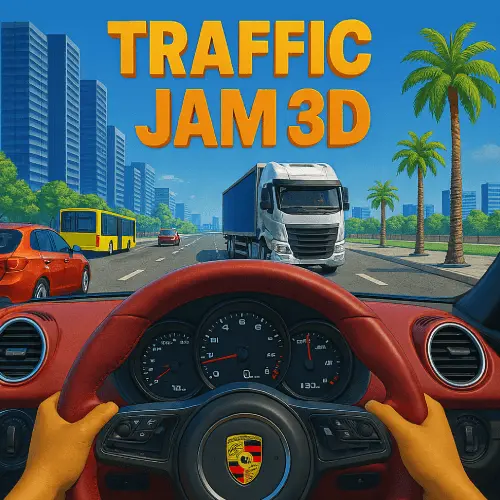
Traffic Jam 3D
Experience the thrill of highway driving in Traffic Jam 3D, a realistic driving simulation that challenges players to navigate congested roads and busy highways. This fast-paced driving game…
 Works on Desktop & Mobile
Tested By BunaGames
- Test date
- May 23, 2026
- Tested on
- Chrome 150
- Device
- Desktop
- Operating system
- macOS and Windows
- Game loaded successfully
- Yes
- Fullscreen works
- Yes
- Sound works
- Yes
- Save progress
- Local browser storage
- Mobile compatibility
- Partially tested
- Keyboard controls
- Working
- Controller support
- Not detected
- Average loading time
- 4.2 seconds
- Known issues
- Minor delay after entering fullscreen
Traffic Jam 3D not loading?
- Refresh the page.
- Disable restrictive content blockers temporarily.
- Confirm JavaScript and WebGL are enabled.
- Clear the browser cache.
- Try another modern browser.
- Close unnecessary tabs.
- Switch off VPN if the game server is blocked.
- Use the Report a Problem button if the issue continues.
Related Games







Continue Playing
Daily Challenge

Play 5 minutes today in Traffic Jam 3D.
Leaderboard
- 1Community rating4.6 ★
- 2Player likes847
- 3Total votes929
- 4Your local progress0%
Your progress is saved locally in this browser. No account required.
 Your progress is saved locally in this browser. No account required.
How to Play
Begin by selecting your vehicle and familiarizing yourself with the control scheme. Your primary objective is to navigate through traffic while avoiding collisions and completing mission objectives within the given timeframe.
Monitor traffic patterns and identify safe opportunities to change lanes or overtake slower vehicles. Maintain appropriate following distances and adjust your speed based on traffic density and road conditions.
Complete missions successfully to unlock new vehicles and progress through increasingly challenging scenarios. Each mission presents unique objectives that test different aspects of your driving skills, from speed management to precision maneuvering.
On mobile: use on-screen buttons or gestures when the game supports them.
 On mobile: use on-screen buttons or gestures when the game supports them.
Controls
- ↑Jump
- ← →Move Left / Right
- ↓Crouch
- W / ↑Climb / Interact
- S / ↓Drop / Slide
Vehicle acceleration and braking are controlled using the arrow keys or WASD configuration, with up arrow or W for acceleration and down arrow or S for braking. Left and right arrows or A and D keys handle steering and lane changes.
Additional controls may include handbrake functionality and camera angle adjustments to optimize your driving perspective. The responsive control scheme ensures precise vehicle handling, allowing for smooth navigation through tight traffic situations.
Practice with the controls in less congested areas before attempting more challenging traffic scenarios to develop muscle memory and improve your reaction times.
Game Progress & Challenges
Why Play This Game?
 Instant PlayPlay instantly in your browser.
 Free to PlayNo hidden fees.
About "Traffic Jam 3D"
Experience the thrill of highway driving in Traffic Jam 3D, a realistic driving simulation that challenges players to navigate congested roads and busy highways. This fast-paced driving game combines realistic vehicle physics with intense traffic scenarios, creating an authentic driving experience that tests your reflexes and strategic thinking.
The game features detailed 3D environments where every decision matters as you weave through traffic, avoid collisions, and complete challenging missions. With its emphasis on realistic driving mechanics and dynamic traffic patterns, this title stands out among online games for its immersive gameplay experience.
Gameplay
The core gameplay revolves around navigating your vehicle through increasingly challenging traffic scenarios while maintaining speed and avoiding accidents. Players must demonstrate precise timing and spatial awareness as they change lanes, overtake slower vehicles, and respond to dynamic traffic conditions.
Mission-based progression keeps the experience engaging, with objectives ranging from reaching destinations within time limits to achieving specific driving performance metrics. The realistic physics engine ensures that every maneuver feels authentic, while the dynamic traffic AI creates unpredictable scenarios that require quick thinking and adaptation.
Vehicle unlocking adds a progression element, rewarding skilled driving with access to new cars that offer different handling characteristics and performance capabilities.
Platform
This driving simulation runs seamlessly in web browsers without requiring downloads or installations. The game is optimized for desktop and laptop computers, providing smooth performance across different browser platforms including Chrome, Firefox, Safari, and Edge.
The browser-based design ensures instant access to the driving experience, making it perfect for quick gaming sessions or extended play periods. Cross-platform compatibility means you can enjoy the same high-quality driving simulation regardless of your operating system.
How to Play "Traffic Jam 3D"
Begin by selecting your vehicle and familiarizing yourself with the control scheme. Your primary objective is to navigate through traffic while avoiding collisions and completing mission objectives within the given timeframe.
Monitor traffic patterns and identify safe opportunities to change lanes or overtake slower vehicles. Maintain appropriate following distances and adjust your speed based on traffic density and road conditions.
Complete missions successfully to unlock new vehicles and progress through increasingly challenging scenarios. Each mission presents unique objectives that test different aspects of your driving skills, from speed management to precision maneuvering.
Controls
Vehicle acceleration and braking are controlled using the arrow keys or WASD configuration, with up arrow or W for acceleration and down arrow or S for braking. Left and right arrows or A and D keys handle steering and lane changes.
Additional controls may include handbrake functionality and camera angle adjustments to optimize your driving perspective. The responsive control scheme ensures precise vehicle handling, allowing for smooth navigation through tight traffic situations.
Practice with the controls in less congested areas before attempting more challenging traffic scenarios to develop muscle memory and improve your reaction times.
Can "Traffic Jam 3D" Unblocked?
Access this driving simulation directly through your web browser without encountering network restrictions or blocked content. The game loads quickly and runs smoothly on most computer systems, making it ideal for gaming during breaks or free time.
No special software or browser extensions are required to play free, ensuring hassle-free access to the driving experience. The unblocked nature means you can enjoy realistic highway driving simulation whenever you want to test your driving skills.
Tips for "Traffic Jam 3D"
Maintain Safe Following Distances: Keep adequate space between your vehicle and others to allow reaction time for sudden stops or lane changes by other drivers.
Plan Lane Changes Early: Anticipate traffic patterns and position yourself for lane changes well in advance rather than making last-minute maneuvers that increase collision risk.
Use Peripheral Vision: Monitor traffic in adjacent lanes and behind your vehicle to make informed decisions about when to change lanes or adjust speed.
Practice Smooth Acceleration: Gradual speed changes help maintain vehicle control and reduce the likelihood of rear-end collisions in heavy traffic situations.
Features "Traffic Jam 3D"
- Realistic 3D Graphics: Detailed vehicle models and highway environments create an immersive driving experience
- Dynamic Traffic System: AI-controlled vehicles with realistic behavior patterns and varying traffic density
- Mission-Based Progression: Structured objectives that challenge different driving skills and unlock new content
- Multiple Vehicle Options: Unlock and drive various cars with unique handling characteristics and performance attributes
- Responsive Physics Engine: Authentic vehicle dynamics that simulate real-world driving mechanics
- Browser Compatibility: Optimized performance across different web browsers without requiring downloads
Best "Traffic Jam 3D" Similar Games & Top Picks
- City Car Driving: Play City Car Driving online and focus on smooth city driving, vehicle control, careful practice, and better handling in your browser.
- Escape Drive: Play Escape Drive online and outrun the police in a fast-paced city car chase filled with sharp turns, obstacles, and crashes.
- The Farmer: Play The Farmer online and manage a growing farm by planting crops, caring for chickens, and building a successful farm.
- Street Life: Play Street Life online, a clicker merge game about tapping, merging, and jamming with a musical monkey on the road to stardom.
- Grand Prix Hero: Race across continents in Grand Prix Hero. Dodge traffic, collect coins, use boosts, and upgrade your car for the next race.
FAQ - Traffic Jam 3D
How do I avoid traffic collisions in Traffic Jam 3D?
Maintain safe following distances, check blind spots before changing lanes, and anticipate the movements of other vehicles. Use smooth acceleration and braking to maintain control, and always plan your lane changes well in advance rather than making sudden maneuvers.
Can I unlock different vehicles in the game?
Yes, the game features a progression system where completing missions successfully unlocks new vehicles. Each car offers different handling characteristics and performance capabilities, allowing you to choose vehicles that match your driving style and mission requirements.
What are the main objectives in Traffic Jam 3D missions?
Missions typically involve reaching specific destinations within time limits, maintaining certain speeds, avoiding collisions, or demonstrating particular driving skills. Each mission is designed to test different aspects of your driving abilities while progressing through increasingly challenging scenarios.
Does Traffic Jam 3D work on all web browsers?
The game is optimized for major web browsers including Chrome, Firefox, Safari, and Edge. It runs directly in your browser without requiring additional plugins or downloads, ensuring broad compatibility across different computer systems and operating platforms.
More Games Like This
 Loop Crash
Driving ★ 4.6
Loop Crash
Driving ★ 4.6
 Wheelie Master
Driving ★ 4.6
Wheelie Master
Driving ★ 4.6
 Stunt Bike Extreme
Driving ★ 4.6
Stunt Bike Extreme
Driving ★ 4.6
 Tanuki Sunset
Driving ★ 4.7
Tanuki Sunset
Driving ★ 4.7
 Stunt Car Extreme
Driving ★ 4.7
Stunt Car Extreme
Driving ★ 4.7
 Hello Neighbor
Driving ★ 4.7
Hello Neighbor
Driving ★ 4.7
 sprunki phase 8
Driving ★ 4.7
sprunki phase 8
Driving ★ 4.7
 Fly the Plane
Driving ★ 4.8
Fly the Plane
Driving ★ 4.8
 Melon Playground
Driving ★ 4.7
Melon Playground
Driving ★ 4.7
 Sprunkr
Driving ★ 4.4
Sprunkr
Driving ★ 4.4
 Dune Surfer Game
Driving ★ 4.6
Dune Surfer Game
Driving ★ 4.6
 Call of Duty
Driving ★ 4.4
Call of Duty
Driving ★ 4.4
 Cupcake Clicker
Driving ★ 4.6
Cupcake Clicker
Driving ★ 4.6
 Poop Clicker 2
Driving ★ 4.8
Poop Clicker 2
Driving ★ 4.8
 Little Farm Clicker Game
Driving ★ 4.8
Little Farm Clicker Game
Driving ★ 4.8
 Minecraft Clicker
Driving ★ 4.7
Minecraft Clicker
Driving ★ 4.7
 Clicker Cookies
Driving ★ 4.5
Clicker Cookies
Driving ★ 4.5
 sprunki 5
Driving ★ 4.7
sprunki 5
Driving ★ 4.7
 Report a Problem
Comments About Traffic Jam 3D