



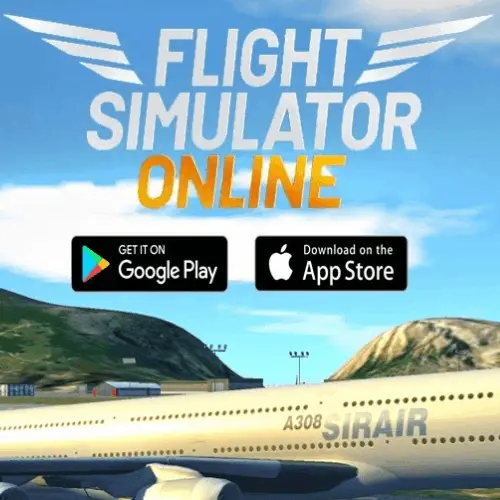
Airplane Simulator
Airplane Simulator is an arcade flying game for players who want the central satisfaction of piloting an aircraft in a quick, approachable browser session. Instead of requiring a…
 Works on Desktop & Mobile
Tested By BunaGames
- Test date
- June 11, 2026
- Tested on
- Chrome 150
- Device
- Desktop
- Operating system
- macOS and Windows
- Game loaded successfully
- Yes
- Fullscreen works
- Yes
- Sound works
- Yes
- Save progress
- Local browser storage
- Mobile compatibility
- Partially tested
- Keyboard controls
- Working
- Controller support
- Not detected
- Average loading time
- 4.2 seconds
- Known issues
- Minor delay after entering fullscreen
Airplane Simulator not loading?
- Refresh the page.
- Disable restrictive content blockers temporarily.
- Confirm JavaScript and WebGL are enabled.
- Clear the browser cache.
- Try another modern browser.
- Close unnecessary tabs.
- Switch off VPN if the game server is blocked.
- Use the Report a Problem button if the issue continues.
Continue Playing

Daily Challenge

Play 5 minutes today in Airplane Simulator.
Leaderboard
- 1Community rating4.7 ★
- 2Player likes983
- 3Total votes1.1K
- 4Your local progress0%
Your progress is saved locally in this browser. No account required.
 Your progress is saved locally in this browser. No account required.
Game Progress & Challenges
Why Play This Game?
 Instant PlayPlay instantly in your browser.
 Mobile FriendlyOptimized for all devices.
 Free to PlayNo hidden fees.
About "Airplane Simulator"
Airplane Simulator is an arcade flying game for players who want the central satisfaction of piloting an aircraft in a quick, approachable browser session. Instead of requiring a lengthy setup, specialist hardware, or a full-scale aviation background, the game places the focus on the core flight experience: guiding an airplane, reading its movement, and responding smoothly as its direction and position change.
Flight games appeal because they combine speed, perspective, and control. An airplane does not react like a car on a road; it moves through open space, so players need to think about direction, momentum, altitude, and gradual steering. That difference gives each adjustment more weight. A sharp correction can change the aircraft's path quickly, while a measured input can make flying feel deliberate and controlled.
As an arcade game, Airplane Simulator is best approached as an accessible introduction to virtual flying rather than a replacement for a detailed real-world training simulator. It is a good choice when you want to practice staying oriented, make cleaner flight corrections, and enjoy a sky-based challenge directly from a game page. The strongest results come from patience, observation, and small purposeful movements rather than constant steering.
Gameplay
Airplane Simulator centers on the relationship between the player and the aircraft's movement. Your immediate goal is to keep the plane traveling where you intend while adapting to the way a flying vehicle changes direction. Unlike ground-based arcade games, there is more than one plane of movement to consider. A turn affects the aircraft's heading, while climbing or descending changes its vertical position. Learning how those choices work together is the heart of the gameplay.
A productive first session is about building awareness instead of chasing perfect maneuvers. Notice the aircraft's current direction before making a correction. Then make one input, watch the response, and decide whether another adjustment is needed. This loop of input, observation, and correction is more useful than rapidly changing commands. It helps you understand how much control is needed for a gentle turn versus a major course change.
The arcade format makes the experience suitable for short play sessions, but it still rewards concentration. Players who stay calm usually fly more cleanly because they avoid overcorrecting. The most satisfying moments come when a planned change in direction feels smooth: the plane turns, levels out, and continues on a stable route without a series of rushed adjustments.
- Focus on aircraft direction before attempting large changes.
- Use short corrections to learn how the plane responds.
- Give each movement time to develop before reversing it.
- Treat stable, controlled flight as a useful goal in its own right.
Platform
Airplane Simulator is presented on BunaGames as a browser game, so it is designed to be opened from the game page rather than installed as a dedicated application. This makes it convenient for players looking for a quick arcade flying experience on a compatible modern web browser. Open the page, allow the game to load, and use the on-screen game interface to begin.
Browser play is especially useful for casual sessions because there is no separate console or mobile-store process to manage. For the clearest experience, use a device with a stable internet connection and enough screen space to see the flight view and any instructions shown by the game. A larger display can make it easier to judge the airplane's orientation, although the exact interface can vary by device and browser.
If the game does not respond immediately, click or tap inside the game area first. This commonly gives the embedded game window focus, allowing its input prompts to register correctly. Players looking for more web-based entertainment can also browse BunaGames online games.
How to Play "Airplane Simulator"
Start Airplane Simulator by opening the game on this page and waiting for the playable area to finish loading. Before making a major move, look for any instructions displayed inside the game window. These prompts are the most reliable guide to the version currently running, particularly when you are playing on a different device or using a touch-enabled screen.
Once the aircraft is active, begin with a simple objective: establish a steady direction and observe how the plane reacts when you change its movement. Avoid treating every moment as an emergency. Flight control is usually easier when you make a small adjustment, let the airplane respond, and then decide whether it needs to be increased, reduced, or reversed.
- Open the game and select the play option when it appears.
- Click or tap the game area so it can receive your input.
- Read the in-game prompts before using controls.
- Begin with gentle directional changes instead of repeated large inputs.
- Watch the aircraft's heading and position after each correction.
- Level out or return to a stable route once the plane is moving as intended.
The key skill is anticipation. If you wait until the plane has already moved far away from your intended direction, you may need a stronger correction. By noticing a drift early, you can make a smaller and smoother adjustment. This is a useful arcade-flight habit because it turns the game from a stream of reactions into a sequence of controlled decisions.
There is no need to know real aviation procedures to enjoy the game. However, borrowing a pilot-like mindset helps: keep track of your direction, avoid abrupt changes when a gentle one will do, and give yourself time to see the outcome of every maneuver.
Controls
Use the controls and prompts shown in the Airplane Simulator game window as the authority for the current playable version. Browser games can present different input layouts depending on the device, screen mode, or game build, so it is better to confirm the displayed instructions than to rely on assumed key bindings.
In practical terms, the controls are used to influence the airplane's movement and direction. The important habit is not simply knowing which input is available, but knowing when to release it. Holding a directional command for too long can create a larger change than expected, while a brief input is often enough to begin a correction.
- Click or tap the game area before trying to control the aircraft.
- Check the in-game control guide at the start of a session.
- Use brief inputs while learning the aircraft response.
- Pause your inputs and observe the result before making another change.
- On touch devices, keep fingers clear of important on-screen indicators where possible.
If an input appears not to work, first confirm that the game window has focus and that no browser overlay is blocking the playable area.
Can "Airplane Simulator" Unblocked?
Airplane Simulator is available through its BunaGames game page for players seeking a direct browser-based arcade flight session. Because it runs in a web page, the usual process is simple: open the page, wait for the game area to load, and start playing through the available interface. There is no need to describe it as a download-only experience when the game is intended to be accessed online.
Availability can still depend on the browser, device settings, network connection, and local access rules where you are playing. If a game does not load, try refreshing the page, checking your connection, disabling an interfering browser extension, or opening the page in another supported browser. A school, workplace, library, or managed network may apply its own browsing policies, and those policies should be respected.
For a smoother session, close unnecessary tabs, make sure the game page is fully loaded, and click inside the play area before using controls. These small steps can prevent common focus and performance issues. Airplane Simulator is most enjoyable when the game can respond promptly to your steering decisions, especially while you are learning how quickly the airplane changes course.
Tips for "Airplane Simulator"
The best Airplane Simulator strategy is controlled input. New players often try to fix every change in direction immediately, but constant correction can make the aircraft harder to manage. A more effective approach is to give the plane one clear instruction, watch the result, and make the next decision from what you see.
- Start gently. Use modest directional changes until you understand the aircraft's response. Large movements are harder to judge when you are still learning the view and handling.
- Look ahead of the plane. Do not focus only on where the aircraft has been. Think about where its current direction will take it if you make no further change.
- Correct early. A small adjustment made early is usually easier than a large correction made after the airplane has drifted far off course.
- Avoid input stacking. Repeatedly pressing opposite directions can produce a cycle of overcorrection. Release the control, assess the flight path, and then respond.
- Practice leveling out. A turn is only half of a maneuver. Once the plane is traveling in the desired direction, reduce or stop the turning input so the route can stabilize.
- Learn one movement at a time. First practice direction changes, then concentrate on how vertical movement affects your view and position. Combining everything at once can be confusing.
Use short sessions to improve a single skill. For example, spend one attempt trying to make smoother turns rather than trying to force a perfect run. On another attempt, focus on recognizing drift sooner. This method gives you measurable progress and makes the flight model feel more predictable.
A useful mental model is that the airplane needs room to move. Plan ahead, leave time for a change to take effect, and resist the urge to steer continuously. The resulting flight will look cleaner and feel more intentional.
Features "Airplane Simulator"
Airplane Simulator brings the appeal of flight-focused arcade gaming into an easy-to-access browser format. Its value comes from the challenge of guiding an aircraft through open space, where movement is less constrained than a typical driving game and every directional choice can affect the next few moments of flight.
- Aircraft-centered play: The game is built around controlling an airplane and understanding how its movement changes in the air.
- Arcade accessibility: It is suited to players who want a direct flying experience without the lengthy preparation associated with deeper simulation software.
- Browser-based access: Play from the BunaGames page on a compatible web browser instead of going through a separate installation process.
- Skill-based progression: Better results come from improved timing, observation, orientation, and smoother correction rather than from memorizing a complicated system.
- Short-session friendly: The format works well when you want to jump into a focused flying challenge for a few minutes.
- Replay value through mastery: Replaying helps you refine small details, such as recognizing a drift earlier or ending a turn more cleanly.
The main information gain for players is understanding that an enjoyable flight-game session is not only about speed. It is about managing a changing flight path with restraint. That makes Airplane Simulator approachable for newcomers while leaving room for players to improve their consistency over time.
Players interested in the wider flight-simulator idea may recognize familiar concepts such as heading, turning, climbing, descending, and maintaining control. In this arcade setting, those concepts are useful as practical cues rather than technical requirements. You can enjoy the game by paying attention to the plane's behavior and making sensible adjustments as you play.
Best "Airplane Simulator" Similar Games & Top Picks
- City Car Driving: Play City Car Driving online and focus on smooth city driving, vehicle control, careful practice, and better handling in your browser.
- Escape Drive: Play Escape Drive online and outrun the police in a fast-paced city car chase filled with sharp turns, obstacles, and crashes.
- The Farmer: Play The Farmer online and manage a growing farm by planting crops, caring for chickens, and building a successful farm.
- Street Life: Play Street Life online, a clicker merge game about tapping, merging, and jamming with a musical monkey on the road to stardom.
- Grand Prix Hero: Race across continents in Grand Prix Hero. Dodge traffic, collect coins, use boosts, and upgrade your car for the next race.
FAQ - Airplane Simulator
What is Airplane Simulator?
Airplane Simulator is an arcade game centered on piloting an airplane. It gives players a browser-based way to engage with the basic appeal of flight: changing direction, managing movement in open space, and trying to keep the aircraft under control. It is best viewed as an accessible arcade flying experience rather than a detailed real-world aviation training program.
Can I play Airplane Simulator in a browser?
Yes. Airplane Simulator is presented on BunaGames as a browser game. Open the game page, wait for the playable area to load, and follow the controls displayed within the game interface. A stable connection and a current browser can help provide a smoother session.
Do I need to download Airplane Simulator?
No separate download is required to access the game through its BunaGames page. The game is intended to be played from the browser. If the game area does not appear right away, allow the page to finish loading and try clicking inside the embedded play area.
How do I control the airplane?
Check the instructions shown in the game window before playing. The displayed prompts are the most dependable source for the control layout available in the current version and on your device. Once you know the inputs, use gentle changes at first and observe how the airplane responds before making another correction.
Why does the airplane keep moving away from my intended direction?
This usually happens when a correction is made too late or held for too long. Aircraft movement is easier to manage when you notice a drift early, make a small adjustment, and then allow time for the change to take effect. Repeatedly switching directions can lead to overcorrection, so pause briefly to assess the plane's new path.
Is Airplane Simulator realistic?
The game uses the familiar theme of airplane control, but it is categorized as an arcade game. Its purpose is to provide an approachable flying challenge, not to reproduce every part of professional flight simulation or real aviation procedure. You do not need pilot knowledge to start playing, although thinking about direction and smooth movement can improve your results.
What is the best way for beginners to improve?
Begin by practicing one skill at a time. Learn how the aircraft changes direction with small inputs, then focus on ending turns cleanly and maintaining a stable route. Try to look ahead instead of reacting only after the plane has already drifted. Short, deliberate practice sessions are more useful than constantly pressing controls.
What should I do if the controls are not responding?
First click or tap inside the game area, because the browser may need to give that window input focus. Then check the on-screen instructions and make sure a browser overlay, extension, or another open tab is not interrupting play. Refreshing the page or trying another compatible browser may also resolve loading or focus problems.
More Games Like This
 Bike Hero
Driving ★ 4.6
Bike Hero
Driving ★ 4.6
 Crazy Stunt Cars Multiplayer
Driving ★ 4.6
Crazy Stunt Cars Multiplayer
Driving ★ 4.6
 Stunt Car Challenge 3
Driving ★ 4.7
Stunt Car Challenge 3
Driving ★ 4.7
 Drive Mad 3
Driving ★ 4.6
Drive Mad 3
Driving ★ 4.6
 Papas Sushiria
Driving ★ 4.6
Papas Sushiria
Driving ★ 4.6
 Papas Wingeria
Driving ★ 4.6
Papas Wingeria
Driving ★ 4.6
 Papas Scooperia
Driving ★ 4.7
Papas Scooperia
Driving ★ 4.7
 Car Rush
Driving ★ 4.6
Car Rush
Driving ★ 4.6
 Papas Pizzeria
Driving ★ 4.6
Papas Pizzeria
Driving ★ 4.6
 Papas Freezeria
Driving ★ 4.6
Papas Freezeria
Driving ★ 4.6
 Madalin Stunt Cars 3
Driving ★ 4.5
Madalin Stunt Cars 3
Driving ★ 4.5
 Papas Taco Mia
Driving ★ 4.6
Papas Taco Mia
Driving ★ 4.6
 Papas Cupcakeria
Driving ★ 4.6
Papas Cupcakeria
Driving ★ 4.6
 Moto X3m Spooky Land
Driving ★ 4.7
Moto X3m Spooky Land
Driving ★ 4.7
 Moto X3m Winter
Driving ★ 4.7
Moto X3m Winter
Driving ★ 4.7
 Retro Highway
Driving ★ 4.4
Retro Highway
Driving ★ 4.4
 Speed Master
Driving ★ 4.7
Speed Master
Driving ★ 4.7
 Loop Crash
Driving ★ 4.6
Loop Crash
Driving ★ 4.6
 Report a Problem
Play Anytime, Anywhere
Add BunaGames to your home screen for quick access to your favorite games!
Comments About Airplane Simulator