



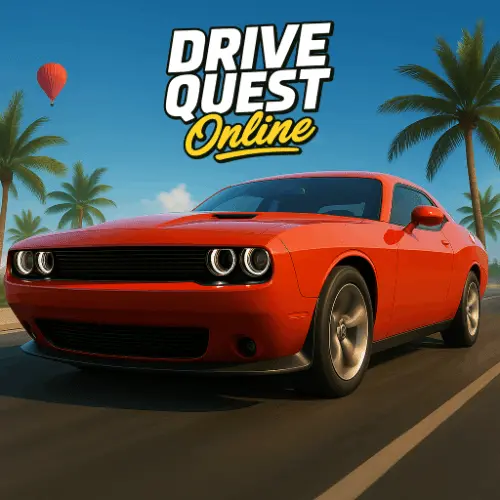
Drive Quest
Drive Quest is an open-world driving adventure that prioritizes exploration freedom over linear racing. Players navigate a continuous map connecting ports, city centers, highways, and unmarked discovery zones…
 Works on Desktop & Mobile
Tested By BunaGames
- Test date
- May 28, 2026
- Tested on
- Chrome 150
- Device
- Desktop
- Operating system
- macOS and Windows
- Game loaded successfully
- Yes
- Fullscreen works
- Yes
- Sound works
- Yes
- Save progress
- Local browser storage
- Mobile compatibility
- Partially tested
- Keyboard controls
- Working
- Controller support
- Not detected
- Average loading time
- 4.2 seconds
- Known issues
- Minor delay after entering fullscreen
Drive Quest not loading?
- Refresh the page.
- Disable restrictive content blockers temporarily.
- Confirm JavaScript and WebGL are enabled.
- Clear the browser cache.
- Try another modern browser.
- Close unnecessary tabs.
- Switch off VPN if the game server is blocked.
- Use the Report a Problem button if the issue continues.
Continue Playing

Daily Challenge

Play 5 minutes today in Drive Quest.
Leaderboard
- 1Community rating4.5 ★
- 2Player likes400
- 3Total votes454
- 4Your local progress0%
Your progress is saved locally in this browser. No account required.
 Your progress is saved locally in this browser. No account required.
Game Progress & Challenges
Why Play This Game?
 Instant PlayPlay instantly in your browser.
 Mobile FriendlyOptimized for all devices.
 Free to PlayNo hidden fees.
About "Drive Quest"
Drive Quest is an open-world driving adventure that prioritizes exploration freedom over linear racing. Players navigate a continuous map connecting ports, city centers, highways, and unmarked discovery zones without loading screens. Unlike circuit-based driving games, this title emphasizes spatial navigation, environmental variety, and player-directed route planning across a persistent world. The game supports both solo exploration and online interaction, allowing drivers to encounter other players while traversing the shared environment. Available as one of the accessible online games, it delivers desktop-quality open-world mechanics through browser technology.
Gameplay
Drive Quest centers on free-roam exploration rather than timed competitions. Players select vehicles and chart their own paths through interconnected regions that include industrial port areas, dense urban grids, extended highway networks, and off-map secret locations. The world design rewards curiosity—hidden areas often contain vehicle upgrades, cosmetic unlocks, or environmental shortcuts that experienced players leverage for efficient cross-map travel.
Mission structures vary from delivery tasks requiring route optimization to checkpoint challenges testing navigation skills under constraints. The online component populates the world with other drivers, creating emergent interactions such as impromptu convoys or competitive sprints between landmarks. Vehicle handling balances arcade accessibility with enough weight transfer and momentum physics to make terrain choice meaningful. Weather cycles and day-night transitions alter visibility and road grip, adding temporal variety to repeat routes.
Progression unlocks faster vehicles and customization options, but the core loop remains exploration-driven. Players who master the map layout discover optimal paths between objectives, transforming the open world into a mental network of shortcuts and scenic detours.
Platform
Drive Quest runs directly in modern web browsers without installation, leveraging WebGL rendering to deliver three-dimensional environments and real-time lighting. Desktop browsers provide the optimal experience with full keyboard or mouse control support and higher graphical fidelity. The game maintains stable frame rates on mid-range hardware, making it accessible to players without dedicated gaming systems.
The browser version mirrors the mobile app's core map and vehicle roster, though control schemes differ. Cross-platform progression is not explicitly confirmed, but the online multiplayer infrastructure suggests shared server environments. Players can launch the game through browser games portals, eliminating download barriers while preserving the open-world scope typically reserved for installed titles.
How to Play "Drive Quest"
Begin by selecting a starter vehicle from the garage menu. The initial spawn point places you in a central hub area with visible roads leading to different map regions. Open the in-game map overlay to identify points of interest marked by icons—these indicate mission givers, vehicle dealerships, and discovery zones.
Drive toward any marker to activate objectives, or ignore them entirely to explore freely. Completing missions earns currency used to purchase faster cars or visual upgrades. The minimap in the corner displays your heading and nearby roads; use it to orient yourself when navigating unfamiliar districts.
Online mode automatically connects you to servers populated with other players. Their vehicles appear as you approach, and you can follow them to discover routes or hidden areas. Experiment with different vehicles to find handling characteristics that match your preferred driving style—some excel on highways, others handle tight city corners more responsively.
Controls
- Arrow Keys / WASD: Accelerate, brake, and steer the vehicle
- Spacebar: Engage handbrake for sharp turns or drifting
- Shift: Activate nitro boost (if equipped on vehicle)
- M: Toggle full map view to plan routes
- C: Cycle camera angles between third-person, hood, and cinematic views
- R: Reset vehicle position if stuck or flipped
- Tab: Open vehicle selection and customization menu
Mouse controls offer an alternative steering method on desktop, with left-click for acceleration and right-click for braking. Touchscreen controls appear automatically on mobile browsers, displaying virtual steering and pedal inputs.
Can "Drive Quest" Unblocked?
Drive Quest functions as an unblocked game in most educational and workplace networks because it operates entirely through standard HTTPS browser protocols without requiring executable downloads or plugin installations. The game's web-based architecture bypasses typical software restrictions, allowing access from environments where installed games are prohibited.
Network administrators rarely block HTML5 game portals that use secure connections, making browser-based driving games like this one reliably accessible. Players on restricted networks can play free without VPN tools or proxy configurations. Performance depends on network bandwidth for initial asset loading and multiplayer synchronization, but single-player exploration remains functional even on throttled connections after the map data caches locally.
Tips for "Drive Quest"
- Memorize landmark clusters: The open world lacks GPS-style turn-by-turn guidance. Identify distinctive buildings or terrain features to create mental waypoints for faster navigation between mission zones.
- Explore perimeter roads first: The map edges often contain hidden vehicle spawns and shortcut tunnels that don't appear on the default map view. Circumnavigating the playable area reveals these before tackling interior missions.
- Match vehicle class to terrain: Lightweight cars handle city traffic and tight corners efficiently, while heavier vehicles maintain stability on highways and rough terrain. Switch vehicles based on your next objective's location.
- Use elevation for speed: Downhill sections provide natural acceleration boosts. Plan routes that chain descents to maintain momentum without consuming nitro reserves.
- Follow experienced players: In online mode, drivers who navigate confidently without hesitation likely know optimal routes. Trailing them briefly can reveal shortcuts or mission-dense areas.
- Check alternate routes during weather: Rain reduces grip on paved roads but has less impact on dirt paths. Rerouting through industrial zones during storms can save time compared to slick highway lanes.
Features "Drive Quest"
- Seamless open-world map: Continuous environment spanning ports, urban districts, highways, and exploration zones without loading transitions
- Online multiplayer integration: Shared world populated with other players for emergent interactions and cooperative discovery
- Diverse vehicle roster: Multiple car classes with distinct handling profiles, from agile city cars to high-speed highway cruisers
- Dynamic weather and time cycles: Environmental conditions that affect visibility, road grip, and scenic atmosphere
- Mission variety: Delivery tasks, checkpoint runs, and exploration objectives that reward both speed and navigation skill
- Hidden discovery zones: Unmarked areas containing vehicle unlocks and cosmetic rewards for thorough explorers
- Customization system: Visual upgrades and performance modifications unlocked through progression currency
- Browser-native technology: Full 3D rendering and real-time multiplayer without downloads or installations
- Flexible camera system: Multiple viewpoints including cinematic angles for scenic cruising or tight views for precision driving
Best "Drive Quest" Similar Games & Top Picks
- City Car Driving: Play City Car Driving online and focus on smooth city driving, vehicle control, careful practice, and better handling in your browser.
- Escape Drive: Play Escape Drive online and outrun the police in a fast-paced city car chase filled with sharp turns, obstacles, and crashes.
- The Farmer: Play The Farmer online and manage a growing farm by planting crops, caring for chickens, and building a successful farm.
- Street Life: Play Street Life online, a clicker merge game about tapping, merging, and jamming with a musical monkey on the road to stardom.
- Grand Prix Hero: Race across continents in Grand Prix Hero. Dodge traffic, collect coins, use boosts, and upgrade your car for the next race.
FAQ - Drive Quest
Is Drive Quest free to play in the browser?
Yes, Drive Quest is completely free to play through web browsers without requiring downloads, subscriptions, or mandatory purchases. All core gameplay features including the full open-world map and online multiplayer are accessible at no cost.
Can I play Drive Quest on mobile devices?
Drive Quest supports mobile browsers with touchscreen controls, though the desktop browser version offers superior performance and visual quality. Dedicated mobile apps are available on Google Play and the App Store for optimized mobile experiences.
Does Drive Quest require an internet connection?
An internet connection is required for initial loading and online multiplayer features. Solo exploration may function with limited connectivity after assets cache, but the full experience including other players requires stable network access.
How do I unlock new vehicles in Drive Quest?
New vehicles unlock by earning in-game currency through mission completion and exploration milestones. Visit the garage menu to purchase unlocked cars using accumulated funds. Some vehicles require discovering specific hidden zones before becoming available for purchase.
What makes Drive Quest different from racing games?
Drive Quest prioritizes open-world exploration and navigation over competitive racing. There are no mandatory lap times or opponent AI in the core gameplay loop. Players set their own objectives, discover routes, and interact with the environment at their own pace, though optional checkpoint challenges exist for players seeking timed objectives.
More Games Like This
 Bike Hero
Driving ★ 4.6
Bike Hero
Driving ★ 4.6
 Crazy Stunt Cars Multiplayer
Driving ★ 4.6
Crazy Stunt Cars Multiplayer
Driving ★ 4.6
 Stunt Car Challenge 3
Driving ★ 4.7
Stunt Car Challenge 3
Driving ★ 4.7
 Drive Mad 3
Driving ★ 4.6
Drive Mad 3
Driving ★ 4.6
 Papas Sushiria
Driving ★ 4.6
Papas Sushiria
Driving ★ 4.6
 Papas Wingeria
Driving ★ 4.6
Papas Wingeria
Driving ★ 4.6
 Papas Scooperia
Driving ★ 4.7
Papas Scooperia
Driving ★ 4.7
 Car Rush
Driving ★ 4.6
Car Rush
Driving ★ 4.6
 Papas Pizzeria
Driving ★ 4.6
Papas Pizzeria
Driving ★ 4.6
 Papas Freezeria
Driving ★ 4.6
Papas Freezeria
Driving ★ 4.6
 Madalin Stunt Cars 3
Driving ★ 4.5
Madalin Stunt Cars 3
Driving ★ 4.5
 Papas Taco Mia
Driving ★ 4.6
Papas Taco Mia
Driving ★ 4.6
 Papas Cupcakeria
Driving ★ 4.6
Papas Cupcakeria
Driving ★ 4.6
 Moto X3m Spooky Land
Driving ★ 4.7
Moto X3m Spooky Land
Driving ★ 4.7
 Moto X3m Winter
Driving ★ 4.7
Moto X3m Winter
Driving ★ 4.7
 Retro Highway
Driving ★ 4.4
Retro Highway
Driving ★ 4.4
 Speed Master
Driving ★ 4.7
Speed Master
Driving ★ 4.7
 Loop Crash
Driving ★ 4.6
Loop Crash
Driving ★ 4.6
 Report a Problem
Play Anytime, Anywhere
Add BunaGames to your home screen for quick access to your favorite games!
Comments About Drive Quest